
Overview
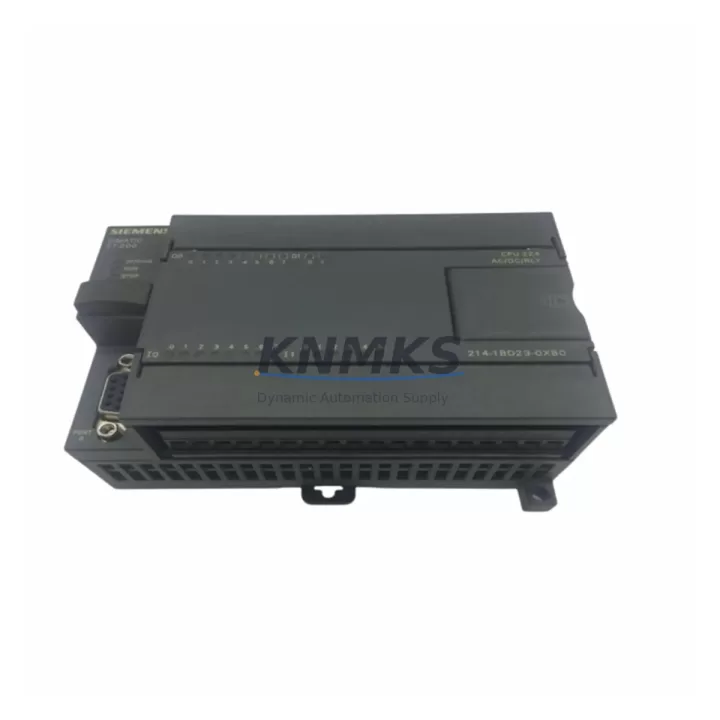
Siemens 6ES7214-1BD23-0XB0 Migration-Ready CPU for Legacy S7-200 Control Systems
The Siemens 6ES7214-1BD23-0XB0 is a CPU 224 DC/DC/DC module from the SIMATIC S7-200 series, purpose-built for legacy control system continuity and migration-ready deployment. As S7-200 platforms approach end-of-life and spare parts become increasingly scarce, this CPU module remains a critical component for engineers managing brownfield automation environments, production line retrofits, and control cabinet upgrades. Whether you are replacing a failed unit, extending the operational life of an existing S7-200 rack, or preparing a phased migration to the S7-1200 or S7-200 SMART platform, the 6ES7214-1BD23-0XB0 provides a verified, drop-in compatible solution with minimal re-engineering overhead.
This CPU module features 14 digital inputs and 10 digital outputs (DC/DC/DC), an integrated RS-485 port for PPI/MPI communication, and onboard support for up to 7 expansion modules. Its compact DIN-rail form factor fits standard 35 mm rails within existing control cabinets, eliminating the need for panel modifications during replacement. The 6ES7214-1BD23-0XB0 is fully compatible with STEP 7 Micro/WIN programming software, allowing engineers to upload, verify, and restore existing ladder logic, STL, and FBD programs without rewriting control sequences.
Migration Compatibility Table
| Parameter | 6ES7214-1BD23-0XB0 (CPU 224) | Migration Notes |
|---|---|---|
| Digital I/O | 14 DI / 10 DO (DC/DC/DC) | Verify terminal wiring matches existing I/O map before power-on |
| Communication Port | RS-485 (PPI / MPI) | Compatible with PC/PPI cable and EM 277 PROFIBUS module for network integration |
| Expansion Modules | Up to 7 EM modules | Confirm backplane slot count; EM 221, EM 222, EM 231, EM 232 remain compatible |
| Power Supply | 24 VDC input | Verify existing PSU capacity covers CPU + all expansion modules (budget ~5 W per EM) |
| Programming Software | STEP 7 Micro/WIN V4.0+ | Upload and verify existing program before replacing hardware; retain .mwp project file |
| Installation | 35 mm DIN rail, standard S7-200 footprint | No panel modification required; confirm clearance for expansion bus connector |
| Firmware Version | V2.01 (factory default) | Check firmware compatibility with existing EM modules and HMI communication drivers |
| Replacement Path | Direct replacement for CPU 224 (6ES7214-1BD23-0XB0) | For platform migration, consider S7-200 SMART CPU ST40 or S7-1200 CPU 1214C |
| Support terms | support terms confirmed by quotation | Pre-shipment functional test included | |
Retrofit Planning for Existing Automation Systems
Successful retrofit of the 6ES7214-1BD23-0XB0 into an existing S7-200 control system requires a structured pre-installation audit. Begin by documenting the current rack configuration: record the CPU slot position, the number and type of expansion modules installed (such as EM 221 digital input modules, EM 231 analog input modules, or EM 232 analog output modules), and the total current draw from the 24 VDC power supply. Overloaded power supplies are a common cause of post-replacement instability, particularly in cabinets where additional I/O modules have been added incrementally over the years.
Next, verify the communication architecture. If the existing system uses a TD 200 text display or a TP 177 HMI panel connected via PPI, confirm that the HMI project file references the correct CPU address and communication parameters. Mismatched station addresses or baud rate settings will prevent HMI reconnection after CPU swap. For systems using an EM 277 PROFIBUS-DP module to integrate the S7-200 into a wider PROFIBUS network, verify that the GSD file and DP master configuration remain unchanged after the CPU replacement.
For control cabinets that also house a CP 243-1 Ethernet module for remote monitoring or SCADA connectivity, confirm that the IP address configuration stored in the CPU’s data block is backed up before removal. Signal isolators installed between the CPU output terminals and field devices should be inspected for terminal compatibility, particularly if the replacement unit uses a slightly different terminal block pitch. Retain the original wiring diagram and cross-reference each terminal against the new CPU’s I/O map before energizing the system.
Where the retrofit is part of a broader migration toward the S7-1200 platform, the 6ES7214-1BD23-0XB0 can serve as an interim solution, maintaining production continuity while the new S7-1200 CPU 1214C program is developed and validated offline. This phased approach minimizes unplanned downtime and allows parallel testing of the new control logic before cutover.
Downtime Control During System Migration
Minimizing downtime during a CPU replacement begins with preparation, not execution. Before removing the 6ES7214-1BD23-0XB0 from service, use STEP 7 Micro/WIN to perform a full program upload and save the project file (.mwp) to a secure location. Document the current data block values, including retentive memory ranges (MB, VB, DB) that store process setpoints, counters, and timers. These values are lost on power cycle unless the CPU’s retentive memory configuration is correctly set and a battery backup or supercapacitor is present.
During the physical swap, label all terminal wiring before disconnection. Photograph the existing wiring layout and compare against the replacement CPU’s terminal diagram. Re-torque all terminal screws to the specified value (typically 0.5–0.6 Nm for S7-200 series terminals) to prevent intermittent contact faults after restart. After reinstallation, download the saved program to the new CPU, set the operating mode to RUN, and monitor the first scan cycle for any output state anomalies.
For systems with connected HMI panels such as the TD 400C or TP 177B, verify that the HMI communication link is re-established before releasing the line to production. Test all critical interlocks, safety outputs, and alarm conditions in a controlled sequence. Where a signal isolator or relay output module is used between the CPU and field actuators, confirm output signal levels are within specification before enabling automatic mode. A structured commissioning checklist, completed and signed off by the responsible engineer, reduces the risk of post-replacement incidents and supports audit trail requirements.
Retrofit Support FAQ
Q1: Is the 6ES7214-1BD23-0XB0 a direct replacement for all CPU 224 variants?
The 6ES7214-1BD23-0XB0 (CPU 224 DC/DC/DC) is a direct replacement for units with the same order number. It is not a direct replacement for the 6ES7214-1AD23-0XB0 (CPU 224 AC/DC/Relay), which uses a 120/240 VAC power input and relay outputs. Verify the power supply type and output configuration before ordering.
Q2: Can I reuse my existing STEP 7 Micro/WIN program without modification?
Yes, provided the program was developed for CPU 224 and does not reference hardware-specific features unavailable on this firmware version. Upload the program from the original CPU before replacement if possible. If the original CPU is non-functional, restore from the last saved .mwp project file and verify all I/O addresses and data block references before downloading.
Q3: What pre-shipment testing is performed on this unit?
Each 6ES7214-1BD23-0XB0 unit undergoes functional power-on testing prior to shipment, including I/O channel verification and communication port check. Units are shipped with original or equivalent packaging to prevent transit damage. A support terms confirmed by quotation cover manufacturing defects and functional failures under normal operating conditions.
Q4: Is stock available for immediate shipment?
Yes. The 6ES7214-1BD23-0XB0 is maintained availability confirmed by RFQ to support urgent replacement and planned maintenance schedules. Lead time for standard orders is 1–3 business days. For bulk procurement or long-term spare parts agreements, contact our sales team to discuss inventory reservation and supply continuity arrangements.
© 2026 KNMKS. All rights reserved.
Original Source: https://knmks.com
Contact: admin@knmks.com | +86 18359268345
Product Identification
- Brand / Ecosystem
-
Siemens
Siemens - Model / Series
-
6ES7214-1BD23-0XB0
SIMATIC Series - Product Family
- PLCs & Controllers
- Availability Status
- Available on request after model and quantity confirmation
- Inquiry Type
- B2B RFQ, replacement inquiry and project spare-part request
- Pre-Quote Check
- Exact SKU, brand, series, quantity, nameplate photos and destination country are checked before quotation
System Path
Where this product fits in the KNMKS automation structure.
Specification & Inquiry Focus
- Control platform
- PLC, PAC and modular controllers
- Common needs
- CPU, rack, power and I/O expansion
- Project support
- Replacement, cabinet build and maintenance
Buyer Confirmation
Information KNMKS checks before replying.
- Exact model
- 6ES7214-1BD23-0XB0
- Brand / ecosystem
- Siemens
- Product family
- PLCs & Controllers
- Application note
- Replacement, maintenance, project build or spare-part list
- Useful photos
- Nameplate, installed unit, cabinet layout or connector side
- Delivery details
- Quantity, destination country and target schedule
Document Support
Files and notes can be confirmed during quotation.
- Product photos or nameplate confirmation when available
- Packing and delivery notes before quotation confirmation
- Support scope and delivery terms confirmed per inquiry
- Export document coordination for qualified B2B requests
Inquiry Support
- Model cross-checking before quotation
- CPU, power, rack and expansion module matching
- Support for replacement and project inquiry
What to Send Us
- Brand and exact model number: Siemens 6ES7214-1BD23-0XB0
- Quantity and required delivery time
- Application, replacement requirement or nameplate photo
- Destination country and shipping preference
RFQ Preparation
This is a product inquiry page built for RFQ communication.
Fast Model Check
Send this model to KNMKS for confirmation.
Include quantity, destination country and photos if this is a maintenance replacement. The inquiry will be saved with a reference number after submission.
Brand & Compatibility Note
KNMKS displays automation product information for well-known industrial brand ecosystems and compatible replacement references. Brand names are used for product identification and compatibility reference only; final availability and commercial terms are confirmed per quotation.
 Manufacturing
 Machine Tools
 Packaging
 Energy & Power



 HMI & Displays
 Servo Systems
 Variable Frequency Drives
 Sensors