
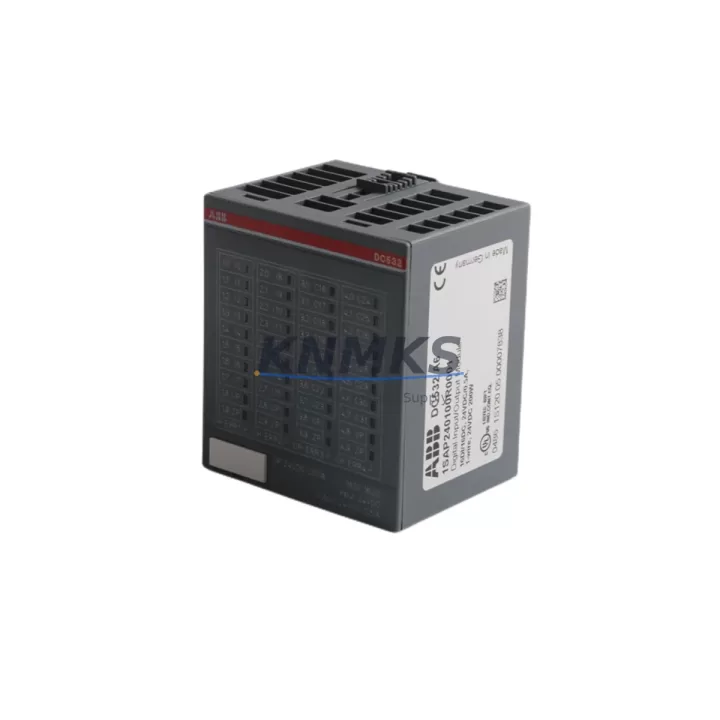
Overview
Siemens 6ES7214-1AG40-0XB0 Maintenance-Proven Spare Part for Factory Uptime
The Siemens 6ES7214-1AG40-0XB0 is the CPU 1214C DC/DC/DC module within the SIMATIC S7-1200 compact PLC family — a cornerstone controller deployed across discrete manufacturing, process automation, conveyor systems, packaging lines, and building automation. Maintaining a verified stock of this CPU module is a fundamental requirement for any maintenance team responsible for S7-1200-based control cabinets. When this CPU fails, the entire control loop halts. Fast, like-for-like replacement with an original Siemens 6ES7214-1AG40-0XB0 is the fastest path to restoring production uptime without re-engineering the program or reconfiguring the hardware configuration in TIA Portal.
At KNMKS, every 6ES7214-1AG40-0XB0 unit is sourced from authorized supply channels, individually inspected before dispatch, and shipped with a support terms confirmed by quotation. We maintain long-term stock to support both emergency breakdown orders and planned annual maintenance procurement cycles.
Spare Maintenance Table
| Part Number | 6ES7214-1AG40-0XB0 |
| Description | CPU 1214C DC/DC/DC |
| Series | SIMATIC S7-1200 |
| Brand | Siemens |
| CPU Type | Compact CPU, DC power supply, DC digital inputs, DC digital outputs (transistor) |
| Digital Inputs | 14 × DC 24V inputs |
| Digital Outputs | 10 × DC 24V transistor outputs (0.5A per output) |
| Analog Inputs | 2 × 0–10V analog inputs (onboard) |
| Work Memory | 100 KB |
| Signal Board Slot | 1 × SB/CB expansion slot |
| Communication Ports | 1 × PROFINET (RJ45), supports PROFIBUS via CM modules |
| Supply Voltage | DC 20.4–28.8V |
| Power Consumption | Max. 12W |
| Operating Temperature | 0°C to +55°C (horizontal), 0°C to +45°C (vertical) |
| Protection Class | IP20 |
| Dimensions (W×H×D) | 110 × 100 × 75 mm |
| Weight | Approx. 420g |
| Origin | Germany |
| Compatibility | SIMATIC S7-1200 system; TIA Portal V13 SP1 and above |
| Firmware | V4.x (latest available at time of shipment) |
| Support terms | 12 Months — KNMKS Verified |
| Condition | Original New / Tested Surplus (confirmed before dispatch) |
Maintenance Planning for Continuous Operation
The 6ES7214-1AG40-0XB0 CPU does not operate in isolation. In a typical S7-1200 control cabinet, it works alongside a suite of signal modules, communication modules, and power infrastructure. When planning a CPU replacement or conducting a scheduled cabinet inspection, maintenance engineers should simultaneously verify the condition of the following components to prevent cascading failures after the CPU is restored.
The SM 1221 and SM 1222 digital I/O expansion modules share the same backplane bus as the CPU. A failed or intermittently faulty I/O module can cause the CPU to report hardware faults even after replacement — always verify I/O module status LEDs and run a hardware diagnostics scan in TIA Portal before closing the work order. Similarly, the SM 1231 analog input module should be checked for signal drift or open-circuit faults, particularly in environments with high vibration or temperature cycling.
The CM 1241 RS485/RS232 communication module is frequently paired with the CPU 1214C in legacy serial communication applications. If the CPU replacement is triggered by a communication fault, inspect the CM 1241 for firmware compatibility with the new CPU firmware version. For PROFINET-connected systems, verify the CSM 1277 compact switch module or the plant-level managed switch port assignment to ensure the replacement CPU is recognized on the network without IP conflicts.
Power integrity is critical. The PM 1207 24VDC power supply module (or equivalent SITOP PSU100S) feeding the S7-1200 rack should be load-tested during any CPU replacement event. An aging power supply with marginal output voltage (below 22V under load) can cause the new CPU to exhibit random restarts or fail to boot — a fault that is frequently misdiagnosed as a CPU defect. Always measure supply voltage at the CPU terminal block under full I/O load before declaring the replacement successful.
For cabinets using the 6ES7221-1BF32-0XB0 SM 1221 8-input module or the 6ES7222-1HF32-0XB0 SM 1222 8-output relay module, inspect the terminal wiring for loose connections and verify that relay output contacts have not welded due to inductive load switching. Relay output modules in high-cycle applications should be treated as consumable spares and stocked alongside the CPU.
Finally, if the control system includes a KTP700 Basic or KTP900 Basic HMI panel communicating with the S7-1200 via PROFINET, confirm that the HMI project is compatible with the firmware version of the replacement CPU. Firmware mismatches between the CPU and HMI can prevent the HMI from connecting, extending perceived downtime beyond the actual CPU swap time.
Site Replacement Workflow
Step 1 — Pre-Replacement Preparation: Before powering down, export the current CPU program from TIA Portal (or retrieve the latest backup from your project archive). Photograph the existing wiring at the CPU terminal block, noting the 24VDC supply connections, I/O wiring, and PROFINET cable routing. Record the current CPU firmware version from the TIA Portal device properties or the CPU web server.
Step 2 — Safe Isolation: Switch the cabinet main isolator to OFF. Verify zero voltage at the CPU supply terminals using a calibrated multimeter. Disconnect the PROFINET cable and all I/O wiring from the CPU terminal blocks, labeling each connector if not already labeled.
Step 3 — Module Removal and Installation: Release the DIN rail mounting clip and slide the CPU out of the backplane. Install the replacement 6ES7214-1AG40-0XB0 by engaging the backplane connector first, then securing the DIN rail clip. Reconnect all terminal block wiring and the PROFINET cable.
Step 4 — Firmware and Program Restore: Power up the cabinet. Connect TIA Portal to the CPU via PROFINET. If the replacement CPU firmware differs from the project requirement, perform a firmware update before downloading the program. Download the hardware configuration and program to the CPU. Verify that all I/O modules are recognized in the hardware diagnostics view.
Step 5 — Functional Verification: Switch the CPU to RUN mode. Confirm all I/O signals are active and correct in the TIA Portal watch table. Verify HMI connectivity and confirm that all process values are displayed correctly. Document the replacement in the maintenance log, including the serial number of the replaced unit and the replacement unit.
This workflow is compatible with replacing older S7-1200 CPU variants (e.g., 6ES7214-1AG31-0XB0 firmware V3.x) with the 6ES7214-1AG40-0XB0 (firmware V4.x). The hardware footprint and terminal block layout are identical, making the swap a direct mechanical replacement. Program compatibility should be verified in TIA Portal before site deployment.
Spare Parts Support FAQ
Q1: Is the 6ES7214-1AG40-0XB0 a direct replacement for the 6ES7214-1AG31-0XB0?
Yes. The 6ES7214-1AG40-0XB0 (firmware V4.x) is the current production successor to the 6ES7214-1AG31-0XB0 (firmware V3.x). The mechanical dimensions, DIN rail mounting, terminal block layout, and I/O count are identical. The program must be re-compiled in TIA Portal V14 or later and downloaded to the new CPU. No hardware rewiring is required.
Q2: How does KNMKS verify the condition of each unit before shipment?
Every 6ES7214-1AG40-0XB0 unit undergoes a pre-shipment inspection that includes visual inspection for physical damage, power-on functional test, firmware version confirmation, and packaging integrity check. Units are shipped in anti-static packaging with a test report. The support terms confirmed by quotation cover manufacturing defects and functional failures under normal operating conditions.
Q3: Can KNMKS support long-term or blanket purchase orders for this CPU module?
Yes. KNMKS maintains dedicated stock of the 6ES7214-1AG40-0XB0 to support both emergency single-unit orders and annual maintenance procurement contracts. For facilities operating multiple S7-1200 lines, we recommend establishing a standing order for 1–2 units per site per year as part of a proactive spare parts strategy. Contact our sales team to discuss volume pricing and reserved stock arrangements.
Q4: What information should I provide when ordering to ensure I receive the correct unit?
Please confirm the full part number (6ES7214-1AG40-0XB0), the required firmware version if known, and whether you need an original new unit or a tested surplus unit. If you are replacing a unit currently in service, providing the existing unit’s serial number and firmware version helps our team confirm compatibility and prepare the correct documentation for your maintenance records.
© 2026 KNMKS. All rights reserved.
Original Source: https://knmks.com
Contact: admin@knmks.com | +86 18359268345
Product Identification
- Brand / Ecosystem
-
Siemens
Siemens - Model / Series
-
DC532 1SAP240100R0001
SIMATIC Series - Product Family
- PLCs & Controllers
- Availability Status
- Available on request after model and quantity confirmation
- Inquiry Type
- B2B RFQ, replacement inquiry and project spare-part request
- Pre-Quote Check
- Exact SKU, brand, series, quantity, nameplate photos and destination country are checked before quotation
System Path
Where this product fits in the KNMKS automation structure.
Specification & Inquiry Focus
- Control platform
- PLC, PAC and modular controllers
- Common needs
- CPU, rack, power and I/O expansion
- Project support
- Replacement, cabinet build and maintenance
Buyer Confirmation
Information KNMKS checks before replying.
- Exact model
- DC532 1SAP240100R0001
- Brand / ecosystem
- Siemens
- Product family
- PLCs & Controllers
- Application note
- Replacement, maintenance, project build or spare-part list
- Useful photos
- Nameplate, installed unit, cabinet layout or connector side
- Delivery details
- Quantity, destination country and target schedule
Document Support
Files and notes can be confirmed during quotation.
- Product photos or nameplate confirmation when available
- Packing and delivery notes before quotation confirmation
- Support scope and delivery terms confirmed per inquiry
- Export document coordination for qualified B2B requests
Inquiry Support
- Model cross-checking before quotation
- CPU, power, rack and expansion module matching
- Support for replacement and project inquiry
What to Send Us
- Brand and exact model number: Siemens DC532 1SAP240100R0001
- Quantity and required delivery time
- Application, replacement requirement or nameplate photo
- Destination country and shipping preference
RFQ Preparation
This is a product inquiry page built for RFQ communication.
Fast Model Check
Send this model to KNMKS for confirmation.
Include quantity, destination country and photos if this is a maintenance replacement. The inquiry will be saved with a reference number after submission.
Brand & Compatibility Note
KNMKS displays automation product information for well-known industrial brand ecosystems and compatible replacement references. Brand names are used for product identification and compatibility reference only; final availability and commercial terms are confirmed per quotation.
 Manufacturing
 Machine Tools
 Packaging
 Energy & Power



 HMI & Displays
 Servo Systems
 Variable Frequency Drives
 Sensors