
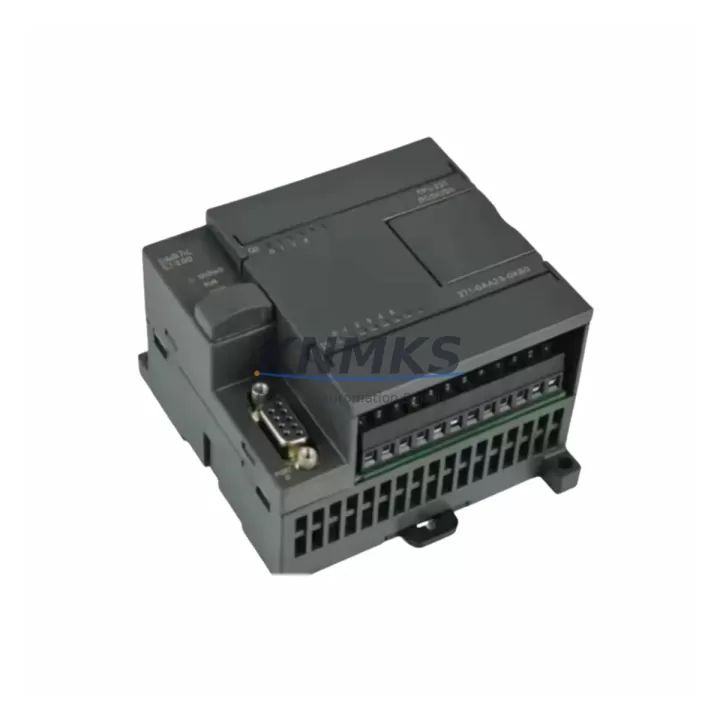
Overview
Siemens 6ES7212-1BB23-0XB8 Migration-Ready CPU for Legacy S7-200 Control Systems
The Siemens 6ES7212-1BB23-0XB8 is a SIMATIC S7-200 CPU 212C compact programmable logic controller designed for legacy automation environments where continuity of control is critical. As original S7-200 hardware reaches end-of-life and spare parts become increasingly scarce, the 6ES7212-1BB23-0XB8 serves as a verified drop-in replacement that preserves existing program logic, terminal wiring, and rack geometry without requiring a full platform migration. This unit is sourced from multi-region stock, pre-shipment tested under load, and backed by a support terms confirmed by quotation — making it the preferred choice for maintenance engineers managing aging DCS/PLC infrastructure under tight downtime constraints.
Engineers replacing failed or end-of-life S7-200 CPUs must verify several critical parameters before commissioning: the 24 VDC supply capacity of the existing power rail, terminal block wiring compatibility with the CPU’s onboard I/O (8 DI / 6 DO transistor outputs on the 212C), and the MPI/PPI communication port configuration used by upstream SCADA or HMI systems. The 6ES7212-1BB23-0XB8 supports PPI and MPI protocols natively, ensuring compatibility with existing SIMATIC HMI panels such as the TP177 or OP77B without requiring protocol bridge hardware. Program upload from the original CPU — where still possible — should be performed using a PC/PPI cable or USB-PPI adapter prior to hardware swap to preserve ladder logic and data block integrity.
In retrofit scenarios involving I/O expansion, the 6ES7212-1BB23-0XB8 supports connection of up to 7 expansion modules via the S7-200 expansion bus. Common expansion pairings include the EM 221 digital input module, EM 222 digital output module, and EM 231 analog input module — all of which retain their original wiring and address assignments when the CPU is replaced in-kind. For applications requiring thermocouple or RTD signal conditioning, the EM 231 TC or EM 231 RTD modules integrate directly without additional signal isolators, reducing panel space requirements and simplifying the retrofit bill of materials.
Communication continuity is a primary concern during S7-200 CPU replacement. The 6ES7212-1BB23-0XB8’s Port 0 (RS-485, PPI/MPI) and Port 1 (RS-485, Freeport) configuration must be matched to the existing network topology. In installations where the S7-200 communicates with a CP 243-1 Ethernet module or a CP 243-2 AS-Interface master, the module address and baud rate settings stored in the original program must be replicated exactly in the replacement unit. Failure to match these parameters will result in communication faults on the PROFIBUS or AS-i network and may trigger safety interlocks in the control cabinet.
Physical installation requires confirmation of DIN rail mounting clearance, particularly in densely populated control cabinets where adjacent terminal blocks, circuit breakers, or the CPU 224 or CPU 226 units may constrain lateral access. The 6ES7212-1BB23-0XB8 occupies a standard S7-200 footprint and does not require backplane modification. Firmware version compatibility should be verified against the STEP 7 Micro/WIN programming software version in use; units supplied by KNMKS are tested with current firmware and include documentation of the firmware revision installed.
Pre-shipment testing at KNMKS includes power-on verification, I/O channel functional check, communication port handshake confirmation, and program load/run cycle validation. Each unit ships with a test report. Global dispatch is available with lead times confirmed at order placement, supporting emergency replacement scenarios where production continuity cannot tolerate extended procurement delays.
Migration Compatibility Table
| Parameter | Detail |
|---|---|
| SKU / Part Number | 6ES7212-1BB23-0XB8 |
| Series | SIMATIC S7-200 |
| CPU Type | CPU 212C Compact |
| Onboard I/O | 8 DI (24 VDC) / 6 DO (Transistor, 24 VDC) |
| Power Supply | 24 VDC (20.4–28.8 VDC operating range) |
| Communication Ports | Port 0: RS-485 PPI/MPI; Port 1: RS-485 Freeport |
| Expansion Bus | Up to 7 expansion modules (EM 221/222/231/232 series) |
| Program Memory | 4 KB (instructions) |
| Data Memory | 2 KB |
| Compatible Programming Software | STEP 7 Micro/WIN V4.0 SP9 and above |
| HMI Compatibility | SIMATIC TP177, OP77B, TD 400C via PPI |
| Replaces / Supersedes | 6ES7212-1BB21-0XB0, 6ES7212-1BB22-0XB0 |
| Installation | DIN rail or panel mount; standard S7-200 footprint |
| Firmware | Current revision; documented in shipment test report |
| Pre-Shipment Testing | Power-on, I/O functional, comms handshake, program cycle |
| Support terms | 12 Months from date of dispatch |
| Origin | Germany (DE) |
| Dispatch | Global; lead time confirmed at order |
Retrofit Planning for Existing Automation Systems
A successful retrofit of the 6ES7212-1BB23-0XB8 into an existing S7-200 installation begins with a structured pre-replacement audit. The maintenance engineer should document the current CPU firmware version, the STEP 7 Micro/WIN project file version, and the configuration of all attached expansion modules before any hardware is disturbed. In systems where the CPU 224 XP or CPU 226 was previously used as the primary controller and the 212C is being introduced as a secondary or replacement unit in a distributed cabinet, address conflicts on the MPI network must be resolved before commissioning.
Power budget verification is essential. The 6ES7212-1BB23-0XB8 draws 5 VDC logic power from the S7-200 system bus and 24 VDC sensor supply from the external rail. When the existing power supply — such as a SITOP PSU100S or equivalent 24 VDC DIN rail unit — is already loaded near capacity by the EM 221 and EM 222 expansion modules, adding or replacing the CPU may push the supply into overload. A current audit of all connected loads should be completed and documented before the replacement unit is installed.
For installations that include a CP 243-1 Ethernet module for remote SCADA connectivity, the IP address, subnet mask, and gateway parameters stored in the module’s configuration must be preserved and re-applied after the CPU swap. Similarly, any Freeport protocol configurations used for serial communication with third-party drives, flow meters, or barcode readers must be re-entered in the replacement CPU’s program. KNMKS recommends retaining the original program backup on a dedicated engineering laptop with Micro/WIN installed throughout the retrofit window to enable rapid re-programming if required.
Signal isolators — such as those used between the CPU’s transistor outputs and inductive loads or high-voltage actuators — do not require replacement during a CPU swap, provided the output voltage and current ratings of the 6ES7212-1BB23-0XB8 match the original unit. The 212C’s transistor outputs are rated at 24 VDC / 0.75 A per channel, which is consistent with the majority of S7-200 CPU 212 variants. Terminal block wiring can be transferred directly without re-labeling in most cases, reducing retrofit labor time significantly.
Downtime Control During System Migration
Minimizing unplanned downtime during a CPU replacement requires a disciplined sequence of pre-swap, swap, and post-swap activities. Before powering down the control cabinet, the engineer should upload the current program from the existing CPU using a PC/PPI cable or USB-PPI adapter and verify the uploaded file against the last known good backup. If the original CPU is non-responsive, the backup file stored on the engineering laptop or in the plant’s document management system becomes the sole recovery path — making backup discipline a non-negotiable prerequisite for any S7-200 retrofit.
During the hardware swap, all expansion module connectors should be disconnected in sequence from right to left before the CPU is removed from the DIN rail. The replacement 6ES7212-1BB23-0XB8 should be installed and the expansion bus reconnected before power is restored. On first power-up, the CPU will enter STOP mode; the program should be downloaded from the engineering laptop before switching to RUN mode. The HMI panel — whether a TD 400C text display or a TP177 touch panel — will reconnect automatically via PPI once the CPU is in RUN mode and the program is executing, provided the PPI address and baud rate match the original configuration.
Post-swap commissioning should include a full I/O force test to verify that all digital inputs and outputs respond correctly, followed by a communications check on all connected network segments. In systems with AS-Interface networks managed by a CP 243-2 module, the AS-i master scan list should be verified against the installed slave devices to confirm no address gaps were introduced during the retrofit. Estimated downtime for a prepared, single-CPU swap in a standard S7-200 cabinet is 2–4 hours, assuming the program backup is available and all replacement hardware has been pre-staged and tested.
Retrofit Support FAQ
Q: Is the 6ES7212-1BB23-0XB8 a direct replacement for the 6ES7212-1BB21-0XB0 and 6ES7212-1BB22-0XB0?
A: Yes. The -0XB8 suffix denotes the current production revision of the CPU 212C. It is backward compatible with earlier -0XB0 and -0XB2 variants in terms of I/O configuration, expansion bus, and PPI/MPI communication. Existing programs compiled under STEP 7 Micro/WIN for earlier revisions will load and execute without modification.
Q: What programming cable is required to download the program to the replacement CPU?
A: A PC/PPI cable (6ES7901-3CB30-0XA0) or a USB-PPI adapter is required to connect a laptop running STEP 7 Micro/WIN to Port 0 of the 6ES7212-1BB23-0XB8. Ethernet-based programming via a CP 243-1 module is also supported once the module is configured and the CPU is in RUN mode.
Q: Does KNMKS provide pre-shipment testing documentation with each unit?
A: Yes. Every 6ES7212-1BB23-0XB8 dispatched by KNMKS includes a test report confirming power-on verification, I/O channel functional check, communication port handshake, and program load/run cycle results. The firmware revision installed on the unit is documented in the test report.
Q: What is the support terms coverage and what does it include?
A: All units carry a support terms confirmed by quotation from the date of dispatch. The support terms covers hardware defects, I/O channel failures, and communication port faults under normal operating conditions. KNMKS maintains multi-region stock to support rapid support terms replacement dispatch, minimizing production impact in the event of a covered failure.
© 2026 KNMKS. All rights reserved.
Original Source: https://knmks.com
Contact: admin@knmks.com | +86 18359268345
Product Identification
- Brand / Ecosystem
-
Siemens
Siemens - Model / Series
-
6ES7212-1BB23-0XB8
SIMATIC Series - Product Family
- PLCs & Controllers
- Availability Status
- Available on request after model and quantity confirmation
- Inquiry Type
- B2B RFQ, replacement inquiry and project spare-part request
- Pre-Quote Check
- Exact SKU, brand, series, quantity, nameplate photos and destination country are checked before quotation
System Path
Where this product fits in the KNMKS automation structure.
Specification & Inquiry Focus
- Control platform
- PLC, PAC and modular controllers
- Common needs
- CPU, rack, power and I/O expansion
- Project support
- Replacement, cabinet build and maintenance
Buyer Confirmation
Information KNMKS checks before replying.
- Exact model
- 6ES7212-1BB23-0XB8
- Brand / ecosystem
- Siemens
- Product family
- PLCs & Controllers
- Application note
- Replacement, maintenance, project build or spare-part list
- Useful photos
- Nameplate, installed unit, cabinet layout or connector side
- Delivery details
- Quantity, destination country and target schedule
Document Support
Files and notes can be confirmed during quotation.
- Product photos or nameplate confirmation when available
- Packing and delivery notes before quotation confirmation
- Support scope and delivery terms confirmed per inquiry
- Export document coordination for qualified B2B requests
Inquiry Support
- Model cross-checking before quotation
- CPU, power, rack and expansion module matching
- Support for replacement and project inquiry
What to Send Us
- Brand and exact model number: Siemens 6ES7212-1BB23-0XB8
- Quantity and required delivery time
- Application, replacement requirement or nameplate photo
- Destination country and shipping preference
RFQ Preparation
This is a product inquiry page built for RFQ communication.
Fast Model Check
Send this model to KNMKS for confirmation.
Include quantity, destination country and photos if this is a maintenance replacement. The inquiry will be saved with a reference number after submission.
Brand & Compatibility Note
KNMKS displays automation product information for well-known industrial brand ecosystems and compatible replacement references. Brand names are used for product identification and compatibility reference only; final availability and commercial terms are confirmed per quotation.
 Manufacturing
 Machine Tools
 Packaging
 Energy & Power



 HMI & Displays
 Servo Systems
 Variable Frequency Drives
 Sensors