
Overview
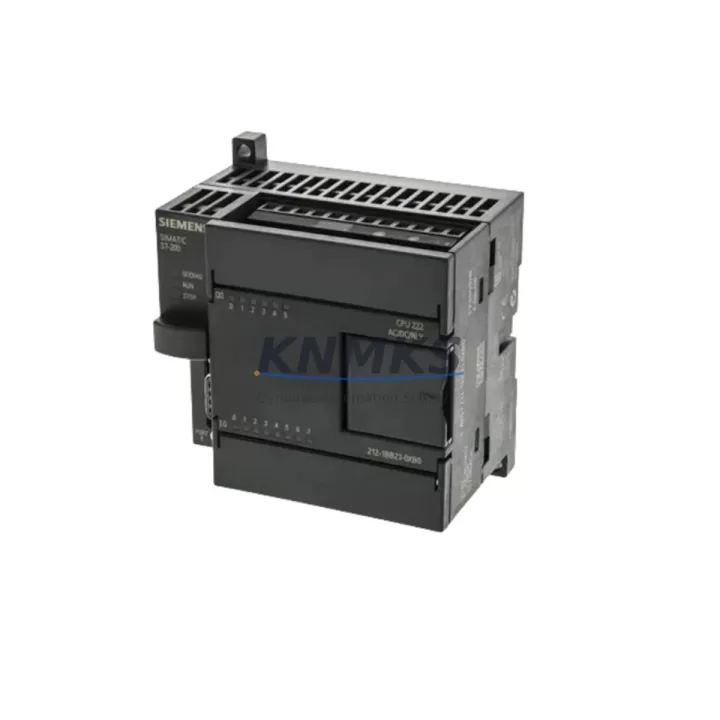
Siemens 6ES7212-1BB23-0XB0 Spare Part for S7-200 Uptime
The Siemens 6ES7212-1BB23-0XB0 is a SIMATIC S7-200 CPU 212 compact programmable logic controller module, widely deployed across petrochemical plants, water treatment facilities, packaging lines, and light manufacturing automation systems. As a maintenance-proven spare part, this unit is stocked and pre-shipment tested to support rapid field replacement, minimize unplanned downtime, and sustain continuous factory operation. Whether you are executing a scheduled annual overhaul, responding to an emergency CPU fault, or building a strategic spare parts inventory for aging S7-200 infrastructure, the 6ES7212-1BB23-0XB0 provides a direct, validated replacement path without requiring system reprogramming or hardware reconfiguration.
Maintenance engineers working with legacy SIMATIC S7-200 systems understand that CPU availability is the single most critical factor in control cabinet uptime. The 6ES7212-1BB23-0XB0 supports 8 digital inputs and 6 digital outputs (24 VDC), with onboard program memory and a compact DIN-rail form factor that fits directly into existing S7-200 panel layouts. Its compatibility with the STEP 7-Micro/WIN programming environment means that existing ladder logic and function block programs can be restored from backup and reloaded without modification, dramatically reducing mean time to repair (MTTR) during fault recovery events.
Spare Maintenance Table
| Part Number | 6ES7212-1BB23-0XB0 |
| Brand | Siemens |
| Series | SIMATIC S7-200 |
| Module Type | CPU 212 Compact PLC |
| Digital Inputs | 8 x 24 VDC |
| Digital Outputs | 6 x 24 VDC Transistor |
| Supply Voltage | 24 VDC |
| Program Memory | 2 KB (user program) |
| Data Memory | 1 KB |
| Communication Port | 1 x RS-485 (PPI/MPI) |
| Mounting | DIN Rail / Panel |
| Operating Temperature | 0 °C to +55 °C |
| Protection Rating | IP20 |
| Country of Origin | Germany |
| Programming Software | STEP 7-Micro/WIN |
| Compatibility | SIMATIC S7-200 system; direct replacement for CPU 212 variants |
| Support terms | 12 Months from shipment date |
| Pre-Shipment Test | Power-on functional verification performed |
| Typical Application | Packaging, water treatment, light manufacturing, conveyor control |
Maintenance Planning for Continuous Operation
When replacing the 6ES7212-1BB23-0XB0 in the field, a disciplined maintenance engineer will not limit the inspection to the CPU module alone. The S7-200 control cabinet ecosystem involves several interdependent components whose condition directly affects post-replacement system stability. Begin by verifying the 24 VDC panel power supply — a degraded or undersized supply is a common root cause of CPU faults that are misdiagnosed as module failures. Inspect the power supply output voltage under load before installing the replacement CPU.
Next, examine the I/O wiring terminals and field device connections at the CPU’s onboard I/O ports. Loose terminals, corroded contacts, or miswired field devices can cause immediate I/O faults after CPU replacement and should be torqued and verified against the original wiring diagram. If the system uses expansion modules — such as the EM 221 digital input module or EM 222 digital output module — inspect the expansion bus connector and ribbon cable for physical damage or oxidation, as these are frequent failure points in high-vibration or high-humidity environments.
For systems using the RS-485 PPI communication port to connect to an HMI panel (such as a Siemens TD 200 text display or OP 73 operator panel), verify the communication cable continuity and termination resistor settings before restoring communication. A faulty RS-485 cable or incorrect network termination will prevent the HMI from establishing a connection with the new CPU, causing unnecessary troubleshooting delays. Similarly, if the S7-200 system communicates with a SCADA host via a PC adapter or CP 243-1 Ethernet module, confirm that the network address settings in the replacement CPU match the original configuration.
Fuse and circuit protection components within the control cabinet should also be inspected during any CPU replacement event. Blown fuses or tripped miniature circuit breakers upstream of the CPU power input are often symptomatic of a transient fault that caused the original CPU failure. Replacing the CPU without addressing the upstream protection circuit risks repeat failure. Maintain a stock of appropriately rated fuses and document their locations in the cabinet maintenance log.
Finally, if the system includes analog signal conditioning — such as signal isolators or loop-powered transmitters connected to an EM 231 analog input module — verify that the analog input ranges and scaling parameters are correctly restored after CPU program reload. Incorrect analog scaling is a silent fault that can cause process deviations without triggering a CPU alarm.
Site Replacement Workflow
Step 1 — Backup Verification: Before removing the faulty CPU, confirm that a current program backup exists in STEP 7-Micro/WIN or on a memory cartridge. If no backup is available, attempt to upload the existing program from the CPU before powering down, provided the CPU is still partially functional.
Step 2 — Safe Isolation: De-energize the control cabinet following site lockout/tagout (LOTO) procedures. Disconnect the 24 VDC supply to the CPU and remove all I/O wiring connectors, labeling each connector position for accurate reinstallation.
Step 3 — Module Swap: Remove the faulty 6ES7212-1BB23-0XB0 from the DIN rail. Install the replacement unit, ensuring the DIN rail clip is fully engaged. Reconnect all I/O wiring connectors in their original positions.
Step 4 — Program Download: Connect the PC adapter to the RS-485 port and download the verified program backup using STEP 7-Micro/WIN. Confirm program checksum and data block integrity after download.
Step 5 — Functional Verification: Restore power and perform a controlled I/O test — verify each digital input and output against the field device list before returning the system to automatic mode. Document the replacement event in the site maintenance log, including the replacement unit serial number and test results.
This structured workflow reduces average replacement time to under two hours for experienced maintenance teams and eliminates the most common causes of post-replacement faults. Stocking one or two 6ES7212-1BB23-0XB0 units as on-site cold spares is strongly recommended for facilities where S7-200 systems remain in active production service.
Spare Parts Support FAQ
Q1: Is the 6ES7212-1BB23-0XB0 still available as a new or tested spare, and what is the lead time?
The 6ES7212-1BB23-0XB0 is available from KNMKS as a stocked, pre-shipment tested spare. While Siemens has transitioned its current PLC portfolio to the S7-1200 and S7-1500 series, S7-200 spare parts remain in active demand for legacy system maintenance. Lead time for in-stock units is typically 3–7 business days for international shipment. Contact admin@knmks.com to confirm current stock status before placing a procurement order.
Q2: How do I verify compatibility before installation?
The 6ES7212-1BB23-0XB0 is a direct replacement for CPU 212 units within the SIMATIC S7-200 family. Confirm that your existing system uses a 24 VDC supply and that the I/O count (8 DI / 6 DO) matches your wiring configuration. If your application requires analog I/O or additional digital points, expansion modules such as the EM 231 or EM 221 remain compatible with this CPU. Provide your existing CPU part number and firmware version when contacting our technical team for compatibility confirmation.
Q3: What pre-shipment testing is performed on each unit?
Every 6ES7212-1BB23-0XB0 shipped by KNMKS undergoes a power-on functional test, including CPU RUN/STOP mode verification, I/O port continuity check, and communication port response test. Units that do not pass functional verification are not shipped. A support terms confirmed by quotation from the shipment date covers manufacturing defects and functional failures under normal operating conditions.
Q4: What is the recommended long-term spare parts strategy for S7-200 systems?
For facilities operating multiple S7-200 systems, we recommend maintaining a minimum of one CPU spare per production line, supplemented by critical expansion modules (EM 221, EM 222, EM 231) and communication accessories. An annual spare parts audit aligned with your preventive maintenance schedule helps identify aging units before failure. KNMKS supports long-term supply agreements for S7-200 components to ensure consistent availability across multi-year maintenance contracts.
© 2026 KNMKS. All rights reserved.
Original Source: https://knmks.com
Contact: admin@knmks.com | +86 18359268345
Product Identification
- Brand / Ecosystem
-
Siemens
Siemens - Model / Series
-
6ES7212-1BB23-0XB0
SIMATIC Series - Product Family
- PLCs & Controllers
- Availability Status
- Available on request after model and quantity confirmation
- Inquiry Type
- B2B RFQ, replacement inquiry and project spare-part request
- Pre-Quote Check
- Exact SKU, brand, series, quantity, nameplate photos and destination country are checked before quotation
System Path
Where this product fits in the KNMKS automation structure.
Specification & Inquiry Focus
- Control platform
- PLC, PAC and modular controllers
- Common needs
- CPU, rack, power and I/O expansion
- Project support
- Replacement, cabinet build and maintenance
Buyer Confirmation
Information KNMKS checks before replying.
- Exact model
- 6ES7212-1BB23-0XB0
- Brand / ecosystem
- Siemens
- Product family
- PLCs & Controllers
- Application note
- Replacement, maintenance, project build or spare-part list
- Useful photos
- Nameplate, installed unit, cabinet layout or connector side
- Delivery details
- Quantity, destination country and target schedule
Document Support
Files and notes can be confirmed during quotation.
- Product photos or nameplate confirmation when available
- Packing and delivery notes before quotation confirmation
- Support scope and delivery terms confirmed per inquiry
- Export document coordination for qualified B2B requests
Inquiry Support
- Model cross-checking before quotation
- CPU, power, rack and expansion module matching
- Support for replacement and project inquiry
What to Send Us
- Brand and exact model number: Siemens 6ES7212-1BB23-0XB0
- Quantity and required delivery time
- Application, replacement requirement or nameplate photo
- Destination country and shipping preference
RFQ Preparation
This is a product inquiry page built for RFQ communication.
Fast Model Check
Send this model to KNMKS for confirmation.
Include quantity, destination country and photos if this is a maintenance replacement. The inquiry will be saved with a reference number after submission.
Brand & Compatibility Note
KNMKS displays automation product information for well-known industrial brand ecosystems and compatible replacement references. Brand names are used for product identification and compatibility reference only; final availability and commercial terms are confirmed per quotation.
 Manufacturing
 Machine Tools
 Packaging
 Energy & Power



 HMI & Displays
 Servo Systems
 Variable Frequency Drives
 Sensors