
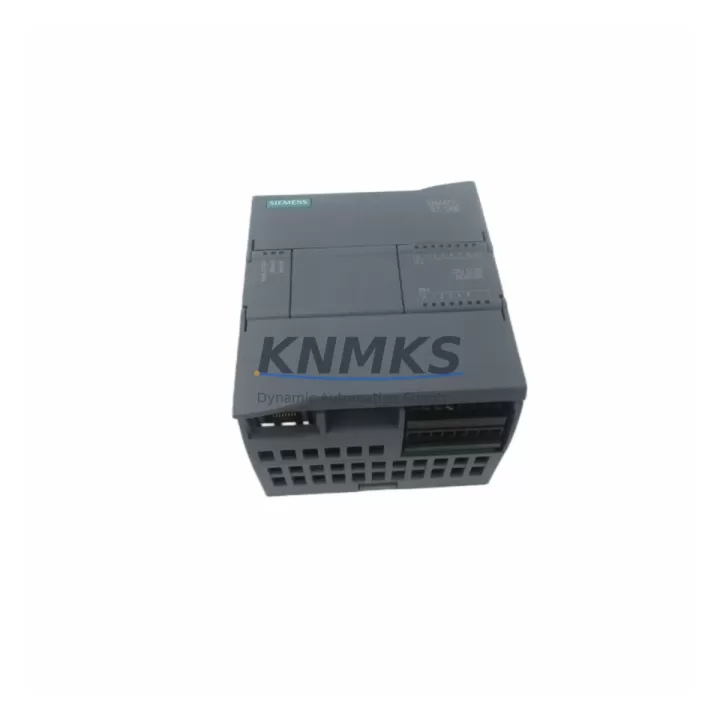
Overview
Siemens 6ES7212-1AE40-0XB0 Maintenance-Proven Spare Part for Factory Uptime
The Siemens 6ES7212-1AE40-0XB0 is the CPU 1212C compact controller within the SIMATIC S7-1200 series — one of the most widely deployed PLC platforms in discrete manufacturing, process automation, and building infrastructure worldwide. As a DC/DC/DC variant with 8 digital inputs, 6 digital outputs, and 2 analog inputs onboard, this CPU handles a broad range of machine-level control tasks without requiring additional I/O expansion in smaller installations. For maintenance engineers managing aging control cabinets or procurement teams building strategic spare parts inventories, securing a verified original 6ES7212-1AE40-0XB0 is a direct investment in production continuity and reduced mean time to repair (MTTR).
In facilities where S7-1200 controllers govern conveyor lines, pump stations, HVAC systems, or packaging machinery, an unplanned CPU failure can halt an entire production cell within minutes. Having a pre-tested, shelf-ready 6ES7212-1AE40-0XB0 on hand eliminates the lead-time risk associated with emergency procurement and allows technicians to execute a structured swap-and-restore procedure rather than an improvised workaround. Every unit supplied is subject to pre-shipment functional verification to confirm firmware integrity, communication readiness, and I/O response — ensuring the replacement module performs identically to the original from the moment it is installed.
Long-term supply commitment is a core part of our spare parts service. For end-of-production or phase-out SKUs within the S7-1200 family, we maintain buffer stock specifically to support customers with multi-year maintenance contracts, OEM service agreements, or legacy system extension programs. All units are shipped with a support terms confirmed by quotation covering manufacturing defects and functional failures under normal operating conditions.
Spare Maintenance Table
| SKU / Part Number | 6ES7212-1AE40-0XB0 |
| Series | SIMATIC S7-1200 |
| Model | CPU 1212C |
| Variant | DC/DC/DC |
| Digital Inputs | 8 × 24 V DC |
| Digital Outputs | 6 × 24 V DC (transistor) |
| Analog Inputs | 2 × 0–10 V |
| Work Memory | 75 KB |
| Communication Ports | 1 × PROFINET (RJ45) |
| Supply Voltage | 20.4–28.8 V DC |
| Operating Temperature | 0 °C to +55 °C |
| Protection Rating | IP20 |
| Mounting | DIN rail / panel |
| Dimensions (W×H×D) | 90 × 100 × 75 mm |
| Weight | Approx. 300 g |
| Origin | Germany |
| Compatibility | SIMATIC S7-1200 system; compatible with SM 1221, SM 1222, SM 1223 signal modules and CM 1241 communication modules |
| Firmware | V4.x (field-upgradeable via STEP 7 / TIA Portal) |
| Pre-Shipment Test | Functional verification performed on every unit |
| Support terms | 12 months from shipment date |
Maintenance Planning for Continuous Operation
A CPU replacement in an S7-1200 control cabinet rarely occurs in isolation. When a 6ES7212-1AE40-0XB0 is flagged for replacement — whether due to firmware corruption, communication failure, I/O fault, or physical damage — the surrounding components in the same cabinet should be inspected and, where appropriate, included in the same maintenance window to prevent a secondary failure shortly after restart.
Begin with the 24 V DC power supply feeding the CPU and I/O bus. Units such as the Siemens SITOP PSU100S or equivalent 24 V stabilized supplies should be checked for output ripple, load regulation, and terminal condition. A degraded power supply is a common root cause of intermittent CPU resets and communication dropouts that are often misdiagnosed as CPU faults. Alongside the power supply, inspect the PM 1207 power module if installed, as it provides buffered 24 V DC for the S7-1200 system rail.
Next, verify the SM 1223 digital I/O signal module and any SM 1221 digital input modules connected to the CPU’s local bus. Connector corrosion, loose terminal screws, and blown channel fuses are frequent findings during cabinet inspections following a CPU fault event. If the installation includes analog signal conditioning, check the SM 1231 analog input module for drift or calibration deviation — particularly in environments with high ambient temperature or vibration.
For installations using PROFINET-based communication, inspect the CM 1241 RS485/RS232 communication module if serial fieldbus devices such as drives, HMIs, or barcode readers are connected. A failed communication module can cause the CPU to log persistent communication errors that mask the true fault source. Similarly, review the PROFINET switch or managed Ethernet infrastructure connecting the CPU to upstream SCADA or HMI systems — cable integrity, port status LEDs, and switch firmware should all be confirmed before returning the system to service.
Finally, check the 24 V DC branch circuit fuses and terminal blocks on the input and output wiring side. Fuse holders with oxidized contacts or undersized fuse ratings are a latent risk that becomes apparent only under full production load. Replacing these as part of a planned maintenance window, rather than reactively during a production outage, significantly reduces the probability of a repeat incident.
Site Replacement Workflow
Step 1 — Backup existing program: Before removing the faulty CPU, use TIA Portal to upload the current project from the CPU memory if the unit is still partially functional. If the CPU is non-responsive, retrieve the project from the engineering workstation or site backup archive. Confirm the project version matches the installed firmware level.
Step 2 — Power down and isolate: De-energize the control cabinet via the main isolator. Verify zero voltage on the 24 V DC bus using a calibrated multimeter. Disconnect the PROFINET cable and all I/O wiring connectors from the CPU front panel. Label all connectors before removal to prevent wiring errors during reinstallation.
Step 3 — Remove and inspect: Slide the CPU off the DIN rail. Inspect the rail mounting clip, backplane bus connector, and adjacent signal modules for physical damage or contamination. Clean the DIN rail contact area before installing the replacement unit.
Step 4 — Install replacement 6ES7212-1AE40-0XB0: Clip the new CPU onto the DIN rail and reconnect all I/O wiring and the PROFINET cable. Verify terminal torque on all screw connections. Restore 24 V DC power and confirm the CPU powers up with the RUN/STOP LED in the expected state.
Step 5 — Download and verify: Use TIA Portal to download the backed-up project to the replacement CPU. Perform an online comparison to confirm program integrity. Execute a controlled test cycle covering all I/O channels before returning the machine to production. Document the replacement in the site maintenance log with the new unit’s serial number and installation date.
This structured workflow minimizes unplanned downtime, ensures system compatibility, and provides a clear audit trail for maintenance records and support requests.
Spare Parts Support FAQ
Q1: Is the 6ES7212-1AE40-0XB0 a direct drop-in replacement for earlier S7-1200 CPU 1212C variants?
The 6ES7212-1AE40-0XB0 (firmware V4.x) is the current production variant of the CPU 1212C DC/DC/DC. It is backward-compatible with projects developed for earlier firmware versions in most cases, though a firmware update via TIA Portal may be required to align with the installed project version. Always perform an online comparison after download to confirm full compatibility before returning to production.
Q2: What pre-shipment testing is performed on each unit?
Every 6ES7212-1AE40-0XB0 supplied undergoes functional verification prior to shipment. This includes power-on self-test confirmation, PROFINET port communication check, digital I/O channel response verification, and firmware version confirmation. A test report is available upon request for quality-critical procurement processes.
Q3: Can you support long-term or blanket purchase orders for this SKU?
Yes. We maintain dedicated buffer stock for S7-1200 series CPUs to support customers with multi-year maintenance contracts, OEM service agreements, and legacy system extension programs. Long-term supply agreements with fixed pricing and scheduled delivery are available — contact our sales team to discuss your annual consumption requirements.
Q4: What does the support terms confirmed by quotation cover?
The support terms confirmed by quotation cover manufacturing defects and functional failures under normal operating conditions from the shipment date. It does not cover damage resulting from incorrect installation, overvoltage events, physical impact, or operation outside the specified environmental parameters. Support requests are processed with priority turnaround to minimize site downtime.
© 2026 KNMKS. All rights reserved.
Original Source: https://knmks.com
Contact: admin@knmks.com | +86 18359268345
Product Identification
- Brand / Ecosystem
-
Siemens
Siemens - Model / Series
-
6ES7212-1AE40-0XB0
SIMATIC Series - Product Family
- PLCs & Controllers
- Availability Status
- Available on request after model and quantity confirmation
- Inquiry Type
- B2B RFQ, replacement inquiry and project spare-part request
- Pre-Quote Check
- Exact SKU, brand, series, quantity, nameplate photos and destination country are checked before quotation
System Path
Where this product fits in the KNMKS automation structure.
Specification & Inquiry Focus
- Control platform
- PLC, PAC and modular controllers
- Common needs
- CPU, rack, power and I/O expansion
- Project support
- Replacement, cabinet build and maintenance
Buyer Confirmation
Information KNMKS checks before replying.
- Exact model
- 6ES7212-1AE40-0XB0
- Brand / ecosystem
- Siemens
- Product family
- PLCs & Controllers
- Application note
- Replacement, maintenance, project build or spare-part list
- Useful photos
- Nameplate, installed unit, cabinet layout or connector side
- Delivery details
- Quantity, destination country and target schedule
Document Support
Files and notes can be confirmed during quotation.
- Product photos or nameplate confirmation when available
- Packing and delivery notes before quotation confirmation
- Support scope and delivery terms confirmed per inquiry
- Export document coordination for qualified B2B requests
Inquiry Support
- Model cross-checking before quotation
- CPU, power, rack and expansion module matching
- Support for replacement and project inquiry
What to Send Us
- Brand and exact model number: Siemens 6ES7212-1AE40-0XB0
- Quantity and required delivery time
- Application, replacement requirement or nameplate photo
- Destination country and shipping preference
RFQ Preparation
This is a product inquiry page built for RFQ communication.
Fast Model Check
Send this model to KNMKS for confirmation.
Include quantity, destination country and photos if this is a maintenance replacement. The inquiry will be saved with a reference number after submission.
Brand & Compatibility Note
KNMKS displays automation product information for well-known industrial brand ecosystems and compatible replacement references. Brand names are used for product identification and compatibility reference only; final availability and commercial terms are confirmed per quotation.
 Manufacturing
 Machine Tools
 Packaging
 Energy & Power



 HMI & Displays
 Servo Systems
 Variable Frequency Drives
 Sensors