
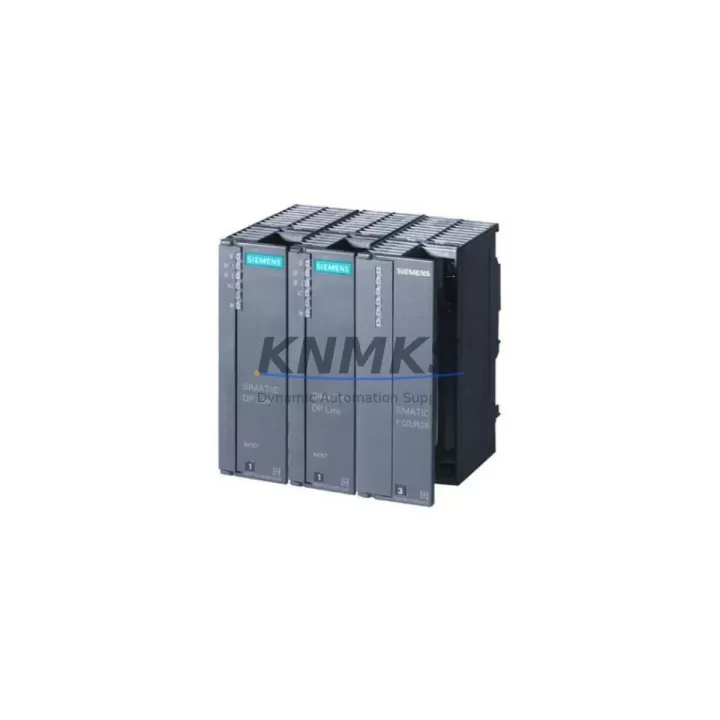
Overview
Siemens 6ES7197-1LB00-0XA0 Maintenance-Proven Spare Part for Factory Uptime
The Siemens 6ES7197-1LB00-0XA0 is an IM (Interface Module) designed for the SIMATIC S7-300 series, enabling reliable rack-to-rack communication in multi-tier PLC configurations. As a send/receive interface module pair, it connects the central rack to expansion racks via the PROFIBUS-based backplane bus, maintaining deterministic I/O communication across distributed control cabinets. For maintenance engineers managing aging S7-300 installations, stocking a verified replacement of the 6ES7197-1LB00-0XA0 is a critical element of any preventive maintenance program — particularly in facilities where unplanned downtime carries significant production cost.
Whether you are responding to a rack communication fault, executing a scheduled annual overhaul, or building a spare parts buffer for a long-lifecycle automation system, the 6ES7197-1LB00-0XA0 delivers the original Siemens engineering quality required for seamless drop-in replacement. Each unit shipped by KNMKS is sourced from verified supply channels, inspected prior to dispatch, and covered by a support terms confirmed by quotation — giving procurement engineers the confidence to plan ahead without compromising system integrity.
Spare Maintenance Table
| Parameter | Specification |
|---|---|
| Part Number | 6ES7197-1LB00-0XA0 |
| Brand | Siemens |
| Series | SIMATIC S7-300 |
| Module Type | IM Interface Module (Send/Receive Pair) |
| Function | Rack-to-rack expansion bus connection |
| Bus Interface | PROFIBUS-compatible backplane bus |
| Compatible Racks | S7-300 Central Rack (CR) and Expansion Racks (ER) |
| Supply Voltage | 24 V DC (via backplane) |
| Operating Temperature | 0 °C to +60 °C |
| Mounting | DIN rail, S7-300 profile rail |
| Origin | Germany |
| Condition | Original, factory-tested before shipment |
| Support terms | 12 Months |
| Delivery | Global express shipping available |
Maintenance Planning for Continuous Operation
When a rack communication fault is traced to the 6ES7197-1LB00-0XA0, experienced maintenance engineers know that the fault isolation process should extend beyond the interface module itself. The S7-300 expansion architecture relies on a tightly integrated chain of components, and a thorough inspection during replacement significantly reduces the risk of repeat failures.
Begin by verifying the PS 307 power supply module (e.g., 6ES7307-1BA01-0AA0) feeding the expansion rack — voltage sag or ripple on the 24 V DC rail is a common root cause of intermittent IM communication errors. Inspect the backplane bus connector on both the central and expansion racks for oxidation, bent pins, or mechanical damage caused by vibration. If the installation includes a CPU 315-2 DP or similar DP-capable CPU, confirm that the PROFIBUS DP configuration in STEP 7 or TIA Portal still matches the physical rack layout after the module swap.
For cabinets with mixed I/O, check the SM 321 digital input modules and SM 322 digital output modules seated in the expansion rack — a communication interruption caused by a failing IM can sometimes mask latent faults in adjacent I/O modules that only surface after the IM is restored. Similarly, if the rack hosts CP 342-5 communication processors for PROFIBUS field device connectivity, re-validate the DP master configuration and slave address assignments post-replacement.
In cabinets where signal integrity is critical, inspect terminal blocks and wiring harnesses connecting field sensors to the expansion rack I/O. Loose terminations or degraded cable insulation can introduce noise that stresses the backplane bus. For installations with legacy OP 7 or OP 17 HMI panels connected via MPI, verify that the MPI network address and baud rate settings remain consistent after the rack reconfiguration. Maintaining a documented spare parts list that includes the 6ES7197-1LB00-0XA0 alongside its associated power supply, bus connectors, and I/O modules is the most effective strategy for minimizing mean time to repair (MTTR) in S7-300-based production lines.
Site Replacement Workflow
Replacing the 6ES7197-1LB00-0XA0 on-site is a straightforward procedure when the correct spare is available and the replacement is planned in advance. Follow this workflow to minimize downtime and ensure system compatibility:
1. Pre-Replacement Verification: Confirm the replacement module matches the exact order number 6ES7197-1LB00-0XA0. Note that the IM 197 is used as a matched send/receive pair — if replacing one module, inspect the paired module in the adjacent rack for wear or damage and consider replacing both simultaneously to avoid a second maintenance event.
2. Safe Isolation: Place the CPU in STOP mode and isolate the expansion rack from the power supply before removing the faulty module. Document the current rack slot assignments and I/O addresses using STEP 7 or TIA Portal hardware configuration export.
3. Module Swap: Remove the defective 6ES7197-1LB00-0XA0 by releasing the bus connector and sliding the module off the profile rail. Install the replacement unit, ensuring the bus connector is fully seated and the module locking mechanism is engaged.
4. System Restart and Validation: Power up the expansion rack, then transition the CPU from STOP to RUN. Monitor the diagnostic buffer in STEP 7 or TIA Portal for any residual rack communication errors. Perform a functional I/O test to confirm all signals in the expansion rack are operating correctly before returning the line to production.
5. Documentation Update: Record the replacement date, module serial number, and test results in the equipment maintenance log. Update the spare parts inventory to trigger reorder of a replacement buffer unit.
Spare Parts Support FAQ
Q1: Is the 6ES7197-1LB00-0XA0 still available as a new original spare?
Yes. KNMKS maintains stock of original Siemens 6ES7197-1LB00-0XA0 modules sourced from verified supply channels. Each unit is inspected and tested before shipment. Contact admin@knmks.com to confirm current stock availability and lead time.
Q2: Does the 6ES7197-1LB00-0XA0 need to be replaced as a matched pair?
The IM 197 interface module operates as a send/receive pair — one module installed in the central rack and one in the expansion rack. While it is technically possible to replace a single module, best practice is to inspect both modules simultaneously and replace the pair if either shows signs of wear, communication errors, or age-related degradation. This approach reduces the risk of a second unplanned outage.
Q3: How do I verify compatibility with my existing S7-300 rack configuration?
The 6ES7197-1LB00-0XA0 is compatible with standard S7-300 profile rails and expansion racks. Verify compatibility by cross-referencing the module order number against your STEP 7 or TIA Portal hardware configuration. If your system uses a non-standard rack layout or a high-feature CPU with specific IM requirements, contact our technical team at admin@knmks.com for pre-purchase compatibility confirmation.
Q4: What support terms and post-shipment support does KNMKS provide?
All 6ES7197-1LB00-0XA0 units supplied by KNMKS are covered by a support terms confirmed by quotation from the date of shipment. Each module undergoes functional testing before dispatch. In the event of a support terms claim, KNMKS provides rapid replacement to minimize impact on your production schedule. For long-term supply agreements or blanket orders to support multi-site maintenance programs, contact admin@knmks.com or call +86 18359268345.
© 2026 KNMKS. All rights reserved.
Original Source: https://knmks.com
Contact: admin@knmks.com | +86 18359268345
Product Identification
- Brand / Ecosystem
-
Siemens
Siemens - Model / Series
-
6ES7197-1LB00-0XA0
SIMATIC Series - Product Family
- PLCs & Controllers
- Availability Status
- Available on request after model and quantity confirmation
- Inquiry Type
- B2B RFQ, replacement inquiry and project spare-part request
- Pre-Quote Check
- Exact SKU, brand, series, quantity, nameplate photos and destination country are checked before quotation
System Path
Where this product fits in the KNMKS automation structure.
Specification & Inquiry Focus
- Control platform
- PLC, PAC and modular controllers
- Common needs
- CPU, rack, power and I/O expansion
- Project support
- Replacement, cabinet build and maintenance
Buyer Confirmation
Information KNMKS checks before replying.
- Exact model
- 6ES7197-1LB00-0XA0
- Brand / ecosystem
- Siemens
- Product family
- PLCs & Controllers
- Application note
- Replacement, maintenance, project build or spare-part list
- Useful photos
- Nameplate, installed unit, cabinet layout or connector side
- Delivery details
- Quantity, destination country and target schedule
Document Support
Files and notes can be confirmed during quotation.
- Product photos or nameplate confirmation when available
- Packing and delivery notes before quotation confirmation
- Support scope and delivery terms confirmed per inquiry
- Export document coordination for qualified B2B requests
Inquiry Support
- Model cross-checking before quotation
- CPU, power, rack and expansion module matching
- Support for replacement and project inquiry
What to Send Us
- Brand and exact model number: Siemens 6ES7197-1LB00-0XA0
- Quantity and required delivery time
- Application, replacement requirement or nameplate photo
- Destination country and shipping preference
RFQ Preparation
This is a product inquiry page built for RFQ communication.
Fast Model Check
Send this model to KNMKS for confirmation.
Include quantity, destination country and photos if this is a maintenance replacement. The inquiry will be saved with a reference number after submission.
Brand & Compatibility Note
KNMKS displays automation product information for well-known industrial brand ecosystems and compatible replacement references. Brand names are used for product identification and compatibility reference only; final availability and commercial terms are confirmed per quotation.
 Manufacturing
 Machine Tools
 Packaging
 Energy & Power



 HMI & Displays
 Servo Systems
 Variable Frequency Drives
 Sensors