
Overview
Siemens 6ES7193-7DA20-0AA0 Migration-Ready BaseUnit for ET 200SP: Legacy System Retrofit & Compatibility Upgrade
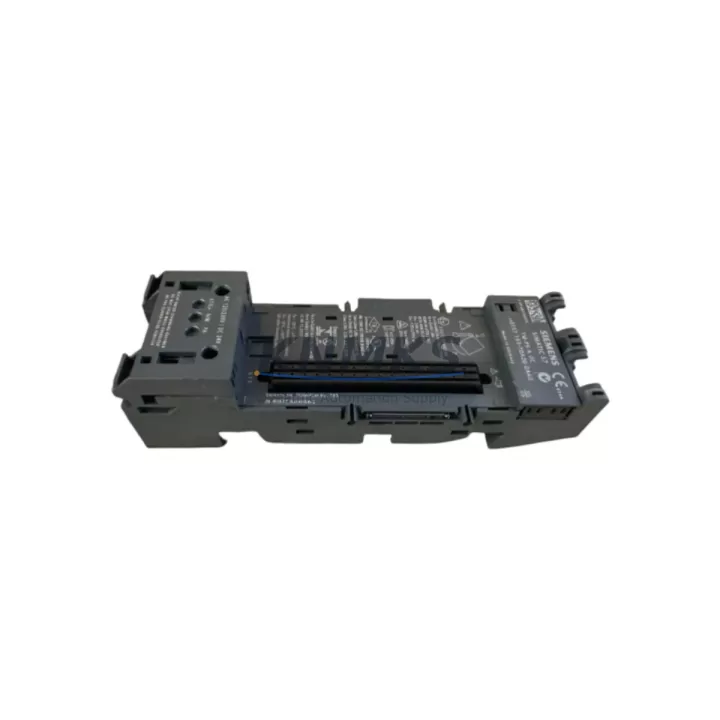
The Siemens 6ES7193-7DA20-0AA0 is a BU15-P16+A0+2D BaseUnit designed for the ET 200SP distributed I/O system, widely deployed across process automation, machine control, and panel-builder applications. As legacy ET 200S and S7-300 installations reach end-of-life, this BaseUnit serves as a critical migration component — enabling engineers to modernize control architectures without full system replacement. Whether you are upgrading an aging PROFIBUS-based cabinet to PROFINET, expanding I/O capacity on an existing ET 200SP rack, or sourcing a verified spare to minimize unplanned downtime, the 6ES7193-7DA20-0AA0 delivers the mechanical and electrical compatibility required for seamless field integration.
This BaseUnit supports up to 16 signal channels (P16 configuration) with integrated AUX power bus (A0) and two dark-side connections (2D), making it suitable for both digital and analog I/O module mounting. Its push-in terminal design eliminates the need for special tooling during wiring, reducing installation time during retrofit campaigns. The color-coded terminal block system ensures correct re-wiring when replacing modules in live panels, a key advantage when downtime windows are measured in minutes rather than hours.
Migration Compatibility Table
| Parameter | 6ES7193-7DA20-0AA0 (This Unit) | Legacy / Predecessor Reference |
|---|---|---|
| Form Factor | ET 200SP BU15 BaseUnit | ET 200S Terminal Module (TM-E / TM-P series) |
| Terminal Type | Push-in, P16 (16-channel) | Screw-type, 20-pin (ET 200S) |
| AUX Bus | A0 (no AUX power pass-through) | Varies by TM type |
| Dark-Side Connections | 2D | Not applicable (ET 200S) |
| Communication Protocol | PROFINET (via IM 155-6 PN interface module) | PROFIBUS DP (via IM 151-x interface module) |
| Backplane Interface | ET 200SP U-connector rail | ET 200S mounting rail (35 mm DIN) |
| Compatible I/O Modules | ET 200SP signal modules (DI, DQ, AI, AQ) | ET 200S electronic modules |
| Controller Compatibility | S7-1200, S7-1500, S7-300 (via PN gateway) | S7-300, S7-400 (PROFIBUS) |
| Installation Space | Compact, 15 mm module pitch | 20-30 mm module pitch (ET 200S) |
| Retrofit Recommendation | Direct replacement within ET 200SP stations | Requires new BaseUnit when migrating from ET 200S |
| Commissioning Focus | Module address assignment, I/O mapping, PROFINET device name | PROFIBUS address, GSD file update |
| Support terms | support terms confirmed by quotation — all units tested prior to shipment | |
Retrofit Planning for Existing Automation Systems
Successful integration of the 6ES7193-7DA20-0AA0 into an existing control architecture requires a structured pre-retrofit assessment. Begin by auditing the current ET 200SP station layout: confirm the number of occupied BaseUnit slots, the AUX bus configuration (A0 vs. A1), and whether any adjacent modules rely on dark-side power bridging. If the station uses an IM 155-6 PN ST interface module (6ES7155-6AU01-0BN0) or the high-feature variant IM 155-6 PN HF, verify that the firmware version supports the I/O module types you plan to mount on this BaseUnit — firmware mismatches between the interface module and signal modules are a common source of commissioning delays.
For cabinets migrating from PROFIBUS-based ET 200S stations, the transition to PROFINET requires replacing not only the terminal modules with ET 200SP BaseUnits but also swapping the IM 151-x interface module for an IM 155-6 PN variant. During this process, engineers must re-map all I/O addresses in the TIA Portal hardware configuration, update the PROFINET device name, and verify that the S7-1500 or S7-1200 CPU’s I/O cycle time accommodates the new station’s response characteristics. If the existing program logic references absolute I/O addresses (e.g., %I0.0, %Q1.3), a full address remapping exercise is required before go-live.
Power budget verification is essential before finalizing the BaseUnit count. Each 6ES7193-7DA20-0AA0 contributes to the station’s total current draw on the 24 V DC supply rail. When mounting high-density digital output modules such as the DQ 16x24VDC/0.5A ST (6ES7132-6BH01-0BA0) or analog input modules like the AI 4xU/I/RTD/TC ST (6ES7134-6JD00-0CA1), calculate the aggregate current consumption against the capacity of the installed power module — typically a PM-E DC24V (6ES7138-4CA01-0AA0) or its successor. Undersized power supply is a leading cause of intermittent faults during initial commissioning of expanded ET 200SP stations.
For applications involving signal isolation — common in process plants where field devices operate at different ground potentials — consider pairing this BaseUnit with signal isolator modules or dedicated potential group separators. When the retrofit involves replacing a legacy S7-300 CPU with an S7-1500 and migrating the HMI from WinCC flexible to WinCC Unified, ensure that all ET 200SP station configurations are re-exported from STEP 7 and re-imported into TIA Portal V17 or later, as hardware catalog entries for older BaseUnit variants may require manual GSD/GSDML file updates. A programming cable (USB-MPI or PC adapter USB) may be needed for direct CPU access during the initial download if the PROFINET network is not yet fully commissioned.
Downtime Control During System Migration
Minimizing production interruption during a BaseUnit replacement or ET 200SP station expansion requires careful pre-staging. Before the maintenance window opens, pre-configure the replacement 6ES7193-7DA20-0AA0 BaseUnit on a bench station: mount the target I/O module, verify the push-in terminal wiring matches the existing field cable schedule, and confirm the module’s LED status indicators respond correctly to a 24 V DC test supply. This bench validation eliminates the most common on-site failure modes — incorrect terminal assignment and module seating errors — before the clock starts on the production shutdown.
During the live swap, use the ET 200SP’s hot-swap capability where the station design permits: the system allows individual I/O modules to be removed and reinserted without powering down the entire station, provided the BaseUnit type and address assignment remain unchanged. If the BaseUnit itself must be replaced (e.g., due to terminal damage or AUX bus reconfiguration), a controlled station power-down is required. In this case, export the current TIA Portal project, document all PROFINET device names and IP addresses, and prepare a rollback plan using the original hardware configuration file.
To protect existing program logic during migration, use TIA Portal’s Compare function to validate that the new hardware configuration matches the original I/O mapping before downloading to the CPU. For S7-1500 systems, the Load preview dialog will flag any address conflicts or missing module assignments before the download is committed. Keeping the original S7-300 or ET 200S station powered and in RUN mode on a parallel rack during the cutover period — where panel space permits — provides a live fallback that can restore field control within minutes if the new station encounters an unexpected fault during first-time commissioning.
Retrofit Support FAQ
Q1: Is the 6ES7193-7DA20-0AA0 a direct drop-in replacement for other ET 200SP BU15 BaseUnits?
Yes, within the ET 200SP family, BU15-type BaseUnits share the same mechanical footprint and U-connector interface. However, you must verify the AUX bus variant (A0 vs. A1) and dark-side connection count (0D vs. 2D) match the original unit’s configuration, as these affect power distribution and module compatibility within the station.
Q2: What commissioning steps are required after installing this BaseUnit in an existing ET 200SP station?
After physical installation, open the TIA Portal project and confirm the hardware configuration reflects the correct BaseUnit type and slot position. Assign or verify the PROFINET device name and IP address of the interface module, download the updated configuration to the CPU, and perform an I/O force test to validate all channels. Check the diagnostic buffer for any module fault entries before returning the station to automatic mode.
Q3: Can this BaseUnit be used with both S7-1200 and S7-1500 controllers?
Yes. The 6ES7193-7DA20-0AA0 is compatible with any PROFINET-capable controller that supports the ET 200SP distributed I/O system, including S7-1200 (firmware V4.1 and above) and S7-1500 series CPUs. For S7-300 or S7-400 systems, a PROFINET-to-PROFIBUS gateway or an IE/PB Link module is required to interface with the ET 200SP station.
Q4: What does the support terms confirmed by quotation cover, and how are units tested before shipment?
All units supplied by KNMKS undergo functional testing prior to dispatch, including power-on verification, terminal continuity checks, and visual inspection for mechanical integrity. The support terms confirmed by quotation cover manufacturing defects and functional failures under normal operating conditions. Units are shipped with anti-static packaging and include a test report on request. Contact admin@knmks.com for support requests or pre-shipment test documentation.
© 2026 KNMKS. All rights reserved.
Original Source: https://knmks.com
Contact: admin@knmks.com | +86 18359268345
Product Identification
- Brand / Ecosystem
-
Siemens
Siemens - Model / Series
-
6ES7193-7DA20-0AA0
SIMATIC Series - Product Family
- PLCs & Controllers
- Availability Status
- Available on request after model and quantity confirmation
- Inquiry Type
- B2B RFQ, replacement inquiry and project spare-part request
- Pre-Quote Check
- Exact SKU, brand, series, quantity, nameplate photos and destination country are checked before quotation
System Path
Where this product fits in the KNMKS automation structure.
Specification & Inquiry Focus
- Control platform
- PLC, PAC and modular controllers
- Common needs
- CPU, rack, power and I/O expansion
- Project support
- Replacement, cabinet build and maintenance
Buyer Confirmation
Information KNMKS checks before replying.
- Exact model
- 6ES7193-7DA20-0AA0
- Brand / ecosystem
- Siemens
- Product family
- PLCs & Controllers
- Application note
- Replacement, maintenance, project build or spare-part list
- Useful photos
- Nameplate, installed unit, cabinet layout or connector side
- Delivery details
- Quantity, destination country and target schedule
Document Support
Files and notes can be confirmed during quotation.
- Product photos or nameplate confirmation when available
- Packing and delivery notes before quotation confirmation
- Support scope and delivery terms confirmed per inquiry
- Export document coordination for qualified B2B requests
Inquiry Support
- Model cross-checking before quotation
- CPU, power, rack and expansion module matching
- Support for replacement and project inquiry
What to Send Us
- Brand and exact model number: Siemens 6ES7193-7DA20-0AA0
- Quantity and required delivery time
- Application, replacement requirement or nameplate photo
- Destination country and shipping preference
RFQ Preparation
This is a product inquiry page built for RFQ communication.
Fast Model Check
Send this model to KNMKS for confirmation.
Include quantity, destination country and photos if this is a maintenance replacement. The inquiry will be saved with a reference number after submission.
Brand & Compatibility Note
KNMKS displays automation product information for well-known industrial brand ecosystems and compatible replacement references. Brand names are used for product identification and compatibility reference only; final availability and commercial terms are confirmed per quotation.
 Manufacturing
 Machine Tools
 Packaging
 Energy & Power



 HMI & Displays
 Servo Systems
 Variable Frequency Drives
 Sensors