
Overview
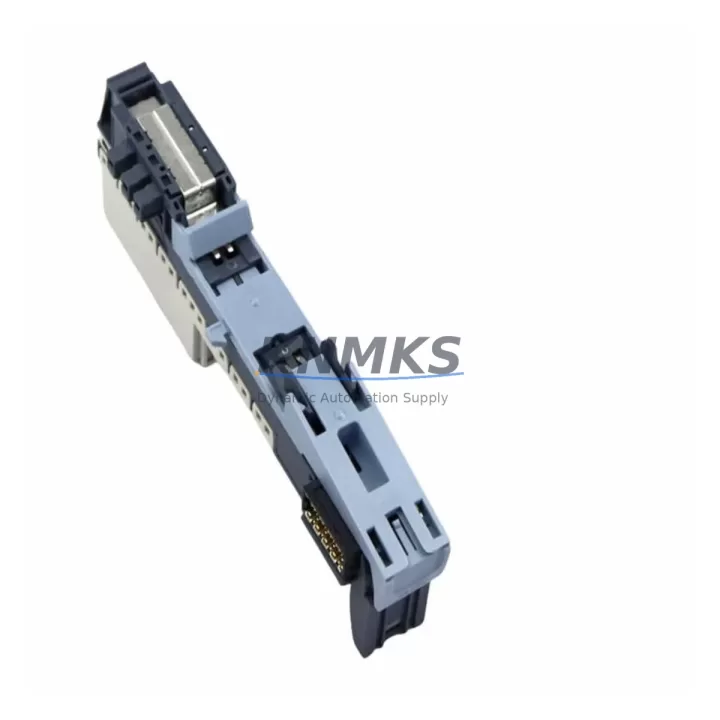
Siemens 6ES7193-6BP00-0DA1 Migration-Ready BaseUnit for Legacy ET 200SP Systems
The Siemens 6ES7193-6BP00-0DA1 is the BU15-P16+A0+2D BaseUnit designed for the ET 200SP distributed I/O system, fully compatible with SIMATIC S7-1500 and S7-1200 controller platforms via PROFINET. This BaseUnit serves as the mechanical and electrical foundation for mounting ET 200SP I/O modules, providing integrated terminal connections, backplane bus communication, and power distribution within the control cabinet. For facilities managing aging distributed I/O infrastructure or replacing discontinued IM/BU components, the 6ES7193-6BP00-0DA1 offers a verified, stock-available migration path with a support terms confirmed by quotation and pre-shipment functional testing.
When planning a retrofit from older ET 200S or ET 200M distributed I/O stations to the current ET 200SP platform, the BaseUnit selection is the first critical decision. The 6ES7193-6BP00-0DA1 supports up to 16 push-in terminals on the process side (P16 designation), with two dark slots (2D) for potential-free terminal modules and one auxiliary voltage output (A0). Engineers migrating from legacy BU configurations must verify terminal pitch compatibility, module slot addressing, and backplane bus segment boundaries before committing to a replacement unit. Incorrect BaseUnit selection can result in mismatched I/O module footprints or broken backplane continuity, causing communication faults at the PROFINET interface module level.
Migration Compatibility Table
| Parameter | 6ES7193-6BP00-0DA1 (This Unit) | Legacy / Predecessor Reference |
|---|---|---|
| Product Family | ET 200SP BaseUnit | ET 200S / ET 200M Terminal Module |
| Terminal Type | Push-in (P16), 16 process terminals | Screw-type (varies by TM model) |
| Auxiliary Voltage Output | A0 (no auxiliary output) | Varies — confirm per legacy TM spec |
| Dark Slots | 2D (two potential-free slots) | Not applicable on ET 200S TMs |
| Backplane Bus | ET 200SP integrated backplane | ET 200S / ET 200M separate bus connector |
| Communication Protocol | PROFINET (via IM 155-6 PN) | PROFIBUS DP (via IM 151-x) |
| Controller Compatibility | S7-1500, S7-1200, ET 200SP CPU | S7-300, S7-400 (legacy) |
| TIA Portal Support | Yes — V13 SP1 and above | STEP 7 Classic (V5.x) |
| Installation Width | 15 mm per module slot | Varies — measure existing rail space |
| Mounting | 35 mm DIN rail | 35 mm DIN rail (compatible) |
| Firmware Dependency | IM firmware ≥ V3.0 recommended | N/A |
| Support terms | 12 Months | — |
| Availability | availability confirmed by RFQ — Ships from verified inventory | Discontinued / EOL risk |
Retrofit Planning for Existing Automation Systems
A successful migration to the ET 200SP platform using the 6ES7193-6BP00-0DA1 BaseUnit requires systematic pre-engineering across multiple subsystems. Begin by auditing the existing control cabinet layout: measure available DIN rail space, document the current I/O module count per station, and identify the interface module (IM) in use. If the legacy system uses a Siemens IM 151-1 DP (PROFIBUS-based), the migration path requires replacing the IM with a Siemens IM 155-6 PN ST or IM 155-6 PN HF to enable PROFINET communication. This IM change is the backbone of the protocol migration and must be reflected in the TIA Portal hardware configuration before any BaseUnit or I/O module is physically swapped.
Terminal wiring is the most labor-intensive phase of any BaseUnit replacement. The 6ES7193-6BP00-0DA1 uses push-in terminals, which differ from the screw-type terminals common on older ET 200S terminal modules. Field wiring must be re-terminated to match the new terminal pitch and insertion method. Prepare ferrule-crimped conductors in advance to reduce on-site termination time. For I/O modules mounted on this BaseUnit — such as Siemens 6ES7131-6BF01-0BA0 (8DI digital input) or 6ES7132-6BF01-0BA0 (8DO digital output) — confirm that the module variant matches the BaseUnit’s dark slot and auxiliary voltage configuration to avoid hardware incompatibility errors during startup.
Power distribution within the ET 200SP station must also be re-evaluated. The 6ES7193-6BP00-0DA1 does not provide an auxiliary voltage output (A0 designation), meaning downstream modules requiring separate supply voltage must use a dedicated Siemens 6ES7193-6PA00-0AA0 BU-Power BaseUnit or an appropriate power feeder module. Failure to account for power segment boundaries is a common cause of station startup failures during retrofit commissioning. Additionally, if the existing system includes analog I/O modules such as the 6ES7134-6GD01-0BA1 (4AI analog input), verify that the BaseUnit slot type (light or dark) matches the module’s requirements as specified in the ET 200SP system manual.
For systems integrating HMI panels — such as a Siemens KTP700 Basic or TP1200 Comfort — update all HMI screen tag connections in TIA Portal to reflect the new I/O module addresses after the hardware reconfiguration. Module address offsets can shift when BaseUnit slot assignments change, causing tag mismatches that result in incorrect process visualization. Export and archive the original HMI project before making any address changes to preserve a rollback reference.
Downtime Control During System Migration
Minimizing production downtime during a BaseUnit replacement requires a phased migration strategy. Where possible, pre-assemble and pre-wire the new ET 200SP station — including the 6ES7193-6BP00-0DA1 BaseUnit, I/O modules, and IM — on a spare DIN rail section outside the live cabinet. Pre-load the TIA Portal hardware configuration and perform an offline simulation to validate module addressing and I/O mapping before the scheduled maintenance window.
During the cutover window, follow this sequence: (1) export and back up the current PLC program from the S7-300 or S7-400 controller; (2) power down the affected I/O station only — not the entire PLC rack — to limit the scope of the outage; (3) physically swap the BaseUnit and re-terminate field wiring; (4) download the updated TIA Portal project to the controller; (5) perform a forced I/O test on each channel before releasing the station to automatic mode. This sequence protects the original program logic, maintains control continuity on unaffected stations, and reduces the risk of unplanned extended downtime.
All units supplied by KNMKS undergo pre-shipment functional testing to verify backplane bus continuity, terminal integrity, and module slot alignment. The support terms confirmed by quotation cover manufacturing defects and ensures a verified replacement is available if a unit fails during the commissioning phase, further reducing retrofit risk.
Retrofit Support FAQ
Q1: Is the 6ES7193-6BP00-0DA1 a direct replacement for ET 200S terminal modules?
A: Not a plug-and-play replacement. The ET 200SP BaseUnit uses a different backplane bus architecture and push-in terminal format compared to ET 200S terminal modules. A full station redesign — including IM replacement and field rewiring — is required. However, the I/O module function (DI, DO, AI, AO) can be replicated with equivalent ET 200SP I/O modules, preserving the control logic structure.
Q2: Which interface module is required to use this BaseUnit with a PROFINET network?
A: The 6ES7193-6BP00-0DA1 is compatible with the ET 200SP IM 155-6 PN series, including the IM 155-6 PN ST (standard) and IM 155-6 PN HF (high feature). The IM must be configured in TIA Portal V13 SP1 or later. Confirm IM firmware version compatibility with your TIA Portal version before ordering.
Q3: Can I mix this BaseUnit with other ET 200SP BaseUnit types in the same station?
A: Yes. ET 200SP stations support mixed BaseUnit configurations (BU15, BU20, BU30) on the same DIN rail segment, provided backplane bus continuity is maintained and power segment boundaries are correctly defined using BU-Power BaseUnits where required. Document the slot layout in TIA Portal before physical assembly.
Q4: What is the support terms and availability status for the 6ES7193-6BP00-0DA1?
A: KNMKS supplies the 6ES7193-6BP00-0DA1 from verified inventory with a support terms confirmed by quotation covering manufacturing defects. Each unit undergoes pre-shipment functional testing. Contact our team for current stock levels and lead time confirmation prior to placing a retrofit order.
© 2026 KNMKS. All rights reserved.
Original Source: https://knmks.com
Contact: admin@knmks.com | +86 18359268345
Product Identification
- Brand / Ecosystem
-
Siemens
Siemens - Model / Series
-
6ES7193-6BP00-0DA1
SIMATIC Series - Product Family
- PLCs & Controllers
- Availability Status
- Available on request after model and quantity confirmation
- Inquiry Type
- B2B RFQ, replacement inquiry and project spare-part request
- Pre-Quote Check
- Exact SKU, brand, series, quantity, nameplate photos and destination country are checked before quotation
System Path
Where this product fits in the KNMKS automation structure.
Specification & Inquiry Focus
- Control platform
- PLC, PAC and modular controllers
- Common needs
- CPU, rack, power and I/O expansion
- Project support
- Replacement, cabinet build and maintenance
Buyer Confirmation
Information KNMKS checks before replying.
- Exact model
- 6ES7193-6BP00-0DA1
- Brand / ecosystem
- Siemens
- Product family
- PLCs & Controllers
- Application note
- Replacement, maintenance, project build or spare-part list
- Useful photos
- Nameplate, installed unit, cabinet layout or connector side
- Delivery details
- Quantity, destination country and target schedule
Document Support
Files and notes can be confirmed during quotation.
- Product photos or nameplate confirmation when available
- Packing and delivery notes before quotation confirmation
- Support scope and delivery terms confirmed per inquiry
- Export document coordination for qualified B2B requests
Inquiry Support
- Model cross-checking before quotation
- CPU, power, rack and expansion module matching
- Support for replacement and project inquiry
What to Send Us
- Brand and exact model number: Siemens 6ES7193-6BP00-0DA1
- Quantity and required delivery time
- Application, replacement requirement or nameplate photo
- Destination country and shipping preference
RFQ Preparation
This is a product inquiry page built for RFQ communication.
Fast Model Check
Send this model to KNMKS for confirmation.
Include quantity, destination country and photos if this is a maintenance replacement. The inquiry will be saved with a reference number after submission.
Brand & Compatibility Note
KNMKS displays automation product information for well-known industrial brand ecosystems and compatible replacement references. Brand names are used for product identification and compatibility reference only; final availability and commercial terms are confirmed per quotation.
 Manufacturing
 Machine Tools
 Packaging
 Energy & Power



 HMI & Displays
 Servo Systems
 Variable Frequency Drives
 Sensors