
Overview
Siemens 6ES7193-4CD30-0AA0 Migration-Ready TM-P for ET 200S: Legacy System Retrofit & Compatibility Upgrade
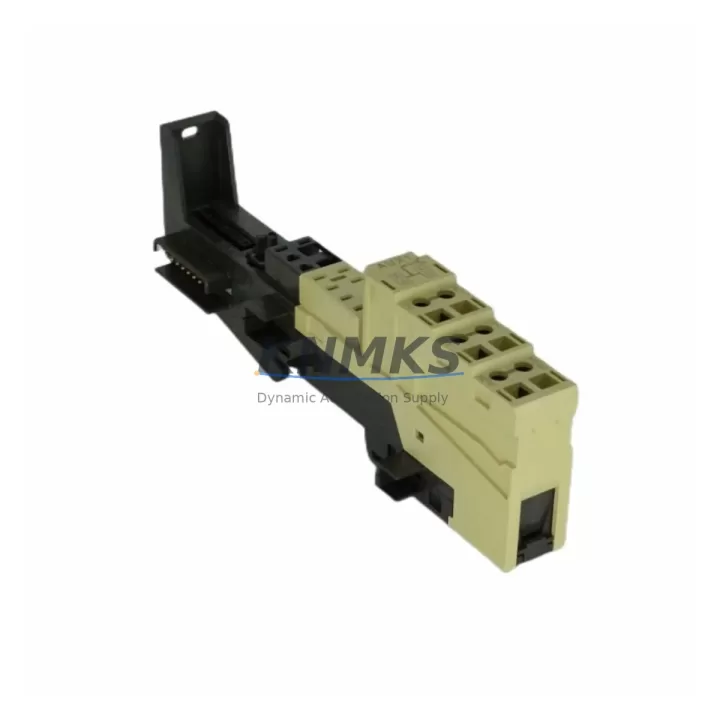
The Siemens 6ES7193-4CD30-0AA0 is a TM-P (Terminal Module for Power) designed for the SIMATIC ET 200S distributed I/O system. As legacy automation lines face end-of-life pressures and spare part shortages, this module has become a critical component in retrofit projects, discontinued model replacements, and control cabinet modernization programs across manufacturing, process, and infrastructure industries.
Whether you are replacing a failed unit in an aging production line, upgrading a PROFIBUS-based ET 200S station to extend its operational life, or planning a phased migration toward a newer SIMATIC platform, the 6ES7193-4CD30-0AA0 provides a reliable, specification-matched solution that minimizes engineering rework and reduces commissioning risk.
This terminal module serves as the power bus interface within the ET 200S rack, supplying the necessary voltage segments to adjacent electronic modules (EMs). In retrofit scenarios, engineers must verify the existing power module — typically a 6ES7138-4CA01-0AA0 PM-E or equivalent — to confirm that the power segment configuration remains compatible after module substitution. Mismatched power segments are among the most common causes of commissioning delays during ET 200S upgrades.
Before installation, confirm the backplane slot assignment and module address allocation within your STEP 7 or TIA Portal hardware configuration. The ET 200S station’s IM 151 interface module — such as the 6ES7151-1AA06-0AB0 — governs the overall station addressing, and any change to the terminal module layout must be reflected in the hardware configuration file to avoid GSD/GSDML mismatch errors during online download.
For projects involving communication protocol migration — for example, transitioning from PROFIBUS DP to PROFINET IO — the 6ES7193-4CD30-0AA0 remains mechanically and electrically compatible with both generations of ET 200S interface modules. This makes it a preferred choice for staged migration strategies where the I/O layer is retained while the communication backbone is upgraded. In such cases, the interface module swap (e.g., replacing a PROFIBUS IM 151 with a PROFINET 6ES7151-3BA23-0AB0) does not require replacement of the terminal modules, significantly reducing retrofit cost and downtime.
Terminal wiring compatibility is another key consideration. The 6ES7193-4CD30-0AA0 uses the standard ET 200S screw-terminal or spring-terminal wiring interface, depending on the associated electronic module. During replacement, technicians should document the existing field wiring assignments — including signal type, wire gauge, and terminal torque specifications — before disconnecting any conductors. Retaining the original wiring harness and terminal labels reduces re-commissioning time and minimizes the risk of wiring errors that could damage connected field devices or PLCs.
Firmware compatibility is generally not a concern for terminal modules, as they are passive components within the ET 200S architecture. However, if the retrofit involves replacing the electronic modules alongside the terminal module — for example, substituting a legacy 6ES7131-4BD01-0AA0 4-channel digital input EM with a current-production equivalent — firmware version alignment between the IM and the EMs should be verified using the SIMATIC compatibility tool or the relevant product lifecycle documentation.
Installation space confirmation is essential in dense control cabinet environments. The ET 200S system uses a modular, rail-mounted architecture, and the 6ES7193-4CD30-0AA0 occupies a standard slot width. When retrofitting into an existing cabinet, verify that adjacent modules — including power supplies, signal isolators, and communication modules — have sufficient clearance for heat dissipation and cable management. In cabinets where space is constrained, consider whether a 6ES7195-7HD10-0XA0 bus cover or end cover needs to be repositioned to accommodate the replacement module.
All units supplied by KNMKS undergo pre-shipment functional testing to verify electrical continuity, connector integrity, and physical condition. Each module is shipped with anti-static packaging and is covered by a support terms confirmed by quotation against manufacturing defects and functional failure under normal operating conditions.
Migration Compatibility Table
| Parameter | Details |
|---|---|
| Part Number | 6ES7193-4CD30-0AA0 |
| Module Type | TM-P (Terminal Module for Power) |
| Compatible System | SIMATIC ET 200S Distributed I/O |
| Interface Compatibility | PROFIBUS DP / PROFINET IO (via IM 151 series) |
| Backplane Connection | ET 200S standard bus connector |
| Installation | DIN rail, standard ET 200S slot |
| Wiring Interface | Screw or spring terminal (per associated EM) |
| Replacement Scope | Direct drop-in for same SKU; verify power segment with PM-E |
| Commissioning Note | Update HW Config in STEP 7 / TIA Portal after substitution |
| Firmware Dependency | None (passive terminal module) |
| Origin | Germany |
| Support terms | 12 Months — KNMKS Quality Guarantee |
Retrofit Planning for Existing Automation Systems
Successful ET 200S retrofit projects require a structured approach to component selection and sequencing. The 6ES7193-4CD30-0AA0 is typically replaced as part of a broader station refurbishment that may also involve the power module (6ES7138-4CA01-0AA0 PM-E DC24V), digital or analog electronic modules, and the interface module itself. When planning a multi-module replacement, it is advisable to photograph the existing station layout and export the current hardware configuration from STEP 7 or TIA Portal before any physical work begins.
In control cabinets where the ET 200S station interfaces with a SIMATIC S7-300 or S7-400 CPU via PROFIBUS, the DP master configuration must be reviewed to ensure that the GSD file version matches the installed IM 151 firmware. If the interface module is also being replaced — for example, upgrading from a 6ES7151-1AA05-0AB0 to a later revision — the GSD file must be updated in the master configuration and a full download performed after the hardware change.
For stations that include analog input or output modules alongside the TM-P, signal isolators may be required to protect sensitive measurement circuits during the transition period. Wiring continuity tests using a calibrated multimeter or loop tester should be performed on all analog channels before re-energizing the station. Digital I/O channels should be verified using the STEP 7 or TIA Portal diagnostic buffer and the module’s LED status indicators.
Where the retrofit involves expanding I/O capacity — for example, adding additional 6ES7131-4BF00-0AA0 8-channel digital input modules — the terminal module count must be increased accordingly, and the DIN rail must have sufficient space to accommodate the expanded station. Power budget calculations should confirm that the existing PM-E module can supply the additional load, or a supplementary power module must be added to the station.
Downtime Control During System Migration
Minimizing production downtime is the primary operational constraint in any live-system retrofit. For ET 200S stations, the recommended approach is to pre-configure the replacement hardware offline — including assembling the terminal modules, electronic modules, and interface module on a spare DIN rail section — and perform a complete bench test before the scheduled maintenance window.
During the maintenance window, the existing station should be powered down in a controlled sequence: first disable the field outputs, then remove power from the PM-E module, and finally disconnect the PROFIBUS or PROFINET cable from the IM 151. This sequence protects connected field devices and prevents spurious output signals during the transition.
After installing the replacement 6ES7193-4CD30-0AA0 and any associated modules, restore power and verify the station’s diagnostic LEDs before reconnecting the communication cable. Once the IM 151 establishes communication with the DP master or IO controller, use the online diagnostic function in STEP 7 or TIA Portal to confirm that all modules are recognized and fault-free. Only then should field outputs be re-enabled and the process returned to automatic control.
For critical processes where even brief interruptions are unacceptable, consider a parallel installation strategy: mount the new ET 200S station alongside the existing one, configure it in the PLC program as a shadow station, and perform a hot-cutover during a planned micro-stop. This approach requires additional hardware but eliminates unplanned downtime risk entirely.
Retrofit Support FAQ
Q1: Is the 6ES7193-4CD30-0AA0 a direct replacement for the same SKU from an older production batch?
Yes. The 6ES7193-4CD30-0AA0 is a passive terminal module with no firmware dependency. Units from different production batches are fully interchangeable within the ET 200S system, provided the associated electronic module and power module remain unchanged. No hardware configuration update is required for a like-for-like replacement.
Q2: What wiring checks are required before replacing the terminal module?
Document all field wiring connections — including wire color, terminal number, signal type, and cable routing — before disconnecting any conductors. Verify that the replacement module’s terminal type (screw or spring) matches the existing wiring harness. After reinstallation, perform a continuity check on all signal and power conductors before energizing the station.
Q3: Does KNMKS provide pre-shipment testing for this module?
Yes. All 6ES7193-4CD30-0AA0 units are inspected and functionally tested before dispatch. Each unit is verified for connector integrity, bus contact condition, and physical completeness. Units are shipped in anti-static packaging with a support terms confirmed by quotation covering manufacturing defects and functional failure under normal operating conditions.
Q4: What is the typical lead time and stock availability?
KNMKS maintains stock of the 6ES7193-4CD30-0AA0 for immediate dispatch. Standard orders are processed within 1–2 business days. For urgent retrofit requirements or bulk procurement, contact our sales team directly to confirm current inventory levels and expedited shipping options.
© 2026 KNMKS. All rights reserved.
Original Source: https://knmks.com
Contact: admin@knmks.com | +86 18359268345
Product Identification
- Brand / Ecosystem
-
Siemens
Siemens - Model / Series
-
6ES7193-4CD30-0AA0
SIMATIC Series - Product Family
- PLCs & Controllers
- Availability Status
- Available on request after model and quantity confirmation
- Inquiry Type
- B2B RFQ, replacement inquiry and project spare-part request
- Pre-Quote Check
- Exact SKU, brand, series, quantity, nameplate photos and destination country are checked before quotation
System Path
Where this product fits in the KNMKS automation structure.
Specification & Inquiry Focus
- Control platform
- PLC, PAC and modular controllers
- Common needs
- CPU, rack, power and I/O expansion
- Project support
- Replacement, cabinet build and maintenance
Buyer Confirmation
Information KNMKS checks before replying.
- Exact model
- 6ES7193-4CD30-0AA0
- Brand / ecosystem
- Siemens
- Product family
- PLCs & Controllers
- Application note
- Replacement, maintenance, project build or spare-part list
- Useful photos
- Nameplate, installed unit, cabinet layout or connector side
- Delivery details
- Quantity, destination country and target schedule
Document Support
Files and notes can be confirmed during quotation.
- Product photos or nameplate confirmation when available
- Packing and delivery notes before quotation confirmation
- Support scope and delivery terms confirmed per inquiry
- Export document coordination for qualified B2B requests
Inquiry Support
- Model cross-checking before quotation
- CPU, power, rack and expansion module matching
- Support for replacement and project inquiry
What to Send Us
- Brand and exact model number: Siemens 6ES7193-4CD30-0AA0
- Quantity and required delivery time
- Application, replacement requirement or nameplate photo
- Destination country and shipping preference
RFQ Preparation
This is a product inquiry page built for RFQ communication.
Fast Model Check
Send this model to KNMKS for confirmation.
Include quantity, destination country and photos if this is a maintenance replacement. The inquiry will be saved with a reference number after submission.
Brand & Compatibility Note
KNMKS displays automation product information for well-known industrial brand ecosystems and compatible replacement references. Brand names are used for product identification and compatibility reference only; final availability and commercial terms are confirmed per quotation.
 Manufacturing
 Machine Tools
 Packaging
 Energy & Power



 HMI & Displays
 Servo Systems
 Variable Frequency Drives
 Sensors