
Overview
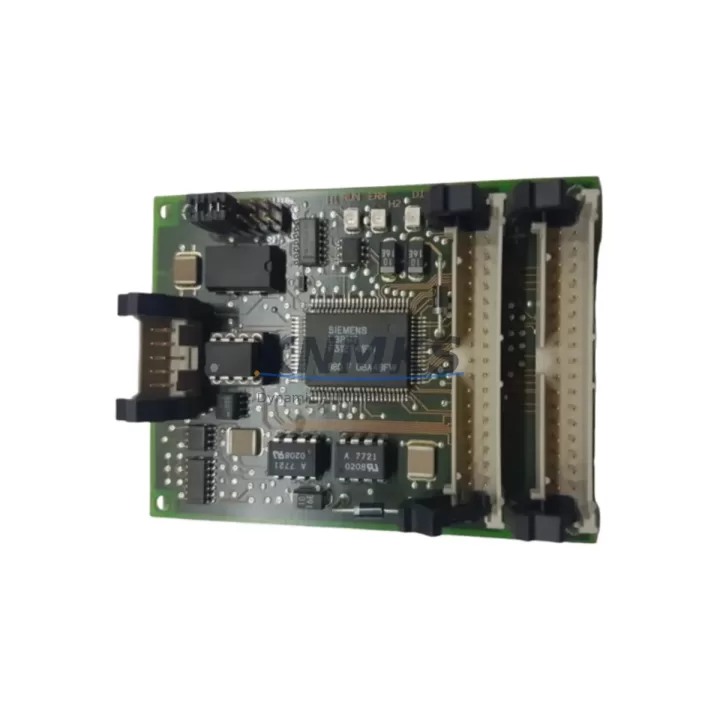
Siemens 6ES7184-0AA00-0XA0 Maintenance-Proven ET 200 Spare: Factory Uptime Through Reliable Interface Module Replacement
The Siemens 6ES7184-0AA00-0XA0 is the IM 184 interface module designed for the SIMATIC ET 200 distributed I/O family — a critical link between the central PLC rack and remote field I/O stations across production lines, process cells, and machine cabinets. When this module fails or degrades, the entire distributed I/O segment it governs goes offline, triggering unplanned downtime that cascades across dependent control loops. Maintaining a verified, tested spare of the 6ES7184-0AA00-0XA0 in your site inventory is one of the most cost-effective decisions a maintenance or procurement engineer can make for any facility running SIMATIC ET 200 architecture.
This listing provides an original Siemens 6ES7184-0AA00-0XA0 sourced from authorized supply channels, individually tested before shipment, and backed by a support terms confirmed by quotation. Whether you are responding to an emergency fault, executing a planned annual overhaul, or building a resilient spare parts buffer for a multi-line facility, this module ships ready for direct installation into your existing ET 200 backplane without firmware reconfiguration in most standard deployments.
Spare Maintenance Table
| Parameter | Specification |
|---|---|
| Part Number / SKU | 6ES7184-0AA00-0XA0 |
| Module Type | IM 184 Interface Module |
| Product Family | SIMATIC ET 200 Distributed I/O |
| Manufacturer | Siemens AG |
| Country of Origin | Germany |
| Communication Interface | PROFIBUS DP (slave interface for ET 200 expansion) |
| Supply Voltage | 24 V DC (via backplane bus) |
| Operating Temperature | 0 °C to +60 °C |
| Storage Temperature | -40 °C to +70 °C |
| Protection Class | IP20 |
| Mounting | DIN rail / ET 200 backplane slot |
| Weight | Approx. 200 g |
| Compatibility | SIMATIC ET 200M, ET 200B, ET 200U distributed I/O stations; S7-300/S7-400 PLC systems via PROFIBUS DP |
| Application Environment | Industrial automation, process control, machine building, panel integration |
| Maintenance Recommendation | Inspect connector pins and backplane seating annually; replace if communication errors or CRC faults appear in diagnostics |
| Pre-Shipment Testing | Yes — functional test performed before dispatch |
| Support terms | 12 Months from date of shipment |
Maintenance Planning for Continuous Operation
The 6ES7184-0AA00-0XA0 does not operate in isolation. It sits at the heart of a distributed I/O segment, and its reliable function depends on the health of every component in the same electrical circuit and control cabinet. When a maintenance engineer replaces this interface module, a disciplined inspection of the surrounding system is essential to prevent repeat failures and confirm the root cause has been fully addressed.
Begin with the 24 V DC power supply feeding the ET 200 station. Voltage ripple, transient spikes, or a supply operating near its rated current limit are common causes of interface module faults that appear intermittent before becoming permanent. A Siemens SITOP PSU100S or equivalent regulated 24 V DC power supply should be verified for output stability under load before the replacement module is inserted.
Next, inspect the PROFIBUS DP cable and bus connectors at both ends of the segment. Damaged shielding, incorrect termination resistors, or a loose 9-pin Sub-D connector on the IM 184 port can cause bus errors that are misdiagnosed as module failure. Siemens PROFIBUS connectors (such as the 6ES7972-0BA52-0XA0 series) should be checked for pin integrity and proper termination at the segment ends.
The I/O signal modules seated in the ET 200 backplane — digital input modules, digital output modules, and analog I/O modules — should be reseated and inspected for bent connector pins or corrosion. A faulty SM 321 digital input module or SM 322 digital output module can generate bus load anomalies that stress the interface module over time. Confirm that all I/O modules are correctly addressed and that no address conflicts exist in the hardware configuration.
For installations where the ET 200 station communicates upstream to a CPU 315-2 DP, CPU 317-2 DP, or similar S7-300/S7-400 master CPU, verify the PROFIBUS master configuration in STEP 7 or TIA Portal matches the physical GSD file for the 6ES7184-0AA00-0XA0. A configuration mismatch after module replacement is a frequent cause of startup failures that are incorrectly attributed to a defective spare.
Do not overlook the backplane bus connector between the IM 184 and adjacent I/O modules. Oxidized or mechanically stressed bus connectors cause intermittent communication faults that worsen over time. If the cabinet has been in service for more than five years, proactive replacement of the backplane bus connectors alongside the interface module is a sound maintenance investment.
Finally, check the cabinet-level fusing and surge protection. A blown fuse on the 24 V DC supply rail or a degraded surge arrester on the PROFIBUS line can expose the replacement module to the same fault condition that damaged the original. Siemens SENTRON circuit breakers and DEHN PROFIBUS surge protection devices are commonly specified in this role and should be part of the post-replacement commissioning checklist.
Site Replacement Workflow
Step 1 — Fault Isolation: Before removing the 6ES7184-0AA00-0XA0, record all active diagnostics from the PLC CPU. Note the exact fault codes, PROFIBUS address, and the last known good operating state. This baseline prevents misdiagnosis and confirms whether the interface module is the primary fault or a secondary casualty.
Step 2 — Safe Isolation: De-energize the ET 200 station following your site LOTO (Lockout/Tagout) procedure. Disconnect the PROFIBUS DP cable from the IM 184 port and label it. Remove the faulty module by releasing the DIN rail locking tab and sliding it clear of the backplane.
Step 3 — Visual Inspection: Inspect the backplane slot, bus connector, and adjacent modules for signs of heat damage, contamination, or mechanical stress. Clean the slot with dry compressed air if necessary.
Step 4 — Module Installation: Insert the replacement 6ES7184-0AA00-0XA0 into the backplane slot, ensuring the bus connector engages fully. Reconnect the PROFIBUS DP cable and verify the termination resistor setting matches the original configuration (active termination at segment ends only).
Step 5 — Power-Up and Diagnostics: Re-energize the station and observe the module’s LED status indicators. A steady green RUN LED confirms successful initialization. Clear any residual fault entries in the PLC CPU and verify all I/O channels report correctly in the diagnostic buffer.
Step 6 — Functional Test: Exercise all I/O channels connected to the replaced station through a controlled test sequence before returning the line to production. Document the replacement in your maintenance management system (CMMS) with the module serial number, date, and technician ID.
This workflow minimizes mean time to repair (MTTR), ensures system compatibility is maintained, and provides a traceable record for future audits and support requests.
Spare Parts Support FAQ
Q1: Is the 6ES7184-0AA00-0XA0 compatible with both ET 200M and ET 200B stations?
The IM 184 interface module is primarily associated with the ET 200 distributed I/O platform. Compatibility depends on the specific ET 200 variant and backplane configuration at your site. We recommend confirming the exact station type and hardware revision against your STEP 7 or TIA Portal hardware configuration before ordering. Our technical team can assist with compatibility verification upon request.
Q2: How is the module tested before shipment?
Every 6ES7184-0AA00-0XA0 unit undergoes a functional power-on test and communication interface check prior to dispatch. Units that fail any test parameter are quarantined and not shipped. A test record is available upon request for quality-critical procurement processes.
Q3: What does the support terms confirmed by quotation cover, and how is a claim processed?
The support terms confirmed by quotation cover manufacturing defects and functional failures under normal operating conditions from the date of shipment. It does not cover damage caused by incorrect installation, overvoltage events, or unauthorized modification. To initiate a support terms claim, contact admin@knmks.com with your order number, fault description, and site installation details. Replacement or repair is arranged within the confirmed support period without additional charge.
Q4: Can you support long-term or blanket order requirements for this module?
Yes. For facilities managing multi-line ET 200 installations or executing multi-year maintenance contracts, we support blanket purchase orders, scheduled release shipments, and reserved stock arrangements. Long-term supply agreements help protect against market availability fluctuations for legacy SIMATIC components and ensure your maintenance team always has a verified spare on hand. Contact admin@knmks.com or call +86 18359268345 to discuss your volume and scheduling requirements.
© 2026 KNMKS. All rights reserved.
Original Source: https://knmks.com
Contact: admin@knmks.com | +86 18359268345
Product Identification
- Brand / Ecosystem
-
Siemens
Siemens - Model / Series
-
6ES7184-0AA00-0XA0
SIMATIC Series - Product Family
- PLCs & Controllers
- Availability Status
- Available on request after model and quantity confirmation
- Inquiry Type
- B2B RFQ, replacement inquiry and project spare-part request
- Pre-Quote Check
- Exact SKU, brand, series, quantity, nameplate photos and destination country are checked before quotation
System Path
Where this product fits in the KNMKS automation structure.
Specification & Inquiry Focus
- Control platform
- PLC, PAC and modular controllers
- Common needs
- CPU, rack, power and I/O expansion
- Project support
- Replacement, cabinet build and maintenance
Buyer Confirmation
Information KNMKS checks before replying.
- Exact model
- 6ES7184-0AA00-0XA0
- Brand / ecosystem
- Siemens
- Product family
- PLCs & Controllers
- Application note
- Replacement, maintenance, project build or spare-part list
- Useful photos
- Nameplate, installed unit, cabinet layout or connector side
- Delivery details
- Quantity, destination country and target schedule
Document Support
Files and notes can be confirmed during quotation.
- Product photos or nameplate confirmation when available
- Packing and delivery notes before quotation confirmation
- Support scope and delivery terms confirmed per inquiry
- Export document coordination for qualified B2B requests
Inquiry Support
- Model cross-checking before quotation
- CPU, power, rack and expansion module matching
- Support for replacement and project inquiry
What to Send Us
- Brand and exact model number: Siemens 6ES7184-0AA00-0XA0
- Quantity and required delivery time
- Application, replacement requirement or nameplate photo
- Destination country and shipping preference
RFQ Preparation
This is a product inquiry page built for RFQ communication.
Fast Model Check
Send this model to KNMKS for confirmation.
Include quantity, destination country and photos if this is a maintenance replacement. The inquiry will be saved with a reference number after submission.
Brand & Compatibility Note
KNMKS displays automation product information for well-known industrial brand ecosystems and compatible replacement references. Brand names are used for product identification and compatibility reference only; final availability and commercial terms are confirmed per quotation.
 Manufacturing
 Machine Tools
 Packaging
 Energy & Power



 HMI & Displays
 Servo Systems
 Variable Frequency Drives
 Sensors