
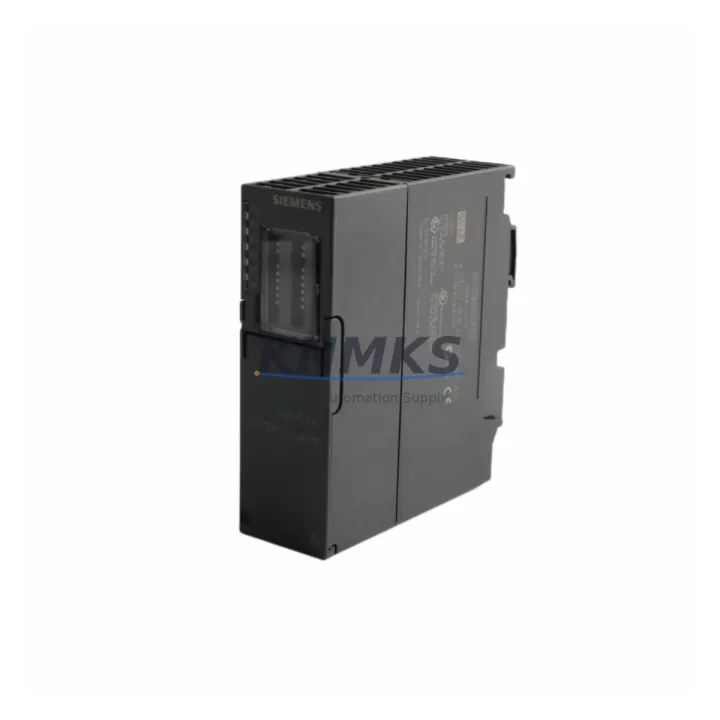
Overview
Siemens 6ES7158-0AD01-0XA0 Migration-Ready PROFIBUS DP Coupler for Legacy Control Systems
The Siemens 6ES7158-0AD01-0XA0 is a PROFIBUS DP/DP Coupler designed for the S7-300 automation platform, enabling seamless coupling between two independent PROFIBUS DP networks operating at different baud rates. As legacy S7-300 installations approach end-of-life and facilities transition toward modern distributed I/O architectures, this coupler remains a critical interface component for maintaining protocol continuity during phased migration projects. Whether you are replacing a failed unit in an active production line or sourcing a verified spare to extend system uptime, the 6ES7158-0AD01-0XA0 provides a direct, drop-in replacement path with no firmware reprogramming required on the master side.
This module supports baud rates from 9.6 kbit/s up to 12 Mbit/s on both DP segments independently, making it compatible with mixed-speed network topologies commonly found in older manufacturing cells. It is fully compatible with the SIMATIC S7-300 rack system and integrates directly into existing ET 200M distributed I/O stations, allowing engineers to preserve existing field wiring, terminal assignments, and GSD-based device configurations during control cabinet upgrades.
Migration Compatibility Table
| Parameter | Specification / Retrofit Note |
|---|---|
| Module Type | PROFIBUS DP/DP Coupler |
| Compatible Platform | SIMATIC S7-300, ET 200M |
| PROFIBUS Baud Rate (Seg. 1 & 2) | 9.6 kbit/s – 12 Mbit/s (independent per segment) |
| Power Supply | DC 24 V via backplane bus (no external supply required) |
| Backplane Interface | S7-300 standard rail mount; slot-independent positioning |
| Connector Type | 2 × DB9 female PROFIBUS connectors |
| Installation Space | Standard S7-300 module width; verify rack slot availability before installation |
| Firmware Compatibility | No firmware update required for drop-in replacement; verify CPU firmware ≥ V2.0 for full diagnostic support |
| Communication Protocol | PROFIBUS DP V0 / V1 |
| Replacement Recommendation | Direct replacement for failed or discontinued 6ES7158-0AD01-0XA0 units; no GSD file changes required |
| Commissioning Focus | Verify bus termination on both segments; confirm baud rate auto-detection; check diagnostic buffer in STEP 7 or TIA Portal |
| Country of Origin | Germany |
| Support terms | support terms confirmed by quotation | Shipped with functional test report |
Retrofit Planning for Existing Automation Systems
When integrating the 6ES7158-0AD01-0XA0 into a retrofit project, the planning phase must account for several interdependent system elements. Begin by auditing the existing PROFIBUS segment topology: document all slave addresses, baud rate settings, and bus termination points on both DP networks before removing the legacy coupler. In many S7-300 installations, the DP/DP Coupler sits between a master CPU segment — such as a CPU 315-2 DP (6ES7315-2AH14-0AB0) — and a downstream distributed I/O segment populated with ET 200M IM 153-2 (6ES7153-2BA02-0XB0) interface modules carrying mixed digital and analog I/O.
Terminal wiring on the DB9 PROFIBUS connectors must be verified against the original network diagram. Pay particular attention to the A/B line polarity and the RTS (Request to Send) signal if using older PROFIBUS cables without integrated termination resistors. If the control cabinet includes a SITOP PSU100S 24V DC power supply, confirm that the 24 V rail feeding the S7-300 backplane can sustain the additional current draw during the transition period when both old and new modules may be temporarily powered.
For installations where the downstream PROFIBUS segment connects to SIMATIC HMI TP700 Comfort or similar operator panels configured with PROFIBUS DP communication, verify that the HMI’s GSD-based device configuration does not reference the coupler’s diagnostic address directly. If it does, a short HMI screen update cycle will be required after replacement — typically under 30 minutes using TIA Portal V15 or later. Similarly, if the upstream segment includes a CP 342-5 (6GK7342-5HX04-0XE0) communications processor for PROFIBUS master functionality, confirm that the CP’s bus parameters (HSA, retry limit, watchdog) remain unchanged after the coupler swap.
In rack-constrained cabinets, measure the available DIN rail space and confirm that the replacement module’s physical footprint matches the original. The 6ES7158-0AD01-0XA0 occupies a standard S7-300 module slot width. If the rack is an older UR2 (6ES7195-1GA00-0XA0) or UR1 chassis, verify that the slot count and power budget of the existing PS 307 power supply remain within specification after the module exchange.
Downtime Control During System Migration
Minimizing production downtime during a PROFIBUS DP coupler replacement requires a structured pre-commissioning checklist executed before the maintenance window opens. First, export and archive the complete STEP 7 or TIA Portal project, including all hardware configuration files, symbol tables, and network topology diagrams. This ensures that if a configuration discrepancy is discovered during commissioning, the original logic can be restored without delay.
Before powering down the rack, record the current diagnostic status of both PROFIBUS segments using the online diagnostic view in STEP 7 or TIA Portal. Note any pre-existing bus faults, slave dropouts, or watchdog timeout events — these may indicate underlying wiring issues that are unrelated to the coupler itself and should be resolved during the same maintenance window to avoid repeat callouts.
During the physical swap, maintain bus termination integrity on both segments. If the existing PROFIBUS cable connectors include integrated termination resistors (e.g., Siemens FastConnect type), ensure the termination switch positions are preserved exactly as documented. After installing the 6ES7158-0AD01-0XA0, power up the rack and allow the CPU to complete its startup cycle before forcing a PROFIBUS bus scan. Monitor the diagnostic buffer for the first 5 minutes of operation to confirm that all slave addresses are recognized and that no spurious bus interruptions are logged.
For facilities operating 24/7 production schedules, a pre-tested replacement module — verified against a functional test report prior to shipment — significantly reduces the risk of a second unplanned outage caused by a defective spare. All units supplied by KNMKS are shipped with a pre-shipment functional test confirmation and are covered by a support terms confirmed by quotation from the date of delivery.
Retrofit Support FAQ
Q1: Is the 6ES7158-0AD01-0XA0 a direct replacement for the older 6ES7158-0AD00-0XA0?
Yes. The 6ES7158-0AD01-0XA0 is the successor revision of the 6ES7158-0AD00-0XA0 and is fully backward compatible in terms of backplane interface, PROFIBUS connector pinout, and GSD file structure. No hardware configuration changes are required in STEP 7 or TIA Portal when performing a like-for-like swap.
Q2: What commissioning steps are required after installation?
After physical installation, power up the S7-300 rack and perform a PROFIBUS bus scan from the CPU or CP master. Verify that all downstream slaves on both DP segments are recognized at their configured addresses. Check the diagnostic buffer for any BF (Bus Fault) or SF (System Fault) LEDs on the coupler itself. If baud rate mismatch errors appear, confirm that the baud rate settings on both segments match the GSD-configured values. No additional firmware flashing is required.
Q3: Can this coupler be used in an ET 200M station as a standalone module?
The 6ES7158-0AD01-0XA0 is designed for use within the S7-300 rack system and is not intended for standalone ET 200M slave station deployment. It functions as a network bridge between two PROFIBUS DP master segments and must be installed in a standard S7-300 rail with a compatible power supply module. Confirm rack slot availability and power budget before ordering.
Q4: What support terms and stock availability does KNMKS provide?
All 6ES7158-0AD01-0XA0 units supplied by KNMKS carry a support terms confirmed by quotation covering manufacturing defects and functional failures under normal operating conditions. Units are pre-tested prior to shipment and include a functional test report. Stock is maintained for immediate dispatch. For volume orders or urgent replacement requirements, contact our sales team directly for lead time confirmation and bulk pricing.
© 2026 KNMKS. All rights reserved.
Original Source: https://knmks.com
Contact: admin@knmks.com | +86 18359268345
Product Identification
- Brand / Ecosystem
-
Siemens
Siemens - Model / Series
-
6ES7158-0AD01-0XA0
SIMATIC Series - Product Family
- PLCs & Controllers
- Availability Status
- Available on request after model and quantity confirmation
- Inquiry Type
- B2B RFQ, replacement inquiry and project spare-part request
- Pre-Quote Check
- Exact SKU, brand, series, quantity, nameplate photos and destination country are checked before quotation
System Path
Where this product fits in the KNMKS automation structure.
Specification & Inquiry Focus
- Control platform
- PLC, PAC and modular controllers
- Common needs
- CPU, rack, power and I/O expansion
- Project support
- Replacement, cabinet build and maintenance
Buyer Confirmation
Information KNMKS checks before replying.
- Exact model
- 6ES7158-0AD01-0XA0
- Brand / ecosystem
- Siemens
- Product family
- PLCs & Controllers
- Application note
- Replacement, maintenance, project build or spare-part list
- Useful photos
- Nameplate, installed unit, cabinet layout or connector side
- Delivery details
- Quantity, destination country and target schedule
Document Support
Files and notes can be confirmed during quotation.
- Product photos or nameplate confirmation when available
- Packing and delivery notes before quotation confirmation
- Support scope and delivery terms confirmed per inquiry
- Export document coordination for qualified B2B requests
Inquiry Support
- Model cross-checking before quotation
- CPU, power, rack and expansion module matching
- Support for replacement and project inquiry
What to Send Us
- Brand and exact model number: Siemens 6ES7158-0AD01-0XA0
- Quantity and required delivery time
- Application, replacement requirement or nameplate photo
- Destination country and shipping preference
RFQ Preparation
This is a product inquiry page built for RFQ communication.
Fast Model Check
Send this model to KNMKS for confirmation.
Include quantity, destination country and photos if this is a maintenance replacement. The inquiry will be saved with a reference number after submission.
Brand & Compatibility Note
KNMKS displays automation product information for well-known industrial brand ecosystems and compatible replacement references. Brand names are used for product identification and compatibility reference only; final availability and commercial terms are confirmed per quotation.
 Manufacturing
 Machine Tools
 Packaging
 Energy & Power



 HMI & Displays
 Servo Systems
 Variable Frequency Drives
 Sensors