
Overview
Siemens 6ES7155-5AA00-0AC0 Migration-Ready PROFINET Interface for Legacy Control Systems
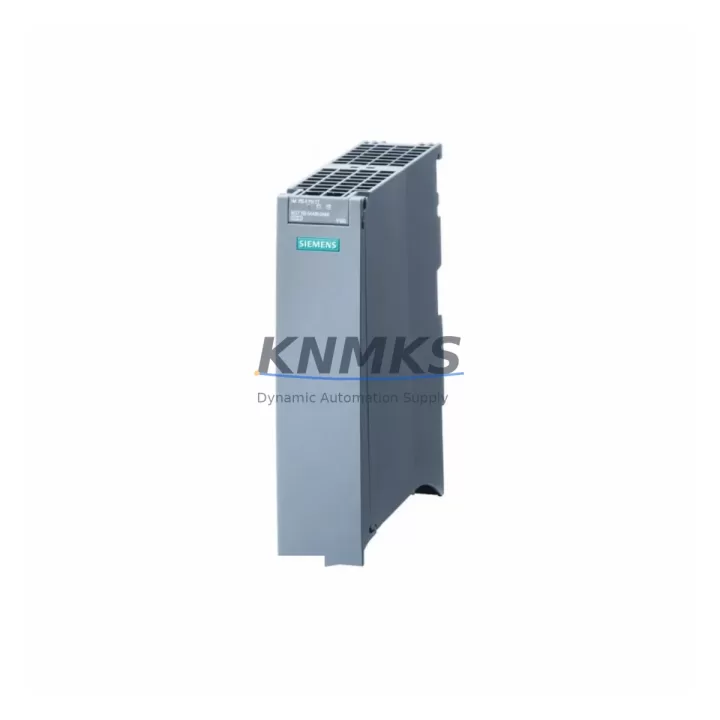
The Siemens 6ES7155-5AA00-0AC0 (IM 155-5 PN ST) is a PROFINET interface module designed for the ET 200S distributed I/O station. As legacy Siemens S7-300 and early ET 200S deployments reach end-of-life, this module serves as the critical migration bridge — enabling engineers to retain existing terminal wiring, I/O slot assignments, and STEP 7 program logic while transitioning the communication backbone to PROFINET IO. Whether you are replacing a failed IM 151-1 HF, upgrading from PROFIBUS DP to PROFINET, or consolidating a multi-rack control cabinet, the 6ES7155-5AA00-0AC0 delivers a verified, in-stock replacement path with a support terms confirmed by quotation.
Migration Compatibility Table
| Parameter | Detail |
|---|---|
| SKU / Order Number | 6ES7155-5AA00-0AC0 |
| Module Designation | IM 155-5 PN ST |
| Series / Platform | Siemens ET 200S / SIMATIC S7 |
| Communication Protocol | PROFINET IO (replaces PROFIBUS DP IM 151-x series) |
| Backplane Interface | ET 200S standard backplane — no mechanical modification required |
| Power Supply Compatibility | 24 V DC; verify PM-E power module (e.g. 6ES7138-4CA01-0AA0) capacity before swap |
| Installation Footprint | Standard ET 200S rail mount; confirm cabinet DIN rail space ≥ 35 mm |
| Firmware Compatibility | Requires TIA Portal V13 SP1 or later; STEP 7 V5.5 SP4 with HSP |
| Replacement Recommendation | Direct replacement for IM 151-1 HF (PROFIBUS) with protocol migration to PROFINET |
| Commissioning Focus | Device name assignment, IP address configuration, GSD/GSDML file import |
| Support terms | 12 months from shipment date — pre-shipment tested |
Retrofit Planning for Existing Automation Systems
A successful retrofit using the 6ES7155-5AA00-0AC0 requires a structured review of the surrounding hardware ecosystem. Begin by auditing the existing ET 200S station: confirm the number of populated I/O slots, verify that each terminal module (TM) is mechanically intact, and document the current module address assignments in your STEP 7 or TIA Portal project. The IM 155-5 PN ST slots directly into the ET 200S head station position — no new terminal modules or backplane segments are required in most standard configurations.
Power budget is a frequent oversight during PROFINET migrations. The existing PM-E power module (such as the 6ES7138-4CA01-0AA0) must supply sufficient current for the new interface module plus all downstream I/O modules. Calculate the total current draw from your I/O module datasheets and confirm headroom before powering up. If the cabinet also houses a 6ES7307-1EA01-0AA0 PS 307 power supply feeding the S7-300 CPU rack, ensure its 5 A output is not shared with the ET 200S station without proper isolation.
On the communication side, the transition from PROFIBUS DP to PROFINET IO requires importing the correct GSDML file for the 6ES7155-5AA00-0AC0 into TIA Portal and reassigning the device name via the online tools. If the existing HMI — for example a SIMATIC TP700 Comfort or MP277 — communicates with the S7-300 CPU over MPI or PROFIBUS, verify that the HMI project’s tag connections remain valid after the I/O reorganization. Screen layouts referencing specific I/O addresses may require remapping if slot positions change during the retrofit.
For stations that include analog signal conditioning, check whether existing signal isolators or 4–20 mA loop-powered transmitters connected to 2AI U ST (6ES7134-4FB01-0AB0) or 2AO U ST analog modules remain within the new module’s input range specifications. Shielded cable routing and PE bonding should be re-verified after any backplane disturbance. If the retrofit scope extends to adding new I/O capacity, the ET 200S architecture supports incremental expansion — additional digital or analog modules can be inserted into vacant slots without replacing the interface module, provided the power budget allows.
Programming cable access during commissioning is essential. A standard USB-to-MPI/PROFIBUS adapter or a PROFINET-capable PC interface (such as a CP 1616 or onboard NIC with PROFINET driver) is required to download the updated hardware configuration and perform device name assignment. Ensure the engineering station running TIA Portal has network access to the PROFINET subnet before scheduling the cutover window.
Downtime Control During System Migration
Minimizing production downtime during a PROFINET migration starts with preparation, not execution. Before the cutover, export and archive the complete STEP 7 or TIA Portal project — including hardware configuration, symbol tables, and HMI screens — to a secure backup location. Verify that the replacement 6ES7155-5AA00-0AC0 has been pre-configured offline: device name set, IP address assigned, and GSDML imported into the project. A pre-tested module reduces on-site commissioning time to device swap and online download only.
During the physical swap, power down the ET 200S station at the PM-E power module rather than at the main cabinet breaker, isolating only the affected station while leaving the S7-300 CPU and other PROFIBUS or PROFINET nodes operational where possible. This approach preserves control continuity for unaffected process segments. After seating the new IM 155-5 PN ST, restore power and use TIA Portal’s online diagnostics to confirm the device appears on the PROFINET network with the correct device name and IP address before downloading the hardware configuration.
If the CPU enters STOP mode during the download, coordinate with the process team to confirm a safe hold state for all actuators. Use the CPU’s memory card to store the updated project so that a power cycle restores the correct configuration automatically. Post-commissioning, run a full I/O force test to verify each digital and analog channel responds correctly before releasing the station to production. Document the as-built configuration, firmware versions, and any address changes for the site maintenance record. All units supplied by KNMKS are pre-shipment tested and covered by a support terms confirmed by quotation, reducing the risk of repeat downtime from module failure.
Retrofit Support FAQ
Q1: Is the 6ES7155-5AA00-0AC0 a direct drop-in replacement for the IM 151-1 HF on PROFIBUS?
A: The 6ES7155-5AA00-0AC0 occupies the same ET 200S head station slot and is mechanically compatible, but it migrates the communication protocol from PROFIBUS DP to PROFINET IO. A hardware configuration update in TIA Portal or STEP 7 (with HSP) is required, along with GSDML import and device name assignment. Existing terminal modules and I/O wiring remain unchanged in most installations.
Q2: What commissioning steps are required after installing the module?
A: Assign the device name using TIA Portal’s online tools or a PRONETA scan, configure the IP address, download the updated hardware configuration to the CPU, and perform an I/O force test on all channels. Confirm HMI tag connections and analog signal ranges before returning the station to automatic mode.
Q3: How do I verify wiring and terminal compatibility before the swap?
A: The ET 200S terminal modules (TMs) are independent of the interface module — wiring does not need to be disturbed. Confirm that each TM is seated correctly on the backplane and that the PM-E power module output current is sufficient for the new IM 155-5 PN ST plus all I/O modules. Review the power budget calculation in the ET 200S system manual before powering up.
Q4: What support terms and stock availability does KNMKS provide?
A: All 6ES7155-5AA00-0AC0 units are availability confirmed by RFQ and ship with a support terms confirmed by quotation from the shipment date. Each unit undergoes pre-shipment functional testing. For volume orders or urgent dispatch requirements, contact admin@knmks.com or call +86 18359268345.
© 2026 KNMKS. All rights reserved. Original Source: https://knmks.com | Contact: admin@knmks.com | +86 18359268345
Product Identification
- Brand / Ecosystem
-
Siemens
Siemens - Model / Series
-
6ES7155-5AA00-0AC0
SIMATIC Series - Product Family
- PLCs & Controllers
- Availability Status
- Available on request after model and quantity confirmation
- Inquiry Type
- B2B RFQ, replacement inquiry and project spare-part request
- Pre-Quote Check
- Exact SKU, brand, series, quantity, nameplate photos and destination country are checked before quotation
System Path
Where this product fits in the KNMKS automation structure.
Specification & Inquiry Focus
- Control platform
- PLC, PAC and modular controllers
- Common needs
- CPU, rack, power and I/O expansion
- Project support
- Replacement, cabinet build and maintenance
Buyer Confirmation
Information KNMKS checks before replying.
- Exact model
- 6ES7155-5AA00-0AC0
- Brand / ecosystem
- Siemens
- Product family
- PLCs & Controllers
- Application note
- Replacement, maintenance, project build or spare-part list
- Useful photos
- Nameplate, installed unit, cabinet layout or connector side
- Delivery details
- Quantity, destination country and target schedule
Document Support
Files and notes can be confirmed during quotation.
- Product photos or nameplate confirmation when available
- Packing and delivery notes before quotation confirmation
- Support scope and delivery terms confirmed per inquiry
- Export document coordination for qualified B2B requests
Inquiry Support
- Model cross-checking before quotation
- CPU, power, rack and expansion module matching
- Support for replacement and project inquiry
What to Send Us
- Brand and exact model number: Siemens 6ES7155-5AA00-0AC0
- Quantity and required delivery time
- Application, replacement requirement or nameplate photo
- Destination country and shipping preference
RFQ Preparation
This is a product inquiry page built for RFQ communication.
Fast Model Check
Send this model to KNMKS for confirmation.
Include quantity, destination country and photos if this is a maintenance replacement. The inquiry will be saved with a reference number after submission.
Brand & Compatibility Note
KNMKS displays automation product information for well-known industrial brand ecosystems and compatible replacement references. Brand names are used for product identification and compatibility reference only; final availability and commercial terms are confirmed per quotation.
 Manufacturing
 Machine Tools
 Packaging
 Energy & Power



 HMI & Displays
 Servo Systems
 Variable Frequency Drives
 Sensors