
Overview
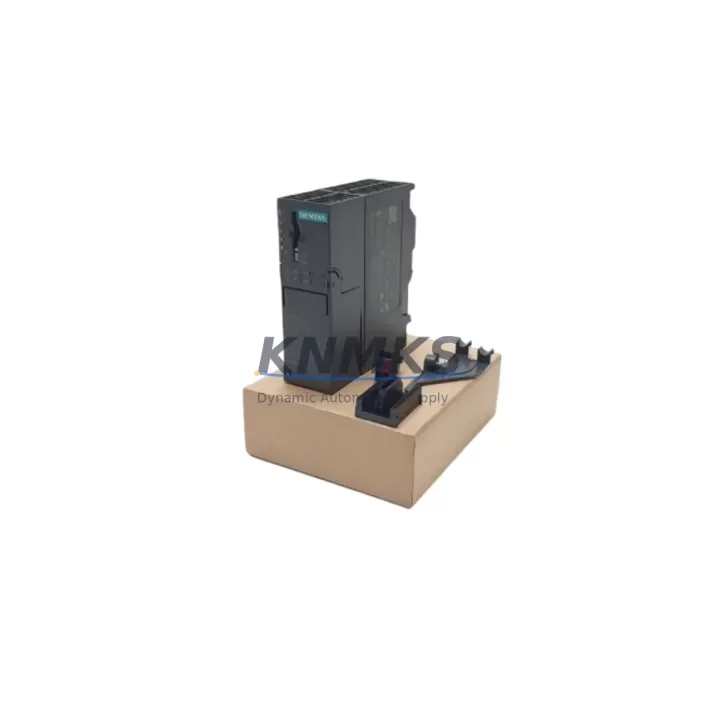
Siemens 6ES7153-4AA01-0XB0 Migration-Ready IM for ET 200M: Legacy System Retrofit & Compatibility Upgrade
The Siemens 6ES7153-4AA01-0XB0 is the IM 153-4 PN IO interface module for the ET 200M distributed I/O station, designed to connect ET 200M racks to PROFINET IO controllers — including the S7-300, S7-400, and compatible third-party PROFINET masters. As legacy ET 200M deployments approach end-of-life and original IM 153-2 or IM 153-3 variants become increasingly difficult to source, the 6ES7153-4AA01-0XB0 represents a proven, migration-ready upgrade path that preserves existing I/O wiring, rack infrastructure, and — in most cases — the original PLC program logic.
For maintenance engineers and automation integrators managing aging control systems, this module addresses one of the most common retrofit challenges: replacing a discontinued interface module without triggering a full panel redesign. The 6ES7153-4AA01-0XB0 slots directly into the existing ET 200M rack, retains the standard DIN rail mounting footprint, and supports up to 8 S7-300 signal modules per station — including digital input/output modules such as the SM 321 and SM 322, analog modules such as the SM 331 and SM 332, and function modules. This means your existing I/O expansion investment remains fully protected during the migration.
Before committing to a replacement, engineers should verify several critical parameters: the PROFINET IO device name and IP address assignment (configured via STEP 7 or TIA Portal), the rack power budget supplied by the PS 307 or equivalent power supply module, the backplane bus compatibility with installed signal modules, and the firmware version of the replacement unit relative to the GSD file version used in the existing project. In most standard ET 200M configurations, no rewiring of field terminals is required — the terminal blocks on downstream SM modules remain undisturbed, which is a significant advantage in minimizing downtime during the changeover.
Communication link integrity is another key checkpoint. The 6ES7153-4AA01-0XB0 uses a standard RJ45 PROFINET interface and supports media redundancy (MRP) when configured in a ring topology. If the existing installation uses an IM 153-2 with PROFIBUS DP, a protocol migration step is required: the PROFIBUS DP master port on the CPU (e.g., CPU 315-2 DP or CPU 317-2 DP) must be reconfigured or supplemented with a CP 343-1 or equivalent PROFINET communication processor to support the PROFINET IO master role. This protocol transition is one of the most common sources of commissioning delays and should be planned and tested offline before the scheduled maintenance window.
HMI screen updates are frequently overlooked during interface module replacements. If the plant uses a TP700 Comfort, TP1200 Comfort, or similar WinCC-based HMI panel, the device name change or IP reassignment of the ET 200M station may require a corresponding update to the HMI project’s connection parameters. Validating this in a simulation environment before the live cutover is strongly recommended.
Installation space confirmation is straightforward for this module: the 6ES7153-4AA01-0XB0 occupies the leftmost slot of the ET 200M rack (Slot 0), identical to all IM 153-x variants. No additional panel space is required. However, if the retrofit involves adding new I/O capacity — for example, expanding with additional SM 321 digital input modules or SM 332 analog output modules — the rack width and power supply capacity must be recalculated accordingly.
All units supplied by KNMKS are pre-shipment tested, verified against the published Siemens hardware compatibility matrix, and covered by a support terms confirmed by quotation. Stock is maintained to support both emergency breakdown replacements and planned retrofit projects with multi-unit requirements.
Migration Compatibility Table
| Parameter | 6ES7153-4AA01-0XB0 (IM 153-4 PN IO) | Legacy IM 153-2 (PROFIBUS) | Notes |
|---|---|---|---|
| Communication Interface | PROFINET IO (RJ45, 100 Mbit/s) | PROFIBUS DP (9-pin Sub-D) | Protocol migration required if replacing IM 153-2 |
| Rack Slot Position | Slot 0 (leftmost) | Slot 0 (leftmost) | Physical fit identical; no rack modification needed |
| Max Signal Modules per Station | Up to 8 S7-300 SM modules | Up to 8 S7-300 SM modules | I/O expansion capacity unchanged |
| Power Supply Compatibility | PS 307 (2A / 5A / 10A) or equivalent | PS 307 or equivalent | Verify total rack power budget before replacement |
| Media Redundancy | MRP supported (ring topology) | Not applicable | Upgrade benefit for high-availability applications |
| GSD / GSDML File | GSDML file required (TIA Portal / STEP 7) | GSD file (STEP 7) | Update hardware catalog and re-download configuration |
| Firmware Version | Verify against project GSDML version | Verify against project GSD version | Mismatch may cause station fault on startup |
| HMI Connection Update | Required if device name/IP changes | Required if DP address changes | Update WinCC / TIA Portal HMI project accordingly |
| Installation Footprint | Standard ET 200M rack (DIN rail) | Standard ET 200M rack (DIN rail) | No panel modification required |
| Support terms | support terms confirmed by quotation — all units pre-shipment tested by KNMKS | ||
Retrofit Planning for Existing Automation Systems
A successful ET 200M retrofit using the 6ES7153-4AA01-0XB0 typically involves coordinating several interdependent components. The interface module itself is only one element of a broader system that must be validated as a whole before the cutover window opens.
Starting from the controller side: if the existing CPU is a CPU 315-2 PN/DP or CPU 317-2 PN/DP, the PROFINET IO master configuration in STEP 7 or TIA Portal must be updated to recognize the new IM 153-4 device name and GSDML descriptor. If the CPU does not natively support PROFINET IO master functionality — for example, older CPU 314 or CPU 313 variants — a CP 343-1 Advanced communication processor must be added to the CPU rack to provide the PROFINET master port. This is a common requirement in older S7-300 panel upgrades and should be scoped into the project budget early.
On the ET 200M rack itself, the existing SM 321 digital input modules, SM 322 digital output modules, SM 331 analog input modules, and SM 332 analog output modules remain in place. Their terminal wiring does not need to be disturbed, which is the primary advantage of this upgrade path over a full I/O system replacement. However, if the retrofit is being combined with an I/O expansion — adding new signal modules to address additional field instruments — the PS 307 power supply module capacity must be recalculated. A 5A PS 307 is typically sufficient for a fully populated 8-slot rack with mixed digital and analog modules, but high-density analog configurations may require the 10A variant.
For applications where signal isolation is required between field devices and the PLC I/O — particularly in environments with high electrical noise, long cable runs, or mixed voltage levels — signal isolators or barriers installed upstream of the SM module terminals remain fully compatible with this retrofit approach. No changes to the isolation architecture are required.
If the plant includes a TP700 Comfort or TP1200 Comfort HMI panel connected to the same PROFINET network, the HMI project must be updated to reflect any changes to the ET 200M station’s device name or IP address. This is a straightforward configuration change in TIA Portal but must be completed and downloaded to the HMI before the live cutover to avoid operator screen faults during startup.
Finally, if the existing system uses a programming cable (e.g., PC Adapter USB or CP 5711) for PROFIBUS-based diagnostics, note that PROFINET-based diagnostics are accessed directly via the Ethernet interface using STEP 7 or TIA Portal — no dedicated programming cable is required for the ET 200M station itself after the migration to PROFINET.
Downtime Control During System Migration
Minimizing unplanned downtime is the primary operational concern in any ET 200M interface module replacement. The 6ES7153-4AA01-0XB0 supports a structured hot-swap approach when the system is configured for isochronous or standard PROFINET IO operation: the replacement module can be inserted into the powered rack, and the IO controller will automatically re-establish communication once the device name is recognized — provided the GSDML configuration has been pre-loaded and the device name has been assigned prior to the maintenance window.
To protect the original program logic, a full CPU backup — including the hardware configuration, symbol table, and all program blocks (OB, FB, FC, DB) — should be archived to a memory card or PC before any hardware changes are made. This ensures that if the replacement triggers an unexpected hardware fault or configuration mismatch, the system can be restored to its last known good state without requiring a full re-engineering effort.
Field control continuity during the transition can be maintained by placing the CPU in STOP mode only for the minimum time required to physically swap the interface module and re-establish the PROFINET connection. In most standard configurations, this window is under 10 minutes for an experienced engineer who has pre-staged the replacement module with the correct device name assignment. For critical processes where even brief STOP mode is unacceptable, a parallel commissioning approach — using a spare rack pre-configured and tested offline — can reduce the live cutover to a single cable transfer.
Post-replacement commissioning should include: verification of all I/O module status LEDs (green = OK, no SF or BF fault indicators), a full I/O force test on representative digital and analog channels, confirmation of HMI screen data refresh, and a review of the CPU diagnostic buffer for any residual fault entries. KNMKS recommends documenting the pre- and post-replacement diagnostic buffer states as part of the project handover record.
Retrofit Support FAQ
Q1: Can the 6ES7153-4AA01-0XB0 directly replace an IM 153-2 without rewiring the field terminals?
Yes — the signal module terminal wiring on SM 321, SM 322, SM 331, and SM 332 modules is completely independent of the interface module and does not need to be disturbed. The only changes required are at the controller level (PROFINET master configuration) and the GSDML hardware catalog update in STEP 7 or TIA Portal. If the existing system uses PROFIBUS DP, a protocol migration step is required at the CPU or via a CP 343-1 communication processor.
Q2: How is the PROFINET device name assigned to the replacement module?
The device name is assigned using the “Assign Device Name” function in STEP 7 (HW Config) or TIA Portal (Device & Networks view), accessed via the Ethernet interface of the programming PC. The replacement module ships in factory default state (no device name assigned) and must be named before it will be recognized by the IO controller. KNMKS can pre-assign the device name upon request if the customer provides the required name string before shipment.
Q3: What is the support terms coverage and how are units tested before shipment?
All 6ES7153-4AA01-0XB0 units supplied by KNMKS carry a support terms confirmed by quotation from the date of shipment. Each unit undergoes pre-shipment functional testing including power-on verification, PROFINET interface check, and backplane bus continuity confirmation. Units are shipped with original or equivalent protective packaging to prevent transit damage. Support requests are processed directly through KNMKS — contact admin@knmks.com for RMA procedures.
Q4: Is stock available for multi-unit retrofit projects or long-term spare parts agreements?
Yes. KNMKS maintains inventory of the 6ES7153-4AA01-0XB0 to support both emergency single-unit breakdown replacements and planned multi-unit retrofit projects. For customers requiring guaranteed supply over a 12–36 month horizon — common in multi-site rollout programs or long-term maintenance contracts — KNMKS offers reserved stock arrangements. Contact admin@knmks.com or +86 18359268345 to discuss volume pricing and supply commitment terms.
© 2026 KNMKS. All rights reserved.
Original Source: https://knmks.com
Contact: admin@knmks.com | +86 18359268345
Product Identification
- Brand / Ecosystem
-
Siemens
Siemens - Model / Series
-
6ES7153-4AA01-0XB0
SIMATIC Series - Product Family
- PLCs & Controllers
- Availability Status
- Available on request after model and quantity confirmation
- Inquiry Type
- B2B RFQ, replacement inquiry and project spare-part request
- Pre-Quote Check
- Exact SKU, brand, series, quantity, nameplate photos and destination country are checked before quotation
System Path
Where this product fits in the KNMKS automation structure.
Specification & Inquiry Focus
- Control platform
- PLC, PAC and modular controllers
- Common needs
- CPU, rack, power and I/O expansion
- Project support
- Replacement, cabinet build and maintenance
Buyer Confirmation
Information KNMKS checks before replying.
- Exact model
- 6ES7153-4AA01-0XB0
- Brand / ecosystem
- Siemens
- Product family
- PLCs & Controllers
- Application note
- Replacement, maintenance, project build or spare-part list
- Useful photos
- Nameplate, installed unit, cabinet layout or connector side
- Delivery details
- Quantity, destination country and target schedule
Document Support
Files and notes can be confirmed during quotation.
- Product photos or nameplate confirmation when available
- Packing and delivery notes before quotation confirmation
- Support scope and delivery terms confirmed per inquiry
- Export document coordination for qualified B2B requests
Inquiry Support
- Model cross-checking before quotation
- CPU, power, rack and expansion module matching
- Support for replacement and project inquiry
What to Send Us
- Brand and exact model number: Siemens 6ES7153-4AA01-0XB0
- Quantity and required delivery time
- Application, replacement requirement or nameplate photo
- Destination country and shipping preference
RFQ Preparation
This is a product inquiry page built for RFQ communication.
Fast Model Check
Send this model to KNMKS for confirmation.
Include quantity, destination country and photos if this is a maintenance replacement. The inquiry will be saved with a reference number after submission.
Brand & Compatibility Note
KNMKS displays automation product information for well-known industrial brand ecosystems and compatible replacement references. Brand names are used for product identification and compatibility reference only; final availability and commercial terms are confirmed per quotation.
 Manufacturing
 Machine Tools
 Packaging
 Energy & Power



 HMI & Displays
 Servo Systems
 Variable Frequency Drives
 Sensors