
Overview
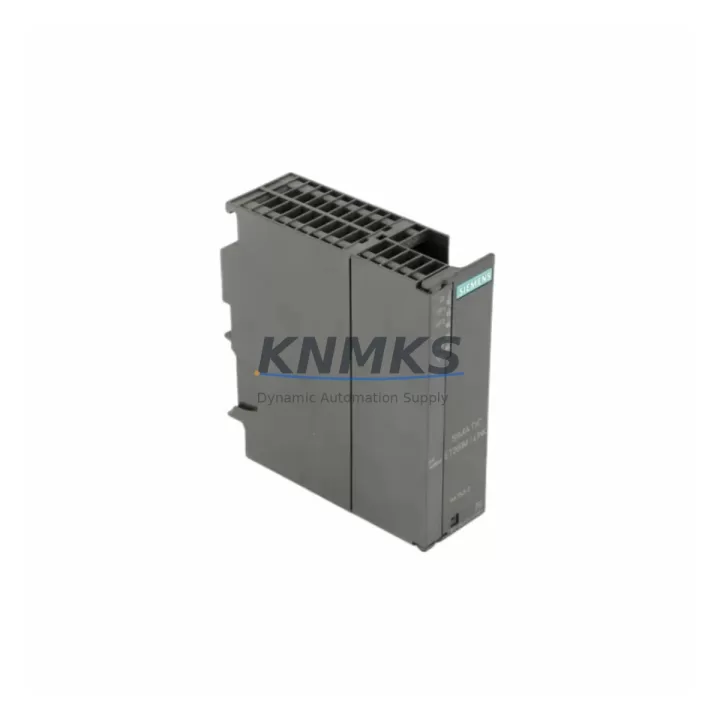
Siemens 6ES7153-2BA70-0XB0 Spare Part for Factory Uptime
The Siemens 6ES7153-2BA70-0XB0 is the IM153-2 HF (High Feature) interface module for the ET 200M distributed I/O station, operating over PROFIBUS DP at up to 12 Mbit/s. As a critical link between the PROFIBUS master (typically an S7-300 or S7-400 CPU) and the ET 200M I/O rack, this module is a high-priority spare in any maintenance-driven automation environment. Unplanned failure of this interface module results in complete loss of the associated I/O station, making immediate replacement capability essential for production continuity.
Sourced as an original Siemens component and tested prior to shipment, this spare is stocked to support maintenance engineers and procurement teams managing aging SIMATIC installations. Whether you are executing a scheduled annual overhaul, responding to an emergency shutdown, or building a strategic spare parts inventory for a multi-line facility, the 6ES7153-2BA70-0XB0 is a direct, plug-compatible replacement that requires no firmware reconfiguration when substituting a like-for-like unit.
Spare Maintenance Table
| Part Number | 6ES7153-2BA70-0XB0 |
| Module Designation | IM153-2 HF (High Feature) |
| Series / Platform | SIMATIC ET 200M |
| Communication Protocol | PROFIBUS DP (up to 12 Mbit/s) |
| Compatible Masters | S7-300, S7-400, S7-1500 (via DP master), third-party PROFIBUS masters |
| Max I/O Modules per Station | Up to 8 signal modules (SM) per IM153-2 |
| Supply Voltage | 24 V DC (via backplane / PS 307 power supply) |
| Operating Temperature | 0 °C to +60 °C |
| Protection Class | IP20 |
| Country of Origin | Germany |
| Weight | 630 g |
| Compatibility Confirmation | Direct replacement for IM153-2 variants in ET 200M racks; verify GSD file version in STEP 7 / TIA Portal |
| Maintenance Recommendation | Inspect PROFIBUS connector, terminating resistor status, and backplane bus connector annually |
| Support terms | 12 Months from shipment date |
| Pre-Shipment Testing | Functional test performed before dispatch |
Maintenance Planning for Continuous Operation
When replacing the 6ES7153-2BA70-0XB0 in an ET 200M station, a disciplined maintenance engineer will not stop at the interface module alone. The PROFIBUS segment feeding this station should be inspected end-to-end: verify that the PROFIBUS DP cable and 9-pin Sub-D connectors (e.g., Siemens 6ES7972-0BA52-0XA0 bus connector) show no oxidation, cracked shielding, or incorrect termination. A faulty terminating resistor at either end of the segment is a common root cause of intermittent DP communication errors that are frequently misdiagnosed as interface module failure.
The ET 200M rack relies on a dedicated PS 307 power supply module (such as the 6ES7307-1BA01-0AA0 or 6ES7307-1EA01-0AA0) to deliver stable 24 V DC to the backplane. Before installing the replacement IM153-2 HF, confirm that the power supply output voltage is within tolerance and that the backplane bus connector on the rack is undamaged. A degraded backplane connector can cause the new interface module to report faults immediately after installation, leading to unnecessary re-replacement cycles.
For facilities running mixed I/O configurations, the signal modules installed in the ET 200M rack — including SM 321 digital input modules, SM 322 digital output modules, and SM 331/SM 332 analog I/O modules — should be inspected for blown fuses, loose terminal connections, and LED fault indicators during the same maintenance window. Replacing the interface module while leaving a marginal analog input module in place risks a repeat unplanned outage within weeks.
If the ET 200M station is part of a safety-instrumented loop, verify the status of any F-modules or safety signal modules installed alongside standard I/O. Communication between the IM153-2 HF and the safety CPU must be re-validated after module replacement per your site’s functional safety procedure. Additionally, check the 24 V DC fuse or circuit breaker protecting the ET 200M power feed — a nuisance trip that caused the original fault may recur if the upstream protection device is not inspected.
For sites managing legacy SIMATIC S7-300 control cabinets with multiple ET 200M drops, maintaining a minimum stock of one 6ES7153-2BA70-0XB0 per production line — alongside a spare PS 307 power supply and a set of PROFIBUS bus connectors — is a proven strategy for reducing mean time to repair (MTTR) from hours to minutes. Procurement engineers should also consider stocking the 6ES7153-2BA00-0XB0 (standard IM153-2) as a cross-reference spare where HF features are not required, broadening coverage across mixed ET 200M installations.
Site Replacement Workflow
Step 1 — Isolation: Place the PROFIBUS master CPU in STOP mode or isolate the affected DP segment. Document the current station address displayed on the IM153-2 rotary switches before removal — the replacement module must be set to the identical address.
Step 2 — Physical Removal: Disconnect the PROFIBUS connector and 24 V DC supply connector. Release the module from the backplane by pressing the release lever and sliding the module out of the rack. Inspect the backplane bus connector pins for damage before inserting the replacement.
Step 3 — Address Configuration: Set the rotary address switches on the 6ES7153-2BA70-0XB0 replacement to match the original station address. Incorrect address setting is the single most common commissioning error during emergency replacements.
Step 4 — Insertion and Power-On: Slide the replacement module into the rack, reconnect the PROFIBUS and power connectors, and restore 24 V DC. Observe the RUN/STOP and BF (Bus Fault) LEDs. A steady green RUN LED with no BF indication confirms successful re-integration into the PROFIBUS segment.
Step 5 — Master Validation: In STEP 7 or TIA Portal, confirm that the ET 200M station returns to DATA_EXCHANGE state. Check the diagnostic buffer of the DP master CPU for any residual fault entries. For HF-variant modules, verify that isochronous mode or equidistant DP cycle settings (if configured) are operating correctly.
Step 6 — Documentation: Record the replacement date, module serial number, and post-replacement test results in the equipment maintenance log. Update the spare parts inventory to trigger reorder of the consumed unit, maintaining buffer stock for the next event.
Spare Parts Support FAQ
Q1: Is the 6ES7153-2BA70-0XB0 a direct drop-in replacement for earlier IM153-2 variants?
In most ET 200M installations, yes. The IM153-2 HF is backward compatible with standard DP configurations. However, if the original module was configured for isochronous (equidistant) PROFIBUS operation or used specific HF diagnostic features, verify that the GSD file version in your STEP 7 / TIA Portal project matches the replacement module’s firmware. A GSD file mismatch will prevent the station from entering DATA_EXCHANGE and must be resolved before the line can restart.
Q2: What pre-shipment testing is performed on this spare?
Each 6ES7153-2BA70-0XB0 unit is functionally tested before dispatch to confirm PROFIBUS communication capability and correct LED behavior under power. Units that do not pass functional verification are not shipped. The support terms confirmed by quotation cover defects in materials and workmanship from the shipment date, providing procurement teams with a documented quality assurance baseline for inventory records.
Q3: How should this spare be stored to maximize shelf life?
Store in original anti-static packaging in a dry environment at 0 °C to +40 °C with relative humidity below 75% (non-condensing). Avoid proximity to strong electromagnetic fields or corrosive atmospheres. Inspect the module annually if held in long-term storage — check connector pins for oxidation and verify that the anti-static bag remains intact. Properly stored, the module can be held in inventory for 3–5 years without degradation of electrical performance.
Q4: Can long-term supply be guaranteed for ongoing maintenance contracts?
We maintain stock of the 6ES7153-2BA70-0XB0 to support facilities with multi-year maintenance agreements and annual overhaul schedules. For procurement engineers managing lifecycle risk on aging SIMATIC ET 200M installations, we recommend placing a standing order or blanket purchase agreement to lock in availability and pricing. Contact our sales team at admin@knmks.com to discuss volume pricing, lead times, and consignment stock arrangements.
© 2026 KNMKS. All rights reserved.
Original Source: https://knmks.com
Contact: admin@knmks.com | +86 18359268345
Product Identification
- Brand / Ecosystem
-
Siemens
Siemens - Model / Series
-
6ES7153-2BA70-0XB0
SIMATIC Series - Product Family
- PLCs & Controllers
- Availability Status
- Available on request after model and quantity confirmation
- Inquiry Type
- B2B RFQ, replacement inquiry and project spare-part request
- Pre-Quote Check
- Exact SKU, brand, series, quantity, nameplate photos and destination country are checked before quotation
System Path
Where this product fits in the KNMKS automation structure.
Specification & Inquiry Focus
- Control platform
- PLC, PAC and modular controllers
- Common needs
- CPU, rack, power and I/O expansion
- Project support
- Replacement, cabinet build and maintenance
Buyer Confirmation
Information KNMKS checks before replying.
- Exact model
- 6ES7153-2BA70-0XB0
- Brand / ecosystem
- Siemens
- Product family
- PLCs & Controllers
- Application note
- Replacement, maintenance, project build or spare-part list
- Useful photos
- Nameplate, installed unit, cabinet layout or connector side
- Delivery details
- Quantity, destination country and target schedule
Document Support
Files and notes can be confirmed during quotation.
- Product photos or nameplate confirmation when available
- Packing and delivery notes before quotation confirmation
- Support scope and delivery terms confirmed per inquiry
- Export document coordination for qualified B2B requests
Inquiry Support
- Model cross-checking before quotation
- CPU, power, rack and expansion module matching
- Support for replacement and project inquiry
What to Send Us
- Brand and exact model number: Siemens 6ES7153-2BA70-0XB0
- Quantity and required delivery time
- Application, replacement requirement or nameplate photo
- Destination country and shipping preference
RFQ Preparation
This is a product inquiry page built for RFQ communication.
Fast Model Check
Send this model to KNMKS for confirmation.
Include quantity, destination country and photos if this is a maintenance replacement. The inquiry will be saved with a reference number after submission.
Brand & Compatibility Note
KNMKS displays automation product information for well-known industrial brand ecosystems and compatible replacement references. Brand names are used for product identification and compatibility reference only; final availability and commercial terms are confirmed per quotation.
 Manufacturing
 Machine Tools
 Packaging
 Energy & Power



 HMI & Displays
 Servo Systems
 Variable Frequency Drives
 Sensors