
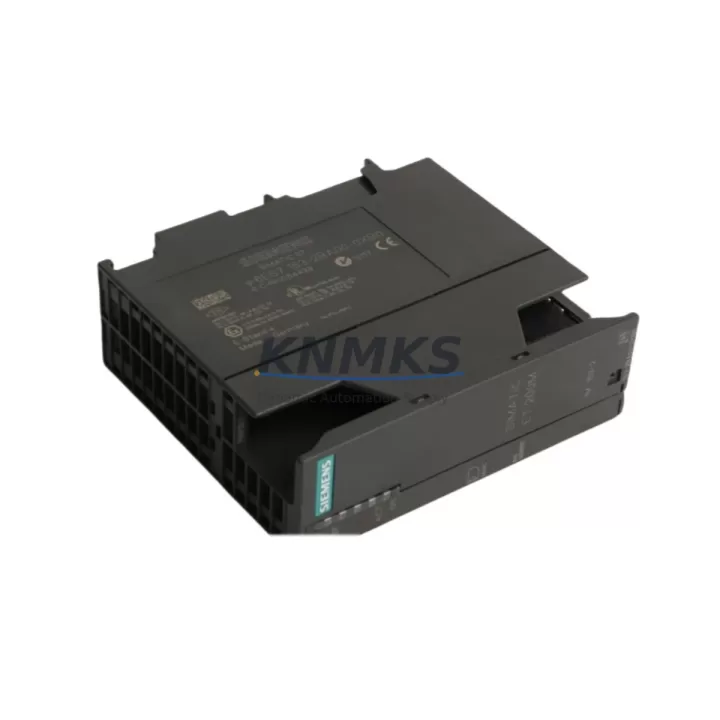
Overview
Siemens 6ES7153-2BA00-0XB0 Maintenance-Proven Spare Part for Factory Uptime
The Siemens 6ES7153-2BA00-0XB0 is the IM 153-2 PROFIBUS DP interface module for the ET 200M distributed I/O station — a critical communication gateway between the PROFIBUS DP master (typically a Siemens S7-300 or S7-400 CPU) and the field-level I/O modules installed in the ET 200M rack. In process plants, automotive assembly lines, and discrete manufacturing environments, this interface module is the backbone of distributed control architecture. When it fails, the entire ET 200M station goes offline, triggering immediate production stoppage. Holding a verified, tested replacement unit of the 6ES7153-2BA00-0XB0 in your spare parts inventory is one of the most cost-effective insurance policies a maintenance team can carry.
At KNMKS, every 6ES7153-2BA00-0XB0 unit is sourced as an original Siemens component, inspected, and functionally tested before shipment. We support maintenance engineers and procurement teams with long-term supply continuity, transparent compatibility documentation, and a support terms confirmed by quotation on every unit shipped.
Spare Maintenance Table
| SKU / Part Number | 6ES7153-2BA00-0XB0 |
| Product Name | IM 153-2 PROFIBUS DP Interface Module |
| Brand | Siemens |
| Series | ET 200M / SIMATIC S7-300 Distributed I/O |
| Product Type | PROFIBUS Interface Module |
| Communication Protocol | PROFIBUS DP (up to 12 Mbit/s) |
| Supply Voltage | DC 24 V (via backplane bus) |
| Max. I/O Modules per Station | Up to 8 S7-300 I/O modules |
| Redundancy Support | Yes (with IM 153-2 redundancy configuration) |
| Operating Temperature | 0 °C to +60 °C |
| Protection Class | IP20 |
| Country of Origin | Germany |
| Compatibility | ET 200M rack, S7-300/S7-400 PROFIBUS DP master, compatible with SM 321/322/331/332/334 I/O modules |
| Installation | DIN rail mount, slot 1 of ET 200M rack |
| Condition | Original Siemens, tested before shipment |
| Support terms | 12 Months |
Maintenance Planning for Continuous Operation
The 6ES7153-2BA00-0XB0 sits at the heart of the ET 200M station’s communication chain. When planning a replacement or conducting a scheduled cabinet inspection, maintenance engineers should treat this module as part of a broader system health check — not an isolated swap. A failed or degraded IM 153-2 rarely fails in isolation; the root cause is often upstream or downstream in the same electrical circuit or control cabinet.
Begin by verifying the 24 VDC power supply feeding the ET 200M rack. A Siemens PS 307 or equivalent 24 V stabilized power supply unit should be checked for output voltage stability and ripple — undervoltage conditions are a common cause of intermittent PROFIBUS communication faults that are misdiagnosed as interface module failures. If the power supply is aging or showing signs of thermal stress, replace it concurrently with the 6ES7153-2BA00-0XB0 to avoid repeat callouts.
Next, inspect the PROFIBUS DP cable termination and the bus connector at slot 1 of the ET 200M rack. Siemens 6ES7972-0BA52-0XA0 PROFIBUS connectors with integrated termination resistors are frequently overlooked during maintenance cycles. A damaged or improperly terminated bus connector will prevent the replacement IM 153-2 from establishing communication even after a successful module swap. Check both the incoming and outgoing PROFIBUS segments for correct termination at the physical bus ends.
For stations running redundant IM 153-2 configurations, verify that the partner interface module — typically a second 6ES7153-2BA00-0XB0 or a compatible IM 153-2 variant — is also within its service life. Redundancy is only effective when both modules are healthy. During annual maintenance, it is good practice to rotate the active and standby modules to equalize operating hours.
Within the ET 200M rack itself, inspect the installed SM 321 digital input modules, SM 322 digital output modules, and any SM 331 or SM 332 analog I/O modules for signs of overheating, blown fuses, or channel failures. A single failed I/O module can generate diagnostic alarms that mask the true health status of the IM 153-2. Clearing I/O module faults before replacing the interface module ensures an accurate post-replacement system test.
If the ET 200M station is part of a larger PROFIBUS segment that also includes Siemens ET 200S stations, frequency inverters, or third-party PROFIBUS slaves, use a PROFIBUS diagnostic tool to verify bus load and cycle time before and after the replacement. Excessive bus load from a misconfigured slave can cause the IM 153-2 to report communication timeouts that are not caused by the module itself.
Finally, for control cabinets in high-humidity or high-vibration environments, inspect the rack backplane connectors and the module locking mechanism. Loose backplane connections are a known cause of intermittent ET 200M station dropouts that are difficult to reproduce during bench testing but recur in the field.
Site Replacement Workflow
Replacing the 6ES7153-2BA00-0XB0 on a live production line requires a structured approach to minimize downtime and avoid configuration errors. Follow this field-proven sequence:
Step 1 — Pre-replacement documentation: Before powering down the ET 200M station, record the current PROFIBUS address set on the IM 153-2 address switch. The replacement module must be configured to the same PROFIBUS address before installation. Photograph the address switch position if the cabinet lighting is poor.
Step 2 — Safe isolation: Isolate the ET 200M station from the PROFIBUS segment by switching the DP master CPU to STOP mode or by using the PROFIBUS segment switch if available. Do not simply remove the module under live bus conditions — this can corrupt the bus state for other slaves on the same segment.
Step 3 — Module removal: Release the locking lever on the 6ES7153-2BA00-0XB0, disconnect the PROFIBUS bus connector, and slide the module out of slot 1. Avoid touching the backplane connector pins.
Step 4 — Address configuration: Set the PROFIBUS address on the replacement 6ES7153-2BA00-0XB0 to match the recorded address from Step 1. This is done via the rotary address switches on the front face of the module.
Step 5 — Installation and restart: Insert the replacement module into slot 1, reconnect the PROFIBUS bus connector, and restore power. The ET 200M station should re-establish PROFIBUS communication within seconds. Monitor the diagnostic LEDs on the IM 153-2 — a steady green BF LED indicates successful bus integration.
Step 6 — System verification: Return the DP master CPU to RUN mode and verify that all I/O modules in the ET 200M rack are reporting correctly in the STEP 7 or TIA Portal hardware configuration. Check for any residual diagnostic alarms and clear them after confirming normal operation.
This replacement procedure is compatible with both standard and redundant IM 153-2 configurations and does not require a hardware configuration download if the PROFIBUS address is correctly set on the replacement module.
Spare Parts Support FAQ
Q1: Is the 6ES7153-2BA00-0XB0 still available as a new original Siemens component?
A: Yes. KNMKS maintains stock of original Siemens 6ES7153-2BA00-0XB0 units sourced through authorized industrial supply channels. Each unit is inspected and functionally tested before shipment. While Siemens has introduced successor models in the ET 200MP and ET 200SP product lines, the 6ES7153-2BA00-0XB0 remains available as a spare for existing ET 200M installations. Contact admin@knmks.com for current stock status and lead times.
Q2: What is the support terms coverage and what does it include?
A: Every 6ES7153-2BA00-0XB0 shipped by KNMKS carries a support terms confirmed by quotation covering manufacturing defects and functional failures under normal operating conditions. The confirmed support period begins from the date of shipment. In the event of a support terms claim, KNMKS will arrange replacement or repair. The support terms does not cover damage caused by incorrect installation, overvoltage, or physical impact.
Q3: How do I verify compatibility with my existing ET 200M configuration before ordering?
A: The 6ES7153-2BA00-0XB0 is compatible with all standard ET 200M racks and is supported by STEP 7 V5.x and TIA Portal hardware configuration tools. To confirm compatibility, check the PROFIBUS DP master CPU model and firmware version, the ET 200M rack type (active or passive bus module), and the GSD file version used in your hardware configuration. KNMKS technical support can assist with compatibility verification — send your hardware configuration details to admin@knmks.com.
Q4: Can KNMKS support long-term blanket orders for ongoing maintenance programs?
A: Yes. KNMKS supports annual maintenance contracts and blanket purchase orders for the 6ES7153-2BA00-0XB0 and related ET 200M spare parts. Long-term supply agreements allow maintenance teams to lock in pricing, guarantee stock availability, and reduce emergency procurement lead times. Contact our sales team at +86 18359268345 to discuss volume pricing and scheduled delivery programs.
© 2026 KNMKS. All rights reserved.
Original Source: https://knmks.com
Contact: admin@knmks.com | +86 18359268345
Product Identification
- Brand / Ecosystem
-
Siemens
Siemens - Model / Series
-
6ES7153-2BA00-0XB0
SIMATIC Series - Product Family
- PLCs & Controllers
- Availability Status
- Available on request after model and quantity confirmation
- Inquiry Type
- B2B RFQ, replacement inquiry and project spare-part request
- Pre-Quote Check
- Exact SKU, brand, series, quantity, nameplate photos and destination country are checked before quotation
System Path
Where this product fits in the KNMKS automation structure.
Specification & Inquiry Focus
- Control platform
- PLC, PAC and modular controllers
- Common needs
- CPU, rack, power and I/O expansion
- Project support
- Replacement, cabinet build and maintenance
Buyer Confirmation
Information KNMKS checks before replying.
- Exact model
- 6ES7153-2BA00-0XB0
- Brand / ecosystem
- Siemens
- Product family
- PLCs & Controllers
- Application note
- Replacement, maintenance, project build or spare-part list
- Useful photos
- Nameplate, installed unit, cabinet layout or connector side
- Delivery details
- Quantity, destination country and target schedule
Document Support
Files and notes can be confirmed during quotation.
- Product photos or nameplate confirmation when available
- Packing and delivery notes before quotation confirmation
- Support scope and delivery terms confirmed per inquiry
- Export document coordination for qualified B2B requests
Inquiry Support
- Model cross-checking before quotation
- CPU, power, rack and expansion module matching
- Support for replacement and project inquiry
What to Send Us
- Brand and exact model number: Siemens 6ES7153-2BA00-0XB0
- Quantity and required delivery time
- Application, replacement requirement or nameplate photo
- Destination country and shipping preference
RFQ Preparation
This is a product inquiry page built for RFQ communication.
Fast Model Check
Send this model to KNMKS for confirmation.
Include quantity, destination country and photos if this is a maintenance replacement. The inquiry will be saved with a reference number after submission.
Brand & Compatibility Note
KNMKS displays automation product information for well-known industrial brand ecosystems and compatible replacement references. Brand names are used for product identification and compatibility reference only; final availability and commercial terms are confirmed per quotation.
 Manufacturing
 Machine Tools
 Packaging
 Energy & Power



 HMI & Displays
 Servo Systems
 Variable Frequency Drives
 Sensors