
Overview
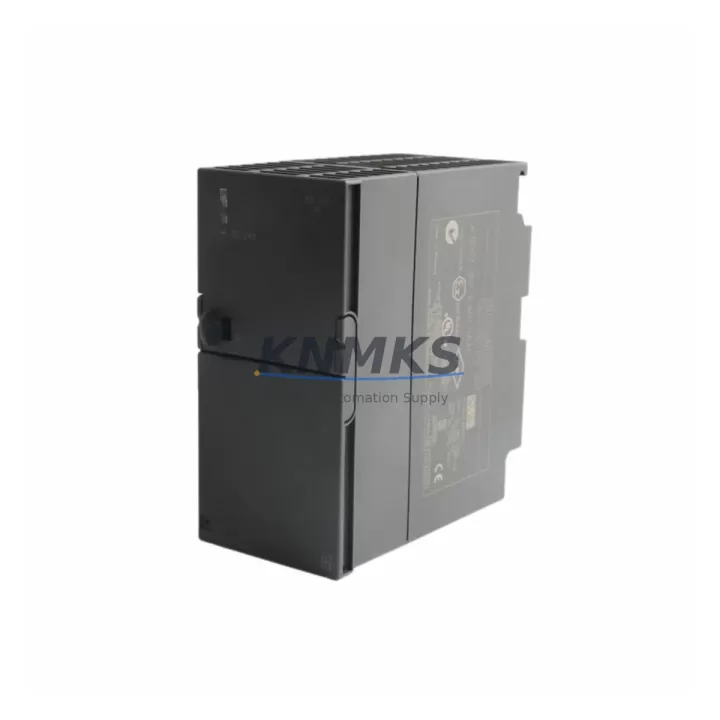
Siemens 6ES7153-1AA03-0XB0 IM153-1 ET 200M PROFIBUS Upgrade: Migration-Ready Interface Module for Legacy Control Systems
The Siemens 6ES7153-1AA03-0XB0 is the IM153-1 interface module for the ET 200M distributed I/O station, designed to operate on PROFIBUS DP networks within Siemens S7-300 and compatible automation architectures. As legacy control systems reach end-of-life and spare parts become increasingly scarce, this module remains a critical component for engineers managing retrofit projects, panel upgrades, and unplanned downtime recovery across energy, petrochemical, manufacturing, and infrastructure sectors.
KNMKS maintains verified stock of the 6ES7153-1AA03-0XB0, fully tested prior to shipment and backed by a support terms confirmed by quotation. Each unit is inspected for firmware integrity, backplane connector condition, and PROFIBUS DP communication readiness — ensuring it is field-deployable without additional pre-commissioning delays.
Migration Compatibility Table
| Parameter | Specification / Recommendation |
|---|---|
| Module Type | IM153-1 Interface Module for ET 200M |
| Order Number | 6ES7153-1AA03-0XB0 |
| Communication Protocol | PROFIBUS DP (up to 12 Mbit/s) |
| Compatible Controllers | Siemens S7-300, S7-400, compatible PROFIBUS DP masters |
| Backplane Interface | ET 200M standard backplane (IM153 series slot) |
| Max I/O Modules per Station | Up to 8 signal modules (SM) per ET 200M rack |
| Power Supply Requirement | 24 VDC via PS 307 or equivalent ET 200M power supply module |
| Installation Format | DIN rail, standard ET 200M rack mounting |
| Replacement Compatibility | Direct replacement for 6ES7153-1AA00-0XB0, 6ES7153-1AA01-0XB0, 6ES7153-1AA02-0XB0 (verify GSD file version) |
| Firmware Compatibility | Verify firmware version against existing STEP 7 hardware configuration before hot-swap |
| Commissioning Note | Re-download hardware configuration via STEP 7 or TIA Portal after module swap |
| Support terms | 12 months from shipment date — KNMKS |
Retrofit Planning for Existing Automation Systems
Replacing the 6ES7153-1AA03-0XB0 in an active production environment requires careful pre-planning to avoid configuration mismatches and extended downtime. Before initiating the swap, engineers should verify the existing ET 200M rack layout, confirm the number and type of signal modules installed — such as SM 321 digital input modules or SM 331 analog input modules — and document the current PROFIBUS DP node address assigned to the station. The DP address is set via rotary switches on the IM153-1 face and must be replicated exactly on the replacement unit.
Power supply capacity is a common oversight in retrofit projects. The PS 307 5A or PS 307 10A power supply module feeding the ET 200M rack must be verified to support the combined current draw of all installed signal modules plus the IM153-1 itself. If the existing power supply is marginal, this is an appropriate time to upgrade to a higher-capacity unit before installing the new interface module.
For systems where the ET 200M station communicates with an S7-300 CPU 315-2 DP or similar DP master, the GSD (General Station Description) file version must match the firmware of the replacement IM153-1. Mismatched GSD files can cause the DP master to fail recognition of the station, resulting in a BF (Bus Fault) LED on the interface module. Always confirm the GSD file version in STEP 7 Hardware Configuration before finalizing the replacement order.
In control cabinet upgrades where space is being reorganized, confirm that the ET 200M rack mounting position allows adequate clearance for the PROFIBUS DP connector — typically a 9-pin Sub-D connector with integrated termination resistor if the station is at the end of the PROFIBUS segment. If the station is mid-segment, ensure the bus connector pass-through is correctly configured. Additionally, if the control system includes an IM 153-2 redundant interface module in a high-availability configuration, the replacement procedure differs and requires coordinated switchover to avoid process interruption.
For sites migrating from older PROFIBUS DP architectures toward PROFINET, the 6ES7153-1AA03-0XB0 serves as a stable interim solution, maintaining existing ET 200M I/O infrastructure while the migration is phased. This approach allows engineers to retain existing SM 322 digital output modules and field wiring while the control layer is progressively upgraded, significantly reducing the scope and risk of any single cutover event. A CP 342-5 PROFIBUS communication processor may also be relevant in systems where the S7-300 CPU lacks an integrated DP port and requires an external communication module to reach the ET 200M station.
Downtime Control During System Migration
Minimizing unplanned downtime during an IM153-1 replacement begins with preparation, not execution. Before the maintenance window opens, the existing STEP 7 or TIA Portal project should be archived and the hardware configuration exported. This ensures that if the replacement module requires a re-download of the configuration, the correct project version is immediately available without searching through backup directories under time pressure.
The IM153-1 module swap itself is a cold-swap procedure — the ET 200M station must be powered down before removing the interface module from the backplane. Signal modules remain in place and do not need to be removed, which preserves field wiring integrity and eliminates the risk of terminal reconnection errors. Once the 6ES7153-1AA03-0XB0 is seated and the PROFIBUS DP address is confirmed, the station can be powered up and the DP master will attempt to re-establish communication.
If the DP master does not automatically recognize the station after power-up — indicated by a persistent BF LED — a hardware configuration download from the programming device is required. This typically takes under five minutes in a prepared environment. HMI screens connected to the S7-300 via MPI or PROFIBUS will reflect the restored I/O status once the DP communication link is re-established, and no HMI project modifications are required for a like-for-like module replacement.
For critical processes where even brief I/O interruption is unacceptable, pre-staging the replacement module with the correct DP address setting and verifying it on a test rack before the maintenance window is strongly recommended. KNMKS can support pre-shipment configuration verification upon request, reducing on-site commissioning time to the minimum required for physical installation and communication confirmation.
Retrofit Support FAQ
Q: Is the 6ES7153-1AA03-0XB0 a direct drop-in replacement for earlier IM153-1 versions?
A: In most cases, yes. The -0XB0 suffix variants (AA00, AA01, AA02, AA03) share the same physical form factor and PROFIBUS DP interface. However, firmware versions differ between hardware revisions. Always verify the GSD file version in your STEP 7 hardware configuration matches the replacement module’s firmware. If a mismatch is detected, a hardware configuration update and re-download will be required before the station comes online.
Q: What pre-shipment testing does KNMKS perform on this module?
A: Every 6ES7153-1AA03-0XB0 unit shipped by KNMKS undergoes functional testing including PROFIBUS DP communication verification, backplane connector inspection, and firmware version confirmation. Units are shipped with a test report and are covered by a support terms confirmed by quotation from the shipment date. Expedited shipping is available for emergency breakdown situations.
Q: Can this module be used in a redundant ET 200M configuration?
A: The IM153-1 (6ES7153-1AA03-0XB0) supports standard (non-redundant) ET 200M configurations. For redundant DP master or redundant station configurations, the IM153-2 variant is required. If your existing system uses redundant interface modules, confirm the exact order number before ordering to ensure compatibility with your high-availability architecture.
Q: What is the typical lead time and do you maintain ongoing inventory?
A: KNMKS maintains stock of the 6ES7153-1AA03-0XB0 to support emergency breakdown and planned maintenance requirements. Standard orders ship within 1–3 business days. For projects requiring guaranteed supply over an extended period — such as multi-year maintenance contracts or fleet-wide retrofit programs — long-term supply commitments are available. Contact our team at admin@knmks.com or +86 18359268345 to discuss volume pricing and inventory reservation.
© 2026 KNMKS. All rights reserved.
Original Source: https://knmks.com
Contact: admin@knmks.com | +86 18359268345
Product Identification
- Brand / Ecosystem
-
Siemens
Siemens - Model / Series
-
6ES7153-1AA03-0XB0
SIMATIC Series - Product Family
- PLCs & Controllers
- Availability Status
- Available on request after model and quantity confirmation
- Inquiry Type
- B2B RFQ, replacement inquiry and project spare-part request
- Pre-Quote Check
- Exact SKU, brand, series, quantity, nameplate photos and destination country are checked before quotation
System Path
Where this product fits in the KNMKS automation structure.
Specification & Inquiry Focus
- Control platform
- PLC, PAC and modular controllers
- Common needs
- CPU, rack, power and I/O expansion
- Project support
- Replacement, cabinet build and maintenance
Buyer Confirmation
Information KNMKS checks before replying.
- Exact model
- 6ES7153-1AA03-0XB0
- Brand / ecosystem
- Siemens
- Product family
- PLCs & Controllers
- Application note
- Replacement, maintenance, project build or spare-part list
- Useful photos
- Nameplate, installed unit, cabinet layout or connector side
- Delivery details
- Quantity, destination country and target schedule
Document Support
Files and notes can be confirmed during quotation.
- Product photos or nameplate confirmation when available
- Packing and delivery notes before quotation confirmation
- Support scope and delivery terms confirmed per inquiry
- Export document coordination for qualified B2B requests
Inquiry Support
- Model cross-checking before quotation
- CPU, power, rack and expansion module matching
- Support for replacement and project inquiry
What to Send Us
- Brand and exact model number: Siemens 6ES7153-1AA03-0XB0
- Quantity and required delivery time
- Application, replacement requirement or nameplate photo
- Destination country and shipping preference
RFQ Preparation
This is a product inquiry page built for RFQ communication.
Fast Model Check
Send this model to KNMKS for confirmation.
Include quantity, destination country and photos if this is a maintenance replacement. The inquiry will be saved with a reference number after submission.
Brand & Compatibility Note
KNMKS displays automation product information for well-known industrial brand ecosystems and compatible replacement references. Brand names are used for product identification and compatibility reference only; final availability and commercial terms are confirmed per quotation.
 Manufacturing
 Machine Tools
 Packaging
 Energy & Power



 HMI & Displays
 Servo Systems
 Variable Frequency Drives
 Sensors