
Overview
Siemens 6ES7151-8FB01-0AB0 Maintenance-Proven Spare for Uptime
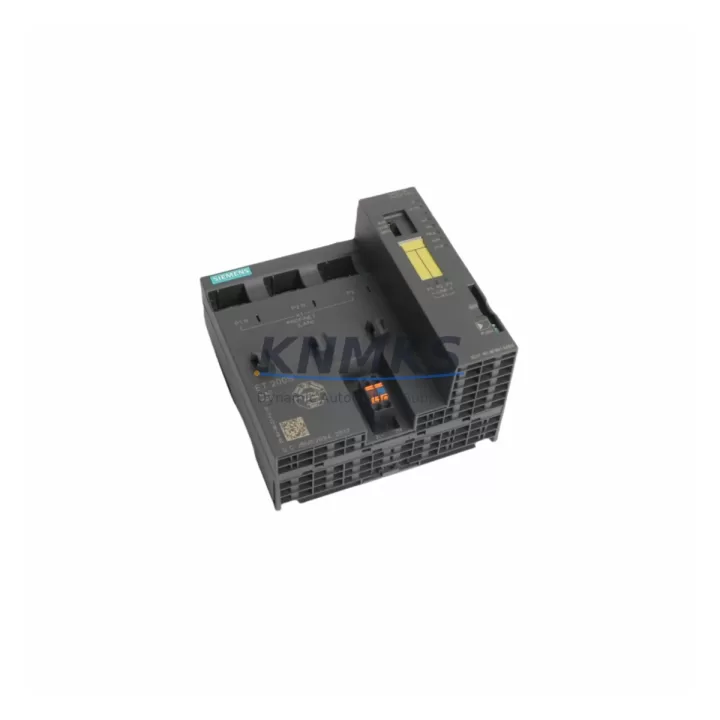
The Siemens 6ES7151-8FB01-0AB0 is the IM 151-8F PN/DP F-CPU — the safety-rated CPU interface module at the heart of the ET 200S distributed I/O station. Designed for SIL 3 / Category 4 safety applications, this module integrates PROFINET IO and PROFIBUS-DP communication in a single compact unit, making it the critical controller for safety-instrumented systems across process plants, automotive lines, and heavy manufacturing. When this module fails or reaches end-of-service life, the entire ET 200S station loses its safety logic execution capability, triggering an immediate production halt. Holding a verified, pre-tested replacement in your spare parts cabinet is the single most effective measure to contain unplanned downtime and protect your safety architecture.
KNMKS stocks the 6ES7151-8FB01-0AB0 as an original Siemens component, sourced from authorized supply channels, pre-shipment tested, and dispatched with a support terms confirmed by quotation. Multi-region inventory ensures fast global dispatch for both emergency callouts and scheduled annual maintenance windows.
Spare Maintenance Table
| Parameter | Specification |
|---|---|
| Part Number / SKU | 6ES7151-8FB01-0AB0 |
| Module Designation | IM 151-8F PN/DP F-CPU |
| Series / Platform | SIMATIC ET 200S |
| Safety Integrity Level | SIL 3 (IEC 61508), Category 4 (EN 954-1) |
| Communication Interfaces | PROFINET IO (IRT/RT), PROFIBUS-DP (Master/Slave) |
| Supply Voltage | 24 V DC (20.4 – 28.8 V) |
| Program Memory | 256 KB work memory (integrated) |
| Max. I/O Modules per Station | Up to 63 ET 200S I/O modules |
| Operating Temperature | 0 °C to +60 °C (horizontal installation) |
| Protection Class | IP20 |
| Country of Origin | Germany |
| Compatibility | SIMATIC ET 200S, STEP 7 Safety, TIA Portal Safety Advanced |
| Firmware Compatibility | Supports firmware update via SIMATIC Automation Tool |
| Support terms | 12 Months — Pre-shipment tested, original Siemens component |
Maintenance Planning for Continuous Operation
When a maintenance engineer or procurement team plans a replacement of the 6ES7151-8FB01-0AB0, the scope of inspection should extend well beyond the CPU module itself. The ET 200S station is a tightly integrated safety architecture, and a thorough site assessment during the replacement window significantly reduces the risk of secondary failures.
Power supply integrity is the first checkpoint. The ET 200S station relies on a stable 24 V DC bus; inspect the 6ES7138-4CA01-0AA0 PM-E DC24V power module for voltage ripple, thermal discoloration, or capacitor bulge. A degraded power module can cause intermittent F-CPU resets that mimic CPU faults, leading to misdiagnosis and repeat callouts.
Terminal module and I/O module condition should be assessed in parallel. The 6ES7193-4CA40-0AA0 TM-E terminal module and associated digital input/output modules such as the 6ES7131-4BF00-0AA0 4DI 24VDC and 6ES7132-4BF00-0AA0 4DO 24VDC/0.5A are subject to contact wear and vibration fatigue. Inspect for loose wiring, corroded terminals, and cracked housings during the same maintenance window.
PROFINET and PROFIBUS-DP cabling must be verified. Damaged shielding on PROFINET patch cables or PROFIBUS-DP trunk cables can introduce cyclic communication errors that destabilize the F-CPU’s safety program execution. Replace any cable with visible jacket damage or measured impedance deviation.
Safety relay and output circuit verification is mandatory for SIL 3 systems. Downstream safety relays connected to the F-DO modules — such as the 6ES7138-4FB03-0AB0 F-PM-E 24VDC/8A PPM power module — should be tested for contact resistance and response time. A worn safety relay can cause nuisance trips or, more critically, fail to de-energize on demand.
Backplane bus integrity should be confirmed by inspecting the ET 200S rail and all module locking clips. Loose modules create intermittent bus errors that are difficult to trace without a full station inspection. Confirm that all modules are seated and locked before powering up the replacement F-CPU.
Procurement engineers should consider stocking the 6ES7151-8FB01-0AB0 alongside the PM-E power module and at least one set of terminal modules as a matched spare kit. This approach eliminates the risk of a secondary component failure extending the downtime window after the primary CPU replacement is complete.
Site Replacement Workflow
Step 1 — Safety isolation: Follow your site LOTO procedure. Confirm the safety function is in a safe state before opening the control cabinet. Document the current F-CPU firmware version and safety program CRC from the STEP 7 Safety or TIA Portal Safety Advanced project.
Step 2 — Module extraction: Remove the 6ES7151-8FB01-0AB0 by releasing the front connector and sliding the module off the terminal module. Label all wiring before disconnection. Photograph the station layout for reference.
Step 3 — Replacement installation: Insert the new 6ES7151-8FB01-0AB0 onto the terminal module. Confirm the module locks positively. Reconnect the PROFINET and PROFIBUS-DP cables. Verify 24 V DC supply voltage at the PM-E module before powering up.
Step 4 — Firmware and program restore: Using SIMATIC Automation Tool or TIA Portal, download the safety program to the replacement F-CPU. Confirm the safety program CRC matches the documented value. Perform a safety function test (proof test) before returning the station to automatic mode.
Step 5 — Commissioning confirmation: Monitor the ET 200S station for one full production cycle. Confirm no diagnostic alarms are active in the CPU or in the PROFINET IO controller. Log the replacement in your maintenance management system with the new module serial number and support terms start date.
This workflow is compatible with both legacy STEP 7 Safety (V5.x) and current TIA Portal Safety Advanced (V16+) environments, ensuring the 6ES7151-8FB01-0AB0 can be integrated into existing safety validation records without requiring a full re-validation in most jurisdictions.
Spare Parts Support FAQ
Q1: Is the 6ES7151-8FB01-0AB0 still available as a new original Siemens component?
Yes. KNMKS maintains multi-region stock of the 6ES7151-8FB01-0AB0 as an original Siemens component. Each unit is sourced from authorized supply channels, individually tested before dispatch, and covered by a support terms confirmed by quotation. Long-term supply agreements are available for customers requiring guaranteed annual allocation.
Q2: How do I confirm compatibility with my existing ET 200S station before ordering?
The 6ES7151-8FB01-0AB0 is compatible with all standard ET 200S terminal modules and rail assemblies. Confirm your STEP 7 Safety or TIA Portal Safety Advanced project version supports the module firmware. If you are migrating from an earlier F-CPU variant, contact admin@knmks.com with your existing module order number and firmware version for a compatibility confirmation before purchase.
Q3: What pre-shipment testing is performed on each unit?
Every 6ES7151-8FB01-0AB0 dispatched by KNMKS undergoes power-on functional verification, PROFINET and PROFIBUS-DP interface testing, and safety output channel validation. Test records are available on request. Units are packed in anti-static ESD packaging with humidity indicators to ensure integrity during international transit.
Q4: What is the recommended spare parts inventory strategy for the 6ES7151-8FB01-0AB0?
For facilities operating more than three ET 200S safety stations, KNMKS recommends holding a minimum of one 6ES7151-8FB01-0AB0 on-site as a hot spare, supplemented by a matched PM-E power module and a set of terminal modules. For single-station installations in critical processes, a consignment stock arrangement with KNMKS ensures next-business-day availability without tying up capital in on-site inventory.
© 2026 KNMKS. All rights reserved.
Original Source: https://knmks.com
Contact: admin@knmks.com | +86 18359268345
Product Identification
- Brand / Ecosystem
-
Siemens
Siemens - Model / Series
-
6ES7151-8FB01-0AB0
SIMATIC Series - Product Family
- PLCs & Controllers
- Availability Status
- Available on request after model and quantity confirmation
- Inquiry Type
- B2B RFQ, replacement inquiry and project spare-part request
- Pre-Quote Check
- Exact SKU, brand, series, quantity, nameplate photos and destination country are checked before quotation
System Path
Where this product fits in the KNMKS automation structure.
Specification & Inquiry Focus
- Control platform
- PLC, PAC and modular controllers
- Common needs
- CPU, rack, power and I/O expansion
- Project support
- Replacement, cabinet build and maintenance
Buyer Confirmation
Information KNMKS checks before replying.
- Exact model
- 6ES7151-8FB01-0AB0
- Brand / ecosystem
- Siemens
- Product family
- PLCs & Controllers
- Application note
- Replacement, maintenance, project build or spare-part list
- Useful photos
- Nameplate, installed unit, cabinet layout or connector side
- Delivery details
- Quantity, destination country and target schedule
Document Support
Files and notes can be confirmed during quotation.
- Product photos or nameplate confirmation when available
- Packing and delivery notes before quotation confirmation
- Support scope and delivery terms confirmed per inquiry
- Export document coordination for qualified B2B requests
Inquiry Support
- Model cross-checking before quotation
- CPU, power, rack and expansion module matching
- Support for replacement and project inquiry
What to Send Us
- Brand and exact model number: Siemens 6ES7151-8FB01-0AB0
- Quantity and required delivery time
- Application, replacement requirement or nameplate photo
- Destination country and shipping preference
RFQ Preparation
This is a product inquiry page built for RFQ communication.
Fast Model Check
Send this model to KNMKS for confirmation.
Include quantity, destination country and photos if this is a maintenance replacement. The inquiry will be saved with a reference number after submission.
Brand & Compatibility Note
KNMKS displays automation product information for well-known industrial brand ecosystems and compatible replacement references. Brand names are used for product identification and compatibility reference only; final availability and commercial terms are confirmed per quotation.
 Manufacturing
 Machine Tools
 Packaging
 Energy & Power



 HMI & Displays
 Servo Systems
 Variable Frequency Drives
 Sensors