
Overview
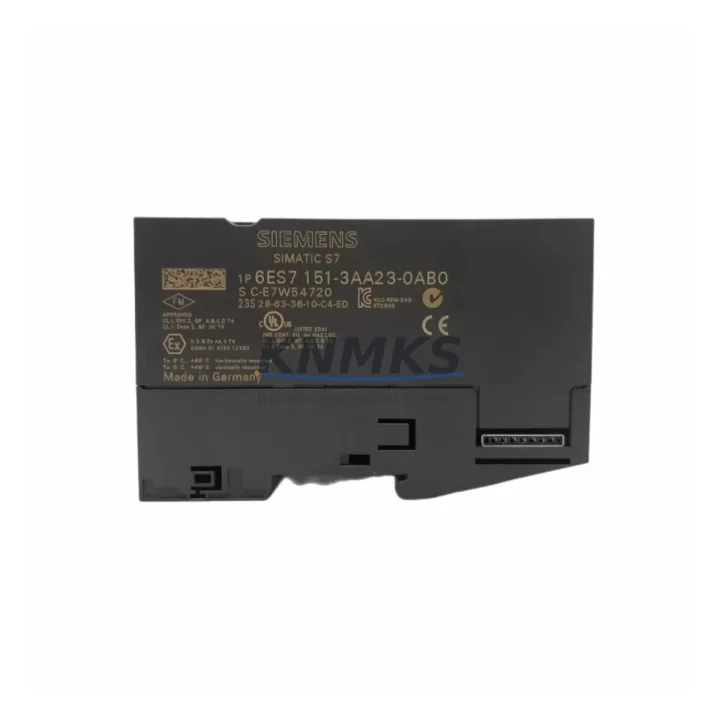
Siemens 6ES7151-3AA23-0AB0 Maintenance-Proven Spare for Factory Uptime
The Siemens 6ES7151-3AA23-0AB0 (IM151-3 PN) is a PROFIBUS DP Interface Module designed for the ET 200S distributed I/O system. As a critical communication gateway between the PROFIBUS DP network and the ET 200S station, this module is a high-priority spare in any maintenance inventory supporting Siemens S7-300, S7-400, or compatible PLC architectures. When this interface module fails, the entire ET 200S station loses communication with the controller — resulting in immediate process shutdown and unplanned downtime. Stocking a verified replacement unit is the single most effective measure to minimize mean time to repair (MTTR) in PROFIBUS-based control systems.
At KNMKS, every 6ES7151-3AA23-0AB0 unit is sourced as an original Siemens spare, functionally tested prior to shipment, and backed by a support terms confirmed by quotation. We supply maintenance engineers and procurement teams across manufacturing, automotive, chemical, and utilities sectors who depend on fast, reliable access to genuine ET 200S components.
Spare Maintenance Table
| Part Number | 6ES7151-3AA23-0AB0 |
| Module Designation | IM151-3 PROFIBUS DP Interface Module |
| Series / Platform | ET 200S Distributed I/O |
| Brand | Siemens |
| Country of Origin | Germany |
| Communication Protocol | PROFIBUS DP (up to 12 Mbit/s) |
| Compatible Controllers | Siemens S7-300, S7-400, S7-1500 (via DP master), third-party PROFIBUS DP masters |
| Power Supply Voltage | 24 V DC (via ET 200S power module) |
| Mounting | DIN rail, ET 200S terminal module |
| Operating Temperature | 0 °C to +60 °C |
| Protection Class | IP20 |
| Diagnostic Functions | Station diagnostics, module status, PROFIBUS address configurable |
| Maintenance Recommendation | Replace immediately upon BF/SF LED fault or loss of DP communication; inspect terminal module and bus connector before installation |
| Pre-shipment Testing | Functional test performed on every unit |
| Support terms | 12 months from date of shipment |
Maintenance Planning for Continuous Operation
The 6ES7151-3AA23-0AB0 sits at the heart of the ET 200S station’s communication architecture. When planning a replacement or conducting a scheduled cabinet inspection, maintenance engineers should treat this module as part of a broader system health check — not an isolated swap. A failed or degraded IM151-3 is frequently accompanied by secondary faults in adjacent components that went undetected during normal operation.
Before or during replacement of the 6ES7151-3AA23-0AB0, inspect and verify the following associated components:
- ET 200S Power Module (e.g., PM-E 24VDC series) — Confirm 24 V DC supply voltage is within tolerance at the terminal module. An unstable power module can cause intermittent IM151-3 resets that mimic communication faults.
- PROFIBUS DP Bus Connector and Cable — Check termination resistors at both ends of the DP segment. A missing or incorrect termination on the 9-pin Sub-D connector is a leading cause of DP communication instability, especially at 1.5 Mbit/s or higher baud rates.
- ET 200S Terminal Module (TM-IM/IM) — The IM151-3 plugs into a dedicated terminal module. Inspect the terminal module contacts for oxidation, mechanical damage, or improper seating. A faulty terminal module will cause repeated IM failures even after module replacement.
- ET 200S Digital and Analog I/O Modules — After restoring DP communication, verify that all downstream I/O modules (e.g., 4DI, 2DO, 2AI series) report correctly in the STEP 7 or TIA Portal hardware configuration. A previously undetected I/O module fault may surface once the interface module is restored.
- PROFIBUS DP Master CPU or CP Module — If the ET 200S station was offline for an extended period, confirm the DP master (e.g., S7-300 CPU with integrated DP port, or a CP 342-5) has not logged persistent station errors that require a hardware reset or configuration reload.
- 24 V DC Panel Power Supply — Inspect the cabinet’s primary 24 V DC power supply (e.g., SITOP PSU series) for output voltage drift, overload indicators, or thermal stress. A marginal power supply under load is a common root cause of distributed I/O communication faults that are misdiagnosed as interface module failures.
For facilities running annual or semi-annual planned maintenance shutdowns, the 6ES7151-3AA23-0AB0 should be included in the critical spare parts list alongside the ET 200S power module and at least one set of high-cycle I/O modules. Procurement teams should confirm lead times and stock at least one unit per active ET 200S station in high-criticality process areas.
Site Replacement Workflow
Replacing the 6ES7151-3AA23-0AB0 on-site is a straightforward procedure when the correct spare is available and the replacement workflow is followed systematically. The steps below are designed to minimize downtime and ensure a clean return to service:
- Isolate and document: Place the affected ET 200S station in a safe state. Record the current PROFIBUS DP address (set via rotary switches on the IM151-3 front panel) before removal. Photograph the existing wiring and module arrangement.
- Power down the station: De-energize the ET 200S power module supplying the IM151-3. Do not hot-swap the interface module without confirming the system supports it — the standard IM151-3 AA23 variant does not support hot insertion under live DP communication.
- Remove the faulty module: Slide the IM151-3 out of the terminal module. Inspect the terminal module contacts and the backplane bus connector for damage or contamination.
- Configure the replacement unit: Set the PROFIBUS DP address on the new 6ES7151-3AA23-0AB0 to match the original using the rotary address switches. Verify the address against the STEP 7 or TIA Portal hardware configuration.
- Install and restore power: Seat the new module firmly into the terminal module. Restore 24 V DC power and observe the BF and SF LEDs. Both should extinguish within a few seconds of successful DP communication establishment.
- Verify in the controller: Confirm the ET 200S station appears online in the DP master’s diagnostic view. Check all I/O module statuses and run a brief functional test of connected field devices before returning the station to automatic operation.
This replacement workflow applies equally to emergency fault recovery and planned maintenance swap-outs. Keeping a pre-configured spare — with the correct DP address already set — reduces on-site replacement time to under 15 minutes for experienced maintenance personnel.
Spare Parts Support FAQ
Q1: Is the 6ES7151-3AA23-0AB0 still available as a new original spare, or only as a refurbished unit?
KNMKS supplies the 6ES7151-3AA23-0AB0 as an original Siemens spare. Each unit undergoes functional testing before shipment. We maintain stock to support both emergency replacement orders and planned procurement cycles. Contact our team to confirm current availability and lead time.
Q2: What is the compatibility of the 6ES7151-3AA23-0AB0 with different PROFIBUS DP masters?
The IM151-3 AA23 is compatible with any standard PROFIBUS DP master operating at baud rates from 9.6 kbit/s to 12 Mbit/s. It is fully supported by Siemens S7-300, S7-400, and S7-1500 CPUs with DP master interfaces, as well as third-party DP masters from other automation vendors. GSD file import into the master configuration tool is required for non-Siemens masters.
Q3: How does KNMKS verify the unit before shipment, and what does the support terms confirmed by quotation cover?
Every 6ES7151-3AA23-0AB0 is powered up and tested for PROFIBUS DP communication functionality, LED status response, and power consumption within specification before packaging. The support terms confirmed by quotation cover manufacturing defects and functional failures under normal operating conditions. It does not cover damage caused by incorrect installation, overvoltage, or environmental conditions outside the module’s rated specifications.
Q4: Can KNMKS support long-term supply for facilities with multiple ET 200S stations?
Yes. KNMKS provides long-term spare parts support for industrial facilities managing aging Siemens ET 200S installations. We can assist procurement teams with multi-unit orders, scheduled replenishment planning, and sourcing of associated ET 200S components. Contact us at admin@knmks.com to discuss your site’s spare parts requirements.
© 2026 KNMKS. All rights reserved.
Original Source: https://knmks.com
Contact: admin@knmks.com | +86 18359268345
Product Identification
- Brand / Ecosystem
-
Siemens
Siemens - Model / Series
-
6ES7151-3AA23-0AB0
SIMATIC Series - Product Family
- PLCs & Controllers
- Availability Status
- Available on request after model and quantity confirmation
- Inquiry Type
- B2B RFQ, replacement inquiry and project spare-part request
- Pre-Quote Check
- Exact SKU, brand, series, quantity, nameplate photos and destination country are checked before quotation
System Path
Where this product fits in the KNMKS automation structure.
Specification & Inquiry Focus
- Control platform
- PLC, PAC and modular controllers
- Common needs
- CPU, rack, power and I/O expansion
- Project support
- Replacement, cabinet build and maintenance
Buyer Confirmation
Information KNMKS checks before replying.
- Exact model
- 6ES7151-3AA23-0AB0
- Brand / ecosystem
- Siemens
- Product family
- PLCs & Controllers
- Application note
- Replacement, maintenance, project build or spare-part list
- Useful photos
- Nameplate, installed unit, cabinet layout or connector side
- Delivery details
- Quantity, destination country and target schedule
Document Support
Files and notes can be confirmed during quotation.
- Product photos or nameplate confirmation when available
- Packing and delivery notes before quotation confirmation
- Support scope and delivery terms confirmed per inquiry
- Export document coordination for qualified B2B requests
Inquiry Support
- Model cross-checking before quotation
- CPU, power, rack and expansion module matching
- Support for replacement and project inquiry
What to Send Us
- Brand and exact model number: Siemens 6ES7151-3AA23-0AB0
- Quantity and required delivery time
- Application, replacement requirement or nameplate photo
- Destination country and shipping preference
RFQ Preparation
This is a product inquiry page built for RFQ communication.
Fast Model Check
Send this model to KNMKS for confirmation.
Include quantity, destination country and photos if this is a maintenance replacement. The inquiry will be saved with a reference number after submission.
Brand & Compatibility Note
KNMKS displays automation product information for well-known industrial brand ecosystems and compatible replacement references. Brand names are used for product identification and compatibility reference only; final availability and commercial terms are confirmed per quotation.
 Manufacturing
 Machine Tools
 Packaging
 Energy & Power



 HMI & Displays
 Servo Systems
 Variable Frequency Drives
 Sensors