
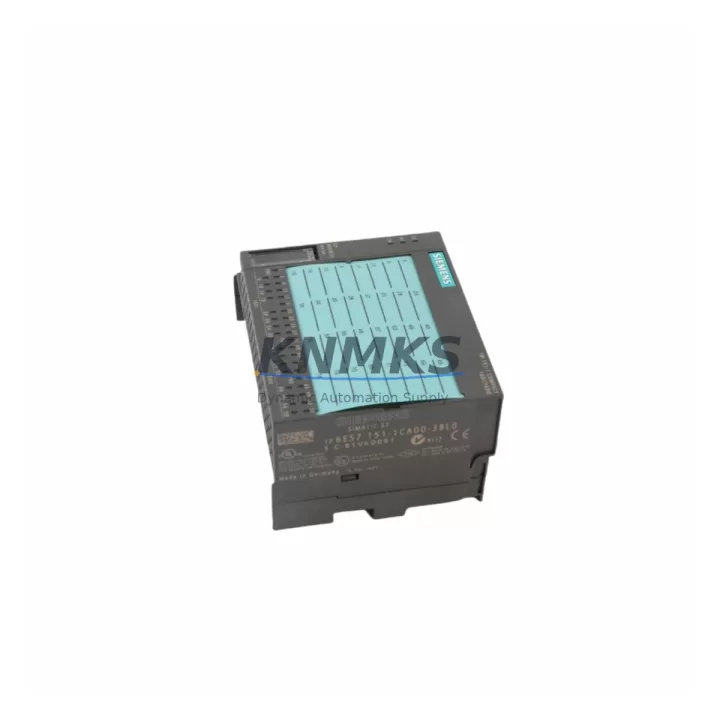
Overview
Siemens 6ES7151-1CA00-3BL0 Migration-Ready IM151-1 for ET 200S: Legacy System Retrofit and Compatible Upgrade
The Siemens 6ES7151-1CA00-3BL0 is the IM151-1 Standard interface module for the ET 200S distributed I/O system, communicating via PROFIBUS DP at up to 12 Mbit/s. Designed for DIN rail installation within a standard ET 200S terminal module assembly, this interface module serves as the communication head for the entire station — managing data exchange between the PROFIBUS DP master (typically an S7-300 or S7-400 CPU) and all downstream I/O modules mounted on the same rail segment.
For facilities running legacy SIMATIC S7-300 or S7-400 control architectures, the 6ES7151-1CA00-3BL0 remains one of the most critical spare parts in the ET 200S ecosystem. As original units age beyond their rated service life or become unavailable through standard distribution channels, sourcing a verified replacement with confirmed firmware compatibility is essential to maintaining production continuity without triggering a full system redesign.
This listing is specifically intended for engineers and procurement teams managing discontinued spare part replacement, legacy control panel upgrades, and PROFIBUS DP network restoration projects. Each unit is sourced from controlled supply channels, inspected prior to dispatch, and covered by a support terms confirmed by quotation.
Migration Compatibility Table
| Parameter | Specification / Retrofit Note |
|---|---|
| SKU / Order Number | 6ES7151-1CA00-3BL0 |
| Module Type | IM151-1 Standard Interface Module |
| Communication Protocol | PROFIBUS DP (up to 12 Mbit/s) |
| Compatible System | ET 200S Distributed I/O |
| Compatible Masters | SIMATIC S7-300, S7-400, S7-1500 (via DP master) |
| Power Supply Requirement | 24 V DC via PM-E power module (e.g. 6ES7138-4CA01-0AA0) |
| Installation | DIN rail, ET 200S terminal module (TM-IM/IM) |
| Backplane Interface | ET 200S internal bus via terminal module connector |
| Replacement for | 6ES7151-1CA00-0AB0, 6ES7151-1BA00-0AB0 (earlier revisions) |
| Firmware Compatibility | Verify GSD file version matches DP master configuration |
| Commissioning Note | PROFIBUS address must be set via rotary switch before power-on |
| Support terms | 12 Months from date of dispatch |
Retrofit Planning for Existing Automation Systems
Replacing the 6ES7151-1CA00-3BL0 in an active ET 200S station requires careful pre-work to avoid configuration mismatches and unplanned downtime. Before removing the existing interface module, engineers should document the current PROFIBUS DP station address (set via the rotary switch on the module face), confirm the GSD file version loaded in the DP master’s hardware configuration, and verify that the downstream I/O modules — including digital input/output modules such as the 6ES7131-4BF00-0AA0 (4DI) or 6ES7132-4BF00-0AA0 (4DO) — are correctly mapped in the STEP 7 or TIA Portal project.
Power distribution within the ET 200S station is handled by the PM-E power module (typically 6ES7138-4CA01-0AA0), which supplies 24 V DC to the I/O modules via the internal bus. Before swapping the IM151-1, confirm that the PM-E is functioning correctly and that the 24 V supply rail is within tolerance — voltage deviations can cause the new interface module to report bus faults on startup. If the control cabinet also houses a SITOP PSU100S or equivalent DIN rail power supply, verify its output load capacity covers the full ET 200S station current draw after the replacement.
For stations that include analog I/O modules such as the 6ES7134-4FB01-0AB0 (2AI) or 6ES7135-4FB01-0AB0 (2AO), confirm that the analog module parameterization stored in the CPU project is preserved. These parameters are held in the CPU’s hardware configuration, not in the IM151-1 itself, so they will survive the interface module swap — but a full download to the CPU after hardware reconfiguration is recommended to ensure consistency.
If the ET 200S station is connected to an S7-300 CPU via a CP 342-5 PROFIBUS DP master module, or directly to an integrated DP port on a CPU 315-2 DP or CPU 317-2 DP, the replacement IM151-1 must be assigned the same PROFIBUS address as the original unit. Failure to match the address will result in the DP master reporting a station failure and the associated I/O going to a safe state (typically all outputs de-energized).
Where the retrofit involves migrating from an older ET 200S station to a newer distributed I/O platform, the 6ES7151-1CA00-3BL0 can serve as an interim solution — maintaining PROFIBUS DP connectivity while the broader migration to PROFINET-based systems (such as ET 200SP with IM155-6 PN) is planned and staged. This phased approach allows production to continue on the existing PROFIBUS backbone while new infrastructure is validated in parallel.
Downtime Control During System Migration
Minimizing control system downtime during an ET 200S interface module replacement begins with preparation, not execution. The physical swap of the 6ES7151-1CA00-3BL0 takes less than five minutes once the station is de-energized — the majority of migration risk lies in configuration, addressing, and post-swap verification.
The recommended procedure is to perform a full backup of the STEP 7 or TIA Portal project before any hardware changes, including the hardware configuration (HW Config) and all program blocks (OBs, FBs, FCs, DBs). If the plant uses an HMI panel — such as a SIMATIC TP700 Comfort or KTP700 Basic — connected to the same S7 CPU, confirm that the HMI project does not reference any I/O addresses that will be affected by the station reconfiguration. HMI screen updates and alarm triggers tied to ET 200S I/O addresses should be tested in simulation before the live cutover.
During the physical replacement, set the PROFIBUS address on the new 6ES7151-1CA00-3BL0 using the rotary switches before mounting the module on the terminal module. Power up the station and observe the BF (Bus Fault) and SF (System Fault) LEDs — both should extinguish within a few seconds of the DP master recognizing the station. If the BF LED remains lit, recheck the PROFIBUS address, cable termination resistors at both ends of the DP segment, and the GSD file version in the master’s hardware configuration.
For critical production lines where even brief interruptions carry significant cost, consider pre-staging the replacement IM151-1 with the correct PROFIBUS address set and a bench-level power-on test completed before the maintenance window. This reduces the live intervention to a straight module swap and a single CPU communication check, typically achievable within a 15–30 minute planned shutdown.
All units supplied by KNMKS undergo pre-shipment functional verification. Each 6ES7151-1CA00-3BL0 is tested for PROFIBUS DP communication integrity, power-on self-test completion, and LED status confirmation before dispatch. Stock is maintained to support urgent replacement requirements, with same-day or next-business-day shipping available for in-stock units.
Retrofit Support FAQ
Q1: Is the 6ES7151-1CA00-3BL0 a direct drop-in replacement for earlier IM151-1 revisions?
In most cases, yes. The 6ES7151-1CA00-3BL0 is mechanically and electrically compatible with earlier IM151-1 variants used in ET 200S stations. However, you should verify the GSD file version used in your DP master’s hardware configuration matches the replacement module. If your STEP 7 or TIA Portal project was configured with an older GSD, a hardware reconfiguration and download may be required after the swap.
Q2: How do I set the PROFIBUS DP address on the replacement module?
The PROFIBUS DP station address is set using two rotary switches on the front face of the IM151-1 module, representing the tens and units digits of the address (valid range: 1–125). Set the address before mounting the module on the terminal module and before applying power. The address cannot be changed via software on this module variant — it is hardware-configured only.
Q3: What pre-shipment testing is performed on each unit?
Every 6ES7151-1CA00-3BL0 dispatched by KNMKS is subject to a pre-shipment functional check covering power-on self-test, PROFIBUS DP communication initialization, and LED status verification. Units that do not pass all checks are not dispatched. A support terms confirmed by quotation is provided from the date of dispatch, covering manufacturing defects and functional failures under normal operating conditions.
Q4: Do you maintain stock for urgent replacement requirements?
Yes. KNMKS maintains inventory of the 6ES7151-1CA00-3BL0 to support unplanned breakdowns and urgent maintenance requirements. Same-day dispatch is available for orders confirmed before the daily cut-off. For large-quantity requirements or long-term supply agreements covering multiple ET 200S stations, contact our sales team to discuss availability and lead times.
© 2026 KNMKS. All rights reserved.
Original Source: https://knmks.com
Contact: admin@knmks.com | +86 18359268345
Product Identification
- Brand / Ecosystem
-
Siemens
Siemens - Model / Series
-
6ES7151-1CA00-3BL0
SIMATIC Series - Product Family
- PLCs & Controllers
- Availability Status
- Available on request after model and quantity confirmation
- Inquiry Type
- B2B RFQ, replacement inquiry and project spare-part request
- Pre-Quote Check
- Exact SKU, brand, series, quantity, nameplate photos and destination country are checked before quotation
System Path
Where this product fits in the KNMKS automation structure.
Specification & Inquiry Focus
- Control platform
- PLC, PAC and modular controllers
- Common needs
- CPU, rack, power and I/O expansion
- Project support
- Replacement, cabinet build and maintenance
Buyer Confirmation
Information KNMKS checks before replying.
- Exact model
- 6ES7151-1CA00-3BL0
- Brand / ecosystem
- Siemens
- Product family
- PLCs & Controllers
- Application note
- Replacement, maintenance, project build or spare-part list
- Useful photos
- Nameplate, installed unit, cabinet layout or connector side
- Delivery details
- Quantity, destination country and target schedule
Document Support
Files and notes can be confirmed during quotation.
- Product photos or nameplate confirmation when available
- Packing and delivery notes before quotation confirmation
- Support scope and delivery terms confirmed per inquiry
- Export document coordination for qualified B2B requests
Inquiry Support
- Model cross-checking before quotation
- CPU, power, rack and expansion module matching
- Support for replacement and project inquiry
What to Send Us
- Brand and exact model number: Siemens 6ES7151-1CA00-3BL0
- Quantity and required delivery time
- Application, replacement requirement or nameplate photo
- Destination country and shipping preference
RFQ Preparation
This is a product inquiry page built for RFQ communication.
Fast Model Check
Send this model to KNMKS for confirmation.
Include quantity, destination country and photos if this is a maintenance replacement. The inquiry will be saved with a reference number after submission.
Brand & Compatibility Note
KNMKS displays automation product information for well-known industrial brand ecosystems and compatible replacement references. Brand names are used for product identification and compatibility reference only; final availability and commercial terms are confirmed per quotation.
 Manufacturing
 Machine Tools
 Packaging
 Energy & Power



 HMI & Displays
 Servo Systems
 Variable Frequency Drives
 Sensors