
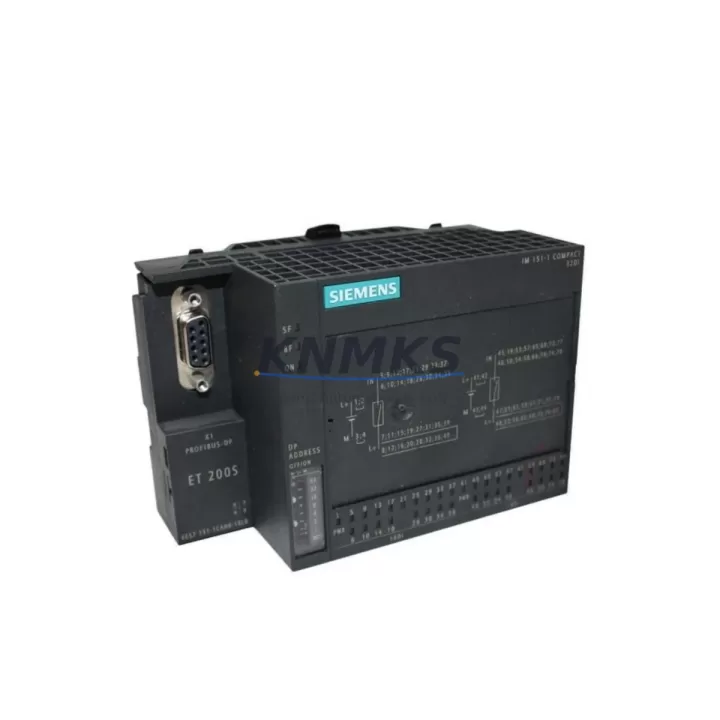
Overview
Siemens 6ES7151-1CA00-1BL0 Spare Part for ET200S Uptime
The Siemens 6ES7151-1CA00-1BL0 is a PROFIBUS DP interface module for the ET 200S distributed I/O system, designed to maintain seamless communication between field-level devices and the S7-300/S7-400 PLC host controller. In industrial maintenance environments where unplanned downtime translates directly into production loss, having a verified, original spare of this interface module on the shelf is a foundational element of any responsible maintenance strategy.
This module serves as the communication gateway for the entire ET 200S station. It manages PROFIBUS DP protocol handling, station addressing, and data exchange with the CPU. When this module fails — whether due to firmware corruption, connector wear, or electrical surge — the entire distributed I/O station goes offline. Maintenance engineers who have experienced this scenario understand the urgency: a replacement must be available immediately, pre-tested, and confirmed compatible before the technician reaches the cabinet.
At KNMKS, each 6ES7151-1CA00-1BL0 unit is sourced from verified supply channels, inspected for physical integrity, and function-tested prior to shipment. Every unit ships with a support terms confirmed by quotation and full documentation support. We maintain long-term stock to support both emergency replacement and planned annual maintenance cycles.
Spare Maintenance Table
| Parameter | Specification |
|---|---|
| Part Number | 6ES7151-1CA00-1BL0 |
| Brand | Siemens |
| Series | ET 200S |
| Module Type | PROFIBUS DP Interface Module |
| Communication Protocol | PROFIBUS DP (up to 12 Mbit/s) |
| Compatible Systems | S7-300, S7-400, SIMATIC ET 200S stations |
| Supply Voltage | 24 V DC (via power module) |
| Station Address Range | 0–125 (configurable via DIP switch) |
| Max I/O Modules per Station | Up to 63 modules |
| Operating Temperature | 0 °C to +60 °C |
| Protection Class | IP20 |
| Country of Origin | Germany |
| Installation | DIN rail, ET 200S rail system |
| Maintenance Recommendation | Inspect PROFIBUS connector annually; verify station address after replacement |
| Support terms | 12 Months |
Maintenance Planning for Continuous Operation
When a 6ES7151-1CA00-1BL0 interface module is flagged for replacement during a scheduled inspection or emergency fault response, the maintenance scope should extend beyond the module itself. A thorough cabinet audit at this point prevents secondary failures and reduces the risk of repeat downtime.
Begin with the PROFIBUS DP cable and connector (9-pin Sub-D) at the interface module port. Connector pin wear and cable shielding degradation are common causes of intermittent communication faults that are often misdiagnosed as module failure. Inspect termination resistors at both ends of the PROFIBUS segment — an improperly terminated segment will cause the new module to exhibit the same fault symptoms as the failed one.
Next, verify the ET 200S power module (such as the 6ES7138-4CA01-0AA0 PM-E DC24V) that supplies 24 V DC to the interface module and downstream I/O modules. A degraded power module with marginal output voltage will shorten the service life of the replacement interface module. Check output voltage under load and inspect the fuse or circuit breaker protecting this supply rail.
Review the digital and analog I/O modules installed in the same ET 200S station — for example, 4DI (6ES7131-4BD01-0AA0) or 2AO (6ES7135-4GB01-0AB0) modules. After replacing the interface module, the station re-initializes and re-parameterizes all downstream modules. Any I/O module with a latent hardware fault may generate a new diagnostic alarm at this point, which can be mistaken for a replacement error. Pre-checking I/O module status LEDs before the swap saves diagnostic time.
If the ET 200S station includes relay output modules (e.g., 6ES7132-4HB01-0AB0), inspect coil drive circuits and output contact wear. Relay modules in high-cycle applications are often the first to degrade and can introduce ground faults that affect the entire station’s communication stability.
For stations with HART-capable analog modules or signal isolators in the loop, confirm that signal isolation barriers remain within calibration tolerance. A failed isolator can introduce noise on the 4–20 mA loop that manifests as erratic process values — a symptom that may be incorrectly attributed to the interface module during fault isolation.
Finally, inspect the terminal blocks and wiring harness within the ET 200S rail assembly. Loose field wiring connections are a leading cause of intermittent I/O faults post-replacement. Torque-check all terminal screws and verify wire ferrule integrity before commissioning the replacement module.
Site Replacement Workflow
Step 1 — Pre-replacement verification: Confirm the PROFIBUS station address of the existing module (DIP switch setting, typically labeled on the module face or documented in the cabinet drawing). Record the address before removal.
Step 2 — Safe isolation: Place the PLC CPU in STOP mode or use the PROFIBUS master’s diagnostic tool to deactivate the station. De-energize the ET 200S power module supplying the interface module. Follow site LOTO (Lockout/Tagout) procedures.
Step 3 — Module removal: Disconnect the PROFIBUS DP connector. Release the module from the ET 200S rail by pressing the release lever and sliding the module out. Note the physical condition of the rail contacts.
Step 4 — Replacement module preparation: Set the DIP switch on the 6ES7151-1CA00-1BL0 replacement to match the recorded station address. Verify firmware version compatibility with the PROFIBUS master if the system uses GSD-file-based configuration.
Step 5 — Installation and commissioning: Slide the replacement module onto the ET 200S rail until it clicks into position. Reconnect the PROFIBUS DP connector. Re-energize the power module. Set the PLC CPU to RUN mode and monitor the PROFIBUS diagnostic display for station acknowledgment (BF LED off, SF LED off).
Step 6 — Post-replacement validation: Verify all I/O module status LEDs are green. Confirm process values in the SCADA/HMI are within expected range. Log the replacement in the maintenance record with date, technician ID, and new module serial number.
This workflow is compatible with legacy S7-300 systems and supports seamless migration from older ET 200S interface module variants without hardware modification to the rail assembly.
Spare Parts Support FAQ
Q1: Is the 6ES7151-1CA00-1BL0 compatible with both S7-300 and S7-400 PROFIBUS DP masters?
Yes. The 6ES7151-1CA00-1BL0 operates as a standard PROFIBUS DP slave and is compatible with any DP master that supports the module’s GSD file, including S7-300 CPUs with integrated DP port, CP 342-5 communication processors, and S7-400 DP masters. Confirm the GSD file version matches your STEP 7 or TIA Portal hardware catalog entry before commissioning.
Q2: How do you verify the module is genuine and not a counterfeit unit?
All units supplied by KNMKS are sourced from verified distribution channels. Each module carries the Siemens CE marking, production date code, and factory serial number on the housing label. We perform visual inspection and basic power-on functional testing before shipment. A certificate of conformity is available upon request for procurement audit purposes.
Q3: What is your lead time and can you support emergency orders?
Standard orders ship within 2–5 business days. For emergency maintenance situations, contact our sales team directly at admin@knmks.com or +86 18359268345 to confirm in-stock availability and expedited shipping options. We maintain buffer stock of high-demand ET 200S components to support unplanned downtime recovery.
Q4: Does the support terms confirmed by quotation cover field installation failures?
The support terms confirmed by quotation cover manufacturing defects and functional failures under normal operating conditions as specified in the Siemens datasheet. It does not cover damage resulting from incorrect installation, overvoltage events, or use outside the rated environmental parameters. Our technical team can assist with pre-installation compatibility verification to minimize installation risk.
© 2026 KNMKS. All rights reserved.
Original Source: https://knmks.com
Contact: admin@knmks.com | +86 18359268345
Product Identification
- Brand / Ecosystem
-
Siemens
Siemens - Model / Series
-
6ES7151-1CA00-1BL0
SIMATIC Series - Product Family
- PLCs & Controllers
- Availability Status
- Available on request after model and quantity confirmation
- Inquiry Type
- B2B RFQ, replacement inquiry and project spare-part request
- Pre-Quote Check
- Exact SKU, brand, series, quantity, nameplate photos and destination country are checked before quotation
System Path
Where this product fits in the KNMKS automation structure.
Specification & Inquiry Focus
- Control platform
- PLC, PAC and modular controllers
- Common needs
- CPU, rack, power and I/O expansion
- Project support
- Replacement, cabinet build and maintenance
Buyer Confirmation
Information KNMKS checks before replying.
- Exact model
- 6ES7151-1CA00-1BL0
- Brand / ecosystem
- Siemens
- Product family
- PLCs & Controllers
- Application note
- Replacement, maintenance, project build or spare-part list
- Useful photos
- Nameplate, installed unit, cabinet layout or connector side
- Delivery details
- Quantity, destination country and target schedule
Document Support
Files and notes can be confirmed during quotation.
- Product photos or nameplate confirmation when available
- Packing and delivery notes before quotation confirmation
- Support scope and delivery terms confirmed per inquiry
- Export document coordination for qualified B2B requests
Inquiry Support
- Model cross-checking before quotation
- CPU, power, rack and expansion module matching
- Support for replacement and project inquiry
What to Send Us
- Brand and exact model number: Siemens 6ES7151-1CA00-1BL0
- Quantity and required delivery time
- Application, replacement requirement or nameplate photo
- Destination country and shipping preference
RFQ Preparation
This is a product inquiry page built for RFQ communication.
Fast Model Check
Send this model to KNMKS for confirmation.
Include quantity, destination country and photos if this is a maintenance replacement. The inquiry will be saved with a reference number after submission.
Brand & Compatibility Note
KNMKS displays automation product information for well-known industrial brand ecosystems and compatible replacement references. Brand names are used for product identification and compatibility reference only; final availability and commercial terms are confirmed per quotation.
 Manufacturing
 Machine Tools
 Packaging
 Energy & Power



 HMI & Displays
 Servo Systems
 Variable Frequency Drives
 Sensors