
Overview
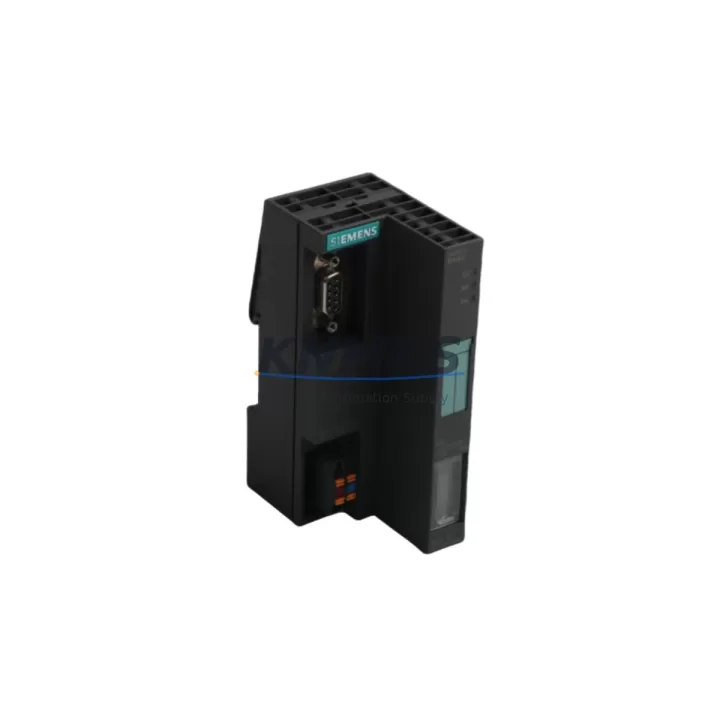
Siemens 6ES7151-1CA00-0AB0 Migration-Ready PROFIBUS DP Interface for Legacy Control Systems
The Siemens 6ES7151-1CA00-0AB0 is the IM151-1 Standard Interface Module for the ET 200S distributed I/O station, designed to operate as a PROFIBUS DP slave on SIMATIC S7 and S5-compatible control networks. As legacy PROFIBUS-based automation lines approach end-of-service milestones, this module has become a critical retrofit component for engineers managing controlled migrations from older S5-era architectures to current S7-300 and S7-1500 platforms — without requiring a full system teardown.
Whether you are replacing a failed IM151-1 in an existing ET 200S rack, consolidating distributed I/O across a multi-drop PROFIBUS segment, or preparing a phased migration toward PROFINET, the 6ES7151-1CA00-0AB0 provides a verified, drop-in compatible solution with a support terms confirmed by quotation and pre-shipment functional testing.
Migration Compatibility Table
| Parameter | Specification / Retrofit Note |
|---|---|
| SKU / Part Number | 6ES7151-1CA00-0AB0 |
| Module Type | IM151-1 Standard — ET 200S Interface Module |
| Communication Protocol | PROFIBUS DP (slave), up to 12 Mbit/s |
| Compatible Rack / Backplane | ET 200S terminal module rail; compatible with PM-E power modules and standard I/O terminal modules |
| Replaces / Supersedes | Earlier IM151-1 revisions; direct replacement for discontinued 6ES7151-1AA00-0AB0 and 6ES7151-1BA00-0AB0 variants |
| Power Supply Requirement | 24 V DC via PM-E power module (e.g., 6ES7138-4CA01-0AA0); verify bus voltage capacity before installation |
| PROFIBUS Address Setting | Hardware DIP switch on module face; must match DP master configuration in STEP 7 or TIA Portal HW Config |
| GSD File Compatibility | Requires correct GSD file loaded in DP master; verify GSD revision matches firmware version |
| Firmware Version | Confirm firmware compatibility with DP master CPU (S7-300, S7-400, or S7-1500 in DP master mode) |
| Installation Footprint | Standard ET 200S rail mounting; no additional panel cutout required for direct swap |
| Wiring / Terminal Adaptation | PROFIBUS DB9 connector; existing cable and termination resistors can be reused if cable integrity is confirmed |
| HMI Screen Impact | No HMI tag remapping required if DP address and I/O slot assignments are preserved |
| Pre-Shipment Testing | Functional communication test performed before dispatch |
| Support terms | 12 months from date of shipment |
Retrofit Planning for Existing Automation Systems
A successful retrofit around the 6ES7151-1CA00-0AB0 begins with a full audit of the existing ET 200S station. Engineers should document the current slot arrangement — including all installed terminal modules, I/O modules, and the PM-E power module (such as the 6ES7138-4CA01-0AA0) — before removing the failed or obsolete interface module. The power budget of the PM-E must be recalculated if additional I/O terminal modules have been added since the original commissioning.
On the PROFIBUS segment, the DP master — typically a CPU 315-2 DP, CPU 317-2 DP, or a CP 342-5 communications processor — must have the correct GSD file installed and the station address pre-configured to match the DIP switch setting on the replacement IM151-1. If the segment includes multiple ET 200S stations or other DP slaves such as a Siemens ET 200M with an IM153-2 interface module, the bus termination at both ends of the PROFIBUS cable must be verified to prevent reflection errors after the swap.
For sites running SIMATIC S7-300 CPUs with onboard PROFIBUS DP ports, the hardware configuration in STEP 7 or TIA Portal should be exported and archived before any physical change. If the migration path eventually leads toward PROFINET, a CP 343-1 communications module or a CPU with integrated PROFINET interface can be introduced in parallel, allowing the PROFIBUS segment to remain operational during the transition period. Signal isolators or repeaters may be required on long cable runs or in electrically noisy environments to maintain data integrity during the cutover phase.
Where the control cabinet includes a TP700 Comfort or similar SIMATIC HMI panel connected via MPI or PROFIBUS, the HMI project should be backed up before the retrofit. In most direct-replacement scenarios, no tag remapping is required, but the HMI connection parameters should be verified after the new module is powered up and the DP link is re-established.
Downtime Control During System Migration
Minimizing unplanned downtime during an ET 200S interface module replacement requires preparation before the maintenance window opens. The replacement 6ES7151-1CA00-0AB0 should be bench-tested with a known-good DP master and a representative I/O configuration before it reaches the production floor. This confirms the module communicates correctly and that the GSD file version is aligned with the firmware on the unit being shipped.
During the physical swap, the original program logic in the S7 CPU does not need to be modified — the CPU retains its configuration in non-volatile memory and will resume normal operation once the DP link is re-established. The PROFIBUS address set on the DIP switches of the replacement module must match the address configured in the hardware configuration exactly; a mismatch will cause the DP master to report a station fault without generating a bus error, which can be difficult to diagnose under time pressure.
After installation, the recommended commissioning sequence is: power up the ET 200S station, confirm the BF LED extinguishes on both the IM151-1 and the DP master CPU, verify all I/O module status LEDs are green, and perform a short functional test of critical I/O channels before releasing the line. If a programming cable such as a PC Adapter USB A2 is available on-site, a live diagnostic read from STEP 7 or TIA Portal can confirm all slots are recognized within minutes of power-up, reducing the risk of a second unplanned outage.
Retrofit Support FAQ
Q1: Is the 6ES7151-1CA00-0AB0 a direct replacement for the 6ES7151-1AA00-0AB0 and 6ES7151-1BA00-0AB0?
Yes. The -1CA00 revision is the current production variant of the IM151-1 Standard and is backward compatible with earlier -1AA00 and -1BA00 revisions in the same ET 200S rack. The PROFIBUS address, GSD file, and I/O slot assignments carry over without modification in the majority of installations.
Q2: What wiring changes are required during the swap?
In a direct replacement, no wiring changes are required. The PROFIBUS DB9 connector and the 24 V DC supply to the PM-E power module remain in place. If the existing PROFIBUS cable shows signs of insulation damage or the connector pins are corroded, replacement with a new Siemens PROFIBUS FastConnect cable and bus connector is recommended before recommissioning.
Q3: How is compatibility with the DP master CPU verified before installation?
Compatibility is confirmed by cross-referencing the GSD file version required by the 6ES7151-1CA00-0AB0 against the GSD library installed in the STEP 7 or TIA Portal project. The module firmware version is documented on the product label. Our team performs a pre-shipment communication test using a reference DP master to confirm the module is fully operational before dispatch.
Q4: What does the support terms confirmed by quotation cover, and what is the typical lead time?
The support terms confirmed by quotation cover manufacturing defects and functional failures under normal operating conditions from the date of shipment. Units are held availability confirmed by RFQ and are available for same-day or next-business-day dispatch depending on order time. Expedited shipping options are available for urgent line-down situations. Contact our team at admin@knmks.com or +86 18359268345 to confirm current stock availability and lead time.
© 2026 KNMKS. All rights reserved. Original Source: https://knmks.com | Contact: admin@knmks.com | +86 18359268345
Product Identification
- Brand / Ecosystem
-
Siemens
Siemens - Model / Series
-
6ES7151-1CA00-0AB0
SIMATIC Series - Product Family
- PLCs & Controllers
- Availability Status
- Available on request after model and quantity confirmation
- Inquiry Type
- B2B RFQ, replacement inquiry and project spare-part request
- Pre-Quote Check
- Exact SKU, brand, series, quantity, nameplate photos and destination country are checked before quotation
System Path
Where this product fits in the KNMKS automation structure.
Specification & Inquiry Focus
- Control platform
- PLC, PAC and modular controllers
- Common needs
- CPU, rack, power and I/O expansion
- Project support
- Replacement, cabinet build and maintenance
Buyer Confirmation
Information KNMKS checks before replying.
- Exact model
- 6ES7151-1CA00-0AB0
- Brand / ecosystem
- Siemens
- Product family
- PLCs & Controllers
- Application note
- Replacement, maintenance, project build or spare-part list
- Useful photos
- Nameplate, installed unit, cabinet layout or connector side
- Delivery details
- Quantity, destination country and target schedule
Document Support
Files and notes can be confirmed during quotation.
- Product photos or nameplate confirmation when available
- Packing and delivery notes before quotation confirmation
- Support scope and delivery terms confirmed per inquiry
- Export document coordination for qualified B2B requests
Inquiry Support
- Model cross-checking before quotation
- CPU, power, rack and expansion module matching
- Support for replacement and project inquiry
What to Send Us
- Brand and exact model number: Siemens 6ES7151-1CA00-0AB0
- Quantity and required delivery time
- Application, replacement requirement or nameplate photo
- Destination country and shipping preference
RFQ Preparation
This is a product inquiry page built for RFQ communication.
Fast Model Check
Send this model to KNMKS for confirmation.
Include quantity, destination country and photos if this is a maintenance replacement. The inquiry will be saved with a reference number after submission.
Brand & Compatibility Note
KNMKS displays automation product information for well-known industrial brand ecosystems and compatible replacement references. Brand names are used for product identification and compatibility reference only; final availability and commercial terms are confirmed per quotation.
 Manufacturing
 Machine Tools
 Packaging
 Energy & Power



 HMI & Displays
 Servo Systems
 Variable Frequency Drives
 Sensors