
Overview
Siemens 6ES7151-1AA06-0AB0 Maintenance-Proven Spare Part for Factory Uptime
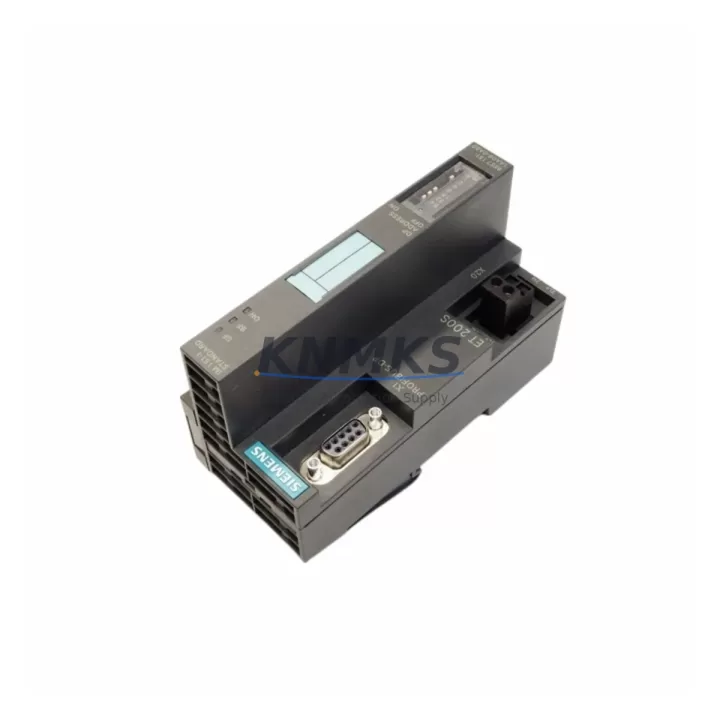
The Siemens 6ES7151-1AA06-0AB0 is the IM151-1 Standard Interface Module for the ET 200S distributed I/O system, designed to operate on PROFIBUS DP networks at data rates up to 12 Mbit/s. As a critical link between the PROFIBUS DP master and the ET 200S terminal modules, this interface module governs the entire I/O station’s communication integrity. When this module fails or degrades, the entire ET 200S station goes offline — making fast, verified replacement stock an operational necessity for any maintenance team running Siemens S7-300, S7-400, or S7-1500 PLC architectures with distributed I/O.
At KNMKS, every 6ES7151-1AA06-0AB0 unit is sourced as an original Siemens component, pre-shipment tested for PROFIBUS DP communication handshake, station address recognition, and power-up diagnostics. Each unit ships with a support terms confirmed by quotation and full traceability documentation, supporting both emergency breakdown replacements and planned annual maintenance cycles.
Spare Maintenance Table
| Parameter | Specification |
|---|---|
| SKU / Part Number | 6ES7151-1AA06-0AB0 |
| Module Designation | IM151-1 Standard Interface Module |
| Series / Platform | Siemens ET 200S Distributed I/O |
| Communication Protocol | PROFIBUS DP (up to 12 Mbit/s) |
| Supply Voltage | 24 V DC (via ET 200S power module) |
| Station Address Range | 1–125 (set via DIP switch) |
| Max. I/O Modules per Station | Up to 63 terminal modules |
| Diagnostic Functions | Station diagnostics, module status, PROFIBUS DP diagnostics |
| Operating Temperature | 0 °C to +60 °C |
| Protection Class | IP20 |
| Mounting | DIN rail, ET 200S rail system |
| Weight | Approx. 140 g |
| Country of Origin | Germany |
| Compatibility | Siemens S7-300, S7-400, S7-1500 (as DP master); ET 200S terminal modules |
| Support terms | 12 Months — KNMKS Verified |
| Pre-Shipment Test | PROFIBUS DP communication, station address, power-up diagnostics |
| Delivery | Global dispatch; multi-region stock available |
Maintenance Planning for Continuous Operation
The 6ES7151-1AA06-0AB0 sits at the heart of the ET 200S station, but a complete maintenance strategy must account for every component in the same electrical and communication loop. During scheduled outages or fault isolation, maintenance engineers should simultaneously inspect the 6ES7138-4CA01-0AA0 PM-E power module, which supplies 24 V DC to the ET 200S rail — a degraded power module is a frequent root cause of intermittent IM151-1 resets that are misdiagnosed as interface module failures.
The PROFIBUS DP cable termination and the 6ES7195-7HD10-0XA0 bus connector should be checked for pin corrosion, impedance mismatch, and correct termination resistor activation at both ends of the segment. A faulty bus connector or improperly terminated segment will cause the IM151-1 to report BF (Bus Fault) LED status even when the interface module itself is fully functional.
For stations with digital and analog I/O, the 6ES7131-4BF00-0AA0 digital input terminal module and 6ES7134-4FB01-0AB0 analog input terminal module should be inspected for contact wear and signal drift. These terminal modules share the same ET 200S rail and are directly managed by the IM151-1; a failed terminal module can generate diagnostic alarms that mask the true fault source during troubleshooting.
Where the ET 200S station interfaces with motor starters or frequency inverters, the 6ES7138-4DC01-0AB0 PM-D power module for motor starters should be included in the inspection checklist. Voltage drops on the motor starter supply rail can cause the IM151-1 to log spurious diagnostic events, complicating fault analysis.
Finally, the 6ES7193-4CA40-0AA0 terminal module base unit for each I/O slot should be checked for rail contact integrity. Oxidized or loose base unit contacts are a common cause of intermittent I/O faults in aging ET 200S installations and are often overlooked during reactive maintenance. Proactive replacement of worn base units during the same maintenance window as the IM151-1 significantly reduces repeat callouts.
Maintaining a minimum of two 6ES7151-1AA06-0AB0 units in local spare stock — alongside one PM-E power module and a set of bus connectors — is the recommended inventory posture for any facility running more than three ET 200S stations on a single PROFIBUS DP segment.
Site Replacement Workflow
1. Pre-replacement verification: Before removing the existing IM151-1, record the current PROFIBUS DP station address from the DIP switch setting on the installed module. Photograph or document the bus connector orientation and cable routing to ensure identical reinstallation.
2. Power isolation: De-energize the ET 200S station by switching off the upstream 24 V DC supply to the PM-E power module. Confirm zero voltage at the rail before handling any modules. Do not hot-swap the IM151-1 without confirming the specific firmware version supports it — the standard IM151-1 (6ES7151-1AA06-0AB0) does not support hot insertion.
3. Module removal: Disconnect the PROFIBUS DP bus connector from the IM151-1. Release the module from the ET 200S rail by pressing the release lever and sliding the module off the rail. Inspect the rail contacts for debris or corrosion before installing the replacement unit.
4. Replacement installation: Set the DIP switch on the new 6ES7151-1AA06-0AB0 to match the recorded station address. Slide the module onto the ET 200S rail until it clicks into position. Reconnect the PROFIBUS DP bus connector, ensuring the termination resistor is correctly set if this station is at the end of the segment.
5. Power-up and commissioning: Re-energize the 24 V DC supply. Observe the IM151-1 LED indicators: SF (System Fault) and BF (Bus Fault) LEDs should extinguish within the DP cycle time once the master recognizes the station. Verify all I/O terminal modules report healthy status in the PLC diagnostic buffer (STEP 7 or TIA Portal).
6. System validation: Confirm process signals are live and correct in the SCADA or HMI. Log the replacement in the maintenance record with the new module’s serial number and the date of installation. Update the spare parts inventory to trigger reorder of the consumed unit.
Spare Parts Support FAQ
Q1: Is the 6ES7151-1AA06-0AB0 compatible with both S7-300 and S7-1500 PLC systems as the PROFIBUS DP master?
Yes. The IM151-1 Standard Interface Module operates as a PROFIBUS DP slave station and is compatible with any PROFIBUS DP master, including Siemens S7-300 CP 342-5, S7-400 CP 443-5, and S7-1500 CM 1542-5 communication modules, as well as third-party DP masters that conform to the EN 50170 standard. Compatibility is governed by the GSD file for the ET 200S station, which is available from Siemens and should be loaded into the master configuration tool (STEP 7 or TIA Portal) before commissioning.
Q2: How does KNMKS verify the 6ES7151-1AA06-0AB0 before shipment?
Each unit undergoes a structured pre-shipment test covering PROFIBUS DP communication initialization, station address recognition across the full DIP switch range, power-up LED sequence verification, and diagnostic register readout. Units that fail any test parameter are quarantined and not shipped. A test report is available on request for quality-critical procurement.
Q3: What is the recommended spare parts inventory strategy for facilities with multiple ET 200S stations?
For facilities operating five or more ET 200S stations, KNMKS recommends maintaining a minimum of two IM151-1 units (6ES7151-1AA06-0AB0) in local stock, supplemented by one PM-E power module (6ES7138-4CA01-0AA0) and a set of PROFIBUS DP bus connectors. For critical production lines with zero-tolerance downtime, a long-term supply agreement with KNMKS ensures priority allocation and guaranteed lead times, reducing procurement risk for end-of-catalog Siemens components.
Q4: What support terms and long-term supply support does KNMKS provide for the 6ES7151-1AA06-0AB0?
All units supplied by KNMKS carry a support terms confirmed by quotation covering manufacturing defects and functional failure under normal operating conditions. KNMKS maintains multi-region stock to support both emergency same-week dispatch and scheduled annual maintenance procurement. For long-term supply agreements covering 12–36 month horizons, contact the KNMKS sales team to discuss volume pricing, reserved stock allocation, and extended support terms options.
© 2026 KNMKS. All rights reserved.
Original Source: https://knmks.com
Contact: admin@knmks.com | +86 18359268345
Product Identification
- Brand / Ecosystem
-
Siemens
Siemens - Model / Series
-
6ES7151-1AA06-0AB0
SIMATIC Series - Product Family
- PLCs & Controllers
- Availability Status
- Available on request after model and quantity confirmation
- Inquiry Type
- B2B RFQ, replacement inquiry and project spare-part request
- Pre-Quote Check
- Exact SKU, brand, series, quantity, nameplate photos and destination country are checked before quotation
System Path
Where this product fits in the KNMKS automation structure.
Specification & Inquiry Focus
- Control platform
- PLC, PAC and modular controllers
- Common needs
- CPU, rack, power and I/O expansion
- Project support
- Replacement, cabinet build and maintenance
Buyer Confirmation
Information KNMKS checks before replying.
- Exact model
- 6ES7151-1AA06-0AB0
- Brand / ecosystem
- Siemens
- Product family
- PLCs & Controllers
- Application note
- Replacement, maintenance, project build or spare-part list
- Useful photos
- Nameplate, installed unit, cabinet layout or connector side
- Delivery details
- Quantity, destination country and target schedule
Document Support
Files and notes can be confirmed during quotation.
- Product photos or nameplate confirmation when available
- Packing and delivery notes before quotation confirmation
- Support scope and delivery terms confirmed per inquiry
- Export document coordination for qualified B2B requests
Inquiry Support
- Model cross-checking before quotation
- CPU, power, rack and expansion module matching
- Support for replacement and project inquiry
What to Send Us
- Brand and exact model number: Siemens 6ES7151-1AA06-0AB0
- Quantity and required delivery time
- Application, replacement requirement or nameplate photo
- Destination country and shipping preference
RFQ Preparation
This is a product inquiry page built for RFQ communication.
Fast Model Check
Send this model to KNMKS for confirmation.
Include quantity, destination country and photos if this is a maintenance replacement. The inquiry will be saved with a reference number after submission.
Brand & Compatibility Note
KNMKS displays automation product information for well-known industrial brand ecosystems and compatible replacement references. Brand names are used for product identification and compatibility reference only; final availability and commercial terms are confirmed per quotation.
 Manufacturing
 Machine Tools
 Packaging
 Energy & Power



 HMI & Displays
 Servo Systems
 Variable Frequency Drives
 Sensors