
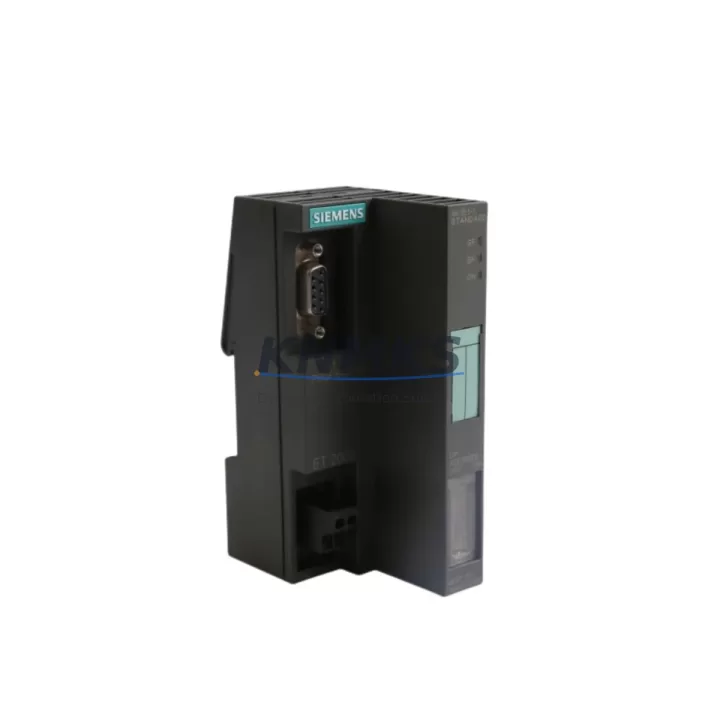
Overview
Siemens 6ES7151-1AA05-0AB0 Migration-Ready Interface for Legacy ET200S Control Systems
The Siemens 6ES7151-1AA05-0AB0 is the IM151-1 Standard interface module for the ET 200S distributed I/O system, communicating via PROFIBUS DP at up to 12 Mbit/s. As legacy SIMATIC S5 and early S7-300 installations reach end-of-service milestones, this module has become a critical migration component — enabling engineers to preserve existing ET200S terminal modules, power modules, and I/O slices while upgrading the head-end controller or communication backbone. Its compact DIN-rail footprint and standard 9-pin PROFIBUS sub-D connector make it a direct drop-in candidate for most existing control cabinet layouts without mechanical rework.
When planning a retrofit around the 6ES7151-1AA05-0AB0, the first verification step is power budget. The module draws its logic supply from the ET200S power module — typically a 6ES7138-4CA01-0AA0 PM-E 24VDC — and the total current consumption of all downstream electronic modules must not exceed the power module’s rated output. Engineers migrating from older IM151 variants should audit each slot’s current draw before commissioning.
Terminal wiring compatibility is the second checkpoint. The 6ES7151-1AA05-0AB0 uses the standard ET200S backplane bus, so existing 6ES7193-4-series terminal modules remain fully reusable. No rewiring of field cables is required provided the terminal module type matches the replacement electronic module. This dramatically reduces downtime during a hot-swap maintenance window.
PROFIBUS address assignment must be confirmed before powering the new module. The station address is set via the rotary switches on the module face and must match the address configured in the SIMATIC Manager or TIA Portal hardware configuration. If the upstream controller is being migrated from a 6GK1502-2CB10 CP5622 PROFIBUS master card to a newer 6GK7343-5FA01-0XE0 CP343-5, the DP master parameters — including slot timing, watchdog response time, and GSD file version — must be re-validated to avoid bus faults.
Migration Compatibility Table
| Parameter | 6ES7151-1AA05-0AB0 (This Module) | Legacy IM151-1 (Earlier Variants) | Migration Note |
|---|---|---|---|
| Communication Protocol | PROFIBUS DP (up to 12 Mbit/s) | PROFIBUS DP (up to 12 Mbit/s) | Direct protocol compatibility — no GSD change required for same firmware generation |
| Backplane Interface | ET200S standard backplane bus | ET200S standard backplane bus | Existing terminal modules (6ES7193-4 series) fully reusable |
| Power Supply | Via PM-E power module (24 VDC) | Via PM-E power module (24 VDC) | Verify total slot current budget before commissioning |
| Station Address | Rotary switch, 1–125 | Rotary switch, 1–125 | Must match HW Config; confirm before power-on |
| Firmware Compatibility | Requires TIA Portal V13+ or SIMATIC Manager V5.5+ | SIMATIC Manager V5.4+ | Update project HW catalog; re-download configuration |
| Installation Space | Standard ET200S slot width | Standard ET200S slot width | No cabinet rework required |
| Support terms | support terms confirmed by quotation — all units tested before shipment | Functional test report available on request | |
Retrofit Planning for Existing Automation Systems
A successful retrofit around the 6ES7151-1AA05-0AB0 typically involves coordinating several interdependent components. On the power side, the 6ES7138-4CA01-0AA0 PM-E 24VDC power module must be sized to cover the aggregate current demand of all electronic modules in the station — including any newly added 6ES7131-4BF00-0AA0 8-channel digital input modules or 6ES7132-4BF00-0AA0 digital output modules introduced during the I/O expansion phase of the upgrade.
For stations that include analog signals, the 6ES7134-4FB01-0AB0 2-channel analog input module integrates directly into the same ET200S rack without additional adapters. Engineers should confirm that the analog module’s measuring range configuration — set via parameter assignment in TIA Portal — matches the field transmitter signal levels before the cutover.
Where the retrofit also involves upgrading the HMI layer, SIMATIC Comfort Panels communicating via PROFIBUS DP to the same network segment must have their tag connections re-mapped if the DP station address of the ET200S changes. Preserving the original station address eliminates this step and protects existing HMI screen logic from requiring redevelopment.
For installations where the upstream PLC is being replaced — for example, migrating from a SIMATIC S7-300 CPU to a 6ES7315-2EH14-0AB0 CPU315-2 DP or a newer S7-1500 series controller — the PROFIBUS DP master configuration must be exported, reviewed, and re-imported into the new project. The GSD file for the 6ES7151-1AA05-0AB0 is available from the Siemens Industry Online Support portal and must be installed in the TIA Portal hardware catalog before the station can be configured. Programming cable access — typically via a 6ES7972-0CB20-0XA0 PC adapter USB — is required for the initial download and for any subsequent online diagnostics during commissioning.
Downtime Control During System Migration
Minimizing production interruption is the primary constraint in any legacy control system retrofit. For the 6ES7151-1AA05-0AB0, the recommended approach is a staged cutover: the new module is pre-configured and tested offline using a spare rack before the maintenance window opens. The existing program logic in the upstream CPU is backed up via SIMATIC Manager or TIA Portal’s “Upload from Device” function, preserving all data blocks, organization blocks, and symbol tables.
During the physical swap, the ET200S terminal modules remain in place — field wiring is not disturbed. Only the IM151-1 interface module is replaced. After seating the new 6ES7151-1AA05-0AB0, the PROFIBUS address is confirmed on the rotary switches, the bus connector is re-attached, and the CPU is set to RUN mode. Diagnostic LEDs on the module face provide immediate feedback: a steady green BF LED indicates successful DP communication; a flashing red SF LED signals a configuration mismatch that must be resolved before handing the system back to operations.
For multi-station PROFIBUS networks, it is advisable to isolate the target ET200S segment using a PROFIBUS repeater during the swap to prevent bus disturbances from affecting other stations. This approach keeps the remainder of the production line running and limits the blast radius of any commissioning issue to a single segment.
Retrofit Support FAQ
Q1: Is the 6ES7151-1AA05-0AB0 a direct replacement for earlier IM151-1 variants?
Yes. The 6ES7151-1AA05-0AB0 is backward-compatible with the ET200S backplane bus and uses the same terminal module interface as earlier IM151-1 variants. Existing 6ES7193-4-series terminal modules and field wiring are fully reusable. The station address and PROFIBUS parameters must be re-confirmed in the hardware configuration after replacement.
Q2: What firmware and software versions are required for commissioning?
The module is supported in SIMATIC Manager V5.5 SP3 or later and TIA Portal V13 SP1 or later. The correct GSD file must be installed in the hardware catalog. If migrating from an older project, re-download the hardware configuration to the CPU after updating the catalog entry to reflect the new module order number.
Q3: How is the module tested before shipment?
Every unit undergoes a functional power-on test and PROFIBUS communication verification before dispatch. A test report is available on request. All units are covered by a support terms confirmed by quotation from the date of shipment. Units are shipped in anti-static packaging with original-style labeling.
Q4: What is the typical lead time and stock availability?
Stock is maintained for immediate dispatch. Orders confirmed before the daily cut-off are typically shipped the same business day. For large-quantity requirements or project-based procurement, contact the sales team to confirm allocation and delivery schedule.
© 2026 KNMKS. All rights reserved.
Original Source: https://knmks.com
Contact: admin@knmks.com | +86 18359268345
Product Identification
- Brand / Ecosystem
-
Siemens
Siemens - Model / Series
-
ES7151-1AA05-0AB0
SIMATIC Series - Product Family
- PLCs & Controllers
- Availability Status
- Available on request after model and quantity confirmation
- Inquiry Type
- B2B RFQ, replacement inquiry and project spare-part request
- Pre-Quote Check
- Exact SKU, brand, series, quantity, nameplate photos and destination country are checked before quotation
System Path
Where this product fits in the KNMKS automation structure.
Specification & Inquiry Focus
- Control platform
- PLC, PAC and modular controllers
- Common needs
- CPU, rack, power and I/O expansion
- Project support
- Replacement, cabinet build and maintenance
Buyer Confirmation
Information KNMKS checks before replying.
- Exact model
- ES7151-1AA05-0AB0
- Brand / ecosystem
- Siemens
- Product family
- PLCs & Controllers
- Application note
- Replacement, maintenance, project build or spare-part list
- Useful photos
- Nameplate, installed unit, cabinet layout or connector side
- Delivery details
- Quantity, destination country and target schedule
Document Support
Files and notes can be confirmed during quotation.
- Product photos or nameplate confirmation when available
- Packing and delivery notes before quotation confirmation
- Support scope and delivery terms confirmed per inquiry
- Export document coordination for qualified B2B requests
Inquiry Support
- Model cross-checking before quotation
- CPU, power, rack and expansion module matching
- Support for replacement and project inquiry
What to Send Us
- Brand and exact model number: Siemens ES7151-1AA05-0AB0
- Quantity and required delivery time
- Application, replacement requirement or nameplate photo
- Destination country and shipping preference
RFQ Preparation
This is a product inquiry page built for RFQ communication.
Fast Model Check
Send this model to KNMKS for confirmation.
Include quantity, destination country and photos if this is a maintenance replacement. The inquiry will be saved with a reference number after submission.
Brand & Compatibility Note
KNMKS displays automation product information for well-known industrial brand ecosystems and compatible replacement references. Brand names are used for product identification and compatibility reference only; final availability and commercial terms are confirmed per quotation.
 Manufacturing
 Machine Tools
 Packaging
 Energy & Power



 HMI & Displays
 Servo Systems
 Variable Frequency Drives
 Sensors