
Overview
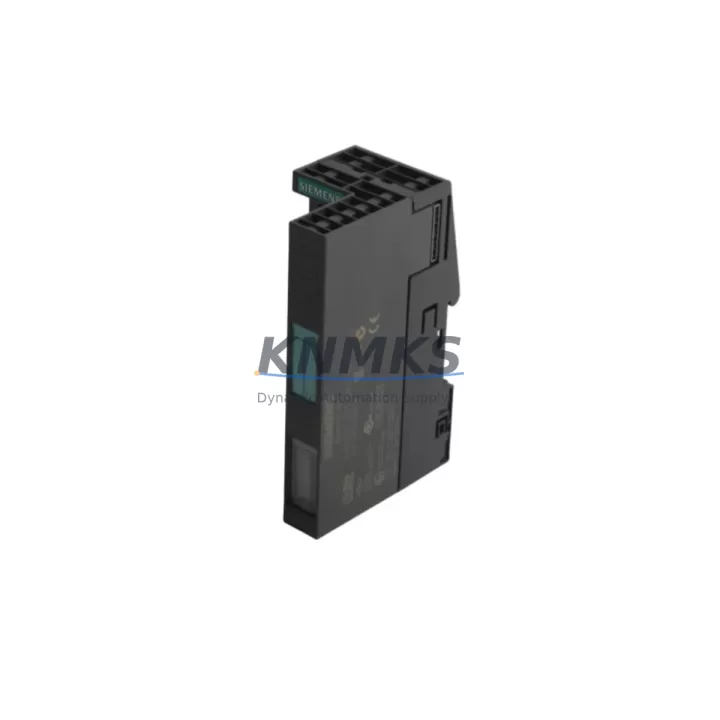
Siemens 6ES7151-1AA05-0AB0 IM151-1 Maintenance Spare for Factory Uptime
The Siemens 6ES7151-1AA05-0AB0 is the IM151-1 Standard interface module for the ET 200S distributed I/O system, designed to connect ET 200S stations to PROFIBUS DP networks in demanding industrial environments. As a critical gateway between the field-level I/O and the S7-300 or S7-400 controller backbone, this module is a high-priority spare for any facility running PROFIBUS-based automation. Holding a verified replacement unit in your spare parts inventory eliminates the risk of extended downtime when the primary module fails during production.
Each 6ES7151-1AA05-0AB0 unit supplied by KNMKS is sourced as an original Siemens component, subjected to pre-shipment functional testing, and backed by a support terms confirmed by quotation. Global dispatch is available with typical lead times of 3–7 business days, supporting both planned annual maintenance and emergency breakdown recovery scenarios.
Spare Maintenance Table
| Part Number | 6ES7151-1AA05-0AB0 |
| Module Type | IM151-1 Standard Interface Module |
| Series / Platform | Siemens ET 200S Distributed I/O |
| Communication Protocol | PROFIBUS DP (up to 12 Mbit/s) |
| Compatible Controllers | S7-300, S7-400, S7-1500 (via PROFIBUS DP master) |
| Supply Voltage | DC 24 V (via power module PM-E or PM-D) |
| Max. I/O Modules per Station | Up to 63 electronic modules |
| Diagnostic Functions | Station diagnostics, module diagnostics via PROFIBUS DP |
| Degree of Protection | IP20 |
| Operating Temperature | 0 °C to +60 °C |
| Storage Temperature | -40 °C to +70 °C |
| Mounting | DIN rail, ET 200S terminal module TM-IM/IM |
| Country of Origin | Germany |
| Condition | Original Siemens, pre-shipment tested |
| Support terms | 12 Months |
| Dispatch | Global, 3–7 business days typical |
Maintenance Planning for Continuous Operation
When the 6ES7151-1AA05-0AB0 IM151-1 module is flagged during a routine control cabinet inspection or fails during production, the replacement process should be treated as a system-level event rather than a single-component swap. Maintenance engineers should simultaneously verify the condition of the associated PM-E 24 VDC power module (6ES7138-4CA01-0AA0), which supplies load voltage to the ET 200S electronic modules. A degraded power module is a common root cause of intermittent IM151-1 faults and should be replaced proactively if it has been in service for more than five years.
The PROFIBUS DP bus connector (6ES7972-0BA52-0XA0) and the associated shielded PROFIBUS cable should be inspected for mechanical damage, correct termination resistor settings, and shield continuity. A faulty bus connector or improperly terminated cable segment can cause the replacement IM151-1 to report communication errors immediately after installation, leading to unnecessary diagnostic cycles.
For ET 200S stations with mixed digital and analog I/O, the 2DI DC24V Standard electronic module (6ES7131-4BB01-0AA0) and 2AO I 4..20mA ST analog output module (6ES7135-4GB01-0AB0) should be included in the annual inspection checklist. These modules share the backplane bus managed by the IM151-1 and can exhibit latent faults that only surface after an interface module replacement triggers a full station re-initialization.
Where the ET 200S station is installed in a cabinet alongside a Siemens S7-300 CPU (e.g., CPU 315-2 DP, 6ES7315-2AH14-0AB0), the CPU’s PROFIBUS DP port parameters — baud rate, station address, and watchdog time — must be confirmed to match the replacement IM151-1 configuration before the station is brought back online. Mismatched parameters are a frequent cause of post-replacement startup failures in legacy installations.
Facilities operating multiple ET 200S stations on a single PROFIBUS segment should also maintain a spare PROFIBUS repeater (6ES7972-0AA02-0XA0) in their cabinet spares kit. A repeater failure can isolate an entire bus segment, making the IM151-1 replacement appear ineffective until the network topology is fully audited. Including the repeater in the spare parts inventory alongside the 6ES7151-1AA05-0AB0 ensures that all single points of failure on the PROFIBUS segment are covered.
Site Replacement Workflow
Step 1 — Pre-replacement verification: Confirm the PROFIBUS DP station address set on the existing 6ES7151-1AA05-0AB0 using the address switches on the module face. Record the address before removal. Verify the replacement unit is set to the same address before installation.
Step 2 — Safe isolation: Place the associated S7-300 or S7-400 CPU in STOP mode and de-energize the ET 200S station via the PM-E power module. Do not remove the IM151-1 under live bus conditions — PROFIBUS DP hot-swap is not supported on the IM151-1 Standard variant.
Step 3 — Module removal and installation: Release the IM151-1 from the TM-IM/IM terminal module by pressing the release lever. Slide the replacement 6ES7151-1AA05-0AB0 into the terminal module until it clicks into place. No tools are required for the module itself, but the bus connector must be re-seated firmly.
Step 4 — Power-up and diagnostics: Re-energize the PM-E power module and return the CPU to RUN mode. Monitor the SF (system fault) and BF (bus fault) LEDs on the IM151-1. Both LEDs should extinguish within 5 seconds of successful PROFIBUS DP communication establishment. If the BF LED remains lit, re-check the bus connector termination and station address.
Step 5 — Functional validation: Trigger a forced I/O test from the S7 programming device (STEP 7 or TIA Portal) to confirm all downstream electronic modules are responding correctly. Document the replacement in the maintenance log with the date, replaced serial number, and post-replacement test results.
This workflow supports a target replacement time of under 30 minutes for a trained maintenance technician, minimizing production line downtime and ensuring full system compatibility is restored before resuming operations.
Spare Parts Support FAQ
Q1: Is the 6ES7151-1AA05-0AB0 still available as a new original Siemens component?
Yes. KNMKS maintains stock of original Siemens 6ES7151-1AA05-0AB0 units. Each unit is pre-shipment tested and supplied with a support terms confirmed by quotation. While Siemens has introduced successor platforms such as ET 200SP, the IM151-1 remains available to support legacy ET 200S installations without requiring a full system migration.
Q2: How many units should I hold in my spare parts inventory?
For facilities with three or more ET 200S stations on a single PROFIBUS segment, a minimum of one 6ES7151-1AA05-0AB0 per segment is recommended. High-criticality lines — such as those in continuous process, pharmaceutical, or automotive assembly environments — should maintain two units per segment to cover simultaneous failures during peak production periods.
Q3: Can the 6ES7151-1AA05-0AB0 be used as a direct replacement for earlier IM151-1 variants?
The 6ES7151-1AA05-0AB0 (firmware version 5 and above) is backward compatible with earlier IM151-1 Standard variants within the ET 200S system. The station address, GSD file version, and PM-E power module compatibility should be verified before installation. No hardware modification to the terminal module or backplane is required for a like-for-like replacement.
Q4: What is included in the pre-shipment testing process?
Each 6ES7151-1AA05-0AB0 unit undergoes power-on functional verification, PROFIBUS DP communication initialization test, LED status confirmation, and visual inspection for connector and housing integrity before dispatch. A test report is available upon request. The support terms confirmed by quotation cover manufacturing defects and functional failures under normal operating conditions from the date of delivery.
© 2026 KNMKS. All rights reserved.
Original Source: https://knmks.com
Contact: admin@knmks.com | +86 18359268345
Product Identification
- Brand / Ecosystem
-
Siemens
Siemens - Model / Series
-
6ES7151-1AA05-0AB0
SIMATIC Series - Product Family
- PLCs & Controllers
- Availability Status
- Available on request after model and quantity confirmation
- Inquiry Type
- B2B RFQ, replacement inquiry and project spare-part request
- Pre-Quote Check
- Exact SKU, brand, series, quantity, nameplate photos and destination country are checked before quotation
System Path
Where this product fits in the KNMKS automation structure.
Specification & Inquiry Focus
- Control platform
- PLC, PAC and modular controllers
- Common needs
- CPU, rack, power and I/O expansion
- Project support
- Replacement, cabinet build and maintenance
Buyer Confirmation
Information KNMKS checks before replying.
- Exact model
- 6ES7151-1AA05-0AB0
- Brand / ecosystem
- Siemens
- Product family
- PLCs & Controllers
- Application note
- Replacement, maintenance, project build or spare-part list
- Useful photos
- Nameplate, installed unit, cabinet layout or connector side
- Delivery details
- Quantity, destination country and target schedule
Document Support
Files and notes can be confirmed during quotation.
- Product photos or nameplate confirmation when available
- Packing and delivery notes before quotation confirmation
- Support scope and delivery terms confirmed per inquiry
- Export document coordination for qualified B2B requests
Inquiry Support
- Model cross-checking before quotation
- CPU, power, rack and expansion module matching
- Support for replacement and project inquiry
What to Send Us
- Brand and exact model number: Siemens 6ES7151-1AA05-0AB0
- Quantity and required delivery time
- Application, replacement requirement or nameplate photo
- Destination country and shipping preference
RFQ Preparation
This is a product inquiry page built for RFQ communication.
Fast Model Check
Send this model to KNMKS for confirmation.
Include quantity, destination country and photos if this is a maintenance replacement. The inquiry will be saved with a reference number after submission.
Brand & Compatibility Note
KNMKS displays automation product information for well-known industrial brand ecosystems and compatible replacement references. Brand names are used for product identification and compatibility reference only; final availability and commercial terms are confirmed per quotation.
 Manufacturing
 Machine Tools
 Packaging
 Energy & Power



 HMI & Displays
 Servo Systems
 Variable Frequency Drives
 Sensors