
Overview
Siemens 6ES7151-1AA04-0AB0 Maintenance-Proven Spare Part for Factory Uptime
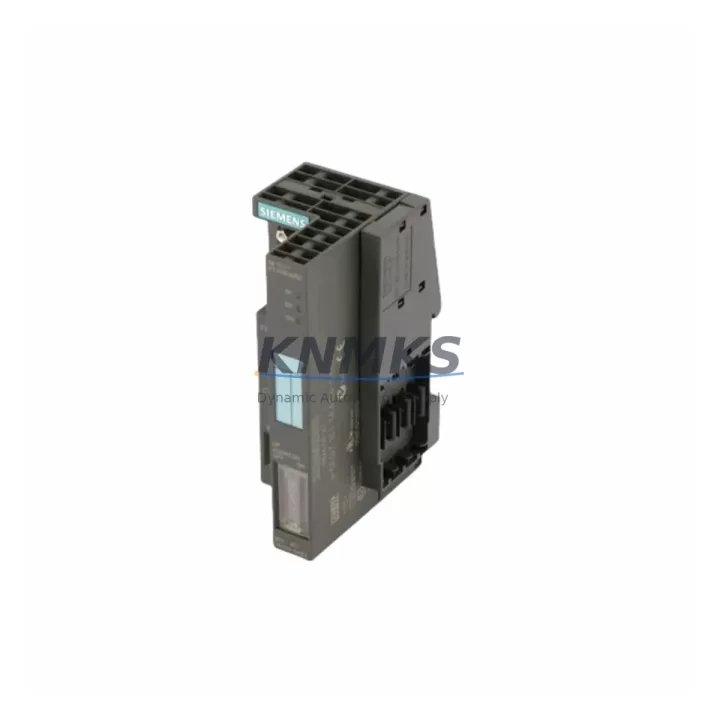
The Siemens 6ES7151-1AA04-0AB0 is the IM 151-1 Standard interface module for the ET 200S distributed I/O system, communicating via PROFIBUS DP at up to 12 Mbit/s. In continuous-process and discrete-manufacturing environments, this module serves as the backbone of field-level communication between the SIMATIC S7 controller and distributed I/O stations. When this interface module fails or reaches end-of-service life, the entire ET 200S station goes offline — making a pre-tested, ready-to-ship replacement an essential element of any maintenance engineer’s spare parts strategy.
KNMKS stocks the 6ES7151-1AA04-0AB0 as an original Siemens unit, pre-shipment tested, with a support terms confirmed by quotation and multi-region dispatch capability. Whether you are responding to an unplanned trip, executing a scheduled outage replacement, or building a buffer stock for a long-running PROFIBUS DP network, this module ships ready for immediate installation.
Spare Maintenance Table
| Parameter | Specification |
|---|---|
| SKU / Order Number | 6ES7151-1AA04-0AB0 |
| Module Designation | IM 151-1 Standard |
| Series / Platform | ET 200S / SIMATIC S7 |
| Communication Protocol | PROFIBUS DP (up to 12 Mbit/s) |
| Supply Voltage | 24 V DC (via backplane / terminal module) |
| Current Consumption (backplane) | ≤ 100 mA at 5 V DC |
| Degree of Protection | IP20 |
| Operating Temperature | 0 °C to +60 °C |
| Storage Temperature | -40 °C to +70 °C |
| Mounting | 35 mm DIN rail via ET 200S terminal module |
| Compatible Controllers | SIMATIC S7-300, S7-400, S7-1500 (via PROFIBUS DP master) |
| Compatible I/O Modules | ET 200S digital, analog, motor starter, and safety modules |
| Origin | Germany (DE) |
| Condition | Original Siemens — pre-shipment tested |
| Support terms | 12 months from date of dispatch |
| Dispatch | Multi-region stock — global delivery details confirmed by RFQ |
Maintenance Planning for Continuous Operation
When a 6ES7151-1AA04-0AB0 interface module is flagged during a control cabinet inspection or triggers a PROFIBUS DP bus fault alarm, the replacement scope rarely ends with the IM 151-1 alone. A thorough maintenance engineer will use the outage window to audit the surrounding components and reduce the risk of a repeat callout.
Begin with the 24 V DC power supply feeding the ET 200S station — a degraded SITOP PSU100S or equivalent rail-mount power supply can cause intermittent DP communication errors that mimic interface module faults. Verify output voltage under load before condemning the IM 151-1. Next, inspect the PROFIBUS DP cable and bus connector (typically a 6ES7972-0BA52-0XA0 or similar 90° connector): damaged shielding or a loose terminating resistor is a common root cause of repeated DP timeouts.
Within the ET 200S station itself, check the terminal modules (TM-E / TM-P series) that the IM 151-1 plugs into — cracked or corroded terminal module contacts cause poor backplane continuity and can damage a replacement interface module if not addressed. Review the digital and analog I/O modules (e.g., 6ES7131-4BF00-0AA0 for 4-channel DI or 6ES7134-4FB01-0AB0 for analog input) for blown fuses or channel faults logged in the S7 diagnostic buffer.
For stations that include motor starter modules such as the 6ES7138-4CA01-0AA0 DS1e-x, confirm that the load feeder and associated 24 V fuse terminal blocks are intact — a shorted motor starter can pull down the backplane supply and corrupt IM 151-1 firmware. If the cabinet also houses a CP 342-5 or CP 443-5 PROFIBUS communication processor on the S7 rack, verify its DP master configuration still matches the GSD file for the 6ES7151-1AA04-0AB0 after the swap, as firmware version mismatches can prevent the station from coming online.
Finally, update the STEP 7 or TIA Portal hardware configuration to confirm the slot assignment and DP address are correctly mapped before energizing the replacement module. Document the swap in the site maintenance log and retain the failed unit for root-cause analysis.
Site Replacement Workflow
Step 1 — Isolate the station. Set the PROFIBUS DP master to STOP mode or place the affected station in local mode to prevent uncontrolled outputs during the swap. Record the current DP address displayed on the IM 151-1 rotary switches before removal.
Step 2 — Remove the failed module. The 6ES7151-1AA04-0AB0 is tool-free: press the release lever on the terminal module and slide the IM 151-1 upward to disengage. No field wiring is disturbed because all connections are made at the terminal module level — a key advantage of the ET 200S architecture that minimizes swap time.
Step 3 — Configure the replacement. Set the rotary address switches on the new 6ES7151-1AA04-0AB0 to match the recorded DP address. If the station uses a memory card (MMC) for parameter storage, transfer it to the new module.
Step 4 — Seat and power up. Slide the replacement module into the terminal module until it clicks. Restore 24 V DC supply and observe the BF (Bus Fault) and SF (System Fault) LEDs. A solid green RUN LED with no BF indication confirms successful DP integration.
Step 5 — Verify I/O. From the S7 controller, force a diagnostic read of the ET 200S station and confirm all I/O modules report healthy status. Run a short functional test of connected field devices before returning the line to automatic mode.
This five-step workflow typically achieves a complete hot-swap in under 15 minutes for a trained technician, minimizing production downtime and avoiding the need for a full system reconfiguration.
Spare Parts Support FAQ
Q1: Is the 6ES7151-1AA04-0AB0 compatible with both S7-300 and S7-400 PROFIBUS DP masters?
Yes. The IM 151-1 Standard operates as a PROFIBUS DP slave and is compatible with any DP master that supports the standard GSD file, including SIMATIC S7-300 CP 342-5, S7-400 CP 443-5, and S7-1500 CM 1542-5 communication modules, as well as third-party DP masters from ABB, Schneider, and Yokogawa.
Q2: How do I verify the module is genuine before installation?
All units supplied by KNMKS are original Siemens parts. Each module ships with its factory label intact, including the order number (6ES7151-1AA04-0AB0), serial number, and firmware version. We recommend cross-referencing the serial number against Siemens Industry Online Support (SIOS) if your site requires traceability documentation. Pre-shipment functional testing results are available on request.
Q3: What is the recommended buffer stock quantity for a plant running multiple ET 200S stations?
Industry best practice for PROFIBUS DP networks with five or more ET 200S stations is to hold a minimum of one IM 151-1 per ten stations, with a floor of two units regardless of station count. For plants operating 24/7 with no scheduled maintenance windows, KNMKS offers long-term supply agreements to ensure replenishment lead times do not exceed 48 hours.
Q4: Does the support terms confirmed by quotation cover field failures caused by power supply transients?
The support terms confirmed by quotation cover manufacturing defects and pre-existing component failures confirmed by post-return inspection. Damage attributable to overvoltage events, incorrect wiring, or installation errors is assessed case by case. KNMKS technical support can assist with root-cause documentation to support support requests and help identify upstream power quality issues that should be corrected before installing the replacement module.
© 2026 KNMKS. All rights reserved.
Original Source: https://knmks.com
Contact: admin@knmks.com | +86 18359268345
Product Identification
- Brand / Ecosystem
-
Siemens
Siemens - Model / Series
-
6ES7151-1AA04-0AB0
SIMATIC Series - Product Family
- PLCs & Controllers
- Availability Status
- Available on request after model and quantity confirmation
- Inquiry Type
- B2B RFQ, replacement inquiry and project spare-part request
- Pre-Quote Check
- Exact SKU, brand, series, quantity, nameplate photos and destination country are checked before quotation
System Path
Where this product fits in the KNMKS automation structure.
Specification & Inquiry Focus
- Control platform
- PLC, PAC and modular controllers
- Common needs
- CPU, rack, power and I/O expansion
- Project support
- Replacement, cabinet build and maintenance
Buyer Confirmation
Information KNMKS checks before replying.
- Exact model
- 6ES7151-1AA04-0AB0
- Brand / ecosystem
- Siemens
- Product family
- PLCs & Controllers
- Application note
- Replacement, maintenance, project build or spare-part list
- Useful photos
- Nameplate, installed unit, cabinet layout or connector side
- Delivery details
- Quantity, destination country and target schedule
Document Support
Files and notes can be confirmed during quotation.
- Product photos or nameplate confirmation when available
- Packing and delivery notes before quotation confirmation
- Support scope and delivery terms confirmed per inquiry
- Export document coordination for qualified B2B requests
Inquiry Support
- Model cross-checking before quotation
- CPU, power, rack and expansion module matching
- Support for replacement and project inquiry
What to Send Us
- Brand and exact model number: Siemens 6ES7151-1AA04-0AB0
- Quantity and required delivery time
- Application, replacement requirement or nameplate photo
- Destination country and shipping preference
RFQ Preparation
This is a product inquiry page built for RFQ communication.
Fast Model Check
Send this model to KNMKS for confirmation.
Include quantity, destination country and photos if this is a maintenance replacement. The inquiry will be saved with a reference number after submission.
Brand & Compatibility Note
KNMKS displays automation product information for well-known industrial brand ecosystems and compatible replacement references. Brand names are used for product identification and compatibility reference only; final availability and commercial terms are confirmed per quotation.
 Manufacturing
 Machine Tools
 Packaging
 Energy & Power



 HMI & Displays
 Servo Systems
 Variable Frequency Drives
 Sensors