
Overview
Siemens 6ES7141-3BH00-0XA0 Maintenance Spare Part for Factory Uptime
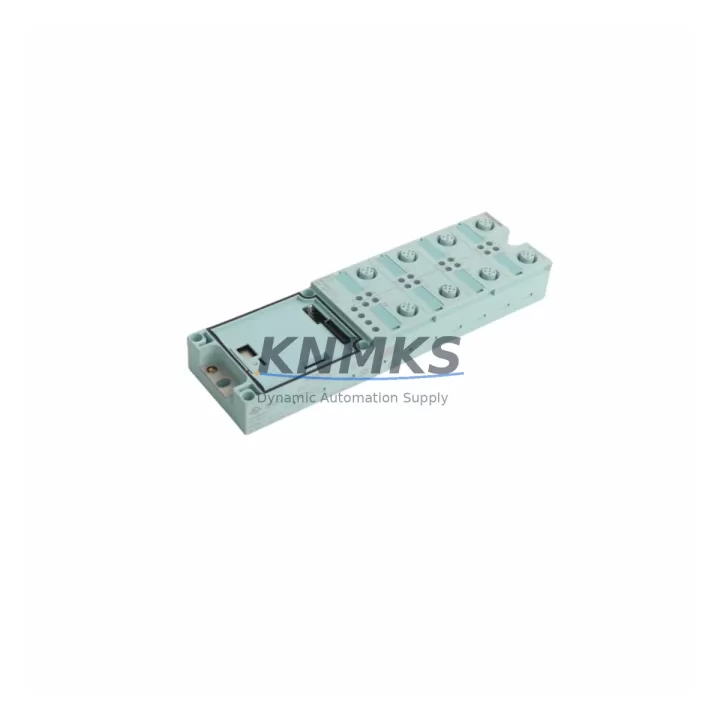
The Siemens 6ES7141-3BH00-0XA0 is an 8-channel 24VDC digital input module designed for the SIMATIC ET 200S distributed I/O system. As a maintenance-proven spare part, it plays a critical role in sustaining factory uptime across process automation, discrete manufacturing, and utility control environments. Whether you are managing a scheduled annual overhaul, responding to an unplanned line stoppage, or building a resilient spare parts inventory, the 6ES7141-3BH00-0XA0 is a direct-fit replacement that restores system integrity without configuration rework or hardware adaptation.
Sourced as an original Siemens component, each unit undergoes pre-shipment functional testing to verify channel integrity, signal response, and backplane communication before dispatch. With a support terms confirmed by quotation and multi-region stock availability, procurement engineers can confidently include this module in both emergency replacement orders and long-cycle maintenance planning. global delivery details confirmed by RFQ ensures that critical lead times are met even in time-sensitive shutdown recovery scenarios.
For maintenance engineers operating SIMATIC S7-300 or S7-400 systems with ET 200S remote I/O stations, the 6ES7141-3BH00-0XA0 integrates directly into existing IM 151 interface module configurations. Its compact terminal module design supports hot-swap capability in compatible ET 200S racks, minimizing the intervention window during live system maintenance. Signal wiring is retained on the terminal module, allowing the electronic module to be replaced without rewiring — a significant advantage in high-density control cabinets where access is limited and downtime costs are high.
Spare Maintenance Table
| SKU / Part Number | 6ES7141-3BH00-0XA0 |
| Brand | Siemens |
| Series | SIMATIC ET 200S |
| Module Type | Digital Input Module, 8-Channel |
| Input Voltage | 24VDC |
| Number of Channels | 8 DI |
| Signal Standard | IEC 61131-2 Type 1 / Type 3 |
| Input Current (per channel) | Approx. 4 mA at 24VDC |
| Backplane Interface | ET 200S terminal module (TM-E series) |
| Compatible Interface Module | IM 151-1, IM 151-3 PN, IM 151-7 CPU |
| Mounting | DIN rail via ET 200S terminal module |
| Protection Class | IP20 |
| Operating Temperature | 0°C to +60°C |
| Country of Origin | Germany |
| Weight | Approx. 220 g |
| Compatibility | SIMATIC S7-300, S7-400, ET 200S distributed I/O stations |
| Application Environment | Process automation, discrete manufacturing, utility control, machine safety panels |
| Maintenance Recommendation | Inspect terminal module contacts and backplane connector annually; verify channel diagnostics via STEP 7 or TIA Portal during scheduled maintenance |
| Pre-Shipment Testing | Yes — functional channel verification and backplane communication test |
| Support terms | 12 Months |
Maintenance Planning for Continuous Operation
When replacing the 6ES7141-3BH00-0XA0 in an ET 200S station, a thorough inspection of the surrounding electrical environment is essential to prevent repeat failures and ensure long-term system stability. Maintenance engineers should begin by verifying the 24VDC supply rail feeding the ET 200S station — a degraded or undersized power supply module such as the Siemens 6EP1333-3BA00 or equivalent SITOP PSU100S unit can cause intermittent input signal errors that mimic module faults. Confirm supply voltage is within the 20.4–28.8VDC operating range under full load.
The terminal module (TM-E15S24-01 or TM-E15C24-01) on which the 6ES7141-3BH00-0XA0 is seated should be inspected for contact wear, corrosion, or mechanical damage. Terminal modules are often overlooked during spare part replacement but are a common source of intermittent connectivity issues in high-vibration or high-humidity environments. If the terminal module shows signs of degradation, it should be replaced concurrently with the electronic module.
Field wiring connected to the input channels should be checked for insulation integrity, correct termination torque, and absence of ground loops. In installations where the 6ES7141-3BH00-0XA0 monitors proximity sensors, limit switches, or pushbutton inputs, verify that sensor supply voltages and output signal levels are within the module’s rated input thresholds. Faulty or aging sensors can generate out-of-spec signals that stress input circuitry over time.
The IM 151 interface module governing the ET 200S station should also be assessed during the same maintenance window. Interface modules such as the IM 151-1 or IM 151-3 PN manage backplane communication and PROFIBUS/PROFINET connectivity for all electronic modules in the station. A degraded interface module can cause diagnostic errors across multiple I/O modules simultaneously. Keeping a spare IM 151 unit in inventory alongside digital input modules is a recommended practice for sites with high availability requirements.
For sites running mixed I/O configurations, it is advisable to audit adjacent digital output modules (such as the 6ES7132-4BF00-0AA0 4-channel 24VDC output module) and analog input modules within the same ET 200S rack. Shared power bus segments and common ground references mean that a fault in one module can affect signal quality in neighboring slots. Fuse elements protecting the 24VDC field supply should be inspected and replaced on a defined cycle, particularly in environments with frequent load switching or inductive loads.
For facilities managing legacy SIMATIC installations, maintaining a documented spare parts list that includes the 6ES7141-3BH00-0XA0 alongside compatible communication modules, power supply units, and terminal modules ensures that the maintenance team can execute rapid replacements without waiting on extended procurement lead times.
Site Replacement Workflow
Step 1 — Identify and Isolate: Confirm the faulty module using STEP 7 or TIA Portal diagnostics. Note the slot position within the ET 200S station and the associated terminal module type before removal.
Step 2 — Power Considerations: The ET 200S electronic module can be replaced without powering down the entire station if the system supports hot-swap and the terminal module remains in place. Verify this capability in your specific IM 151 configuration before proceeding. If hot-swap is not supported, isolate the affected station segment and notify the control room.
Step 3 — Module Removal: Release the electronic module from the terminal module by pressing the release lever. The field wiring remains connected to the terminal module and does not need to be disturbed. Remove the 6ES7141-3BH00-0XA0 from the terminal module.
Step 4 — Replacement Installation: Insert the new 6ES7141-3BH00-0XA0 into the terminal module until it clicks into place. The module is keyed to prevent incorrect insertion. Restore power if it was isolated.
Step 5 — Verification: Confirm module status via the diagnostic LED indicators and validate channel states in STEP 7 or TIA Portal. Perform a functional test by activating each input channel and confirming correct signal registration in the PLC program.
Step 6 — Documentation: Record the replacement in the site maintenance log, including the date, module serial number, slot position, and technician ID. Update the spare parts inventory to trigger replenishment of the consumed unit.
This workflow supports a typical replacement time of under 15 minutes for experienced maintenance personnel, minimizing production downtime and ensuring system compatibility is maintained without software reconfiguration.
Spare Parts Support FAQ
Q1: Is the 6ES7141-3BH00-0XA0 still available as a new original part, or only as a refurbished unit?
The 6ES7141-3BH00-0XA0 is available as an original Siemens spare part. Each unit supplied is sourced from authorized distribution channels and undergoes pre-shipment functional testing. Refurbished or reconditioned units are not supplied without explicit disclosure. A support terms confirmed by quotation is provided on all units.
Q2: How many units should a facility stock for a site with multiple ET 200S stations?
For sites operating three or more ET 200S stations with digital input modules, a minimum of two 6ES7141-3BH00-0XA0 units per station type is recommended as a baseline inventory level. High-criticality lines or 24/7 continuous process environments should maintain a higher buffer. Procurement engineers should also consider stocking compatible terminal modules and at least one IM 151 interface module per station type to cover multi-component failure scenarios.
Q3: Can the 6ES7141-3BH00-0XA0 be used as a direct replacement for other ET 200S 8-channel digital input variants?
The 6ES7141-3BH00-0XA0 is specifically rated for 24VDC input signals. It is compatible with the standard TM-E terminal module series used across the ET 200S platform. Before substituting for other part numbers in the 6ES7141 family, verify that the input voltage rating, channel count, and terminal module type match the existing installation. Compatibility should always be confirmed against the original hardware configuration documentation or STEP 7 hardware catalog.
Q4: What is the lead time for emergency orders, and is long-term supply availability guaranteed?
Stock is maintained across multiple regions to support emergency dispatch requirements. Standard orders are processed and shipped within 1–3 business days. For sites with critical uptime requirements, blanket purchase orders or scheduled replenishment agreements can be arranged to ensure continuous supply availability over a 6–12 month horizon. All units are covered by a support terms confirmed by quotation from the date of shipment.
© 2026 KNMKS. All rights reserved.
Original Source: https://knmks.com
Contact: admin@knmks.com | +86 18359268345
Product Identification
- Brand / Ecosystem
-
Siemens
Siemens - Model / Series
-
6ES7141-3BH00-0XA0
SIMATIC Series - Product Family
- PLCs & Controllers
- Availability Status
- Available on request after model and quantity confirmation
- Inquiry Type
- B2B RFQ, replacement inquiry and project spare-part request
- Pre-Quote Check
- Exact SKU, brand, series, quantity, nameplate photos and destination country are checked before quotation
System Path
Where this product fits in the KNMKS automation structure.
Specification & Inquiry Focus
- Control platform
- PLC, PAC and modular controllers
- Common needs
- CPU, rack, power and I/O expansion
- Project support
- Replacement, cabinet build and maintenance
Buyer Confirmation
Information KNMKS checks before replying.
- Exact model
- 6ES7141-3BH00-0XA0
- Brand / ecosystem
- Siemens
- Product family
- PLCs & Controllers
- Application note
- Replacement, maintenance, project build or spare-part list
- Useful photos
- Nameplate, installed unit, cabinet layout or connector side
- Delivery details
- Quantity, destination country and target schedule
Document Support
Files and notes can be confirmed during quotation.
- Product photos or nameplate confirmation when available
- Packing and delivery notes before quotation confirmation
- Support scope and delivery terms confirmed per inquiry
- Export document coordination for qualified B2B requests
Inquiry Support
- Model cross-checking before quotation
- CPU, power, rack and expansion module matching
- Support for replacement and project inquiry
What to Send Us
- Brand and exact model number: Siemens 6ES7141-3BH00-0XA0
- Quantity and required delivery time
- Application, replacement requirement or nameplate photo
- Destination country and shipping preference
RFQ Preparation
This is a product inquiry page built for RFQ communication.
Fast Model Check
Send this model to KNMKS for confirmation.
Include quantity, destination country and photos if this is a maintenance replacement. The inquiry will be saved with a reference number after submission.
Brand & Compatibility Note
KNMKS displays automation product information for well-known industrial brand ecosystems and compatible replacement references. Brand names are used for product identification and compatibility reference only; final availability and commercial terms are confirmed per quotation.
 Manufacturing
 Machine Tools
 Packaging
 Energy & Power



 HMI & Displays
 Servo Systems
 Variable Frequency Drives
 Sensors