
Overview
Siemens 6ES7138-4DF00-0AB0 Maintenance-Proven Spare Part for Factory Uptime
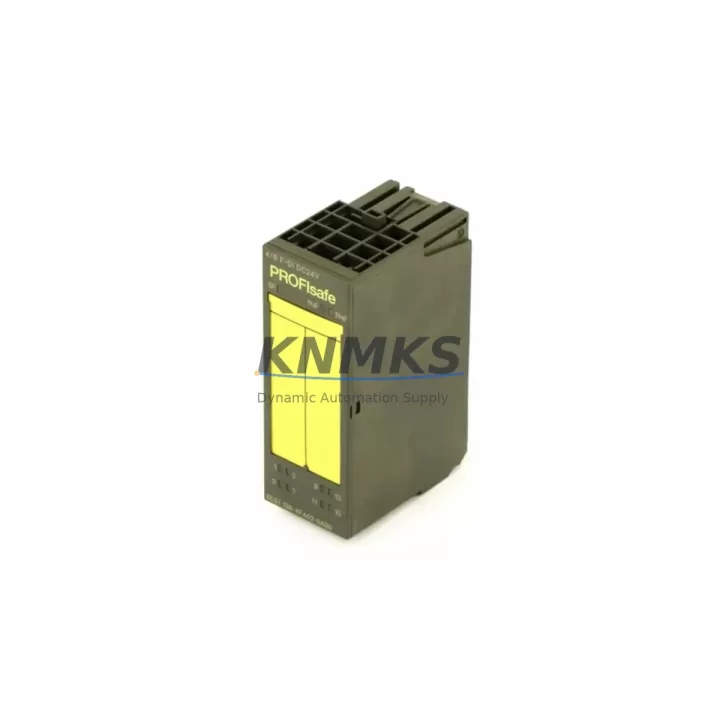
The Siemens 6ES7138-4DF00-0AB0 is a PM-E power module designed for the ET 200S distributed I/O system, widely deployed in manufacturing lines, process automation, and machine control cabinets across automotive, chemical, food & beverage, and energy sectors. As a critical power supply component within the ET 200S backplane, this module delivers 24 VDC supply voltage to the electronic modules mounted downstream on the terminal block assembly. Its failure — whether due to voltage fluctuation, aging capacitors, or overload — can bring an entire I/O segment offline, triggering unplanned downtime that costs far more than the part itself.
At KNMKS, every 6ES7138-4DF00-0AB0 unit is sourced as an original Siemens spare, inspected, and tested before shipment. We maintain long-term stock to support both emergency replacement orders and planned annual maintenance procurement. Our support terms confirmed by quotation cover all shipped units, giving maintenance engineers and procurement teams confidence in every purchase.
Spare Maintenance Table
| Parameter | Specification |
|---|---|
| SKU / Part Number | 6ES7138-4DF00-0AB0 |
| Brand | Siemens |
| Series | ET 200S (SIMATIC S7-300 Distributed I/O) |
| Module Type | PM-E Power Module |
| Supply Voltage | 24 VDC |
| Current Output | Up to 4 A (to downstream electronic modules) |
| Protection Class | IP20 |
| Operating Temperature | 0 °C to +60 °C |
| Mounting | DIN rail, ET 200S terminal block |
| Compatibility | ET 200S IM 151-1, IM 151-3, IM 151-7 interface modules |
| Origin | Germany |
| Support terms | 12 Months |
| Pre-shipment Test | Yes — function and output voltage verified |
| Typical Application | Distributed I/O power segmentation, machine control cabinets, process automation panels |
Maintenance Planning for Continuous Operation
When a 6ES7138-4DF00-0AB0 PM-E module fails or is flagged during a scheduled cabinet inspection, experienced maintenance engineers know that replacing the power module alone is rarely sufficient for a complete and reliable recovery. The ET 200S architecture distributes power across segments, meaning adjacent components are exposed to the same electrical stress events — voltage spikes, ground faults, or sustained overloads — that caused the original failure.
Begin your inspection by verifying the IM 151-1 or IM 151-3 interface module (e.g., 6ES7151-1AA05-0AB0 or 6ES7151-3BA23-0AB0), which manages communication between the ET 200S station and the PROFIBUS DP or PROFINET network. A damaged PM-E can sometimes corrupt the interface module’s firmware or damage its internal power regulation. Check the diagnostic LEDs and confirm the station re-enumerates correctly on the network after the PM-E is replaced.
Next, inspect the electronic modules (EMs) installed downstream of the PM-E segment — particularly digital input modules such as the 6ES7131-4BF00-0AA0 and digital output modules such as the 6ES7132-4BF00-0AA0. These modules draw their operating voltage directly from the PM-E; a failed or degraded power module may have subjected them to undervoltage or transient overvoltage conditions. Verify each module’s status LED and run a channel-level diagnostic from the PLC program before returning the line to production.
For cabinets with mixed I/O, also check any analog input or output modules in the same ET 200S station. Analog modules are particularly sensitive to power quality; even brief supply interruptions can cause offset drift or calibration loss. If the station includes a 4AI U/I ST analog input module (e.g., 6ES7134-4LB02-0AB0), verify signal accuracy against a known reference before sign-off.
Do not overlook the 24 VDC panel power supply feeding the PM-E. A Siemens SITOP PSU100S or equivalent industrial DIN-rail power supply should be load-tested to confirm it can sustain rated current under full I/O load. A degraded power supply is frequently the root cause of repeated PM-E failures. Replace or derate the supply if output ripple or voltage drop under load exceeds specification.
Finally, inspect the terminal block wiring and fuse protection upstream of the ET 200S station. Loose terminals, corroded contacts, or undersized fuses can cause intermittent supply interruptions that stress the PM-E over time. Torque all terminals to specification and replace any fuse that shows signs of heat discoloration. Documenting these checks in your maintenance log supports both support requests and future root-cause analysis.
Site Replacement Workflow
Step 1 — Isolate and de-energize. Switch off the 24 VDC supply to the ET 200S station. Confirm zero voltage at the PM-E input terminals with a calibrated multimeter before proceeding. Do not rely solely on the PLC program state or HMI indication.
Step 2 — Record the existing configuration. Before removing any module, photograph the terminal block wiring layout and note the slot positions of all electronic modules. The ET 200S uses a fixed slot-assignment architecture; modules must be reinstalled in the same positions to match the PLC hardware configuration.
Step 3 — Remove the failed PM-E. Unlock the module from the terminal block by pressing the release lever and sliding the module upward. Inspect the terminal block contacts for burn marks, corrosion, or mechanical damage. Replace the terminal block (6ES7193-4CA40-0AA0 or equivalent) if contact damage is found — installing a new PM-E onto a damaged terminal block will cause immediate re-failure.
Step 4 — Install the replacement 6ES7138-4DF00-0AB0. Align the module with the terminal block guide rails and press firmly until the locking lever clicks. Verify the module is fully seated before re-energizing.
Step 5 — Power-on and diagnostic check. Restore 24 VDC supply and observe the PM-E status LED. A steady green LED indicates normal operation. If the LED flashes or shows red, check the downstream load current — the PM-E will enter current-limiting mode if the total EM load exceeds 4 A. Redistribute modules across multiple PM-E segments if necessary.
Step 6 — PLC communication verification. From the SIMATIC Manager or TIA Portal, run a hardware scan to confirm the ET 200S station is recognized and all modules report no faults. Clear any retained diagnostic messages and perform a short production trial run before releasing the line.
This workflow minimizes downtime, ensures system compatibility, and provides a documented audit trail for maintenance records — all critical for ISO-compliant production environments.
Spare Parts Support FAQ
Q1: Is the 6ES7138-4DF00-0AB0 compatible with all ET 200S interface modules?
The PM-E 6ES7138-4DF00-0AB0 is compatible with the full range of ET 200S interface modules, including IM 151-1 Standard, IM 151-3 PN, and IM 151-7 CPU variants. It operates independently of the communication protocol (PROFIBUS DP or PROFINET) used by the interface module. Always verify the hardware revision of your existing station against the Siemens ET 200S system manual to confirm slot compatibility before installation.
Q2: How do you verify the unit before shipment?
Every 6ES7138-4DF00-0AB0 unit shipped by KNMKS undergoes a pre-shipment functional test: output voltage is measured under load, the status LED behavior is confirmed, and the module is inspected for physical damage. Units that do not pass testing are not shipped. A test report is available upon request for quality-critical procurement.
Q3: What is your long-term supply commitment for this part?
KNMKS maintains dedicated stock of the 6ES7138-4DF00-0AB0 to support both emergency single-unit orders and annual maintenance blanket orders. For customers managing aging ET 200S installations, we recommend establishing a standing order or consignment stock arrangement to eliminate lead-time risk during unplanned outages. Contact our sales team to discuss volume pricing and reserved stock agreements.
Q4: What does the support terms confirmed by quotation cover?
Our support terms confirmed by quotation cover manufacturing defects and functional failure under normal operating conditions as specified in the Siemens datasheet. It does not cover damage caused by incorrect installation, overvoltage events beyond rated limits, or physical mishandling. In the event of a support terms claim, KNMKS will arrange replacement shipment after receiving the returned defective unit and completing a failure analysis.
© 2026 KNMKS. All rights reserved.
Original Source: https://knmks.com
Contact: admin@knmks.com | +86 18359268345
Product Identification
- Brand / Ecosystem
-
Siemens
Siemens - Model / Series
-
6ES7138-4DF00-0AB0
SIMATIC Series - Product Family
- PLCs & Controllers
- Availability Status
- Available on request after model and quantity confirmation
- Inquiry Type
- B2B RFQ, replacement inquiry and project spare-part request
- Pre-Quote Check
- Exact SKU, brand, series, quantity, nameplate photos and destination country are checked before quotation
System Path
Where this product fits in the KNMKS automation structure.
Specification & Inquiry Focus
- Control platform
- PLC, PAC and modular controllers
- Common needs
- CPU, rack, power and I/O expansion
- Project support
- Replacement, cabinet build and maintenance
Buyer Confirmation
Information KNMKS checks before replying.
- Exact model
- 6ES7138-4DF00-0AB0
- Brand / ecosystem
- Siemens
- Product family
- PLCs & Controllers
- Application note
- Replacement, maintenance, project build or spare-part list
- Useful photos
- Nameplate, installed unit, cabinet layout or connector side
- Delivery details
- Quantity, destination country and target schedule
Document Support
Files and notes can be confirmed during quotation.
- Product photos or nameplate confirmation when available
- Packing and delivery notes before quotation confirmation
- Support scope and delivery terms confirmed per inquiry
- Export document coordination for qualified B2B requests
Inquiry Support
- Model cross-checking before quotation
- CPU, power, rack and expansion module matching
- Support for replacement and project inquiry
What to Send Us
- Brand and exact model number: Siemens 6ES7138-4DF00-0AB0
- Quantity and required delivery time
- Application, replacement requirement or nameplate photo
- Destination country and shipping preference
RFQ Preparation
This is a product inquiry page built for RFQ communication.
Fast Model Check
Send this model to KNMKS for confirmation.
Include quantity, destination country and photos if this is a maintenance replacement. The inquiry will be saved with a reference number after submission.
Brand & Compatibility Note
KNMKS displays automation product information for well-known industrial brand ecosystems and compatible replacement references. Brand names are used for product identification and compatibility reference only; final availability and commercial terms are confirmed per quotation.
 Manufacturing
 Machine Tools
 Packaging
 Energy & Power



 HMI & Displays
 Servo Systems
 Variable Frequency Drives
 Sensors