
Overview
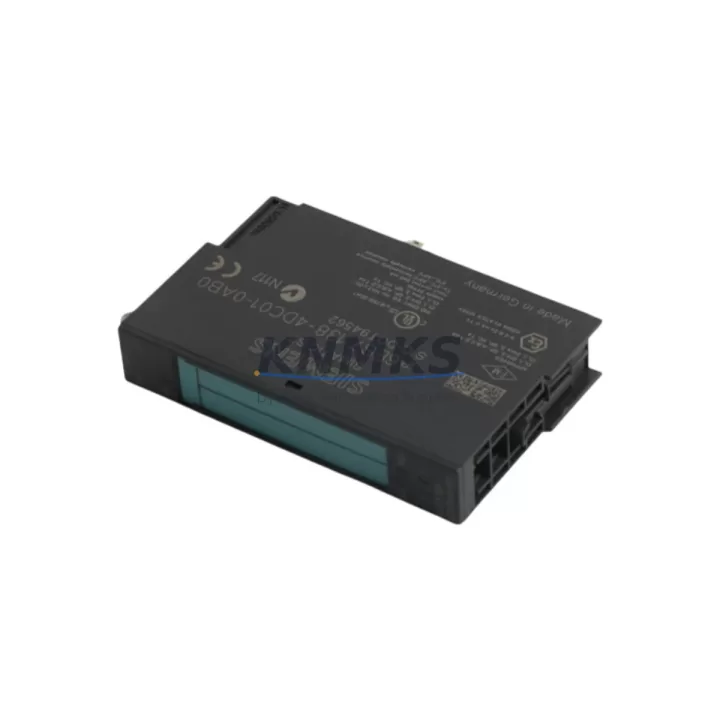
Siemens 6ES7138-4DC01-0AB0 Spare Part for ET 200S Uptime
The Siemens 6ES7138-4DC01-0AB0 is a 4-channel digital output module (4DO DC24V / 0.5A) designed for the ET 200S distributed I/O system. As a maintenance-proven spare part, it plays a critical role in sustaining factory uptime across automotive assembly lines, process plants, packaging machinery, and material handling systems. Whether you are managing a scheduled annual overhaul, responding to an unplanned output channel failure, or building a strategic spare parts inventory for a multi-site SIMATIC installation, the 6ES7138-4DC01-0AB0 is a direct-fit replacement that restores full digital output capacity without system reconfiguration.
Maintenance engineers and procurement teams working with ET 200S-based control architectures rely on this module to maintain signal integrity across actuator-driven circuits. Its compact form factor, plug-in terminal design, and compatibility with the ET 200S power module and interface module make it a practical choice for rapid field replacement. Each unit supplied by KNMKS is sourced as an original Siemens component, pre-shipment tested under load conditions, and backed by a support terms confirmed by quotation — ensuring that your replacement cycle is both reliable and auditable.
Spare Maintenance Table
| SKU / Part Number | 6ES7138-4DC01-0AB0 |
| Brand | Siemens |
| Series | SIMATIC ET 200S |
| Module Type | 4-Channel Digital Output (4DO) |
| Output Voltage | DC 24V |
| Output Current | 0.5A per channel |
| Total Output Current | 2A (all channels combined) |
| Communication Interface | ET 200S backplane bus (PROFIBUS / PROFINET via IM) |
| Compatible Interface Modules | 6ES7151-1AA05-0AB0, 6ES7151-3AA23-0AB0 and compatible IM variants |
| Power Supply Requirement | DC 24V via ET 200S power module (e.g., 6ES7138-4CA01-0AA0) |
| Installation | Plug-in onto ET 200S rail; no tools required for module swap |
| Operating Temperature | 0°C to +60°C |
| Protection Class | IP20 |
| Origin | Germany |
| Condition | Original, New or Tested Surplus |
| Support terms | 12 Months from shipment date |
| Pre-Shipment Test | Yes — functional output verification under DC 24V load |
Maintenance Planning for Continuous Operation
When replacing the 6ES7138-4DC01-0AB0 in an ET 200S station, a thorough site inspection should extend beyond the module itself. Maintenance engineers are advised to verify the condition of the adjacent ET 200S power module — typically a 6ES7138-4CA01-0AA0 or equivalent — since a degraded power supply rail is a common root cause of premature output module failure. Confirm that the DC 24V supply voltage is within tolerance (20.4V–28.8V) before inserting the replacement module.
The interface module (IM) governing the ET 200S station — such as the 6ES7151-1AA05-0AB0 for PROFIBUS or the 6ES7151-3AA23-0AB0 for PROFINET — should be inspected for firmware currency and communication fault history. A corrupted IM configuration or a degraded backplane connector can cause repeated output module faults that are misdiagnosed as module failures. Reviewing the STEP 7 or TIA Portal diagnostic buffer before and after replacement is standard practice.
Terminal wiring connected to the 6ES7138-4DC01-0AB0 should be inspected for loose connections, oxidation, or insulation damage — particularly on actuator circuits driving solenoid valves, contactors, or indicator lamps. If the station includes signal isolators or relay output modules such as the 6ES7138-4HA00-0AB0 relay module, these should be tested for contact wear, especially in high-cycle applications. Fuse protection on the 24V actuator supply rail should also be verified; a blown fuse on the load side is frequently overlooked during rapid fault recovery.
For control cabinets running mixed I/O configurations, it is good practice to cross-check the digital input modules — such as the 6ES7131-4BD01-0AB0 (4DI DC24V) — for signal consistency after output replacement, as input feedback loops tied to actuator confirmation signals may mask residual wiring faults. Where HMI panels are integrated into the same PROFIBUS or PROFINET segment, verify that the HMI (e.g., SIMATIC TP or KTP series) is correctly reflecting the restored output states post-replacement.
For long-term spare parts planning, procurement engineers managing ET 200S-based installations should maintain a minimum buffer of two 6ES7138-4DC01-0AB0 units per active production line, alongside one spare interface module and one spare power module per station cluster. This inventory posture supports same-shift recovery without waiting for international logistics, which is especially critical for facilities operating 24/7 or in remote locations with limited local distributor access.
Site Replacement Workflow
Step 1 — Isolate and de-energize: Switch the ET 200S station to STOP mode via the PLC CPU or TIA Portal online interface. De-energize the 24V actuator supply to the affected station before touching any module.
Step 2 — Document current configuration: Record the slot position of the 6ES7138-4DC01-0AB0 and photograph the terminal wiring before disconnection. In TIA Portal or STEP 7, export the hardware configuration for reference.
Step 3 — Remove the faulty module: Unlock the module latch, disconnect the plug-in terminal block (wiring remains intact on the terminal block), and slide the module out of the backplane slot.
Step 4 — Insert the replacement module: Slide the new 6ES7138-4DC01-0AB0 into the same slot. Reconnect the terminal block. The plug-in terminal design ensures wiring polarity is preserved without re-termination.
Step 5 — Power-up and verify: Re-energize the station. Switch the CPU to RUN. Verify all four output channels are active and that actuator feedback signals are confirmed in the PLC diagnostic buffer and HMI display.
Step 6 — Log the replacement: Record the replacement in the maintenance log with the date, module serial number, and post-replacement test result. Update the spare parts inventory accordingly.
This workflow is compatible with hot-swap-capable ET 200S configurations where the IM supports module replacement during operation (MRPD). Consult the station’s hardware configuration to confirm whether hot-swap is enabled before attempting live replacement.
Spare Parts Support FAQ
Q1: Is the 6ES7138-4DC01-0AB0 compatible with both PROFIBUS and PROFINET ET 200S stations?
Yes. The 6ES7138-4DC01-0AB0 is a slot module that operates on the ET 200S internal backplane bus. Its compatibility is determined by the interface module (IM) installed in the station, not the module itself. It works with PROFIBUS-based stations (using IM 151-1 variants) and PROFINET-based stations (using IM 151-3 variants) without modification.
Q2: What does the support terms confirmed by quotation cover?
The support terms confirmed by quotation cover functional failure under normal operating conditions from the date of shipment. Each unit is pre-shipment tested under DC 24V load to verify all four output channels. Support requests are supported with replacement dispatch within standard lead time. Physical damage caused by incorrect installation, overvoltage, or reverse polarity is excluded.
Q3: Can KNMKS support long-term supply agreements for this module?
Yes. KNMKS supports blanket purchase orders and long-term supply agreements for the 6ES7138-4DC01-0AB0 and related ET 200S components. This is particularly relevant for facilities managing aging SIMATIC installations where Siemens has announced product lifecycle transitions. Contact admin@knmks.com to discuss volume pricing, lead time commitments, and multi-site delivery arrangements.
Q4: How do I verify authenticity before installation?
Original Siemens modules carry a CE marking, Siemens part label with date code, and a unique serial number traceable in the Siemens Industry Online Support portal. KNMKS provides documentation of origin and test records upon request. If you require third-party inspection or factory acceptance testing (FAT) documentation, this can be arranged prior to shipment.
© 2026 KNMKS. All rights reserved.
Original Source: https://knmks.com
Contact: admin@knmks.com | +86 18359268345
Product Identification
- Brand / Ecosystem
-
Siemens
Siemens - Model / Series
-
6ES7138-4DC01-0AB0
SIMATIC Series - Product Family
- PLCs & Controllers
- Availability Status
- Available on request after model and quantity confirmation
- Inquiry Type
- B2B RFQ, replacement inquiry and project spare-part request
- Pre-Quote Check
- Exact SKU, brand, series, quantity, nameplate photos and destination country are checked before quotation
System Path
Where this product fits in the KNMKS automation structure.
Specification & Inquiry Focus
- Control platform
- PLC, PAC and modular controllers
- Common needs
- CPU, rack, power and I/O expansion
- Project support
- Replacement, cabinet build and maintenance
Buyer Confirmation
Information KNMKS checks before replying.
- Exact model
- 6ES7138-4DC01-0AB0
- Brand / ecosystem
- Siemens
- Product family
- PLCs & Controllers
- Application note
- Replacement, maintenance, project build or spare-part list
- Useful photos
- Nameplate, installed unit, cabinet layout or connector side
- Delivery details
- Quantity, destination country and target schedule
Document Support
Files and notes can be confirmed during quotation.
- Product photos or nameplate confirmation when available
- Packing and delivery notes before quotation confirmation
- Support scope and delivery terms confirmed per inquiry
- Export document coordination for qualified B2B requests
Inquiry Support
- Model cross-checking before quotation
- CPU, power, rack and expansion module matching
- Support for replacement and project inquiry
What to Send Us
- Brand and exact model number: Siemens 6ES7138-4DC01-0AB0
- Quantity and required delivery time
- Application, replacement requirement or nameplate photo
- Destination country and shipping preference
RFQ Preparation
This is a product inquiry page built for RFQ communication.
Fast Model Check
Send this model to KNMKS for confirmation.
Include quantity, destination country and photos if this is a maintenance replacement. The inquiry will be saved with a reference number after submission.
Brand & Compatibility Note
KNMKS displays automation product information for well-known industrial brand ecosystems and compatible replacement references. Brand names are used for product identification and compatibility reference only; final availability and commercial terms are confirmed per quotation.
 Manufacturing
 Machine Tools
 Packaging
 Energy & Power



 HMI & Displays
 Servo Systems
 Variable Frequency Drives
 Sensors