
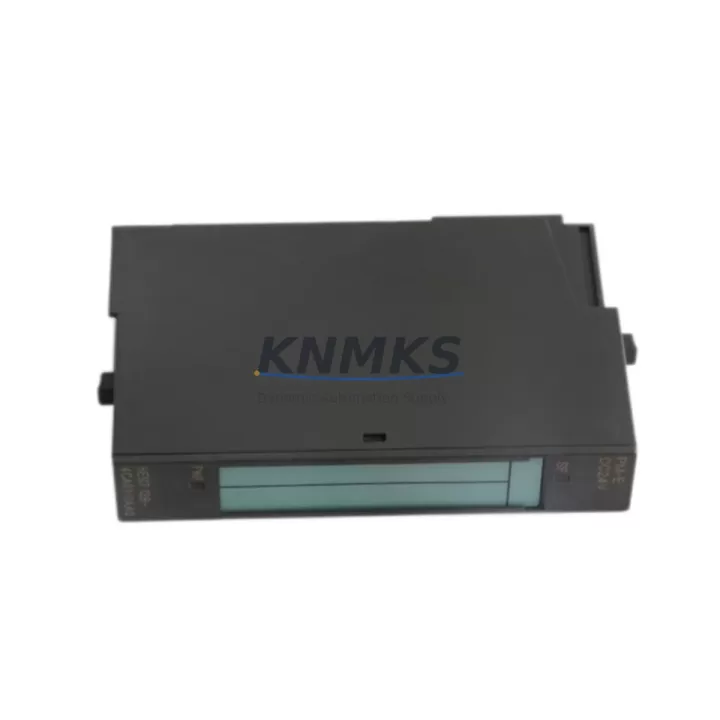
Overview
Siemens 6ES7138-4CA01-0AA0 Migration-Ready Analog Output for Legacy ET 200S Control Systems
The Siemens 6ES7138-4CA01-0AA0 is a 2-channel analog output module designed for the SIMATIC ET 200S distributed I/O platform, operating over PROFIBUS DP. As legacy automation lines face end-of-life pressures, this module remains one of the most sought-after retrofit components for engineers tasked with upgrading or sustaining older distributed control architectures without full system replacement.
Whether you are replacing a failed unit on an active production line, sourcing a long-term spare for a discontinued control cabinet, or planning a phased migration from an older SIMATIC S5 or early S7-300 architecture, the 6ES7138-4CA01-0AA0 delivers verified compatibility with existing ET 200S backplanes, terminal modules, and PROFIBUS DP segment configurations. Each unit shipped from our inventory undergoes pre-shipment functional testing and is backed by a support terms confirmed by quotation.
Migration Compatibility Table
| Parameter | Specification / Retrofit Note |
|---|---|
| Module SKU | 6ES7138-4CA01-0AA0 |
| Series | SIMATIC ET 200S |
| Output Channels | 2-channel analog output (voltage / current selectable) |
| Output Range | ±10 V / 0–20 mA / 4–20 mA (configurable per channel) |
| Communication Interface | PROFIBUS DP via ET 200S interface module (e.g., 6ES7151-1AA05-0AB0) |
| Backplane Compatibility | ET 200S standard terminal module TM-AO2/U or TM-AO2/I required |
| Power Supply Requirement | 24 VDC via backplane bus; verify PM-E power module capacity before installation |
| Installation Footprint | Standard ET 200S slot; confirm rail space and slot addressing in HW Config |
| Firmware Compatibility | Compatible with STEP 7 V5.x and TIA Portal V13 and above (via legacy mode) |
| Replacement Path | Direct drop-in for earlier 6ES7138-4CA00-0AA0 variant; verify terminal module revision |
| Commissioning Note | Re-download HW configuration after slot replacement; verify analog scaling in OB1/FC |
| Support terms | 12 months from shipment date — functional defects covered |
Retrofit Planning for Existing Automation Systems
Integrating the 6ES7138-4CA01-0AA0 into an existing control cabinet requires a structured pre-retrofit assessment. Begin by auditing the installed ET 200S interface module — typically a 6ES7151-1AA05-0AB0 or similar IM151 variant — to confirm the PROFIBUS DP address assignment and GSD file version used in the original HW Config. Mismatched GSD files are a common source of commissioning delays when replacing analog output modules in legacy distributed I/O racks.
Next, verify the terminal module already installed in the slot. The 6ES7138-4CA01-0AA0 requires a compatible TM-AO terminal module; if the existing terminal module was paired with an older 6ES7138-4CA00-0AA0, physical compatibility should be confirmed before ordering. In most cases, the terminal module remains in place and only the electronics module is swapped — a significant advantage for minimizing downtime on active lines.
Power budget verification is critical. The PM-E power module (such as the 6ES7138-4CA01-0AA0’s rack neighbor, the 6ES7138-4CB11-0AB0 PM-E DC24V) must have sufficient current headroom to support the analog output module alongside other I/O modules in the same ET 200S station. Overloaded power segments are a frequent root cause of intermittent faults during and after retrofit.
For systems where the ET 200S station communicates upstream to a SIMATIC S7-300 CPU (e.g., CPU 315-2 DP or CPU 317-2 DP), the analog output address in the process image must be re-verified after hardware replacement. If the slot position changes, the I/O address will shift, requiring updates to the PLC program’s analog write instructions (AW or QW addressing). Coordinate with the controls engineer to freeze the program version before the swap and validate output scaling post-commissioning.
Where the retrofit involves a broader migration — for example, transitioning from a standalone ET 200S station to an ET 200SP platform — the 6ES7138-4CA01-0AA0 serves as a bridge component, maintaining analog output continuity on the legacy segment while the new platform is commissioned in parallel. In such scenarios, PROFIBUS DP repeaters and segment terminators should be inspected to ensure signal integrity is maintained across the extended bus during the transition period.
For facilities managing multiple control cabinets, it is advisable to maintain at least one spare 6ES7138-4CA01-0AA0 per active ET 200S station. Given the module’s discontinued production status, sourcing lead times from the OEM channel are unpredictable. Stocking verified, tested units from a reliable distributor — with documented support terms confirmed by quotation coverage — is the most effective strategy for extending the operational life of legacy PROFIBUS DP systems without committing to a full platform migration.
Downtime Control During System Migration
Minimizing unplanned downtime during analog output module replacement requires preparation at three levels: program protection, hardware sequencing, and field verification.
Program Protection: Before any hardware change, archive the current STEP 7 or TIA Portal project, including the HW Config, symbol table, and all program blocks (OBs, FCs, FBs, DBs). Store the archive on an offline medium independent of the PLC. If the CPU supports memory card backup, create a card image before the swap. This ensures that if the replacement module triggers an unexpected configuration fault, the original program state can be restored within minutes.
Hardware Sequencing: Power down only the affected ET 200S station segment, not the entire PROFIBUS DP network, where possible. Use the PM-E power module’s enable input to isolate the station while keeping the DP master and other stations online. Remove the 6ES7138-4CA01-0AA0 electronics module from the terminal module without disturbing field wiring. Insert the replacement module, confirm the green LED sequence on power-up, and check for BF (Bus Fault) or SF (System Fault) indicators before re-enabling outputs.
Field Verification: After the module is online, force each analog output channel individually from the PLC diagnostic buffer or a test FC, and verify the corresponding field signal at the actuator (control valve, variable frequency drive, or positioner). Confirm that the 4–20 mA or voltage signal matches the expected engineering unit range. Document the as-found and as-left values for the maintenance record. For systems with SIMATIC HMI panels (e.g., TP700 Comfort or MP377), verify that analog trend displays and alarm setpoints reflect correct values after the module swap — HMI tag addresses tied to analog output QW addresses should be cross-checked against the updated HW Config.
A well-executed module swap on an ET 200S station typically requires 30–90 minutes of controlled downtime when pre-commissioning steps are completed in advance. Unplanned replacements without prior program archiving or hardware documentation can extend this to several hours. Investing in pre-retrofit planning and maintaining verified spare inventory are the two most effective levers for downtime control in legacy PROFIBUS DP environments.
Retrofit Support FAQ
Q1: Is the 6ES7138-4CA01-0AA0 a direct replacement for the 6ES7138-4CA00-0AA0?
In most cases, yes. The -4CA01- revision is the successor to the -4CA00- variant and is physically and functionally compatible with the same ET 200S terminal modules. However, confirm the terminal module revision (TM-AO2/U or TM-AO2/I) installed in your rack before ordering, as terminal module compatibility determines whether the electronics module can be swapped without additional hardware changes.
Q2: Do I need to modify my PLC program after replacing this module?
If the replacement module is installed in the same physical slot and the HW Config is not changed, no program modification is required. However, if the slot position changes or the HW Config is re-downloaded, verify that the analog output I/O address (QW) in your program blocks still maps correctly to the new module position. Re-download the HW Config to the CPU and perform a warm restart before resuming production.
Q3: What pre-shipment testing is performed on your 6ES7138-4CA01-0AA0 units?
Each unit undergoes functional power-on testing to verify module initialization, channel output response, and bus communication readiness. Units that fail any stage of testing are quarantined and not shipped. A test report is available upon request. All shipped units are covered by a support terms confirmed by quotation against functional defects from the date of shipment.
Q4: What is the typical lead time and do you maintain stock?
We maintain warehouse inventory of the 6ES7138-4CA01-0AA0 to support urgent replacement and planned retrofit projects. Standard orders ship within 1–3 business days. For bulk orders or project-based procurement requiring multiple units across an ET 200S installation, contact our sales team to confirm available stock and arrange consolidated shipment. We supply globally with export documentation available for international shipments.
© 2026 KNMKS. All rights reserved.
Original Source: https://knmks.com
Contact: admin@knmks.com | +86 18359268345
Product Identification
- Brand / Ecosystem
-
Siemens
Siemens - Model / Series
-
6ES7138-4CA01-0AA0
SIMATIC Series - Product Family
- PLCs & Controllers
- Availability Status
- Available on request after model and quantity confirmation
- Inquiry Type
- B2B RFQ, replacement inquiry and project spare-part request
- Pre-Quote Check
- Exact SKU, brand, series, quantity, nameplate photos and destination country are checked before quotation
System Path
Where this product fits in the KNMKS automation structure.
Specification & Inquiry Focus
- Control platform
- PLC, PAC and modular controllers
- Common needs
- CPU, rack, power and I/O expansion
- Project support
- Replacement, cabinet build and maintenance
Buyer Confirmation
Information KNMKS checks before replying.
- Exact model
- 6ES7138-4CA01-0AA0
- Brand / ecosystem
- Siemens
- Product family
- PLCs & Controllers
- Application note
- Replacement, maintenance, project build or spare-part list
- Useful photos
- Nameplate, installed unit, cabinet layout or connector side
- Delivery details
- Quantity, destination country and target schedule
Document Support
Files and notes can be confirmed during quotation.
- Product photos or nameplate confirmation when available
- Packing and delivery notes before quotation confirmation
- Support scope and delivery terms confirmed per inquiry
- Export document coordination for qualified B2B requests
Inquiry Support
- Model cross-checking before quotation
- CPU, power, rack and expansion module matching
- Support for replacement and project inquiry
What to Send Us
- Brand and exact model number: Siemens 6ES7138-4CA01-0AA0
- Quantity and required delivery time
- Application, replacement requirement or nameplate photo
- Destination country and shipping preference
RFQ Preparation
This is a product inquiry page built for RFQ communication.
Fast Model Check
Send this model to KNMKS for confirmation.
Include quantity, destination country and photos if this is a maintenance replacement. The inquiry will be saved with a reference number after submission.
Brand & Compatibility Note
KNMKS displays automation product information for well-known industrial brand ecosystems and compatible replacement references. Brand names are used for product identification and compatibility reference only; final availability and commercial terms are confirmed per quotation.
 Manufacturing
 Machine Tools
 Packaging
 Energy & Power



 HMI & Displays
 Servo Systems
 Variable Frequency Drives
 Sensors