
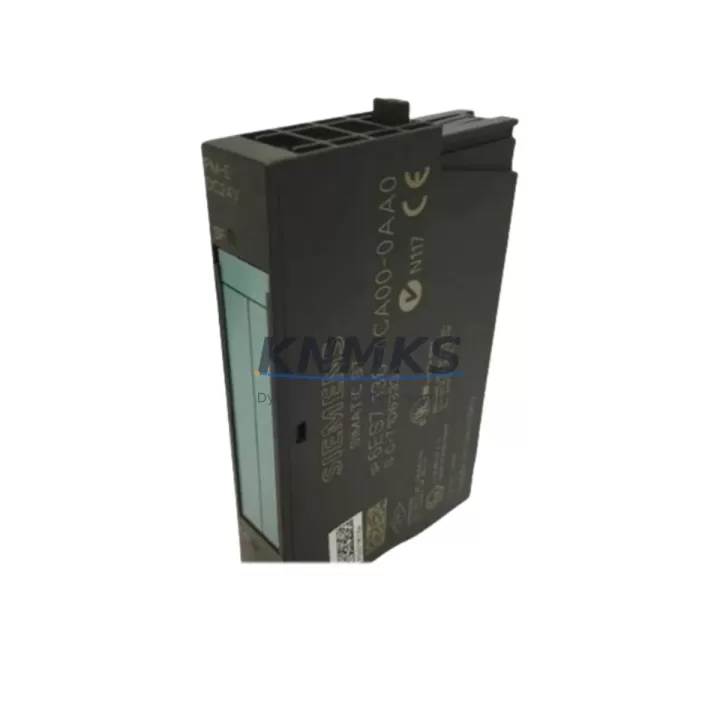
Overview
Siemens 6ES7138-4CA00-0AA0 Maintenance-Proven Spare Part for Factory Uptime
The Siemens 6ES7138-4CA00-0AA0 is a 2-channel analog input/output module designed for the SIMATIC ET 200S distributed I/O system. In industrial maintenance environments — from automotive assembly lines to chemical processing plants — this module plays a critical role in sustaining accurate signal acquisition and analog output control. Keeping a verified spare of the 6ES7138-4CA00-0AA0 on the shelf is a proven strategy for reducing unplanned downtime and protecting production continuity.
Maintenance engineers working with ET 200S racks understand that analog I/O modules are among the highest-wear components in a distributed control architecture. Signal drift, connector fatigue, and firmware incompatibility after a control system upgrade are common failure triggers. When the 6ES7138-4CA00-0AA0 is flagged during a fault isolation routine, a pre-tested replacement unit allows the technician to restore the rack to full operation within minutes rather than waiting days for emergency procurement.
Each unit supplied by KNMKS is sourced from verified industrial channels, inspected for physical integrity, and function-tested prior to shipment. All units carry a support terms confirmed by quotation and are dispatched with full traceability documentation to support your maintenance records and audit requirements.
Spare Maintenance Table
| Parameter | Specification |
|---|---|
| Part Number | 6ES7138-4CA00-0AA0 |
| Brand / Manufacturer | Siemens |
| Series | SIMATIC ET 200S |
| Module Type | 2-Channel Analog Input / 2-Channel Analog Output |
| Input Signal Range | ±10 V / 0–20 mA / 4–20 mA (configurable) |
| Output Signal Range | ±10 V / 0–20 mA / 4–20 mA (configurable) |
| Resolution | 13-bit + sign |
| Supply Voltage | 24 V DC (via ET 200S power module) |
| Backplane Interface | ET 200S terminal module (e.g. TM-E series) |
| Compatibility | SIMATIC ET 200S IM 151-1, IM 151-3 PN/DP interface modules |
| Country of Origin | Germany |
| Weight | Approx. 200 g |
| Operating Temperature | 0 °C to +60 °C |
| Protection Class | IP20 |
| Maintenance Recommendation | Inspect signal wiring and terminal module contacts every 12 months; replace if signal drift exceeds ±0.5% of full scale |
| Support terms | 12 Months — Tested Before Shipment |
Maintenance Planning for Continuous Operation
When a 6ES7138-4CA00-0AA0 module is identified as a fault source during a routine point inspection or emergency fault isolation, experienced maintenance engineers know that the analog I/O module rarely fails in isolation. A systematic check of the surrounding components is essential to prevent repeat failures and ensure the restored system operates reliably.
Begin by verifying the ET 200S power module (such as the PM-E 24 V DC series) that supplies 24 V DC to the analog module rail. Voltage sag or ripple on the power bus is a leading cause of analog signal instability and premature module failure. If the power module shows signs of thermal stress or output voltage deviation, it should be replaced concurrently with the analog I/O module.
Next, inspect the terminal module (TM-E) on which the 6ES7138-4CA00-0AA0 is mounted. Corroded or mechanically worn terminal module contacts can introduce resistance into the signal path, causing offset errors that are often misdiagnosed as module faults. Terminal modules are low-cost components that are frequently overlooked in spare parts inventories.
For systems where the ET 200S rack communicates over PROFIBUS DP or PROFINET, verify the integrity of the IM 151-1 or IM 151-3 PN/DP interface module. A degraded interface module can cause intermittent communication faults that manifest as analog I/O errors at the controller level, masking the true root cause.
Signal wiring connected to the analog inputs and outputs should be inspected for insulation damage, loose ferrules, and ground loops. Where signal runs exceed 10 metres or pass through electrically noisy environments, consider installing signal isolators (such as the Siemens SITRANS series or equivalent DIN-rail isolators) to protect the module inputs from common-mode interference.
In control cabinets where the ET 200S rack is co-located with 24 V DC relay modules or digital output modules (e.g. 6ES7132-4BD series), verify that inductive loads are properly suppressed with freewheeling diodes or RC snubbers. Unsuppressed switching transients are a documented cause of analog module degradation over time.
Finally, review the fuse protection on the 24 V DC supply rail feeding the ET 200S rack. A correctly rated fuse (typically 2 A to 4 A depending on rack configuration) protects the entire module assembly from overcurrent events. Fuse holders and fuse elements should be included in the annual inspection checklist alongside the modules themselves.
Site Replacement Workflow
Replacing the 6ES7138-4CA00-0AA0 on-site is a straightforward procedure when the correct spare is available and the replacement workflow is followed systematically.
Step 1 — Isolate and document: Before removing the faulty module, record the current channel configuration parameters from the SIMATIC Manager or TIA Portal project. Note the signal type, range, and any scaling or filter settings applied to each channel. This data is required to configure the replacement module correctly.
Step 2 — Power down the terminal module: Switch off the PM-E power module supplying the affected rack segment. The ET 200S modular design allows segment-level power isolation, meaning only the affected section of the rack needs to be de-energised — minimising disruption to adjacent I/O modules that remain operational.
Step 3 — Remove and inspect: Slide the 6ES7138-4CA00-0AA0 out of the terminal module. Inspect the terminal module contacts and the backplane connector for contamination or mechanical damage. Clean contacts with isopropyl alcohol if required.
Step 4 — Install the replacement: Seat the new 6ES7138-4CA00-0AA0 firmly into the terminal module until the locking mechanism engages. Restore power and verify that the module’s status LED indicates normal operation (green steady).
Step 5 — Verify in TIA Portal / SIMATIC Manager: Perform an online comparison to confirm the replacement module is recognised by the CPU. Download channel configuration if required and verify analog signal values against known reference inputs before returning the system to production.
This workflow is compatible with legacy S7-300/ET 200S installations as well as modernised systems where the ET 200S rack has been retained as a distributed I/O node under a newer S7-1500 or SIMATIC PCS 7 controller. The 6ES7138-4CA00-0AA0 maintains backward compatibility across these configurations, making it a reliable long-term spare choice for sites managing mixed-generation control infrastructure.
Spare Parts Support FAQ
Q1: Is the 6ES7138-4CA00-0AA0 compatible with both PROFIBUS DP and PROFINET ET 200S configurations?
Yes. The 6ES7138-4CA00-0AA0 is a slot module that interfaces with the ET 200S terminal module and backplane, making it compatible with all ET 200S interface module variants including IM 151-1 (PROFIBUS DP) and IM 151-3 PN (PROFINET). The communication protocol is handled by the interface module, not the analog I/O module itself.
Q2: How do you verify the module is genuine and functional before shipment?
Every 6ES7138-4CA00-0AA0 unit supplied by KNMKS undergoes a visual inspection for physical damage, a label and firmware version check, and a functional test on an ET 200S test rack prior to dispatch. A test report is available upon request. All units are covered by a support terms confirmed by quotation from the date of shipment.
Q3: What is the recommended spare parts holding strategy for ET 200S analog modules?
For production lines with more than four ET 200S racks, maintenance planners typically hold a minimum of two 6ES7138-4CA00-0AA0 units as on-site cold spares. For critical processes where analog I/O failure triggers a full line stop, a hot-swap spare kept in the control cabinet is advisable. Annual consumption data should be reviewed to adjust stock levels before the end-of-life phase of the ET 200S platform.
Q4: Can KNMKS support long-term supply of the 6ES7138-4CA00-0AA0 for multi-year maintenance contracts?
Yes. KNMKS maintains stock of the 6ES7138-4CA00-0AA0 and can support blanket order arrangements for customers with multi-site or multi-year maintenance requirements. Contact our sales team to discuss volume pricing, reserved stock agreements, and consolidated shipment scheduling.
© 2026 KNMKS. All rights reserved.
Original Source: https://knmks.com
Contact: admin@knmks.com | +86 18359268345
Product Identification
- Brand / Ecosystem
-
Siemens
Siemens - Model / Series
-
6ES7138-4CA00-0AA0
SIMATIC Series - Product Family
- PLCs & Controllers
- Availability Status
- Available on request after model and quantity confirmation
- Inquiry Type
- B2B RFQ, replacement inquiry and project spare-part request
- Pre-Quote Check
- Exact SKU, brand, series, quantity, nameplate photos and destination country are checked before quotation
System Path
Where this product fits in the KNMKS automation structure.
Specification & Inquiry Focus
- Control platform
- PLC, PAC and modular controllers
- Common needs
- CPU, rack, power and I/O expansion
- Project support
- Replacement, cabinet build and maintenance
Buyer Confirmation
Information KNMKS checks before replying.
- Exact model
- 6ES7138-4CA00-0AA0
- Brand / ecosystem
- Siemens
- Product family
- PLCs & Controllers
- Application note
- Replacement, maintenance, project build or spare-part list
- Useful photos
- Nameplate, installed unit, cabinet layout or connector side
- Delivery details
- Quantity, destination country and target schedule
Document Support
Files and notes can be confirmed during quotation.
- Product photos or nameplate confirmation when available
- Packing and delivery notes before quotation confirmation
- Support scope and delivery terms confirmed per inquiry
- Export document coordination for qualified B2B requests
Inquiry Support
- Model cross-checking before quotation
- CPU, power, rack and expansion module matching
- Support for replacement and project inquiry
What to Send Us
- Brand and exact model number: Siemens 6ES7138-4CA00-0AA0
- Quantity and required delivery time
- Application, replacement requirement or nameplate photo
- Destination country and shipping preference
RFQ Preparation
This is a product inquiry page built for RFQ communication.
Fast Model Check
Send this model to KNMKS for confirmation.
Include quantity, destination country and photos if this is a maintenance replacement. The inquiry will be saved with a reference number after submission.
Brand & Compatibility Note
KNMKS displays automation product information for well-known industrial brand ecosystems and compatible replacement references. Brand names are used for product identification and compatibility reference only; final availability and commercial terms are confirmed per quotation.
 Manufacturing
 Machine Tools
 Packaging
 Energy & Power



 HMI & Displays
 Servo Systems
 Variable Frequency Drives
 Sensors