
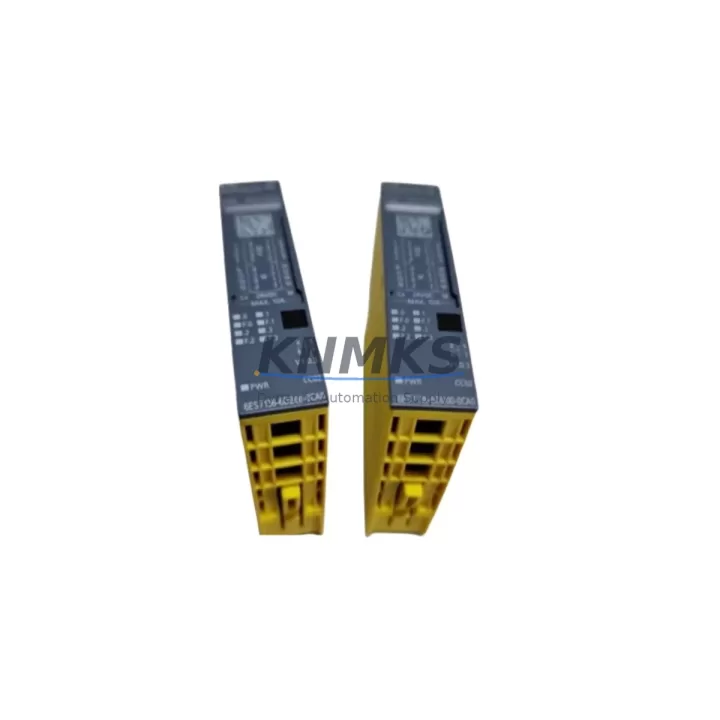
Overview
Siemens 6ES7136-6DB00-0CA0 Migration-Ready DQ Module for ET 200SP: Legacy System Migration and Compatible Upgrade
The Siemens 6ES7136-6DB00-0CA0 is a digital output module designed for the ET 200SP distributed I/O system, delivering 8 channels of 24VDC/0.5A output with full PROFINET integration. As legacy S7-300 and S7-400 control architectures reach end-of-life, this module serves as a critical component in migration projects targeting the ET 200SP platform — offering a compact, DIN-rail-mounted solution that fits directly into existing control cabinet layouts without requiring structural modification.
For facilities running older IM 153-x interface modules or transitioning from ET 200M distributed I/O racks, the 6ES7136-6DB00-0CA0 provides a validated upgrade path. Its BaseUnit compatibility — specifically the BU type A0 — must be confirmed prior to installation, as the module requires the correct BaseUnit to establish backplane communication and terminal wiring. Engineers migrating from screw-terminal ET 200M I/O should account for the push-in terminal design of the ET 200SP BaseUnit, which changes the field wiring approach and may require re-termination of existing cable looms.
Each unit is pre-shipment tested against Siemens factory specifications and covered by a support terms confirmed by quotation, ensuring confidence in both new installations and emergency spare part replacements.
Migration Compatibility Table
| Parameter | Details |
|---|---|
| SKU / Part Number | 6ES7136-6DB00-0CA0 |
| Series / Platform | Siemens ET 200SP |
| Module Type | Digital Output (DQ), 8-channel, 24VDC / 0.5A per channel |
| Interface / Communication | PROFINET IO (via ET 200SP IM interface module) |
| Compatible Interface Modules | IM 155-6 PN ST, IM 155-6 PN HF, IM 155-6 PN BA |
| Required BaseUnit | BU type A0 (e.g. 6ES7193-6BP00-0BA0) |
| Legacy Replacement Target | ET 200M DQ modules (e.g. SM 322 series), S7-300 digital output cards |
| Installation Format | DIN rail, ET 200SP station slot |
| Terminal Type | Push-in (via BaseUnit) — verify field wiring compatibility |
| Power Supply Requirement | 24VDC load voltage; confirm cabinet PSU capacity before migration |
| Firmware Compatibility | Confirm TIA Portal version supports 6ES7136-6DB00-0CA0 GSD/GSDML file |
| Program Migration Note | Remap I/O addresses in TIA Portal; validate HMI tag references post-migration |
| Support terms | 12 months from date of shipment, pre-shipment tested |
Retrofit Planning for Existing Automation Systems
Successful integration of the 6ES7136-6DB00-0CA0 into a running production environment requires a structured retrofit plan. Begin by auditing the existing ET 200M or S7-300 rack configuration: document each slot’s I/O address assignment, load current draw, and field device wiring before any hardware is removed. The ET 200SP station hosting this DQ module will typically include an IM 155-6 PN ST interface module as the PROFINET head, one or more power modules such as the PM-E 24VDC (6ES7138-6CB01-0BA0) to segment load groups, and a server module at the end of the station to terminate the backplane bus.
When planning the physical layout, confirm that the control cabinet has sufficient DIN rail space for the new ET 200SP station. The 6ES7136-6DB00-0CA0 module itself is narrow — approximately 15mm wide — but the full station including BaseUnits, interface module, and power module will require careful space calculation, particularly in retrofit scenarios where the original ET 200M rack occupied a wider footprint.
For projects involving communication protocol migration — for example, moving from PROFIBUS DP to PROFINET — the IM 155-6 PN ST replaces the IM 153-2 interface module. This change requires updating the hardware configuration in TIA Portal, importing the correct GSDML file for the new interface module, and reassigning all I/O addresses. If the existing PLC program uses absolute addressing (e.g., Q4.0), these addresses must be remapped to match the new ET 200SP slot configuration.
Signal isolation requirements should also be reviewed: if the legacy system used signal isolators or relay output modules between the PLC output and field devices, verify whether the 0.5A per channel rating of the 6ES7136-6DB00-0CA0 is sufficient for direct connection, or whether intermediate relay modules remain necessary. For I/O expansion beyond the current station, additional DQ or DI modules can be added to the same ET 200SP station up to the maximum station length supported by the interface module.
Programming cable access for firmware updates or diagnostic reads during commissioning should be planned in advance — the ET 200SP interface module supports PROFINET-based online access from TIA Portal, eliminating the need for a dedicated MPI/DP programming cable in most cases.
Downtime Control During System Migration
Minimizing production downtime during a control system migration requires parallel preparation before any live cutover. Build and test the new ET 200SP station — including the 6ES7136-6DB00-0CA0 and its associated BaseUnit — on a bench or in a staging cabinet before the scheduled maintenance window. Use TIA Portal to compile the updated hardware configuration and simulate I/O behavior where possible.
During the cutover window, follow a structured sequence: power down the affected control zone, remove the legacy ET 200M rack or S7-300 I/O card, install the new ET 200SP station, reconnect field wiring to the BaseUnit terminals, restore power, and perform a controlled startup with the updated PLC program loaded. Keep the original program backup and hardware configuration archived — if unexpected behavior occurs during commissioning, the ability to revert to the previous configuration reduces recovery time significantly.
HMI screen validation is a frequently overlooked step: after I/O address remapping, verify that all HMI tags linked to the migrated outputs are reading and writing correctly. A single unmapped tag can cause a process alarm or operator confusion that extends the effective downtime beyond the planned window.
For critical production lines, consider a phased migration approach — migrating one I/O station at a time while keeping adjacent stations on the legacy system — to limit the blast radius of any commissioning issue. Each 6ES7136-6DB00-0CA0 unit shipped from our inventory has been individually tested prior to dispatch, reducing the risk of a DOA module extending your maintenance window.
Retrofit Support FAQ
Q: Can the 6ES7136-6DB00-0CA0 directly replace an SM 322 digital output module from an S7-300 system?
A: Not as a direct slot-for-slot replacement — the ET 200SP platform uses a different physical form factor and backplane architecture than the S7-300 rack. However, it is the functional equivalent for 24VDC digital output in a PROFINET-based ET 200SP station, and is the recommended migration target when upgrading from S7-300 or ET 200M distributed I/O to the ET 200SP platform.
Q: What commissioning steps are required after installing this module?
A: After physical installation into the correct BaseUnit (BU type A0), the ET 200SP station must be configured in TIA Portal with the correct GSDML file for the interface module. The 6ES7136-6DB00-0CA0 will be automatically recognized within the station configuration. Assign I/O addresses, download the updated hardware configuration to the CPU, and verify output behavior using the TIA Portal online diagnostic view before returning the system to automatic mode.
Q: Is the support terms confirmed by quotation valid for spare part stock held in inventory?
A: The support terms confirmed by quotation period begins from the date of shipment to the customer. Each unit undergoes pre-shipment functional testing. For long-term spare part planning (12–36 month horizon), contact our sales team to discuss inventory reservation agreements and staggered delivery schedules.
Q: How do I verify wiring compatibility between my existing field cables and the ET 200SP BaseUnit terminals?
A: The ET 200SP BaseUnit uses push-in terminals, which accept solid or ferrule-terminated conductors. If your existing field wiring uses bare stranded conductors, fitting wire ferrules (end sleeves) before termination is strongly recommended to ensure reliable contact. Verify conductor cross-section against the BaseUnit specification — typically 0.2–1.5mm² for signal wiring — and confirm that the terminal assignment on the BaseUnit matches your field device wiring diagram before energizing.
© 2026 KNMKS. All rights reserved.
Original Source: https://knmks.com
Contact: admin@knmks.com | +86 18359268345
Product Identification
- Brand / Ecosystem
-
Siemens
Siemens - Model / Series
-
6ES7136-6DB00-0CA0
SIMATIC Series - Product Family
- PLCs & Controllers
- Availability Status
- Available on request after model and quantity confirmation
- Inquiry Type
- B2B RFQ, replacement inquiry and project spare-part request
- Pre-Quote Check
- Exact SKU, brand, series, quantity, nameplate photos and destination country are checked before quotation
System Path
Where this product fits in the KNMKS automation structure.
Specification & Inquiry Focus
- Control platform
- PLC, PAC and modular controllers
- Common needs
- CPU, rack, power and I/O expansion
- Project support
- Replacement, cabinet build and maintenance
Buyer Confirmation
Information KNMKS checks before replying.
- Exact model
- 6ES7136-6DB00-0CA0
- Brand / ecosystem
- Siemens
- Product family
- PLCs & Controllers
- Application note
- Replacement, maintenance, project build or spare-part list
- Useful photos
- Nameplate, installed unit, cabinet layout or connector side
- Delivery details
- Quantity, destination country and target schedule
Document Support
Files and notes can be confirmed during quotation.
- Product photos or nameplate confirmation when available
- Packing and delivery notes before quotation confirmation
- Support scope and delivery terms confirmed per inquiry
- Export document coordination for qualified B2B requests
Inquiry Support
- Model cross-checking before quotation
- CPU, power, rack and expansion module matching
- Support for replacement and project inquiry
What to Send Us
- Brand and exact model number: Siemens 6ES7136-6DB00-0CA0
- Quantity and required delivery time
- Application, replacement requirement or nameplate photo
- Destination country and shipping preference
RFQ Preparation
This is a product inquiry page built for RFQ communication.
Fast Model Check
Send this model to KNMKS for confirmation.
Include quantity, destination country and photos if this is a maintenance replacement. The inquiry will be saved with a reference number after submission.
Brand & Compatibility Note
KNMKS displays automation product information for well-known industrial brand ecosystems and compatible replacement references. Brand names are used for product identification and compatibility reference only; final availability and commercial terms are confirmed per quotation.
 Manufacturing
 Machine Tools
 Packaging
 Energy & Power



 HMI & Displays
 Servo Systems
 Variable Frequency Drives
 Sensors