
Overview
Siemens 6ES7135-6FB00-0BA1 Migration-Ready Analog Output for Legacy Control Systems
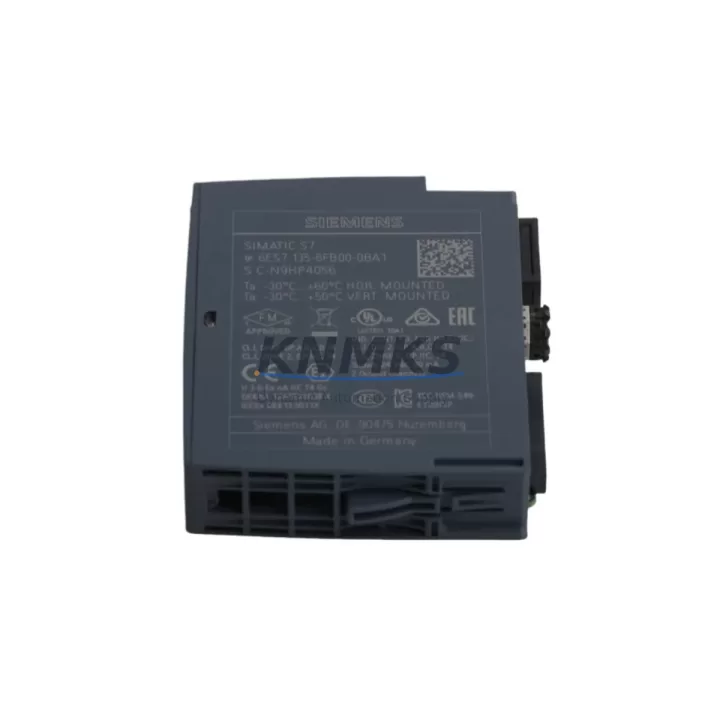
The Siemens 6ES7135-6FB00-0BA1 is a 2-channel analog output module designed for the ET 200SP distributed I/O system, fully compatible with SIMATIC S7-1500 and TIA Portal-based automation architectures. As legacy S7-300 and S7-400 control systems approach end-of-life, this module serves as a critical component in plant-wide migration strategies — enabling engineers to modernize field-level signal output without redesigning the entire control cabinet or rewriting core PLC logic.
Rated for ±10 V voltage output and 0–20 mA / 4–20 mA current output per channel, the 6ES7135-6FB00-0BA1 integrates directly into the ET 200SP BaseUnit BU15-P16+A0+2D (e.g., 6ES7193-6BP20-0BA0), maintaining the compact, rail-mounted form factor that makes ET 200SP a preferred choice for space-constrained control cabinets and distributed field panels. Output resolution reaches 16-bit, providing the signal fidelity required for precision drive control, valve positioning, and process variable setpoint transmission.
During retrofit projects, engineers replacing S7-300 SM 332 analog output modules or decommissioning older DP/PA field devices will find the 6ES7135-6FB00-0BA1 a reliable migration target. The transition from PROFIBUS DP to PROFINET IO — a common requirement in brownfield upgrades — is fully supported when this module is paired with an ET 200SP IM 155-6 PN interface module (such as the 6ES7155-6AU01-0BN0), which handles the PROFINET communication layer while the analog output module retains its standard wiring interface. This means existing terminal block layouts and field cable runs can often be preserved, significantly reducing rewiring time and the risk of commissioning errors.
When planning a retrofit around the 6ES7135-6FB00-0BA1, several system-level factors must be confirmed before cutover. Power budget verification is essential: the ET 200SP backplane distributes 24 VDC load current across all installed modules, and adding or replacing analog output modules requires recalculating the total current draw against the capacity of the installed PM-E power module (e.g., 6ES7138-4CA01-0AA0). Terminal assignment must be cross-referenced against the original SM 332 wiring diagram — while the physical connector format differs, the signal polarity and shielding requirements remain consistent with standard analog output practice. Module slot addressing in the hardware configuration (STEP 7 or TIA Portal) must be updated to reflect the new module GSD/GSDML file, and any existing FB/FC blocks referencing the old module’s I/O address range must be remapped accordingly.
HMI screen updates are frequently overlooked during analog output module replacements. If the replaced module’s channel data was linked to WinCC or a TP/KP panel faceplate via symbolic addressing, the tag database must be updated to reflect the new module’s process image address. Failure to do so can result in setpoint write errors or silent output failures that are difficult to diagnose during live commissioning. Similarly, if the system uses a CP 343-1 or CP 443-1 communications processor for remote I/O supervision, the updated hardware configuration must be downloaded and the communication link re-established before the new module is brought online.
Installation space confirmation is straightforward for ET 200SP: the 6ES7135-6FB00-0BA1 occupies a single slot on the BaseUnit and requires no additional mounting hardware beyond the standard DIN rail. However, in dense cabinet configurations where multiple ET 200SP stations share a common backplane, the total station width — including the IM 155-6 PN, all I/O modules, and the server module (6ES7193-6PA00-0AA0) — must be measured against available rail space before ordering replacement modules in bulk.
All units supplied by KNMKS are sourced from verified distribution channels, pre-tested for output accuracy across both voltage and current ranges prior to shipment, and covered by a support terms confirmed by quotation. Stock is maintained to support both single-unit emergency replacements and multi-unit planned retrofit deployments, with typical lead times suitable for scheduled maintenance windows.
Migration Compatibility Table
| Parameter | Details |
|---|---|
| SKU / Part Number | 6ES7135-6FB00-0BA1 |
| Series | ET 200SP |
| Output Channels | 2 × Analog Output (Voltage / Current) |
| Output Range | ±10 V / 0–20 mA / 4–20 mA |
| Resolution | 16-bit |
| Compatible BaseUnit | BU15-P16+A0+2D (6ES7193-6BP20-0BA0) |
| Compatible Interface Module | IM 155-6 PN (6ES7155-6AU01-0BN0) |
| Communication Protocol | PROFINET IO (via IM 155-6 PN) |
| Legacy Replacement Target | S7-300 SM 332 Analog Output Modules |
| Controller Compatibility | SIMATIC S7-1500, S7-1200 (with ET 200SP IM) |
| Supply Voltage | 24 VDC (via ET 200SP backplane) |
| Installation | Single-slot, DIN rail, ET 200SP station |
| Configuration Tool | TIA Portal V15.1 and above |
| Firmware Compatibility | Verify GSDML version against TIA Portal project |
| Origin | Germany |
| Support terms | 12 Months (KNMKS) |
| Pre-Shipment Test | Yes — output accuracy verified on both channels |
Retrofit Planning for Existing Automation Systems
A successful retrofit centered on the 6ES7135-6FB00-0BA1 typically involves coordinating several interdependent components across the ET 200SP station and the upstream control system. The IM 155-6 PN interface module is the communication backbone of the station — its firmware version must be compatible with the TIA Portal project version and the S7-1500 CPU firmware to avoid PROFINET topology errors during startup. In stations where the existing IM is an older IM 151-3 PN (PROFIBUS-era), a full interface module swap to the IM 155-6 PN is required as part of the protocol migration, which also necessitates updating the GSD file references in the hardware configuration.
On the power side, the PM-E 24VDC power module governs the load current available to all downstream I/O modules in the ET 200SP station. When adding analog output modules — which draw more current than digital I/O modules — the power budget must be recalculated. If the existing PM-E is at or near capacity, a second PM-E module must be inserted at the appropriate station position before the new analog output modules are added. Overlooking this step is a common cause of intermittent module faults during post-retrofit commissioning.
For systems that include a SIMATIC HMI TP1200 Comfort or similar panel connected via PROFINET, the tag database update is a mandatory step. Analog output setpoint tags linked to the old SM 332 module addresses must be remapped to the new ET 200SP module process image addresses. This is best performed in TIA Portal using the symbolic tag migration tool, which can batch-update tag addresses when the hardware configuration is regenerated after the module swap.
In control cabinets where signal isolation is required — for example, when driving long cable runs to field actuators or crossing electrical noise boundaries — a signal isolator or analog signal conditioner should be inserted between the 6ES7135-6FB00-0BA1 output terminals and the field device. This is particularly relevant in retrofit scenarios where the original SM 332 installation included external isolators that may not have been documented in the as-built drawings. A programming cable (e.g., PC adapter USB or PROFINET direct connection) is required for online diagnostics and firmware updates during commissioning, and should be confirmed available on-site before the maintenance window begins.
Downtime Control During System Migration
Minimizing production downtime during an analog output module replacement requires a structured pre-cutover checklist. Before the maintenance window opens, the TIA Portal project should be backed up with the existing hardware configuration, and the new module’s GSDML file should be imported and validated in an offline project copy. This allows the engineer to confirm address mapping, channel parameter settings, and diagnostic interrupt configurations without touching the live system.
During the cutover, the recommended sequence is: place the CPU in STOP mode, remove the old module, insert the 6ES7135-6FB00-0BA1 into the correct BaseUnit slot, download the updated hardware configuration, and perform a controlled CPU restart. If the system uses a redundant power supply or UPS, field devices connected to the analog outputs should be placed in manual/local control mode before the CPU is stopped, preventing uncontrolled actuator movement during the transition. After restart, each output channel should be verified against the expected setpoint using a calibrated process meter before returning the system to automatic control.
For multi-station retrofits where several ET 200SP stations are being upgraded simultaneously, a phased approach — upgrading one station per maintenance window — reduces the blast radius of any configuration error and allows the engineering team to validate the process before proceeding to the next station. KNMKS maintains buffer stock to support phased delivery schedules, ensuring modules are available for each planned window without requiring large upfront inventory commitments.
Retrofit Support FAQ
Q: Is the 6ES7135-6FB00-0BA1 a direct replacement for the S7-300 SM 332 analog output module?
A: It is a functional replacement in terms of signal output capability, but it is not a plug-in physical replacement. The 6ES7135-6FB00-0BA1 installs into an ET 200SP BaseUnit and requires an IM 155-6 PN interface module for PROFINET communication. The hardware configuration in TIA Portal must be updated, and terminal wiring must be adapted to the ET 200SP connector format. The output signal ranges (±10 V, 4–20 mA) are compatible with the same field devices previously driven by the SM 332.
Q: What firmware version is required for TIA Portal compatibility?
A: TIA Portal V15.1 or higher is recommended. The GSDML file for the 6ES7135-6FB00-0BA1 must be installed in the TIA Portal hardware catalog before the module can be configured. The IM 155-6 PN firmware version should also be verified against the TIA Portal project version to avoid compatibility warnings during hardware configuration download.
Q: Does KNMKS perform pre-shipment testing on this module?
A: Yes. All 6ES7135-6FB00-0BA1 units are tested for output accuracy on both voltage and current channels before shipment. Units are supplied with a support terms confirmed by quotation covering manufacturing defects and functional failures under normal operating conditions. Test records are available upon request for quality-critical procurement processes.
Q: What is the typical lead time and can KNMKS support emergency replacement orders?
A: KNMKS maintains in-stock inventory of the 6ES7135-6FB00-0BA1 to support both planned retrofit projects and emergency spare part requirements. Contact admin@knmks.com or call +86 18359268345 to confirm current stock levels and arrange expedited shipment if required.
© 2026 KNMKS. All rights reserved.
Original Source: https://knmks.com
Contact: admin@knmks.com | +86 18359268345
Product Identification
- Brand / Ecosystem
-
Siemens
Siemens - Model / Series
-
6ES7135-6FB00-0BA1
SIMATIC Series - Product Family
- PLCs & Controllers
- Availability Status
- Available on request after model and quantity confirmation
- Inquiry Type
- B2B RFQ, replacement inquiry and project spare-part request
- Pre-Quote Check
- Exact SKU, brand, series, quantity, nameplate photos and destination country are checked before quotation
System Path
Where this product fits in the KNMKS automation structure.
Specification & Inquiry Focus
- Control platform
- PLC, PAC and modular controllers
- Common needs
- CPU, rack, power and I/O expansion
- Project support
- Replacement, cabinet build and maintenance
Buyer Confirmation
Information KNMKS checks before replying.
- Exact model
- 6ES7135-6FB00-0BA1
- Brand / ecosystem
- Siemens
- Product family
- PLCs & Controllers
- Application note
- Replacement, maintenance, project build or spare-part list
- Useful photos
- Nameplate, installed unit, cabinet layout or connector side
- Delivery details
- Quantity, destination country and target schedule
Document Support
Files and notes can be confirmed during quotation.
- Product photos or nameplate confirmation when available
- Packing and delivery notes before quotation confirmation
- Support scope and delivery terms confirmed per inquiry
- Export document coordination for qualified B2B requests
Inquiry Support
- Model cross-checking before quotation
- CPU, power, rack and expansion module matching
- Support for replacement and project inquiry
What to Send Us
- Brand and exact model number: Siemens 6ES7135-6FB00-0BA1
- Quantity and required delivery time
- Application, replacement requirement or nameplate photo
- Destination country and shipping preference
RFQ Preparation
This is a product inquiry page built for RFQ communication.
Fast Model Check
Send this model to KNMKS for confirmation.
Include quantity, destination country and photos if this is a maintenance replacement. The inquiry will be saved with a reference number after submission.
Brand & Compatibility Note
KNMKS displays automation product information for well-known industrial brand ecosystems and compatible replacement references. Brand names are used for product identification and compatibility reference only; final availability and commercial terms are confirmed per quotation.
 Manufacturing
 Machine Tools
 Packaging
 Energy & Power



 HMI & Displays
 Servo Systems
 Variable Frequency Drives
 Sensors