
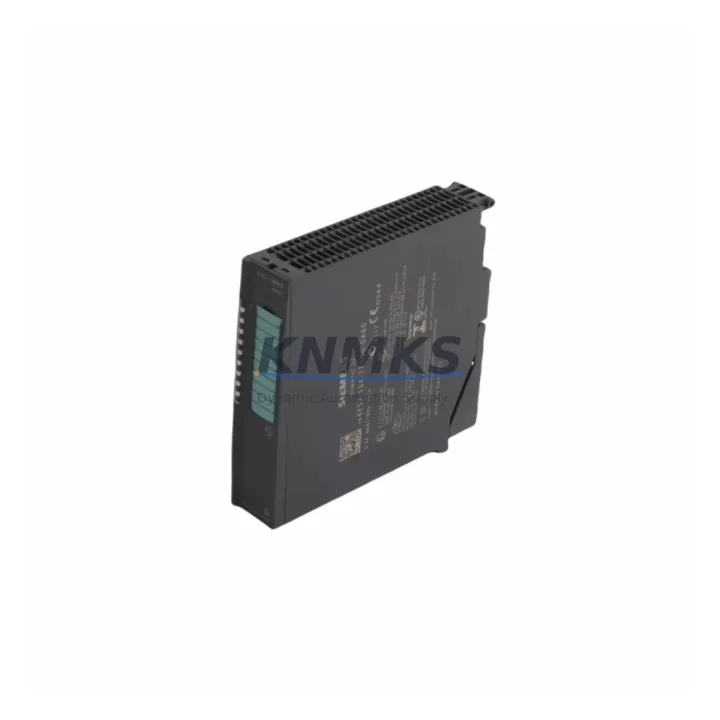
Overview
Siemens 6ES7134-7TD00-0AB0 Spare Part for Factory Uptime
The Siemens 6ES7134-7TD00-0AB0 is a high-feature analog input module for the ET 200SP distributed I/O system, designed to acquire thermocouple (TC) and resistance temperature detector (RTD) signals with high accuracy and resolution. As a maintenance-proven spare part, it supports continuous factory operation in process automation, energy management, and discrete manufacturing environments where temperature measurement integrity is critical to production quality and safety compliance.
KNMKS maintains verified stock of the 6ES7134-7TD00-0AB0 to support emergency replacements, scheduled outages, and annual maintenance cycles. Every unit is pre-shipment tested, supplied with original Siemens packaging where available, and backed by a support terms confirmed by quotation. Fast global dispatch ensures minimal downtime exposure for maintenance engineers managing S7-1500 and ET 200SP-based control architectures.
Spare Maintenance Table
| Parameter | Specification |
|---|---|
| SKU / Part Number | 6ES7134-7TD00-0AB0 |
| Brand | Siemens |
| Series | SIMATIC ET 200SP |
| Module Type | Analog Input Module — AI 4xTC/RTD High Feature (HF) |
| Compatible Systems | SIMATIC S7-1500, ET 200SP IM 155-6 PN/DP interface modules |
| Input Channels | 4 channels — Thermocouple (TC) and RTD measurement |
| Measurement Range | TC: Type B/E/J/K/L/N/R/S/T/U; RTD: Pt100, Pt200, Pt500, Pt1000, Ni100, Ni1000 |
| Resolution | 16-bit (including sign) |
| Supply Voltage | 24 V DC (via backplane bus) |
| Dimensions (W×H×D) | 15 mm × 73 mm × 58 mm |
| Weight | Approx. 280 g |
| Operating Temperature | -40 °C to +70 °C (horizontal installation) |
| Protection Class | IP20 |
| Country of Origin | Germany |
| Support terms | 12 Months — KNMKS Maintenance Support terms |
| Pre-Shipment Test | Yes — functional verification before dispatch |
| Availability | availability confirmed by RFQ — Multi-Region Dispatch |
Maintenance Planning for Continuous Operation
When replacing the 6ES7134-7TD00-0AB0 during a scheduled outage or emergency fault isolation, maintenance engineers should conduct a systematic inspection of the surrounding ET 200SP station to prevent repeat failures and ensure signal integrity across the entire measurement loop.
Begin by verifying the BaseUnit BU15-P16+A0+2D (6ES7193-6BP20-0DA0) or equivalent push-in base unit for contact wear, terminal corrosion, and secure module seating. A degraded base unit is a common root cause of intermittent channel faults that are incorrectly attributed to the AI module itself. Simultaneously, inspect the ET 200SP Interface Module IM 155-6 PN ST (6ES7155-6AU01-0BN0) for firmware currency and PROFINET link stability — an outdated IM firmware can cause cyclic data errors that mask genuine sensor faults.
For the measurement circuit, check all thermocouple extension cables and RTD connection leads for insulation breakdown, cold-junction compensation accuracy, and correct polarity. Shielding continuity on signal cables is especially critical in high-EMI environments such as variable frequency drive (VFD) cabinets. If the station includes a Digital Output Module (e.g., 6ES7132-6BF01-2BA0 DQ 8×24VDC/0.5A ST) in the same rack, verify that inductive load switching is not inducing noise onto the analog measurement channels.
Power supply integrity is equally important: confirm that the 24 V DC load power supply feeding the ET 200SP station maintains voltage within ±5% under full load. A marginal power supply will cause measurement drift on HF analog modules before triggering any diagnostic alarm. Where the station includes a Power Module PM-E DC24V (6ES7138-4CA01-0AA0), inspect for capacitor aging and output ripple. Additionally, review any installed signal isolators or loop-powered transmitter barriers in the TC/RTD measurement circuit — these components age independently and can introduce offset errors that are difficult to distinguish from module faults without systematic loop calibration.
For sites running mixed analog and digital I/O in the same ET 200SP station, also verify the potential group separators and PE bus connectors for continuity. Loose PE connections are a leading cause of common-mode interference on high-resolution analog inputs. Completing this checklist during each 6ES7134-7TD00-0AB0 replacement ensures that the new module operates within specification from first power-on and reduces the probability of a repeat callout within the same maintenance window.
Site Replacement Workflow
Step 1 — Preparation: Download the current hardware configuration from the S7-1500 CPU using SIMATIC STEP 7 (TIA Portal V16 or later). Confirm the slot assignment and parameter set for the 6ES7134-7TD00-0AB0 — channel type (TC/RTD), measurement range, wire connection type (2-wire, 3-wire, 4-wire), and temperature unit. Save the project backup before any hardware change.
Step 2 — Safe Isolation: Place the ET 200SP station in STOP mode via the CPU or TIA Portal online view. De-energize the 24 V DC load power supply to the affected station segment. Do not rely solely on software STOP — physically isolate the supply to prevent accidental re-energization during module removal.
Step 3 — Module Removal: Unlock the 6ES7134-7TD00-0AB0 from its base unit by pressing the release lever and sliding the module upward. Inspect the base unit contacts and the module connector for contamination or mechanical damage before installing the replacement unit.
Step 4 — Replacement Installation: Slide the new 6ES7134-7TD00-0AB0 onto the base unit until it clicks into the locked position. The ET 200SP system uses parameter assignment via the base unit — no manual DIP switch setting is required. Re-energize the station and confirm the module LED status: RUN (green) indicates successful initialization; MAINT (yellow) indicates a parameter mismatch that requires TIA Portal correction.
Step 5 — Functional Verification: Apply a known reference signal (calibrated TC or RTD simulator) to each channel and verify the process value in the TIA Portal online diagnostics. Confirm that all four channels report within the expected measurement tolerance before returning the station to AUTOMATIC mode. Document the replacement in the site maintenance log with the new module serial number and test results.
This workflow is compatible with hot-swap-capable ET 200SP configurations where the CPU supports module replacement during operation (iDevice or F-system configurations may require additional steps per the system safety manual).
Spare Parts Support FAQ
Q1: Is the 6ES7134-7TD00-0AB0 a direct drop-in replacement for earlier ET 200SP AI TC/RTD modules?
Yes, within the ET 200SP system family, the 6ES7134-7TD00-0AB0 (HF variant) is mechanically and electrically compatible with the same BU15 base unit footprint. However, if replacing an earlier SF (Standard Feature) variant, verify that the TIA Portal hardware catalog entry is updated to the HF module type, as the parameter sets differ — particularly for wire resistance compensation and filter settings. A hardware configuration download is required after the swap.
Q2: What pre-shipment testing does KNMKS perform on the 6ES7134-7TD00-0AB0?
Each unit undergoes power-on functional verification, channel continuity check, and diagnostic register readout prior to dispatch. Modules that fail any test stage are quarantined and not shipped. A test record is available on request for quality-critical procurement processes. All units are dispatched in anti-static packaging with physical protection for the module connector.
Q3: How should the 6ES7134-7TD00-0AB0 be stored as a long-term spare?
Store in a dry, temperature-controlled environment (recommended: 0 °C to +40 °C, relative humidity <75% non-condensing) in the original anti-static bag. Avoid storage near strong magnetic fields or in environments with corrosive gases. For long-term inventory (beyond 24 months), perform a power-on functional check annually to confirm module health before committing to a critical replacement deployment.
Q4: Does KNMKS support long-term supply agreements for the 6ES7134-7TD00-0AB0?
Yes. KNMKS offers framework supply agreements for maintenance teams managing multiple ET 200SP stations or operating in industries with mandatory spare parts holding requirements (oil & gas, power generation, water treatment). Long-term agreements include reserved stock allocation, fixed pricing for the agreement period, and priority dispatch for emergency orders. Contact admin@knmks.com to discuss volume and lead-time requirements.
© 2026 KNMKS. All rights reserved.
Original Source: https://knmks.com
Contact: admin@knmks.com | +86 18359268345
Product Identification
- Brand / Ecosystem
-
Siemens
Siemens - Model / Series
-
6ES7134-7TD00-0AB0
SIMATIC Series - Product Family
- PLCs & Controllers
- Availability Status
- Available on request after model and quantity confirmation
- Inquiry Type
- B2B RFQ, replacement inquiry and project spare-part request
- Pre-Quote Check
- Exact SKU, brand, series, quantity, nameplate photos and destination country are checked before quotation
System Path
Where this product fits in the KNMKS automation structure.
Specification & Inquiry Focus
- Control platform
- PLC, PAC and modular controllers
- Common needs
- CPU, rack, power and I/O expansion
- Project support
- Replacement, cabinet build and maintenance
Buyer Confirmation
Information KNMKS checks before replying.
- Exact model
- 6ES7134-7TD00-0AB0
- Brand / ecosystem
- Siemens
- Product family
- PLCs & Controllers
- Application note
- Replacement, maintenance, project build or spare-part list
- Useful photos
- Nameplate, installed unit, cabinet layout or connector side
- Delivery details
- Quantity, destination country and target schedule
Document Support
Files and notes can be confirmed during quotation.
- Product photos or nameplate confirmation when available
- Packing and delivery notes before quotation confirmation
- Support scope and delivery terms confirmed per inquiry
- Export document coordination for qualified B2B requests
Inquiry Support
- Model cross-checking before quotation
- CPU, power, rack and expansion module matching
- Support for replacement and project inquiry
What to Send Us
- Brand and exact model number: Siemens 6ES7134-7TD00-0AB0
- Quantity and required delivery time
- Application, replacement requirement or nameplate photo
- Destination country and shipping preference
RFQ Preparation
This is a product inquiry page built for RFQ communication.
Fast Model Check
Send this model to KNMKS for confirmation.
Include quantity, destination country and photos if this is a maintenance replacement. The inquiry will be saved with a reference number after submission.
Brand & Compatibility Note
KNMKS displays automation product information for well-known industrial brand ecosystems and compatible replacement references. Brand names are used for product identification and compatibility reference only; final availability and commercial terms are confirmed per quotation.
 Manufacturing
 Machine Tools
 Packaging
 Energy & Power



 HMI & Displays
 Servo Systems
 Variable Frequency Drives
 Sensors