
Overview
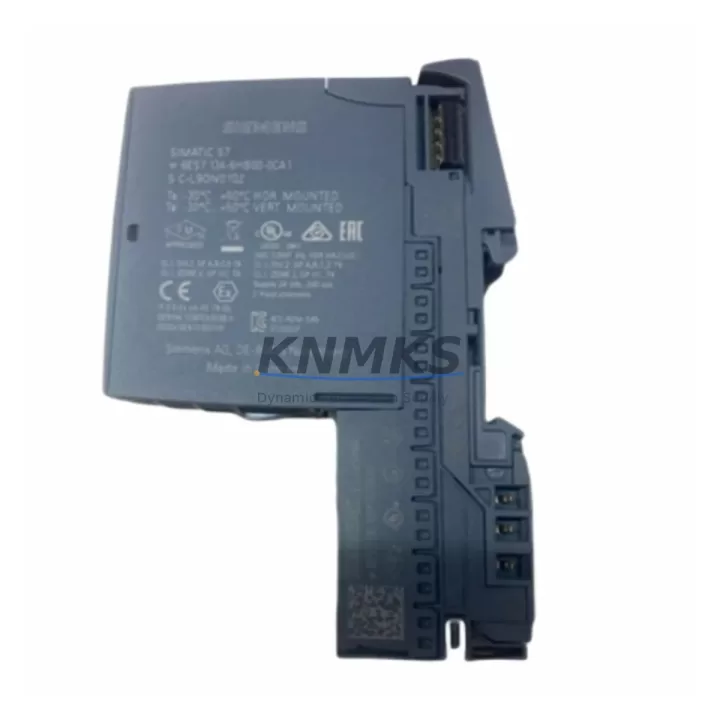
Siemens 6ES7134-6HB00-0CA1 Migration-Ready DI for ET 200SP: Legacy System Migration and Compatible Upgrade
The Siemens 6ES7134-6HB00-0CA1 is an 8-channel, 24 VDC digital input module designed for the ET 200SP distributed I/O system, operating within the SIMATIC S7-1500 and S7-300/400 control platforms via PROFINET or PROFIBUS-DP communication backbones. As legacy automation lines reach end-of-life and OEM support windows close, this module has become a primary retrofit solution for engineers tasked with replacing discontinued input cards, upgrading aging control cabinets, and restoring system availability without full PLC replacement.
When migrating from older ET 200S or S7-300 distributed I/O architectures, the 6ES7134-6HB00-0CA1 slots directly into the ET 200SP BaseUnit — typically a BU15-P16+A0+2D or BU20-P16+A0+2D — and requires no additional wiring adapter in most standard 24 VDC field signal environments. Engineers replacing legacy 6ES7131-series DI cards from the ET 200S family should verify terminal pitch compatibility and confirm that the BaseUnit type matches the module’s power class before installation. The module supports both standard and high-feature input processing modes, enabling direct substitution in programs where input filter times and diagnostic interrupt configurations were previously defined.
Before committing to a retrofit, the following parameters must be confirmed on-site: available 24 VDC supply capacity on the ET 200SP power segment, backplane slot address assignment in the hardware configuration (TIA Portal or STEP 7), module diagnostic address range, and whether the existing CPU firmware supports the 6ES7134-6HB00-0CA1 GSD/GSDML device description. In systems running older S7-300 CPUs with PROFIBUS-DP, a DP/PA coupler or IM 155-6 DP interface module may be required to bridge the communication protocol before the new DI module can be addressed correctly.
For control cabinets undergoing partial modernization, the 6ES7134-6HB00-0CA1 is frequently installed alongside the 6ES7138-6AA00-0AA0 power module (PM-E 24VDC) to maintain segment power integrity when expanding I/O capacity. In mixed-generation panels where both ET 200SP and ET 200S modules coexist during phased migration, signal isolation requirements should be reviewed — particularly for long cable runs or noisy industrial environments where a signal isolator or barrier module may be inserted upstream of the DI inputs to protect input integrity.
HMI screen updates are a commonly overlooked step during DI module replacement. If the original HMI project (WinCC, WinCC Flexible, or a third-party SCADA panel) references specific I/O addresses tied to the legacy module’s slot position, those tag addresses must be remapped in the HMI configuration before go-live. Failure to update HMI tags results in silent signal loss on operator displays even when the PLC program is functioning correctly.
Program compatibility should be validated in offline simulation before field commissioning. In TIA Portal projects, the hardware catalog entry for the 6ES7134-6HB00-0CA1 must match the physical firmware version of the installed module. Mismatched firmware versions between the module and the TIA Portal hardware catalog can prevent the CPU from entering RUN mode. Always confirm the module’s firmware version via the module’s front label or via the online device diagnostics view in TIA Portal prior to downloading the updated hardware configuration.
Installation space in the control cabinet should be measured against the ET 200SP rail segment length. The 6ES7134-6HB00-0CA1 occupies a standard ET 200SP slot width; however, when replacing multiple legacy modules simultaneously, the cumulative rail length of the new ET 200SP station — including the IM 155-6 interface module, power modules, and all I/O modules — must fit within the available DIN rail space. In compact cabinets, this may require rearranging adjacent components such as circuit breakers, terminal blocks, or the 6ES7193-6BP20-0DA0 server module used for spare slot coverage.
Pre-shipment functional testing is performed on all 6ES7134-6HB00-0CA1 units prior to dispatch. Each module is powered, addressed, and verified for correct channel response across all 8 digital input channels. Units are shipped with original or equivalent protective packaging to prevent ESD damage during transit. A support terms confirmed by quotation is provided from the date of shipment, covering manufacturing defects and functional failures under normal operating conditions.
Stock is maintained in our regional warehouses to support urgent retrofit and breakdown replacement requirements. Lead times for standard orders are typically 1–3 business days for in-stock units. For projects requiring multiple modules or phased delivery schedules, contact our sales team to arrange a forward stock reservation aligned with your project timeline.
Migration Compatibility Table
| Parameter | 6ES7134-6HB00-0CA1 (Current) | Legacy Reference (ET 200S / S7-300 DI) | Retrofit Notes |
|---|---|---|---|
| Platform | ET 200SP / S7-1500 | ET 200S / S7-300 | Interface module upgrade required (IM 155-6 PN) |
| Communication | PROFINET (primary) | PROFIBUS-DP | Protocol migration needed; verify CPU PN port availability |
| Input Channels | 8 x 24 VDC DI | 4–8 x 24 VDC DI (varies by legacy SKU) | Confirm channel count; may require additional DI module |
| BaseUnit Required | BU15-P16+A0+2D or BU20-P16+A0+2D | Terminal module (TM-E series) | BaseUnit must be ordered separately if not present |
| Power Supply | 24 VDC via PM-E segment | 24 VDC via TM power rail | Verify PM-E 24VDC (6ES7138-6AA00-0AA0) capacity |
| Installation Width | Standard ET 200SP slot | ET 200S slot (wider) | Rail space recalculation required for full station |
| Firmware Compatibility | TIA Portal V14 SP1 and above | STEP 7 V5.x | Hardware catalog update and CPU firmware check required |
| HMI Tag Remapping | Required if slot address changes | Original address map | Update WinCC/SCADA tags before commissioning |
| Diagnostic Interrupt | Supported (configurable) | Limited (legacy modules) | Enable diagnostics in TIA Portal hardware config |
| Support terms | 12 Months from date of shipment — manufacturing defects and functional failures covered | ||
Retrofit Planning for Existing Automation Systems
A successful retrofit using the 6ES7134-6HB00-0CA1 typically involves coordinating several interdependent components within the same control station. The IM 155-6 PN ST interface module (6ES7155-6AU00-0CN0) serves as the communication head for the ET 200SP station and must be confirmed as present and firmware-compatible before adding new I/O modules to the station. In stations where the IM 155-6 is already installed and running, adding the 6ES7134-6HB00-0CA1 requires only a hardware configuration download — no physical rewiring of the communication link is needed.
Power segmentation is a critical planning step. The PM-E 24VDC power module (6ES7138-6AA00-0AA0) defines the power segment boundary within the ET 200SP station. When adding the 6ES7134-6HB00-0CA1 to an existing station, confirm that the current power segment has sufficient load capacity for the additional 8-channel DI module. If the segment is at capacity, a new PM-E module must be inserted to start a new power segment before the new DI module’s BaseUnit.
For systems requiring analog signal acquisition alongside digital inputs, the 6ES7134-6HB00-0CA1 is commonly deployed in the same station as AI modules from the ET 200SP analog input family, sharing the same backplane and communication link. This eliminates the need for a separate I/O station for mixed signal types and reduces cabinet footprint during modernization projects.
In applications where field signal integrity is a concern — particularly in environments with variable-frequency drives, welding equipment, or high-current switching loads nearby — a signal isolator or DIN-rail-mounted barrier module should be inserted between the field wiring and the DI module inputs. This protects the 6ES7134-6HB00-0CA1 from transient overvoltage and extends module service life in electrically noisy environments.
Programming cable and laptop access to the CPU is required during commissioning. A standard PROFINET-capable programming cable (USB to RJ45 or direct Ethernet) connected to the CPU’s PN port allows TIA Portal to perform online hardware detection, firmware version verification, and I/O forcing tests to confirm correct channel mapping before handing over to the operations team.
Downtime Control During System Migration
Minimizing unplanned downtime during a DI module replacement requires a structured pre-migration checklist. Before removing the legacy module, export the current hardware configuration from TIA Portal or STEP 7 and save a backup of the CPU program, including all data blocks, function blocks, and symbol tables. This backup serves as the recovery baseline if the migration encounters unexpected compatibility issues.
Where production schedules permit, perform the hardware configuration update and offline simulation in TIA Portal before the physical module swap. Simulate the new hardware configuration with the 6ES7134-6HB00-0CA1 in place and verify that all I/O addresses, diagnostic settings, and input filter times match the original program’s expectations. This reduces on-site commissioning time to a download, a hardware swap, and a functional test — typically achievable within a single planned maintenance window.
For systems where a cold restart is not acceptable, consider a phased migration approach: install the new ET 200SP station in parallel with the existing legacy station, configure it in TIA Portal as a secondary I/O station, and perform a controlled switchover during a scheduled low-production period. This approach preserves the original control logic and HMI displays until the new station is fully validated, reducing the risk of extended unplanned downtime.
After the module swap and configuration download, perform a full I/O forcing test on all 8 channels of the 6ES7134-6HB00-0CA1 to confirm correct signal mapping. Verify that all HMI displays reflect the correct input states and that no diagnostic alarms are active in the CPU’s diagnostic buffer. Document the commissioning results and retain the updated hardware configuration backup for future maintenance reference.
Retrofit Support FAQ
Q1: Is the 6ES7134-6HB00-0CA1 a direct drop-in replacement for ET 200S digital input modules?
A: The 6ES7134-6HB00-0CA1 is not a pin-for-pin drop-in for ET 200S modules due to the different BaseUnit/terminal module system used by ET 200SP. However, it is the correct functional replacement for 8-channel 24 VDC DI applications when migrating from ET 200S to ET 200SP. A compatible BaseUnit (BU15 or BU20 series) must be installed, and the hardware configuration in TIA Portal must be updated to reflect the new module type and slot assignment.
Q2: What firmware version is required on the ET 200SP IM 155-6 interface module to support the 6ES7134-6HB00-0CA1?
A: The IM 155-6 PN ST should be running firmware V4.0 or higher for full compatibility with current ET 200SP I/O modules including the 6ES7134-6HB00-0CA1. Firmware version can be checked via TIA Portal’s online device view or via the module’s front display. Firmware updates are available through Siemens Industry Online Support and can be applied via TIA Portal without removing the module from the station.
Q3: Are units pre-tested before shipment, and what does the support terms confirmed by quotation cover?
A: Yes. All 6ES7134-6HB00-0CA1 units are functionally tested prior to dispatch — each channel is verified for correct input response under 24 VDC signal conditions. The support terms confirmed by quotation cover manufacturing defects and functional failures under normal operating conditions from the date of shipment. Physical damage caused by incorrect installation, overvoltage, or ESD mishandling is excluded. Support requests are processed directly through our sales team with a standard RMA procedure.
Q4: Can this module be used in a PROFIBUS-DP system without upgrading to PROFINET?
A: The 6ES7134-6HB00-0CA1 is designed for use within an ET 200SP station, which communicates via PROFINET PN or PROFIBUS-DP depending on the interface module selected. If your existing system uses PROFIBUS-DP, the IM 155-6 DP interface module (6ES7155-6BA00-0CN0) can be used as the station head, allowing the 6ES7134-6HB00-0CA1 to operate within a PROFIBUS-DP network without requiring a full protocol migration. Confirm GSD file compatibility with your DP master CPU before ordering.
© 2026 KNMKS. All rights reserved.
Original Source: https://knmks.com
Contact: admin@knmks.com | +86 18359268345
Product Identification
- Brand / Ecosystem
-
Siemens
Siemens - Model / Series
-
6ES7134-6HB00-0CA1
SIMATIC Series - Product Family
- PLCs & Controllers
- Availability Status
- Available on request after model and quantity confirmation
- Inquiry Type
- B2B RFQ, replacement inquiry and project spare-part request
- Pre-Quote Check
- Exact SKU, brand, series, quantity, nameplate photos and destination country are checked before quotation
System Path
Where this product fits in the KNMKS automation structure.
Specification & Inquiry Focus
- Control platform
- PLC, PAC and modular controllers
- Common needs
- CPU, rack, power and I/O expansion
- Project support
- Replacement, cabinet build and maintenance
Buyer Confirmation
Information KNMKS checks before replying.
- Exact model
- 6ES7134-6HB00-0CA1
- Brand / ecosystem
- Siemens
- Product family
- PLCs & Controllers
- Application note
- Replacement, maintenance, project build or spare-part list
- Useful photos
- Nameplate, installed unit, cabinet layout or connector side
- Delivery details
- Quantity, destination country and target schedule
Document Support
Files and notes can be confirmed during quotation.
- Product photos or nameplate confirmation when available
- Packing and delivery notes before quotation confirmation
- Support scope and delivery terms confirmed per inquiry
- Export document coordination for qualified B2B requests
Inquiry Support
- Model cross-checking before quotation
- CPU, power, rack and expansion module matching
- Support for replacement and project inquiry
What to Send Us
- Brand and exact model number: Siemens 6ES7134-6HB00-0CA1
- Quantity and required delivery time
- Application, replacement requirement or nameplate photo
- Destination country and shipping preference
RFQ Preparation
This is a product inquiry page built for RFQ communication.
Fast Model Check
Send this model to KNMKS for confirmation.
Include quantity, destination country and photos if this is a maintenance replacement. The inquiry will be saved with a reference number after submission.
Brand & Compatibility Note
KNMKS displays automation product information for well-known industrial brand ecosystems and compatible replacement references. Brand names are used for product identification and compatibility reference only; final availability and commercial terms are confirmed per quotation.
 Manufacturing
 Machine Tools
 Packaging
 Energy & Power



 HMI & Displays
 Servo Systems
 Variable Frequency Drives
 Sensors