
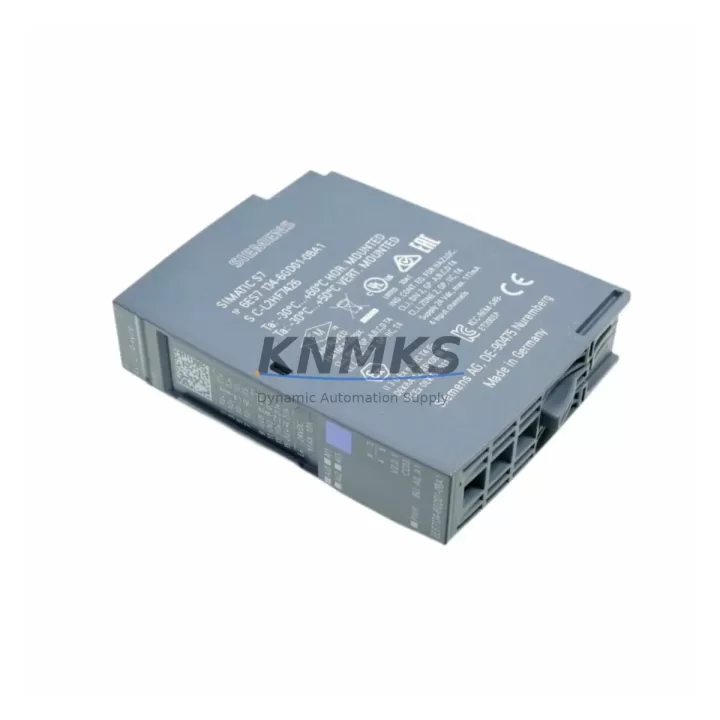
Overview
Siemens 6ES7134-6GD01-0BA1 Migration-Ready Analog Input for Legacy Control Systems
The Siemens 6ES7134-6GD01-0BA1 is a 4-channel analog input module designed for the ET 200SP distributed I/O system, fully compatible with SIMATIC S7-1500 and TIA Portal-based control architectures. For facilities operating legacy S7-300 or S7-400 control systems with aging ET 200M or ET 200S I/O stations, this module represents a validated migration path that preserves existing field wiring while modernizing the control layer. It supports current and voltage input signals (±10 V, 0–20 mA, 4–20 mA) with high-resolution 16-bit conversion, making it suitable for process instrumentation, drive feedback, and sensor signal acquisition in demanding industrial environments.
When planning a retrofit from an ET 200S or ET 200M rack to an ET 200SP station, engineers must verify terminal block compatibility before committing to a wiring migration. The 6ES7134-6GD01-0BA1 uses the ET 200SP BaseUnit system — specifically the BU type A0 (e.g., 6ES7193-6BP00-0BA0) — which accepts push-in terminal connections and supports direct field wiring without intermediate marshalling. If the existing installation uses screw-type terminals from an older ET 200S analog module such as the 6ES7134-4GB11-0AB0, a terminal adapter or rewiring plan must be included in the project scope. Confirming terminal pitch, wire gauge compatibility, and shield grounding continuity is essential before the cutover window opens.
Module addressing in TIA Portal is handled automatically through the ET 200SP station configuration, but the hardware configuration must be rebuilt when migrating from Step 7 Classic (used with S7-300/400) to TIA Portal V16 or later. Program blocks referencing absolute I/O addresses (e.g., PIW256) must be reviewed and, where necessary, converted to symbolic addressing using data block structures. This is particularly important when the analog input values feed PID controllers, ratio controllers, or HMI trend displays — any address shift will require corresponding updates in the HMI tag table and screen bindings. Siemens WinCC or WinCC Unified projects referencing these tags must be re-validated after the hardware migration is complete.
Backplane slot assignment within the ET 200SP station determines the module’s process image address. Unlike the fixed slot addressing of S7-300 racks, ET 200SP uses a flexible slot model where the CPU Interface Module (IM 155-6 PN ST, for example) assigns addresses based on slot order. When adding the 6ES7134-6GD01-0BA1 to an existing ET 200SP station that already includes digital I/O modules such as the 6ES7131-6BF01-0BA0 (8-channel DI) or 6ES7132-6BF01-0BA0 (8-channel DQ), the analog module’s slot position must be planned to avoid address conflicts with existing program logic. A full hardware configuration download is required after any slot change, which constitutes a brief interruption to the station — this must be coordinated with the production schedule.
Power budget verification is a mandatory step before commissioning. The ET 200SP power rail is fed by the IM 155-6 and supplemented by Power Module inserts (e.g., PM-E DC24V, 6ES7405-0DA02-0AA0 equivalent for ET 200SP). The 6ES7134-6GD01-0BA1 draws 45 mA from the backplane 5 V supply. When the station includes multiple analog input and output modules alongside communication modules such as the CM PtP for serial protocol bridging or a CM DP for PROFIBUS legacy device integration, the cumulative current draw must be calculated against the IM’s rated output. Exceeding the power budget without inserting an additional Power Module will cause intermittent module faults that are difficult to diagnose under load.
Firmware compatibility between the IM 155-6 and the analog module should be confirmed in the TIA Portal hardware catalog before ordering. Siemens periodically releases firmware updates that extend diagnostic capabilities or resolve known issues with specific module combinations. For sites running older IM firmware versions, a firmware update may be required before the new analog module is recognized correctly. This update can typically be performed online via TIA Portal without removing the IM from service, but it requires a brief communication interruption to the ET 200SP station.
Migration Compatibility Table
| Parameter | Legacy Reference | 6ES7134-6GD01-0BA1 (ET 200SP) |
|---|---|---|
| Compatible Platform | S7-300 / S7-400 / ET 200M / ET 200S | S7-1500 / ET 200SP (IM 155-6 PN) |
| Channels | 4-ch analog input (varies by legacy module) | 4-ch analog input (±10 V / 0–20 mA / 4–20 mA) |
| Resolution | 12–13 bit (ET 200S / ET 200M typical) | 16-bit high resolution |
| Communication | PROFIBUS DP (legacy stations) | PROFINET IO (via IM 155-6 PN ST) |
| Terminal Connection | Screw-type (ET 200S / ET 200M) | Push-in (ET 200SP BaseUnit A0) |
| Backplane Interface | Fixed rack slot (S7-300 style) | ET 200SP flexible slot assignment |
| Programming Environment | STEP 7 Classic (V5.x) | TIA Portal V16 or later |
| Diagnostic Capability | Basic channel fault | Extended per-channel diagnostics via PROFINET |
| Installation Width | 25–40 mm (ET 200S module) | 15 mm (ET 200SP compact form factor) |
| Retrofit Recommendation | Verify BaseUnit type, terminal rewiring plan, TIA Portal hardware config, and HMI tag update before cutover | |
| support terms confirmed by quotation | All units supplied by KNMKS include support terms confirmed by quotation coverage from date of shipment | |
Retrofit Planning for Existing Automation Systems
A successful ET 200SP migration begins with a complete audit of the existing I/O station. For a typical S7-300 installation with an ET 200M remote I/O rack connected via PROFIBUS DP, the migration path involves replacing the IM 153-2 interface module with an IM 155-6 PN ST, substituting legacy SM 331 analog input modules with ET 200SP analog modules such as the 6ES7134-6GD01-0BA1, and converting the PROFIBUS segment to PROFINET. This transition also affects any PROFIBUS-connected HMI panels (e.g., TP700 Comfort or MP277) that may need network reconfiguration or replacement with PROFINET-capable panels.
Within the new ET 200SP station, the module lineup typically includes a mix of digital and analog I/O alongside specialty modules. A common configuration pairs the 6ES7134-6GD01-0BA1 analog input module with digital input modules (6ES7131-6BF01-0BA0), digital output modules (6ES7132-6BF01-0BA0), and where serial legacy devices remain in the field, a CM PtP communication module for RS-232/RS-485 bridging. If the legacy system included HART-capable transmitters, the ET 200SP AI Energy Meter or HART-enabled analog input variants should be evaluated as alternatives to ensure instrument compatibility is maintained without adding signal conditioners.
For control cabinets with limited DIN rail space, the ET 200SP’s 15 mm module width is a significant advantage over the 25–40 mm footprint of ET 200S modules. A 16-slot ET 200SP station occupies roughly the same rail length as a 6-slot ET 200S station, which can eliminate the need for cabinet expansion during the retrofit. When space is particularly constrained, the Power Module inserts (PM-E) can be positioned strategically within the station to balance the power rail without adding external power supply terminals.
Signal isolators and loop-powered barriers from the legacy installation should be reviewed during the retrofit. The 6ES7134-6GD01-0BA1 supports 2-wire and 4-wire transmitter configurations, but if the existing field loop includes galvanic isolation barriers (common in hazardous area installations), their output impedance must be verified against the module’s input impedance specification to avoid measurement error. In some cases, replacing aging isolators with modern DIN rail signal conditioners during the same maintenance window reduces long-term failure risk and simplifies future troubleshooting.
Downtime Control During System Migration
Minimizing production downtime during a control system migration requires a structured cutover plan developed well before the maintenance window. For the 6ES7134-6GD01-0BA1 and its associated ET 200SP station, the recommended approach is to pre-build and pre-test the new station on a bench setup using the actual TIA Portal project, simulating field signals with a signal generator to verify all analog channel scaling, diagnostic behavior, and PID setpoint responses before the cutover date.
The existing STEP 7 program should be exported and used as the reference for rebuilding the TIA Portal project. Analog input scaling parameters — including input range, engineering unit conversion, and high/low limit alarms — must be transferred manually, as there is no automated migration tool that handles analog channel parameterization between STEP 7 Classic and TIA Portal. Each channel’s configuration should be documented in a migration checklist and verified against the field instrument datasheet before the cutover window opens.
During the cutover itself, the sequence should follow: de-energize the legacy I/O rack, disconnect field wiring at the terminal block level (not at the instrument), install the new ET 200SP station with pre-configured BaseUnits, reconnect field wiring, download the TIA Portal hardware configuration, and perform a controlled startup with all analog inputs in monitor mode before enabling automatic control. This sequence protects the original field wiring from damage and allows the engineering team to verify signal integrity before returning the process to automatic operation.
HMI screens referencing analog values from the migrated station should be tested in parallel using the pre-production TIA Portal project connected to the bench station. Any tag address changes identified during the hardware configuration rebuild must be propagated to the HMI project and validated before the cutover. Keeping a rollback plan — including the original STEP 7 project, the legacy hardware in storage, and a documented rewiring procedure — ensures that the production line can be restored within the maintenance window if an unexpected issue arises during commissioning.
Retrofit Support FAQ
Q: Can the 6ES7134-6GD01-0BA1 directly replace an ET 200S analog input module like the 6ES7134-4GB11-0AB0?
A: Functionally yes — both provide 4-channel analog input with similar signal ranges. However, the ET 200SP uses a different BaseUnit and push-in terminal system, so field wiring must be reconnected to the new BaseUnit terminals. The hardware configuration in TIA Portal must also be rebuilt, as the two modules belong to different I/O families. A direct plug-in swap without rewiring and reconfiguration is not supported.
Q: What pre-shipment testing is performed on units supplied by KNMKS?
A: All 6ES7134-6GD01-0BA1 units are powered-on tested prior to shipment. Functional verification includes module initialization, channel diagnostic response, and communication handshake with an ET 200SP IM. Units are supplied with original Siemens packaging where available. A support terms confirmed by quotation is included from the date of shipment, covering manufacturing defects and functional failures under normal operating conditions.
Q: Is inventory available for immediate shipment, and what lead times apply?
A: KNMKS maintains stock of the 6ES7134-6GD01-0BA1 for prompt dispatch. Standard orders are processed within 1–2 business days. For urgent maintenance requirements or large-quantity orders, contact admin@knmks.com or call +86 18359268345 to confirm current stock levels and expedited shipping options.
Q: What firmware version is required on the IM 155-6 PN ST to support this module?
A: The 6ES7134-6GD01-0BA1 is supported from IM 155-6 PN ST firmware V2.0 onward. For installations running older IM firmware, a firmware update via TIA Portal is recommended before integrating the new analog module. The current firmware version can be read online from the IM’s module properties in TIA Portal without interrupting station operation.
© 2026 KNMKS. All rights reserved.
Original Source: https://knmks.com
Contact: admin@knmks.com | +86 18359268345
Product Identification
- Brand / Ecosystem
-
Siemens
Siemens - Model / Series
-
6ES7134-6GD01-0BA1
SIMATIC Series - Product Family
- PLCs & Controllers
- Availability Status
- Available on request after model and quantity confirmation
- Inquiry Type
- B2B RFQ, replacement inquiry and project spare-part request
- Pre-Quote Check
- Exact SKU, brand, series, quantity, nameplate photos and destination country are checked before quotation
System Path
Where this product fits in the KNMKS automation structure.
Specification & Inquiry Focus
- Control platform
- PLC, PAC and modular controllers
- Common needs
- CPU, rack, power and I/O expansion
- Project support
- Replacement, cabinet build and maintenance
Buyer Confirmation
Information KNMKS checks before replying.
- Exact model
- 6ES7134-6GD01-0BA1
- Brand / ecosystem
- Siemens
- Product family
- PLCs & Controllers
- Application note
- Replacement, maintenance, project build or spare-part list
- Useful photos
- Nameplate, installed unit, cabinet layout or connector side
- Delivery details
- Quantity, destination country and target schedule
Document Support
Files and notes can be confirmed during quotation.
- Product photos or nameplate confirmation when available
- Packing and delivery notes before quotation confirmation
- Support scope and delivery terms confirmed per inquiry
- Export document coordination for qualified B2B requests
Inquiry Support
- Model cross-checking before quotation
- CPU, power, rack and expansion module matching
- Support for replacement and project inquiry
What to Send Us
- Brand and exact model number: Siemens 6ES7134-6GD01-0BA1
- Quantity and required delivery time
- Application, replacement requirement or nameplate photo
- Destination country and shipping preference
RFQ Preparation
This is a product inquiry page built for RFQ communication.
Fast Model Check
Send this model to KNMKS for confirmation.
Include quantity, destination country and photos if this is a maintenance replacement. The inquiry will be saved with a reference number after submission.
Brand & Compatibility Note
KNMKS displays automation product information for well-known industrial brand ecosystems and compatible replacement references. Brand names are used for product identification and compatibility reference only; final availability and commercial terms are confirmed per quotation.
 Manufacturing
 Machine Tools
 Packaging
 Energy & Power



 HMI & Displays
 Servo Systems
 Variable Frequency Drives
 Sensors