
Overview
Siemens 6ES7134-4NB51-0AB0 Migration-Ready Analog Input for Legacy ET 200S Control Systems
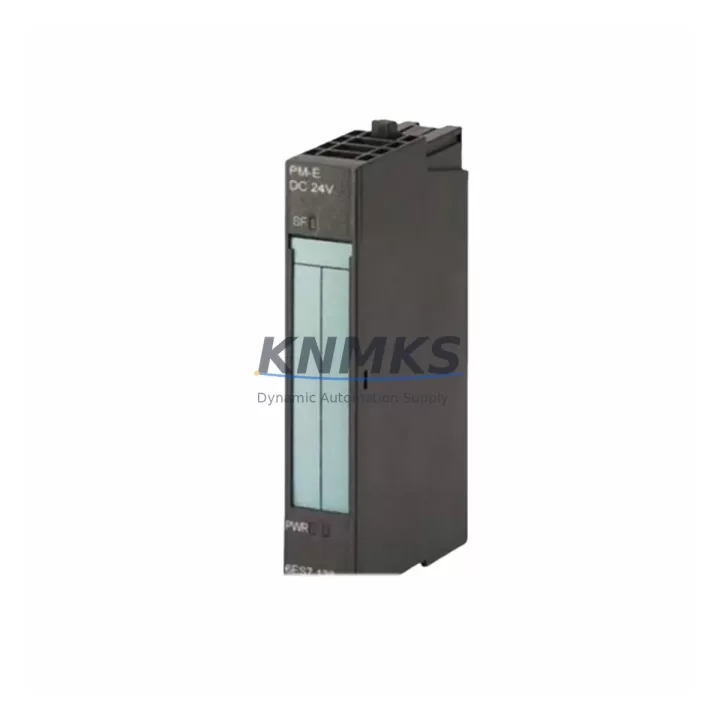
The Siemens 6ES7134-4NB51-0AB0 is a 2-channel analog input module designed for the ET 200S distributed I/O platform. As legacy SIMATIC S7-300 and ET 200S installations approach end-of-support milestones, engineering teams increasingly rely on pre-tested, migration-ready replacements to minimize unplanned downtime and protect existing control logic. This module provides a direct drop-in replacement path for aging or failed analog input channels within existing ET 200S racks, maintaining full compatibility with PROFIBUS-DP communication and the original terminal block wiring layout.
Sourced from verified supply channels and dispatched from multi-region stock, each unit undergoes pre-shipment functional testing before leaving the warehouse. A support terms confirmed by quotation is included as standard, covering both hardware integrity and signal accuracy across the full rated input range. Whether you are executing a scheduled outage replacement, responding to an emergency module failure, or planning a phased migration from S7-300 to S7-1500, the 6ES7134-4NB51-0AB0 is available for immediate dispatch to minimize control system downtime.
Migration Compatibility Table
| Parameter | Details |
|---|---|
| SKU / Part Number | 6ES7134-4NB51-0AB0 |
| Platform | Siemens ET 200S Distributed I/O |
| Series | SIMATIC ET 200S |
| Communication Interface | PROFIBUS-DP (via IM 151 interface module) |
| Analog Input Channels | 2-channel, configurable for voltage / current / resistance / thermocouple |
| Terminal Block Compatibility | Direct replacement — existing terminal wiring retained without re-termination |
| Backplane / Rack Interface | ET 200S power module rail; compatible with standard PM-E and PM-D power modules |
| Module Address | Configured via STEP 7 / TIA Portal hardware configuration; address retained from original slot assignment |
| Firmware Compatibility | Compatible with STEP 7 V5.x and TIA Portal V13 and above |
| Installation Space | Standard ET 200S single-width slot; no additional rail space required |
| Replacement Recommendation | Direct swap for 6ES7134-4NB01-0AB0 and 6ES7134-4NB50-0AB0 variants |
| Commissioning Note | Re-download hardware configuration after replacement; verify channel diagnostics in online mode |
| Origin | Germany (DE) |
| Support terms | 12 months from date of dispatch |
Retrofit Planning for Existing Automation Systems
Successful integration of the 6ES7134-4NB51-0AB0 into an existing ET 200S station begins with a thorough review of the current hardware configuration file in STEP 7 or TIA Portal. Engineers should confirm the slot position of the original analog input module and verify that the IM 151-1 or IM 151-3 interface module firmware supports the replacement unit’s diagnostic profile. In most installations, the existing 6ES7138-4CA01-0AA0 PM-E power module provides sufficient bus voltage for the replacement without any power budget recalculation, but this should be confirmed against the station’s total current draw before proceeding.
Terminal block wiring on the ET 200S platform uses a push-in or screw-type terminal carrier that remains physically attached to the rail during module swap. This means field wiring — including 4–20 mA transmitter loops, PT100 resistance inputs, and thermocouple pairs — does not need to be disconnected during the replacement procedure, significantly reducing the risk of wiring errors and shortening the maintenance window. Engineers should label and photograph the existing terminal assignments before removal as a precaution.
For stations that also include 6ES7132-4BD32-0AA0 digital output modules or 6ES7131-4BF00-0AA0 digital input modules in adjacent slots, the module swap does not affect their operation, as each ET 200S module is independently addressed on the backplane. However, if the station includes a 6ES7138-4DF01-0AB0 F-PM-E safety power module, the safety segment must be reviewed to confirm that the analog input replacement does not alter the safety-relevant I/O mapping.
Where the migration path involves transitioning from a legacy S7-300 CPU — such as the 6ES7315-2AH14-0AB0 CPU 315-2 DP — to a newer S7-1500 platform, the ET 200S station can be retained as a PROFIBUS-DP slave during the transition period. This allows the analog input data from the 6ES7134-4NB51-0AB0 to continue feeding the existing HMI screens and PID control blocks without modification, protecting the investment in existing process visualization and control logic until the full migration is completed. A 6GK7343-1EX30-0XE0 CP 343-1 communications processor may be used to bridge PROFIBUS and Industrial Ethernet segments during phased migration projects where mixed-generation CPUs are temporarily in service.
Downtime Control During System Migration
Minimizing control system downtime during an analog input module replacement on an ET 200S station requires careful pre-staging and a structured commissioning sequence. Before the maintenance window begins, the replacement 6ES7134-4NB51-0AB0 should be pre-configured offline in TIA Portal or STEP 7, with the hardware configuration downloaded to a memory card or laptop ready for transfer. This eliminates configuration time during the live outage window.
During the swap, the PROFIBUS-DP master CPU should be placed in STOP mode to prevent diagnostic alarms from propagating to the SCADA or DCS layer. The ET 200S station will enter a safe state, and the IM 151 interface module will hold the last valid output values according to its configured substitute value behavior. This protects downstream actuators and prevents spurious process trips during the module exchange.
After the replacement module is seated and the terminal carrier re-engaged, the CPU should be returned to RUN mode and the analog input channels verified in online diagnostic mode. Channel-by-channel signal comparison against the process transmitter readings confirms correct wiring polarity, input range configuration, and scaling factors before the process is returned to automatic control. Total elapsed time for a prepared swap on a single ET 200S analog input slot is typically 15–30 minutes, including signal verification — well within a standard planned maintenance window and achievable within an emergency response timeframe when a pre-tested spare is available from stock.
Each 6ES7134-4NB51-0AB0 unit dispatched by KNMKS is pre-tested against its full input range specification prior to shipment, ensuring that the replacement module performs to factory specification from the moment it is installed. Multi-region stock availability supports fast dispatch for both emergency replacements and scheduled outage kits, with units available for same-day or next-business-day dispatch depending on destination.
Retrofit Support FAQ
Q1: Is the 6ES7134-4NB51-0AB0 a direct replacement for the 6ES7134-4NB01-0AB0?
Yes. The -0AB0 suffix variants within the 6ES7134-4NB5x family are functionally compatible and share the same terminal block carrier, slot footprint, and PROFIBUS-DP diagnostic profile. The hardware configuration in STEP 7 or TIA Portal should be updated to reflect the new order number, and a hardware download performed after installation to clear any configuration mismatch diagnostics.
Q2: What commissioning steps are required after installing the replacement module?
After seating the module and re-engaging the terminal carrier, place the CPU in STOP, perform a hardware configuration download, then return to RUN. Verify each analog input channel in online diagnostic mode, confirm signal values match process transmitter readings, and check that no channel fault LEDs are active. Update the station’s maintenance log with the replacement date and new module serial number.
Q3: Does KNMKS provide pre-shipment testing and a support terms for this module?
Yes. Every 6ES7134-4NB51-0AB0 unit is functionally tested across its full analog input range before dispatch. A support terms confirmed by quotation is included from the date of shipment, covering hardware defects and signal accuracy. Replacement or refund is provided for any unit that fails to perform to specification within the confirmed support period.
Q4: What is the typical lead time and stock availability?
KNMKS maintains multi-region stock of the 6ES7134-4NB51-0AB0 to support both emergency replacements and planned outage kits. Standard dispatch is same-day or next-business-day for in-stock units. Contact the sales team to confirm current inventory levels and regional dispatch options for your project timeline.
© 2026 KNMKS. All rights reserved.
Original Source: https://knmks.com
Contact: admin@knmks.com | +86 18359268345
Product Identification
- Brand / Ecosystem
-
Siemens
Siemens - Model / Series
-
6ES7134-4NB51-0AB0
SIMATIC Series - Product Family
- PLCs & Controllers
- Availability Status
- Available on request after model and quantity confirmation
- Inquiry Type
- B2B RFQ, replacement inquiry and project spare-part request
- Pre-Quote Check
- Exact SKU, brand, series, quantity, nameplate photos and destination country are checked before quotation
System Path
Where this product fits in the KNMKS automation structure.
Specification & Inquiry Focus
- Control platform
- PLC, PAC and modular controllers
- Common needs
- CPU, rack, power and I/O expansion
- Project support
- Replacement, cabinet build and maintenance
Buyer Confirmation
Information KNMKS checks before replying.
- Exact model
- 6ES7134-4NB51-0AB0
- Brand / ecosystem
- Siemens
- Product family
- PLCs & Controllers
- Application note
- Replacement, maintenance, project build or spare-part list
- Useful photos
- Nameplate, installed unit, cabinet layout or connector side
- Delivery details
- Quantity, destination country and target schedule
Document Support
Files and notes can be confirmed during quotation.
- Product photos or nameplate confirmation when available
- Packing and delivery notes before quotation confirmation
- Support scope and delivery terms confirmed per inquiry
- Export document coordination for qualified B2B requests
Inquiry Support
- Model cross-checking before quotation
- CPU, power, rack and expansion module matching
- Support for replacement and project inquiry
What to Send Us
- Brand and exact model number: Siemens 6ES7134-4NB51-0AB0
- Quantity and required delivery time
- Application, replacement requirement or nameplate photo
- Destination country and shipping preference
RFQ Preparation
This is a product inquiry page built for RFQ communication.
Fast Model Check
Send this model to KNMKS for confirmation.
Include quantity, destination country and photos if this is a maintenance replacement. The inquiry will be saved with a reference number after submission.
Brand & Compatibility Note
KNMKS displays automation product information for well-known industrial brand ecosystems and compatible replacement references. Brand names are used for product identification and compatibility reference only; final availability and commercial terms are confirmed per quotation.
 Manufacturing
 Machine Tools
 Packaging
 Energy & Power



 HMI & Displays
 Servo Systems
 Variable Frequency Drives
 Sensors