
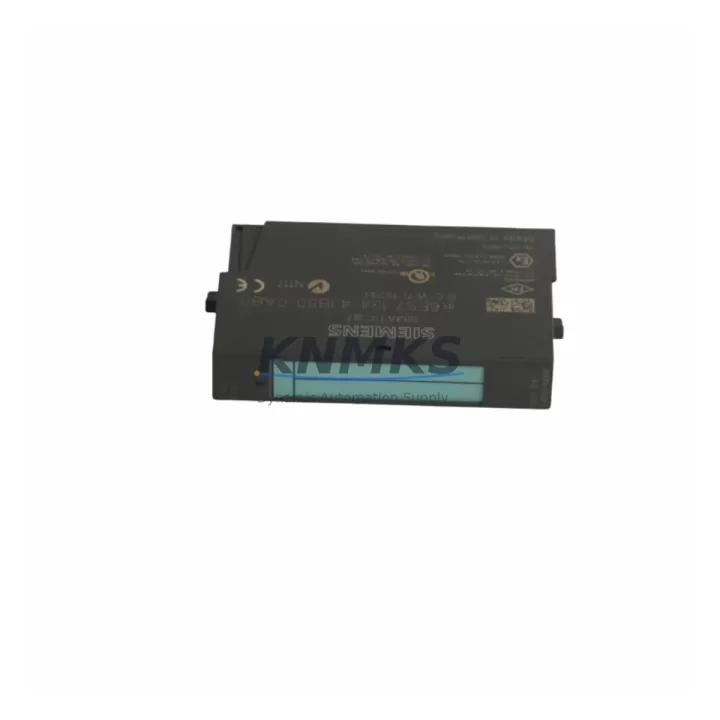
Overview
Siemens 6ES7134-4JB50-0AB0 Migration-Ready Analog Input Module for Legacy Control Systems
The Siemens 6ES7134-4JB50-0AB0 is a 2-channel analog input module designed for the ET 200S distributed I/O platform, operating within SIMATIC S7-300 and S7-400 control architectures. As legacy automation lines face increasing pressure from discontinued spare parts, aging backplane infrastructure, and evolving communication standards, the 6ES7134-4JB50-0AB0 serves as a proven migration-ready replacement for facilities managing long-cycle production environments. This module supports voltage and current signal acquisition with high-resolution conversion, making it a reliable choice for process control, machine monitoring, and sensor integration in both greenfield upgrades and brownfield retrofit projects.
When planning a replacement for discontinued analog input modules within an ET 200S rack, engineers must verify the terminal block wiring configuration, confirm the module slot address within the IM 151 interface module assignment, and validate the signal type (0–10 V, ±10 V, 4–20 mA) against the existing field wiring. The 6ES7134-4JB50-0AB0 uses a standard 2-wire or 4-wire connection scheme compatible with most legacy terminal assignments, reducing rewiring time during planned maintenance windows.
Each unit is pre-shipment tested against Siemens factory specifications and ships with a support terms confirmed by quotation, supporting procurement teams managing critical spare parts inventories for extended plant lifecycles.
Migration Compatibility Table
| Parameter | Details |
|---|---|
| SKU / Part Number | 6ES7134-4JB50-0AB0 |
| Series | SIMATIC ET 200S |
| Module Type | 2-Channel Analog Input (2AI) |
| Signal Range | Voltage: ±10 V / 0–10 V; Current: 0–20 mA / 4–20 mA |
| Resolution | 13-bit + sign |
| Communication Interface | Profibus-DP / Profinet (via IM 151 interface module) |
| Backplane Compatibility | ET 200S standard rail; compatible with IM 151-1, IM 151-3 PN |
| Power Supply | 24 V DC via backplane bus |
| Terminal Connection | Front connector (20-pin), compatible with legacy ET 200S terminal blocks |
| Installation Space | Standard ET 200S slot width; no additional spacing required |
| Firmware Compatibility | Compatible with STEP 7 V5.x and TIA Portal V13 and above |
| Replacement Scope | Direct drop-in for 6ES7134-4JB00-0AB0 and 6ES7134-4JB01-0AB0 variants |
| Pre-Shipment Testing | Yes — functional and signal accuracy verified |
| Support terms | 12 Months |
| Origin | Germany |
Retrofit Planning for Existing Automation Systems
Integrating the 6ES7134-4JB50-0AB0 into an existing ET 200S station requires a structured approach to avoid configuration drift and signal mapping errors. Begin by auditing the current hardware configuration in STEP 7 or TIA Portal, confirming the slot order within the ET 200S rack and the GSD file version loaded for the IM 151 interface module. If the station is running on Profibus-DP and a migration to Profinet is planned, the IM 151-3 PN interface module must be substituted alongside the analog input module, and the network topology updated in the hardware configuration tool.
Terminal block compatibility is a critical checkpoint. The 6ES7134-4JB50-0AB0 uses the standard ET 200S 20-pin front connector. If the existing installation uses an older screw-type terminal block (e.g., from a 6ES7134-4JB00-0AB0 predecessor), the connector can typically be reused without rewiring, significantly reducing field labor time. Verify the shield connection and cable routing to maintain signal integrity, particularly in environments with high electromagnetic interference from variable frequency drives or servo amplifiers.
For facilities also upgrading power distribution within the control cabinet, the PM-E 24 V DC power module for ET 200S should be inspected for load capacity when adding analog channels. If the station includes a 6ES7138-4CA01-0AA0 PM-E module, confirm that the additional analog input current draw remains within the module’s rated output. Similarly, if the retrofit involves expanding I/O capacity, the 6ES7131-4BF00-0AA0 digital input module and 6ES7132-4BF00-0AA0 digital output module are common companions in mixed-signal ET 200S stations and should be included in the hardware configuration review.
Where HMI integration is part of the upgrade scope, confirm that the analog channel tag addresses in WinCC or TP/OP panel projects reflect the new slot assignment. A slot shift caused by inserting or removing a module upstream of the 6ES7134-4JB50-0AB0 will invalidate existing tag mappings and require a full HMI screen update. Document the before-and-after slot layout and retain a backup of the original STEP 7 project before making any hardware changes.
For systems incorporating signal conditioning or isolation between field sensors and the ET 200S rack, the use of a signal isolator or loop-powered transmitter should be validated against the input impedance specifications of the 6ES7134-4JB50-0AB0 to prevent measurement offset. Programming cables such as the 6ES7972-0CB20-0XA0 PC adapter USB are recommended for on-site firmware verification and online diagnostics during commissioning.
Downtime Control During System Migration
Minimizing unplanned downtime during an ET 200S analog input module replacement requires pre-staging the 6ES7134-4JB50-0AB0 with the correct hardware configuration loaded and verified offline before the maintenance window begins. Use TIA Portal or STEP 7 to compile and simulate the updated hardware configuration, confirming that no address conflicts exist and that the diagnostic buffer does not report module faults in simulation mode.
During the physical swap, power down only the affected ET 200S station segment if the control system architecture permits zone isolation. In systems where the ET 200S station is shared across multiple process cells, coordinate with the operations team to identify the minimum isolation boundary. Retain the original front connector with field wiring attached and transfer it directly to the replacement module to eliminate rewiring errors and reduce reconnection time.
After module insertion, perform an online comparison in STEP 7 or TIA Portal to confirm that the loaded configuration matches the physical hardware. Force the analog input channels to known test values using a signal calibrator and verify that the PLC program reads the expected engineering unit values before releasing the station back to automatic control. Retain the original module for bench testing and root cause analysis if the replacement was triggered by a suspected fault rather than scheduled maintenance.
Maintaining a documented retrofit log — including the date, technician, firmware version, terminal block condition, and signal verification results — supports future audits and reduces diagnostic time during subsequent maintenance cycles. All units supplied by KNMKS are pre-tested prior to dispatch, reducing the risk of DOA modules and supporting tight maintenance schedules.
Retrofit Support FAQ
Q1: Is the 6ES7134-4JB50-0AB0 a direct replacement for the 6ES7134-4JB00-0AB0?
Yes. The 6ES7134-4JB50-0AB0 is the current successor variant and is mechanically and electrically compatible with earlier 4JB00 and 4JB01 variants in the ET 200S platform. The front connector and slot footprint are identical, allowing direct substitution without rack modification.
Q2: Can this module operate on both Profibus-DP and Profinet networks?
The 6ES7134-4JB50-0AB0 itself is a local I/O module and does not directly connect to the fieldbus. Communication is handled by the IM 151 interface module installed at the head of the ET 200S station. The analog input module is compatible with both IM 151-1 (Profibus) and IM 151-3 PN (Profinet) interface modules, making it suitable for both legacy Profibus installations and Profinet migration projects.
Q3: What pre-shipment testing is performed before dispatch?
Each 6ES7134-4JB50-0AB0 unit is functionally tested prior to shipment, including power-on verification, channel signal accuracy check across the rated input range, and backplane communication validation. Units that do not meet Siemens factory specifications are quarantined and not dispatched. A support terms confirmed by quotation is provided from the date of shipment.
Q4: What is the typical lead time and stock availability?
KNMKS maintains multi-region stock of the 6ES7134-4JB50-0AB0 to support emergency replacement and planned maintenance procurement. Standard orders are dispatched within 1–3 business days. For urgent requirements, contact the sales team directly to confirm real-time availability and expedited shipping options.
© 2026 KNMKS. All rights reserved.
Original Source: https://knmks.com
Contact: admin@knmks.com | +86 18359268345
Product Identification
- Brand / Ecosystem
-
Siemens
Siemens - Model / Series
-
6ES7134-4JB50-0AB0
SIMATIC Series - Product Family
- PLCs & Controllers
- Availability Status
- Available on request after model and quantity confirmation
- Inquiry Type
- B2B RFQ, replacement inquiry and project spare-part request
- Pre-Quote Check
- Exact SKU, brand, series, quantity, nameplate photos and destination country are checked before quotation
System Path
Where this product fits in the KNMKS automation structure.
Specification & Inquiry Focus
- Control platform
- PLC, PAC and modular controllers
- Common needs
- CPU, rack, power and I/O expansion
- Project support
- Replacement, cabinet build and maintenance
Buyer Confirmation
Information KNMKS checks before replying.
- Exact model
- 6ES7134-4JB50-0AB0
- Brand / ecosystem
- Siemens
- Product family
- PLCs & Controllers
- Application note
- Replacement, maintenance, project build or spare-part list
- Useful photos
- Nameplate, installed unit, cabinet layout or connector side
- Delivery details
- Quantity, destination country and target schedule
Document Support
Files and notes can be confirmed during quotation.
- Product photos or nameplate confirmation when available
- Packing and delivery notes before quotation confirmation
- Support scope and delivery terms confirmed per inquiry
- Export document coordination for qualified B2B requests
Inquiry Support
- Model cross-checking before quotation
- CPU, power, rack and expansion module matching
- Support for replacement and project inquiry
What to Send Us
- Brand and exact model number: Siemens 6ES7134-4JB50-0AB0
- Quantity and required delivery time
- Application, replacement requirement or nameplate photo
- Destination country and shipping preference
RFQ Preparation
This is a product inquiry page built for RFQ communication.
Fast Model Check
Send this model to KNMKS for confirmation.
Include quantity, destination country and photos if this is a maintenance replacement. The inquiry will be saved with a reference number after submission.
Brand & Compatibility Note
KNMKS displays automation product information for well-known industrial brand ecosystems and compatible replacement references. Brand names are used for product identification and compatibility reference only; final availability and commercial terms are confirmed per quotation.
 Manufacturing
 Machine Tools
 Packaging
 Energy & Power



 HMI & Displays
 Servo Systems
 Variable Frequency Drives
 Sensors