
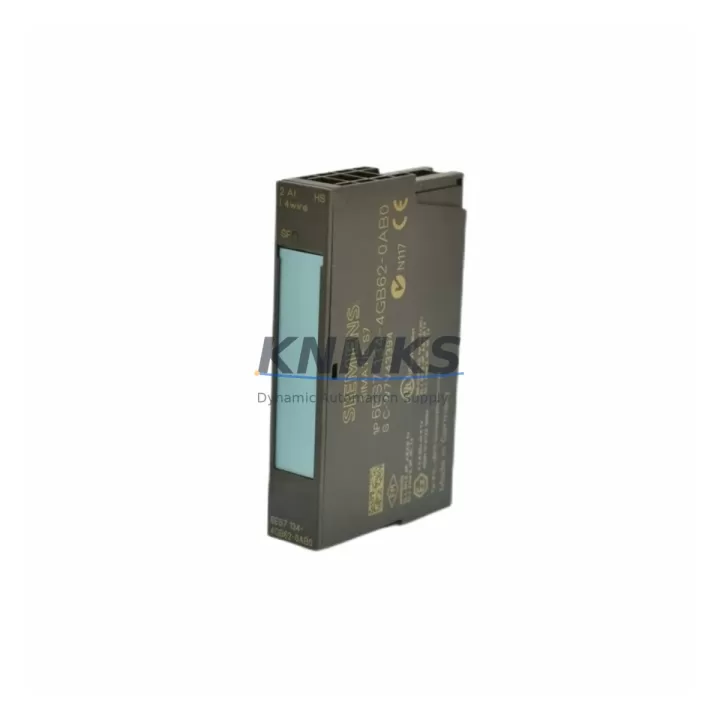
Overview
Siemens 6ES7134-4GB62-0AB0 Maintenance-Proven Spare Part for Factory Uptime
The Siemens 6ES7134-4GB62-0AB0 is a 4-channel analog input module designed for the SIMATIC ET 200S distributed I/O system. In process-critical environments — from automotive body shops and chemical dosing lines to food packaging and water treatment facilities — this module serves as the primary signal acquisition interface between field sensors and the S7-300 or S7-400 PLC controller. When this module fails or degrades, the entire analog measurement chain is interrupted, triggering unplanned downtime that can cost thousands of dollars per hour. Holding a verified spare in your maintenance cabinet is the single most effective way to contain that risk.
This listing supplies an original Siemens 6ES7134-4GB62-0AB0 sourced through authorized industrial channels. Every unit undergoes pre-shipment functional verification — channel-by-channel signal integrity, terminal block seating, and firmware revision confirmation — before dispatch. A support terms confirmed by quotation cover the full post-installation period, giving procurement engineers a defensible quality record for asset management systems.
Spare Maintenance Table
| Part Number | 6ES7134-4GB62-0AB0 |
| Brand | Siemens |
| Series | SIMATIC ET 200S |
| Product Type | Analog Input Module |
| Channels | 4 × Analog Input (voltage/current selectable) |
| Input Range | ±10 V / 0–20 mA / 4–20 mA (parameterizable) |
| Resolution | 13-bit + sign |
| Cycle Time | Approx. 6 ms per channel (standard mode) |
| Supply Voltage | 24 V DC (via ET 200S power module) |
| Backplane Interface | ET 200S terminal module (e.g. TM-E15S24-01) |
| Compatible Controllers | S7-300, S7-400, S7-1500 (via IM 151-x interface modules) |
| Compatible IM Modules | 6ES7151-1AA05-0AB0, 6ES7151-3AA23-0AB0 |
| Operating Temperature | 0 °C to +60 °C |
| Protection Class | IP20 |
| Mounting | Snap-on to ET 200S terminal module on DIN rail |
| Origin | Germany |
| Condition | Original, New / Tested Surplus |
| Support terms | 12 Months from date of shipment |
| Shipping | Pre-tested, ESD-safe packaging, global dispatch within 2 business days |
Maintenance Planning for Continuous Operation
Analog input modules like the 6ES7134-4GB62-0AB0 rarely fail in isolation. When a maintenance engineer investigates a signal anomaly or a complete channel loss on an ET 200S station, the root cause often extends beyond the module itself. A structured inspection of the surrounding electrical circuit prevents repeat failures and shortens the next maintenance window.
Begin with the ET 200S power module (e.g., 6ES7138-4CA01-0AA0 PM-E 24VDC) supplying the segment. A sagging or noisy 24 V rail will cause intermittent analog readings that mimic module faults. Verify output voltage under load with a calibrated meter before condemning the input module. Next, inspect the terminal module (TM-E15S24-01 or equivalent) on which the 6ES7134-4GB62-0AB0 snaps. Corroded or cracked terminal contacts are a common source of high-resistance signal paths that produce offset errors across all four channels.
On the field side, check the 4–20 mA transmitter loop wiring for insulation breakdown, especially in high-vibration or high-temperature zones. A shorted cable shield or a floating ground reference will inject common-mode noise that exceeds the module’s rejection capability. If the plant uses signal isolators (such as Phoenix Contact MINI MCR or Pepperl+Fuchs KFD series) between field instruments and the ET 200S rack, verify isolator output calibration and power supply integrity — these devices age and drift independently of the PLC hardware.
At the rack level, confirm that the IM 151 interface module (e.g., 6ES7151-1AA05-0AB0) is communicating cleanly with the CPU. A degraded PROFIBUS DP or PROFINET connection will cause the entire ET 200S station to report diagnostic errors that appear as analog module faults in the CPU’s diagnostic buffer. Review the STEP 7 or TIA Portal hardware configuration to ensure the module’s parameter set — input range, smoothing level, and diagnostic enable flags — matches the replacement unit’s firmware revision.
Finally, include a 24 V DC fuse or circuit breaker inspection in the same maintenance cycle. Undersized or aging fuses on the ET 200S power segment can cause nuisance trips under sensor inrush, and a blown fuse is frequently misdiagnosed as a module failure. Keeping one spare 6ES7134-4GB62-0AB0 alongside a matched terminal module and a spare IM 151 interface module in the control cabinet spares kit covers the three most common ET 200S analog station failure modes without requiring an emergency procurement cycle.
Site Replacement Workflow
Step 1 — Isolate and document. Place the ET 200S station in STOP mode from the CPU or via the IM 151 RUN/STOP switch. Record the current hardware configuration, firmware version, and parameter assignment for the 6ES7134-4GB62-0AB0 slot from STEP 7 / TIA Portal before removing the module. Take a photograph of the terminal wiring for reference.
Step 2 — Remove the faulty module. The 6ES7134-4GB62-0AB0 snaps onto its terminal module without tools. Press the release lever and slide the electronics module upward to disengage. The terminal module and field wiring remain in place — no rewiring is required for a like-for-like replacement.
Step 3 — Verify the replacement unit. Confirm the replacement 6ES7134-4GB62-0AB0 carries the same order number and firmware revision (visible on the module label). If the firmware revision differs, check the Siemens compatibility matrix or update the hardware catalog in TIA Portal before proceeding.
Step 4 — Install and parameterize. Snap the replacement module onto the terminal module. Power up the ET 200S station and observe the module’s SF/BF LEDs. A solid green RUN LED with no SF (System Fault) indication confirms successful hardware recognition. In TIA Portal, perform a “Download to Device” if parameter changes are required, or confirm that the existing configuration is accepted without modification.
Step 5 — Functional verification. Apply known reference signals to each of the four input channels using a loop calibrator or signal generator. Compare the PLC process image values against the expected engineering-unit readings. Document the as-found and as-left values in the maintenance record. Return the station to RUN mode and monitor for 15 minutes before releasing the line.
Step 6 — Replenish the spare. Log the consumed spare in the CMMS and initiate a replenishment order immediately. A 12-month buffer stock of at least one 6ES7134-4GB62-0AB0 per ET 200S station cluster is the recommended minimum for plants with more than five analog stations on a single production line.
Spare Parts Support FAQ
Q1: Is the 6ES7134-4GB62-0AB0 still in production, and what is the recommended replacement if it reaches end-of-life?
Siemens has transitioned the ET 200S platform toward ET 200SP for new installations, but the 6ES7134-4GB62-0AB0 remains available as a spare part through authorized channels. For systems where ET 200S is deeply embedded, maintaining a forward stock of 12–24 months is the most cost-effective continuity strategy. KNMKS maintains ongoing inventory and can advise on migration paths to ET 200SP analog input modules when a full platform upgrade is planned.
Q2: How do I confirm compatibility between the replacement module and my existing ET 200S hardware configuration?
Compatibility depends on three factors: the terminal module type (TM-E15S24-01 is the standard match), the IM 151 interface module firmware, and the TIA Portal / STEP 7 hardware catalog version. Every unit shipped by KNMKS includes the module’s firmware revision on the label. Cross-reference this against your existing hardware configuration in TIA Portal before installation. If revisions differ, a catalog update or parameter re-download is required — a 15-minute task for a qualified automation engineer.
Q3: What pre-shipment testing does KNMKS perform on the 6ES7134-4GB62-0AB0?
Each unit is powered up on an ET 200S test bench, all four analog input channels are stimulated with calibrated 4–20 mA and ±10 V reference signals, and the process image values are verified against expected engineering-unit outputs. The module’s diagnostic buffer is cleared, and the unit is packed in ESD-safe anti-static bags with foam cushioning before dispatch. A test record is retained for 24 months and can be provided on request.
Q4: What does the support terms confirmed by quotation cover, and how is a support terms claim processed?
The support terms confirmed by quotation cover manufacturing defects and functional failures under normal operating conditions (24 V DC supply, 0–60 °C ambient, IP20 enclosure). It does not cover damage from incorrect wiring, overvoltage, or physical impact. To initiate a claim, contact KNMKS at admin@knmks.com with the order number, installation date, and a brief fault description. A replacement unit is dispatched within 2 business days of claim approval, and the faulty unit is returned for root-cause analysis at KNMKS’s cost.
© 2026 KNMKS. All rights reserved.
Original Source: https://knmks.com
Contact: admin@knmks.com | +86 18359268345
Product Identification
- Brand / Ecosystem
-
Siemens
Siemens - Model / Series
-
6ES7134-4GB62-0AB0
SIMATIC Series - Product Family
- PLCs & Controllers
- Availability Status
- Available on request after model and quantity confirmation
- Inquiry Type
- B2B RFQ, replacement inquiry and project spare-part request
- Pre-Quote Check
- Exact SKU, brand, series, quantity, nameplate photos and destination country are checked before quotation
System Path
Where this product fits in the KNMKS automation structure.
Specification & Inquiry Focus
- Control platform
- PLC, PAC and modular controllers
- Common needs
- CPU, rack, power and I/O expansion
- Project support
- Replacement, cabinet build and maintenance
Buyer Confirmation
Information KNMKS checks before replying.
- Exact model
- 6ES7134-4GB62-0AB0
- Brand / ecosystem
- Siemens
- Product family
- PLCs & Controllers
- Application note
- Replacement, maintenance, project build or spare-part list
- Useful photos
- Nameplate, installed unit, cabinet layout or connector side
- Delivery details
- Quantity, destination country and target schedule
Document Support
Files and notes can be confirmed during quotation.
- Product photos or nameplate confirmation when available
- Packing and delivery notes before quotation confirmation
- Support scope and delivery terms confirmed per inquiry
- Export document coordination for qualified B2B requests
Inquiry Support
- Model cross-checking before quotation
- CPU, power, rack and expansion module matching
- Support for replacement and project inquiry
What to Send Us
- Brand and exact model number: Siemens 6ES7134-4GB62-0AB0
- Quantity and required delivery time
- Application, replacement requirement or nameplate photo
- Destination country and shipping preference
RFQ Preparation
This is a product inquiry page built for RFQ communication.
Fast Model Check
Send this model to KNMKS for confirmation.
Include quantity, destination country and photos if this is a maintenance replacement. The inquiry will be saved with a reference number after submission.
Brand & Compatibility Note
KNMKS displays automation product information for well-known industrial brand ecosystems and compatible replacement references. Brand names are used for product identification and compatibility reference only; final availability and commercial terms are confirmed per quotation.
 Manufacturing
 Machine Tools
 Packaging
 Energy & Power



 HMI & Displays
 Servo Systems
 Variable Frequency Drives
 Sensors