
Overview
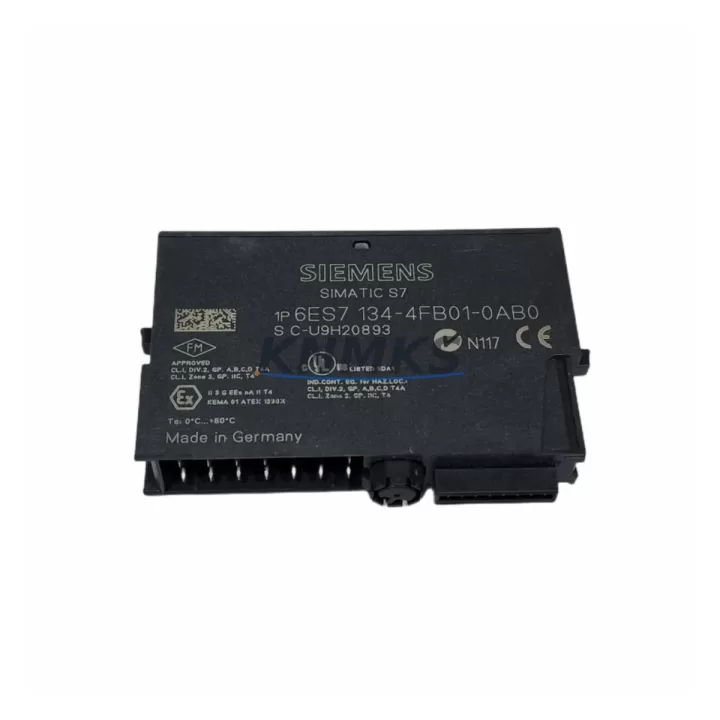
Siemens 6ES7134-4FB01-0AB0 Maintenance-Proven Spare Part for Factory Uptime
The Siemens 6ES7134-4FB01-0AB0 is a 2-channel analog input module designed for the ET 200S distributed I/O system, fully compatible with SIMATIC S7-300 and S7-400 control architectures. As a precision signal acquisition component, it plays a critical role in process monitoring, machine feedback loops, and closed-loop control across manufacturing, chemical, energy, and automotive production environments. Sourced as an original OEM spare, this module is tested prior to shipment and backed by a support terms confirmed by quotation, making it a reliable choice for both emergency replacement and planned maintenance inventory.
For maintenance engineers managing aging SIMATIC installations, the 6ES7134-4FB01-0AB0 represents a direct, plug-compatible replacement that eliminates the need for system reconfiguration or software re-parameterization. Its standardized terminal block interface and STEP 7 / TIA Portal compatibility ensure minimal downtime during field swap-out, even in time-critical production recovery scenarios.
Spare Maintenance Table
| Parameter | Specification |
|---|---|
| Part Number | 6ES7134-4FB01-0AB0 |
| Brand | Siemens |
| Series | SIMATIC ET 200S |
| Module Type | 2-Channel Analog Input Module |
| Input Signal | 4–20 mA / 0–20 mA (current input) |
| Resolution | 13-bit + sign |
| Supply Voltage | 24 V DC (via ET 200S power module) |
| Compatibility | SIMATIC S7-300, S7-400, ET 200S IM 151 interface modules |
| Installation | ET 200S terminal module (TM-E series required) |
| Operating Temperature | 0 °C to +60 °C |
| Protection Class | IP20 |
| Country of Origin | Germany |
| Support terms | 12 Months |
| Condition | Original OEM, Pre-shipment Tested |
Maintenance Planning for Continuous Operation
When replacing the 6ES7134-4FB01-0AB0 in the field, a thorough inspection of the surrounding control cabinet components is essential to prevent repeat failures and ensure system stability. Maintenance engineers should begin by verifying the 24 V DC supply rail feeding the ET 200S station — a failing 6ES7138-4CA01-0AA0 PM-E power module is a common root cause of analog input faults that are misdiagnosed as module failures.
Next, inspect the terminal module on which the 6ES7134-4FB01-0AB0 is seated. Worn or corroded TM-E15S26-A1 terminal modules can cause intermittent signal loss even when the electronics module itself is functional. Check for discoloration, mechanical stress, or loose locking tabs before installing the replacement module.
The interface module coordinating the ET 200S station — typically a 6ES7151-1AA05-0AB0 IM 151-1 Standard — should also be inspected for firmware currency and communication health. A degraded IM 151 can cause cyclic data errors that appear as analog input faults at the CPU level. Verify PROFIBUS DP or PROFINET link status and check for diagnostic buffer entries in STEP 7 or TIA Portal.
For installations where the 6ES7134-4FB01-0AB0 is used in conjunction with thermocouple or RTD sensors, confirm that any upstream signal isolators or transmitters (such as Phoenix Contact MINI MCR or Pepperl+Fuchs KFD series) are within calibration and outputting within the expected 4–20 mA range. Out-of-range signals can trigger module diagnostics and false alarms at the PLC level.
Additionally, review the 6ES7193-4CA40-0AA0 TM-E terminal module inventory in your spare parts cabinet. These passive components are frequently overlooked in annual maintenance budgets but are essential for rapid module swap-out without rewiring. Stocking 2–3 pre-wired terminal modules per ET 200S station significantly reduces mean time to repair (MTTR) during unplanned outages.
Finally, if the control system includes a SIMATIC HMI panel (such as the TP700 Comfort or KTP900 Basic) displaying analog process values sourced from this module, verify that tag addresses and scaling parameters remain intact after module replacement. Incorrect scaling after a swap is a common commissioning oversight that can delay production restart.
Site Replacement Workflow
Step 1 — Pre-replacement verification: Confirm the replacement module part number matches 6ES7134-4FB01-0AB0 exactly. Check the firmware version label if your installation uses a specific STEP 7 hardware catalog version. Mismatched firmware revisions can cause GSD/GSDML import errors in older STEP 7 V5.x projects.
Step 2 — Safe isolation: Switch the ET 200S station to STOP mode via the CPU or IM 151 interface. Do not remove the module under live bus conditions. Discharge any residual voltage on the terminal module before proceeding.
Step 3 — Module extraction: Release the locking mechanism on the terminal module and slide the 6ES7134-4FB01-0AB0 electronics module upward to disengage. No tools are required. Retain the faulty module for failure analysis if root cause investigation is required.
Step 4 — Replacement installation: Align the new 6ES7134-4FB01-0AB0 with the terminal module guide rails and press firmly until the locking tab clicks. The terminal module retains all field wiring, eliminating rewiring time.
Step 5 — System restart and verification: Return the CPU to RUN mode and monitor the diagnostic buffer for any residual faults. Verify analog input values in the process image using STEP 7 Monitor/Modify or TIA Portal Watch Table. Confirm signal scaling matches pre-failure baseline values before releasing the line to production.
This workflow supports a target replacement time of under 15 minutes for trained maintenance personnel, minimizing production line downtime and supporting rapid factory uptime recovery.
Spare Parts Support FAQ
Q1: Is the 6ES7134-4FB01-0AB0 compatible with both STEP 7 Classic and TIA Portal projects?
Yes. The 6ES7134-4FB01-0AB0 is supported in STEP 7 V5.4 and above as well as TIA Portal V13 SP1 and later via the HSP (Hardware Support Package) for ET 200S. Ensure your hardware catalog is updated before performing online configuration changes.
Q2: What is the recommended spare parts stocking strategy for ET 200S analog input modules?
For production lines with more than 4 ET 200S stations, we recommend maintaining a minimum of 1 spare 6ES7134-4FB01-0AB0 per 8 installed units, plus 2–3 pre-wired terminal modules per station. Annual consumption planning should account for modules in service for more than 7 years, as capacitor aging and connector wear increase failure probability.
Q3: How is the module tested before shipment?
Each 6ES7134-4FB01-0AB0 unit is functionally tested on an ET 200S test bench prior to dispatch, verifying analog input accuracy, channel isolation, and bus communication integrity. A test report is available upon request for quality-critical procurement processes.
Q4: What does the support terms confirmed by quotation cover?
The support terms confirmed by quotation cover manufacturing defects and functional failures under normal operating conditions. It does not cover damage resulting from incorrect installation, overvoltage events, or use outside the specified operating parameters. Support requests are processed with return shipment support and priority replacement dispatch to minimize your downtime exposure.
© 2026 KNMKS. All rights reserved.
Original Source: https://knmks.com
Contact: admin@knmks.com | +86 18359268345
Product Identification
- Brand / Ecosystem
-
Siemens
Siemens - Model / Series
-
6ES7134-4FB01-0AB0
SIMATIC Series - Product Family
- PLCs & Controllers
- Availability Status
- Available on request after model and quantity confirmation
- Inquiry Type
- B2B RFQ, replacement inquiry and project spare-part request
- Pre-Quote Check
- Exact SKU, brand, series, quantity, nameplate photos and destination country are checked before quotation
System Path
Where this product fits in the KNMKS automation structure.
Specification & Inquiry Focus
- Control platform
- PLC, PAC and modular controllers
- Common needs
- CPU, rack, power and I/O expansion
- Project support
- Replacement, cabinet build and maintenance
Buyer Confirmation
Information KNMKS checks before replying.
- Exact model
- 6ES7134-4FB01-0AB0
- Brand / ecosystem
- Siemens
- Product family
- PLCs & Controllers
- Application note
- Replacement, maintenance, project build or spare-part list
- Useful photos
- Nameplate, installed unit, cabinet layout or connector side
- Delivery details
- Quantity, destination country and target schedule
Document Support
Files and notes can be confirmed during quotation.
- Product photos or nameplate confirmation when available
- Packing and delivery notes before quotation confirmation
- Support scope and delivery terms confirmed per inquiry
- Export document coordination for qualified B2B requests
Inquiry Support
- Model cross-checking before quotation
- CPU, power, rack and expansion module matching
- Support for replacement and project inquiry
What to Send Us
- Brand and exact model number: Siemens 6ES7134-4FB01-0AB0
- Quantity and required delivery time
- Application, replacement requirement or nameplate photo
- Destination country and shipping preference
RFQ Preparation
This is a product inquiry page built for RFQ communication.
Fast Model Check
Send this model to KNMKS for confirmation.
Include quantity, destination country and photos if this is a maintenance replacement. The inquiry will be saved with a reference number after submission.
Brand & Compatibility Note
KNMKS displays automation product information for well-known industrial brand ecosystems and compatible replacement references. Brand names are used for product identification and compatibility reference only; final availability and commercial terms are confirmed per quotation.
 Manufacturing
 Machine Tools
 Packaging
 Energy & Power



 HMI & Displays
 Servo Systems
 Variable Frequency Drives
 Sensors