
Overview
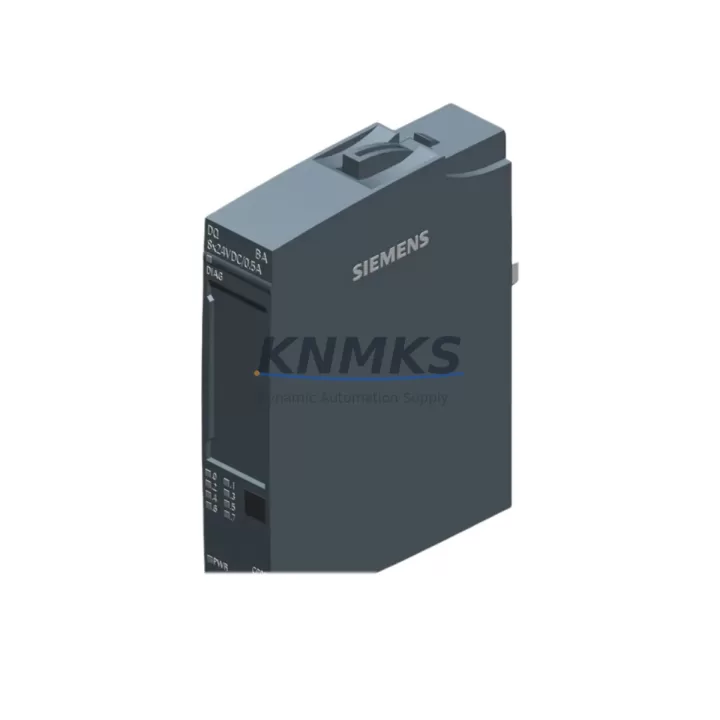
Siemens 6ES7132-6BF01-0AA0 Spare Part for Factory Uptime
The Siemens 6ES7132-6BF01-0AA0 is a Digital Output Module (DQ 8×24VDC/0.5A ST) designed for the SIMATIC ET 200SP distributed I/O system. As a maintenance-proven spare part, it supports uninterrupted factory operation in process automation, machine control, and discrete manufacturing environments. Whether you are managing a scheduled annual overhaul, responding to an unplanned output channel failure, or building a strategic spare parts buffer for your control cabinet, the 6ES7132-6BF01-0AA0 delivers the electrical performance and system compatibility required to restore production quickly and reliably.
This module is sourced as an original Siemens component, fully tested prior to shipment, and backed by a support terms confirmed by quotation. It is suitable for direct replacement in existing ET 200SP racks without firmware reconfiguration in most standard applications, minimizing engineering intervention during emergency downtime recovery.
Spare Maintenance Table
| Parameter | Specification |
|---|---|
| Part Number / SKU | 6ES7132-6BF01-0AA0 |
| Series | SIMATIC ET 200SP |
| Module Type | Digital Output Module (DQ 8×24VDC/0.5A ST) |
| Output Channels | 8 × 24 VDC, 0.5 A per channel |
| Supply Voltage | 24 VDC (rated) |
| Output Current (per channel) | 0.5 A |
| Total Output Current | 4 A (all channels simultaneously) |
| Short-Circuit Protection | Yes (electronic) |
| Backplane Bus Interface | ET 200SP BaseUnit (BU type A0) |
| Compatible BaseUnit | 6ES7193-6BP00-0BA0 / 6ES7193-6BP20-0BA0 |
| Ambient Operating Temperature | 0 °C to +60 °C |
| Degree of Protection | IP20 |
| Mounting | DIN rail via ET 200SP BaseUnit |
| Origin | Germany |
| Support terms | 12 Months |
| Condition | Original, tested before shipment |
| Compatibility | SIMATIC ET 200SP, TIA Portal V13 SP1 and above |
| Maintenance Recommendation | Inspect output wiring and load connections every 12 months; replace module if channel fault LED persists after reset |
Maintenance Planning for Continuous Operation
When replacing the 6ES7132-6BF01-0AA0 in the field, a thorough inspection of the surrounding electrical environment is essential to prevent repeat failures and ensure long-term system stability. Maintenance engineers should begin by verifying the 24 VDC load power supply feeding the ET 200SP station — a degraded or undersized power supply module such as the 6EP1333-2BA20 SITOP PSU100S can cause intermittent output faults that mimic module failure. Check supply voltage under full load conditions before condemning the output module.
The BaseUnit associated with this module — typically a 6ES7193-6BP00-0BA0 — should be inspected for terminal corrosion, loose wiring, and mechanical damage to the push-in connectors. Wiring integrity at the field device side (solenoid valves, contactors, indicator lamps) must also be confirmed, as inductive load spikes without adequate suppression diodes can degrade output transistors over time.
For stations with mixed I/O, also inspect adjacent digital input modules such as the 6ES7131-6BF01-0AA0 (DI 8×24VDC HF) and any analog output modules in the same rack. A shared backplane fault or corrupted configuration in the CPU 1512SP-1 PN (6ES7512-1SK01-0AB0) can cascade across multiple I/O modules. Review the TIA Portal hardware configuration to confirm the module slot assignment matches the physical installation.
Where the ET 200SP station communicates over PROFINET, verify the PROFINET interface module (IM 155-6 PN ST, 6ES7155-6AU01-0BN0) is operating without communication errors. A degraded IM can cause the CPU to report all downstream I/O as faulted even when individual modules are functional. Check the network switch port, cable continuity, and IP address assignment as part of the diagnostic workflow.
For facilities managing aging SIMATIC S7-300 or S7-400 systems alongside newer ET 200SP installations, consider stocking the 6ES7321-1BL00-0AA0 (SM 321 DI 32×24VDC) as a parallel spare to cover legacy digital input requirements. Maintaining a cross-generation spare parts strategy reduces procurement lead time risk during emergency shutdowns and supports a phased migration path toward the ET 200SP platform.
Finally, inspect the control cabinet’s fuse protection for each output group. Blade fuses or miniature circuit breakers protecting the 24 VDC output circuits should be rated appropriately for the connected load and verified for continuity. A blown fuse on the load side is frequently misdiagnosed as a module fault, resulting in unnecessary module replacement and extended downtime.
Site Replacement Workflow
The 6ES7132-6BF01-0AA0 is designed for tool-free replacement within the ET 200SP system, enabling rapid field swap without specialized equipment. Follow this workflow to minimize downtime and maintain system integrity:
Step 1 — Safe Isolation: Place the CPU in STOP mode via TIA Portal or the mode selector switch. De-energize the 24 VDC load power supply for the affected ET 200SP station. Confirm absence of voltage at the BaseUnit terminals using a calibrated multimeter.
Step 2 — Module Removal: Unlock the module from the BaseUnit by pressing the release lever and sliding the module upward. The BaseUnit remains installed on the DIN rail — wiring does not need to be disturbed.
Step 3 — Replacement Installation: Slide the new 6ES7132-6BF01-0AA0 onto the BaseUnit until it clicks into the locked position. Verify the module color coding matches the BaseUnit type (Type A0 for standard output modules).
Step 4 — Configuration Verification: Re-energize the station and place the CPU in RUN mode. In TIA Portal, navigate to the Online & Diagnostics view and confirm the module reports no faults. Verify all 8 output channels respond correctly to test signals from the PLC program.
Step 5 — Documentation: Record the replacement date, module serial number, and any observed fault history in the plant maintenance log. Update the spare parts inventory to trigger replenishment of the consumed unit.
This plug-and-play replacement approach — enabled by the ET 200SP’s BaseUnit architecture — eliminates the need to rewire field connections during module swap, reducing mean time to repair (MTTR) to under 15 minutes for trained technicians.
Spare Parts Support FAQ
Q1: Is the 6ES7132-6BF01-0AA0 compatible with all ET 200SP BaseUnit types?
This module is compatible with Type A0 BaseUnits, including the 6ES7193-6BP00-0BA0 and 6ES7193-6BP20-0BA0. It is not compatible with Type B BaseUnits used for high-feature (HF) modules. Always verify the BaseUnit type before ordering to ensure mechanical and electrical compatibility.
Q2: What does the support terms confirmed by quotation cover, and how is it validated?
The support terms confirmed by quotation cover manufacturing defects and functional failures under normal operating conditions. Each unit is tested for output channel integrity, backplane communication, and short-circuit protection prior to shipment. Support requests are supported with shipment documentation and test records. Contact admin@knmks.com to initiate a support terms claim.
Q3: How should we manage long-term supply risk for this module?
For facilities with multiple ET 200SP stations, we recommend maintaining a minimum buffer stock of 2–3 units per site. Given that Siemens periodically revises ET 200SP module variants, procurement engineers should confirm the current active part number and request a long-term supply commitment when placing blanket orders. KNMKS supports scheduled delivery programs to align spare parts replenishment with annual maintenance cycles.
Q4: Can this module replace older Siemens digital output modules from S7-300 or S7-400 systems?
The 6ES7132-6BF01-0AA0 is an ET 200SP platform module and is not a direct plug-in replacement for S7-300 SM 322 or S7-400 SM 422 output modules. However, it can serve as the target module in a system migration project where legacy S7-300/400 I/O is being replaced with ET 200SP distributed I/O. Engineering support for migration compatibility assessment is available upon request.
© 2026 KNMKS. All rights reserved.
Original Source: https://knmks.com
Contact: admin@knmks.com | +86 18359268345
Product Identification
- Brand / Ecosystem
-
Siemens
Siemens - Model / Series
-
6ES7132-6BF01-0AA0
SIMATIC Series - Product Family
- PLCs & Controllers
- Availability Status
- Available on request after model and quantity confirmation
- Inquiry Type
- B2B RFQ, replacement inquiry and project spare-part request
- Pre-Quote Check
- Exact SKU, brand, series, quantity, nameplate photos and destination country are checked before quotation
System Path
Where this product fits in the KNMKS automation structure.
Specification & Inquiry Focus
- Control platform
- PLC, PAC and modular controllers
- Common needs
- CPU, rack, power and I/O expansion
- Project support
- Replacement, cabinet build and maintenance
Buyer Confirmation
Information KNMKS checks before replying.
- Exact model
- 6ES7132-6BF01-0AA0
- Brand / ecosystem
- Siemens
- Product family
- PLCs & Controllers
- Application note
- Replacement, maintenance, project build or spare-part list
- Useful photos
- Nameplate, installed unit, cabinet layout or connector side
- Delivery details
- Quantity, destination country and target schedule
Document Support
Files and notes can be confirmed during quotation.
- Product photos or nameplate confirmation when available
- Packing and delivery notes before quotation confirmation
- Support scope and delivery terms confirmed per inquiry
- Export document coordination for qualified B2B requests
Inquiry Support
- Model cross-checking before quotation
- CPU, power, rack and expansion module matching
- Support for replacement and project inquiry
What to Send Us
- Brand and exact model number: Siemens 6ES7132-6BF01-0AA0
- Quantity and required delivery time
- Application, replacement requirement or nameplate photo
- Destination country and shipping preference
RFQ Preparation
This is a product inquiry page built for RFQ communication.
Fast Model Check
Send this model to KNMKS for confirmation.
Include quantity, destination country and photos if this is a maintenance replacement. The inquiry will be saved with a reference number after submission.
Brand & Compatibility Note
KNMKS displays automation product information for well-known industrial brand ecosystems and compatible replacement references. Brand names are used for product identification and compatibility reference only; final availability and commercial terms are confirmed per quotation.
 Manufacturing
 Machine Tools
 Packaging
 Energy & Power



 HMI & Displays
 Servo Systems
 Variable Frequency Drives
 Sensors