
Overview
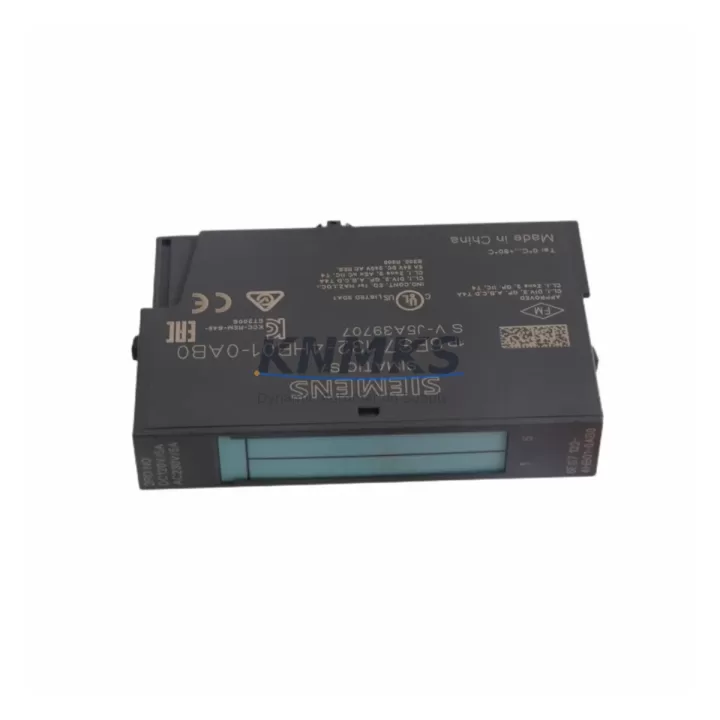
Siemens 6ES7132-4HB01-0AB0 Maintenance-Proven Spare Part for Factory Uptime
The Siemens 6ES7132-4HB01-0AB0 is a 2-channel digital output module (2DO) designed for the ET 200S distributed I/O system, operating at 24 VDC with a rated output current of 0.5 A per channel. As a core component of SIMATIC S7-300 and S7-400 control architectures, this module is widely deployed in discrete manufacturing, process automation, conveyor systems, and packaging lines. Maintaining a verified spare of the 6ES7132-4HB01-0AB0 in your MRO inventory is a proven strategy for reducing unplanned downtime and accelerating fault recovery during scheduled and emergency maintenance windows.
At KNMKS, every 6ES7132-4HB01-0AB0 unit is sourced as an original Siemens component, inspected prior to dispatch, and covered by a support terms confirmed by quotation. We support maintenance engineers and procurement teams with long-term supply continuity, fast order processing, and pre-shipment functional verification — ensuring your replacement part arrives ready to install.
Spare Maintenance Table
| SKU / Part Number | 6ES7132-4HB01-0AB0 |
| Brand | Siemens |
| Series | SIMATIC ET 200S |
| Module Type | 2-Channel Digital Output (2DO) |
| Output Voltage | 24 VDC |
| Rated Output Current | 0.5 A per channel |
| Compatible Systems | SIMATIC S7-300, S7-400, ET 200S IM 151 interface modules |
| Installation | Snap-on terminal module (TM-E series required) |
| Protection Class | IP20 (cabinet-mounted) |
| Operating Temperature | 0 °C to +60 °C |
| Weight | Approx. 40 g |
| Origin | Germany |
| Condition | Original, new or tested-serviceable |
| Support terms | 12 Months |
| Pre-Shipment Test | Yes — functional verification before dispatch |
| Maintenance Recommendation | Replace at first sign of output fault, LED error, or channel failure; inspect terminal module contacts simultaneously |
Maintenance Planning for Continuous Operation
When a 6ES7132-4HB01-0AB0 output module fails or is flagged during a routine control cabinet inspection, the fault rarely exists in isolation. Maintenance engineers should treat the replacement as an opportunity to audit the surrounding electrical circuit and associated components to prevent repeat failures and ensure system stability.
Begin by verifying the 24 VDC supply rail feeding the ET 200S station. A degraded or undersized power supply module — such as the Siemens 6ES7138-4CA01-0AA0 PM-E power module — can cause intermittent output faults that mimic module failure. Confirm supply voltage is within tolerance before condemning the output module.
Inspect the terminal module (TM-E15S24-A1 or equivalent) on which the 6ES7132-4HB01-0AB0 is mounted. Worn or corroded terminal contacts are a common root cause of output channel errors and should be replaced together with the electronic module during any planned maintenance window.
Check the ET 200S interface module (IM 151-1 or IM 151-7) for firmware currency and communication health. A degraded IM module can cause false diagnostics on downstream I/O modules, including the 2DO. Review the PROFIBUS or PROFINET segment for bus errors, termination resistance, and cable integrity.
For systems with mixed I/O, also inspect adjacent digital input modules such as the 6ES7131-4BB01-0AB0 (2DI 24VDC) and any analog output modules (e.g., 6ES7135-4FB01-0AB0) sharing the same backplane segment. Cross-channel interference or shared ground faults can affect multiple modules simultaneously.
Where the ET 200S station controls relay-driven loads, verify the condition of any intermediate relay modules or solid-state relay couplers in the output circuit. Coil inrush or back-EMF from inductive loads without proper suppression diodes can shorten the service life of 24 VDC output modules significantly.
Finally, review the 24 VDC fuse or circuit breaker protecting the output group. A nuisance trip or slow-blow fuse degradation can cause intermittent output loss that is misdiagnosed as module failure. Replacing the protective device as part of the corrective maintenance action is best practice in high-cycle industrial environments.
Site Replacement Workflow
Step 1 — Isolate and de-energize: Switch the ET 200S station to STOP mode via the CPU or IM module. De-energize the 24 VDC supply to the affected power segment before touching any module.
Step 2 — Document current configuration: Record the slot position, wiring labels, and any parameter assignments in STEP 7 or TIA Portal before removal. Take a photo of the terminal wiring for reference.
Step 3 — Remove the faulty module: The 6ES7132-4HB01-0AB0 snaps off the terminal module without tools. Slide the release lever and lift the electronic module clear. The terminal module and field wiring remain in place — no rewiring is required for a like-for-like replacement.
Step 4 — Install the replacement: Snap the new 6ES7132-4HB01-0AB0 onto the existing terminal module. Verify the module is fully seated and the locking tab is engaged.
Step 5 — Re-energize and verify: Restore 24 VDC supply and set the CPU/IM to RUN. Confirm the module’s RUN LED is green and no SF (system fault) LED is active. Perform a functional output test by activating each channel from the PLC program or via force table in TIA Portal.
Step 6 — Update maintenance records: Log the replacement date, part serial number, and technician ID in your CMMS. Schedule the next inspection interval per your preventive maintenance plan.
This hot-swap-compatible design minimizes downtime — a trained technician can complete the physical replacement in under five minutes, making the 6ES7132-4HB01-0AB0 one of the most field-serviceable modules in the ET 200S family.
Spare Parts Support FAQ
Q1: Is the 6ES7132-4HB01-0AB0 still available as a new original part?
Yes. KNMKS maintains stock of original Siemens 6ES7132-4HB01-0AB0 modules. While Siemens has introduced successor models in the ET 200SP platform, the 6ES7132-4HB01-0AB0 remains available for installed-base maintenance and system life extension. Contact us for current stock status and lead times.
Q2: What is covered under the support terms confirmed by quotation?
All units supplied by KNMKS carry a support terms confirmed by quotation covering manufacturing defects and functional failure under normal operating conditions. Each module undergoes pre-shipment functional verification. In the event of a support terms claim, we provide rapid replacement to minimize your downtime exposure.
Q3: Can I replace the 6ES7132-4HB01-0AB0 without rewiring the terminal module?
Yes. The ET 200S system separates the electronic module from the terminal module. Field wiring connects to the terminal module (TM-E series), which remains fixed in the cabinet. The 6ES7132-4HB01-0AB0 electronic module snaps on and off without disturbing any field wiring, making replacement fast and error-free.
Q4: How should I manage long-term spare parts inventory for ET 200S systems?
For critical production lines, we recommend holding a minimum of one 6ES7132-4HB01-0AB0 per ET 200S station as a hot spare. For facilities with multiple stations, a pooled spare strategy — typically 10–15% of installed quantity — balances inventory cost against downtime risk. KNMKS supports blanket order arrangements and scheduled replenishment to help procurement teams maintain optimal stock levels without capital overcommitment.
© 2026 KNMKS. All rights reserved.
Original Source: https://knmks.com
Contact: admin@knmks.com | +86 18359268345
Product Identification
- Brand / Ecosystem
-
Siemens
Siemens - Model / Series
-
6ES7132-4HB01-0AB0
SIMATIC Series - Product Family
- PLCs & Controllers
- Availability Status
- Available on request after model and quantity confirmation
- Inquiry Type
- B2B RFQ, replacement inquiry and project spare-part request
- Pre-Quote Check
- Exact SKU, brand, series, quantity, nameplate photos and destination country are checked before quotation
System Path
Where this product fits in the KNMKS automation structure.
Specification & Inquiry Focus
- Control platform
- PLC, PAC and modular controllers
- Common needs
- CPU, rack, power and I/O expansion
- Project support
- Replacement, cabinet build and maintenance
Buyer Confirmation
Information KNMKS checks before replying.
- Exact model
- 6ES7132-4HB01-0AB0
- Brand / ecosystem
- Siemens
- Product family
- PLCs & Controllers
- Application note
- Replacement, maintenance, project build or spare-part list
- Useful photos
- Nameplate, installed unit, cabinet layout or connector side
- Delivery details
- Quantity, destination country and target schedule
Document Support
Files and notes can be confirmed during quotation.
- Product photos or nameplate confirmation when available
- Packing and delivery notes before quotation confirmation
- Support scope and delivery terms confirmed per inquiry
- Export document coordination for qualified B2B requests
Inquiry Support
- Model cross-checking before quotation
- CPU, power, rack and expansion module matching
- Support for replacement and project inquiry
What to Send Us
- Brand and exact model number: Siemens 6ES7132-4HB01-0AB0
- Quantity and required delivery time
- Application, replacement requirement or nameplate photo
- Destination country and shipping preference
RFQ Preparation
This is a product inquiry page built for RFQ communication.
Fast Model Check
Send this model to KNMKS for confirmation.
Include quantity, destination country and photos if this is a maintenance replacement. The inquiry will be saved with a reference number after submission.
Brand & Compatibility Note
KNMKS displays automation product information for well-known industrial brand ecosystems and compatible replacement references. Brand names are used for product identification and compatibility reference only; final availability and commercial terms are confirmed per quotation.
 Manufacturing
 Machine Tools
 Packaging
 Energy & Power



 HMI & Displays
 Servo Systems
 Variable Frequency Drives
 Sensors