
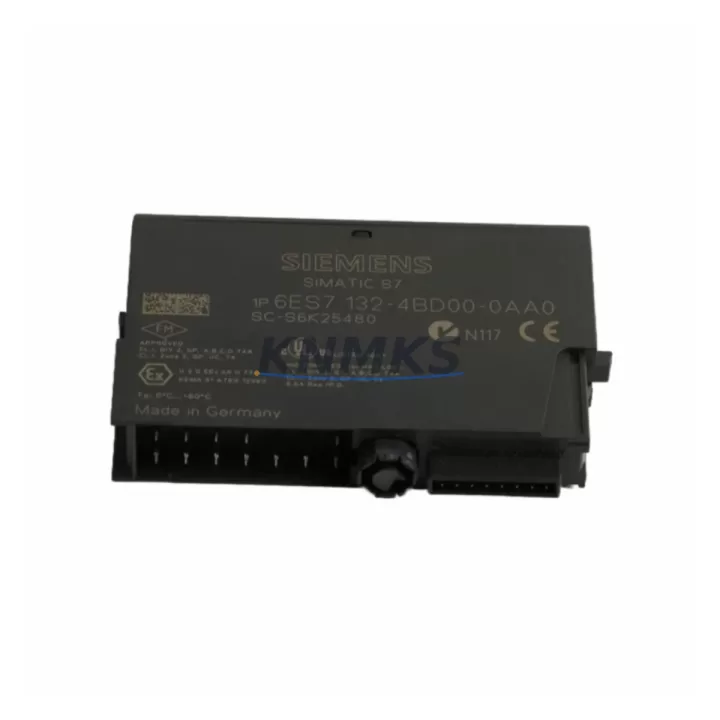
Overview
Siemens 6ES7132-4BD31-0AA0 Migration-Ready Digital Output for Legacy Control Systems
The Siemens 6ES7132-4BD31-0AA0 is a 2-channel 24 VDC digital output module designed for the ET 200S distributed I/O system. As legacy SIMATIC S7-300 and early ET 200S installations approach end-of-life, this module has become a critical component in retrofit projects, discontinued spare part replacement programs, and control cabinet modernization initiatives across manufacturing, process automation, and infrastructure sectors. Whether you are replacing a failed output module on an aging production line or executing a planned migration from an obsolete control architecture, the 6ES7132-4BD31-0AA0 provides a verified drop-in solution that minimizes engineering rework and reduces unplanned downtime.
Before integrating this module into an existing ET 200S station, engineers should confirm several key parameters. Power budget verification is essential: the ET 200S power module — typically a PM-E 24VDC such as the 6ES7138-4CA01-0AA0 — must have sufficient remaining capacity to supply the additional 2 × 0.5 A output current. Terminal wiring must match the original 20-pin front connector pinout; the 6ES7132-4BD31-0AA0 uses the same terminal assignment as earlier 4BD-series output modules, which simplifies direct substitution without rewiring the field cable harness. Backplane slot addressing should be verified in STEP 7 or TIA Portal: the module occupies one slot on the ET 200S interface module rail, and the hardware configuration must reflect the correct module order to avoid address conflicts with adjacent I/O modules.
Program compatibility is generally maintained when replacing within the same 4BD output module family, but engineers should cross-check the output byte address in the OB1 or function block calls. If the original system used a 6ES7132-4BD01-0AA0 or 6ES7132-4BD02-0AA0, the logical address mapping remains identical, and no PLC program modification is required. HMI screens referencing specific output tags will continue to function without update. Communication link integrity between the ET 200S interface module — such as the 6ES7151-1AA05-0AB0 IM151-1 — and the CPU should be verified after module swap, particularly in PROFIBUS DP configurations where the GSD file version may affect diagnostic behavior.
Installation space on the ET 200S rail is standardized at 15 mm per module slot, so no mechanical modification to the control cabinet is required. Firmware compatibility is not a concern for this passive output module, as it contains no embedded firmware. Field commissioning involves confirming output activation via force table in STEP 7 or TIA Portal watch table, verifying load current within the 0.5 A per channel limit, and checking short-circuit protection response. Full functional testing should be completed before returning the system to automatic mode.
Migration Compatibility Table
| Parameter | Detail |
|---|---|
| SKU / Part Number | 6ES7132-4BD31-0AA0 |
| Series | SIMATIC ET 200S |
| Output Channels | 2 × Digital Output, 24 VDC, 0.5 A per channel |
| Replaces / Compatible With | 6ES7132-4BD01-0AA0, 6ES7132-4BD02-0AA0, 6ES7132-4BD30-0AA0 |
| Interface Module Compatibility | IM151-1, IM151-3 PN, IM151-7 CPU (ET 200S rail) |
| Communication Protocol | PROFIBUS DP / PROFINET (via interface module) |
| Installation Width | 15 mm (standard ET 200S slot) |
| Power Supply Requirement | 24 VDC via PM-E power module on same rail |
| Terminal Connector | 20-pin front connector (compatible with existing field wiring) |
| Firmware | No embedded firmware — passive hardware module |
| PLC Program Modification | Not required when replacing within 4BD output module family |
| Commissioning Tool | STEP 7 V5.x / TIA Portal V13 and above |
| Pre-shipment Testing | Function and output channel verification completed before dispatch |
| Support terms | 12 Months from date of shipment |
Retrofit Planning for Existing Automation Systems
Successful integration of the 6ES7132-4BD31-0AA0 into a legacy control system requires a structured retrofit plan that accounts for the full scope of the ET 200S station. In most field installations, the output module operates alongside a 6ES7131-4BD01-0AA0 digital input module handling feedback signals from field devices, and both modules share the same PM-E 24VDC power module rail segment. When planning a cabinet upgrade, engineers should audit the total current draw across all I/O modules on the rail to confirm the power module is not operating near its rated capacity.
For systems migrating from PROFIBUS DP to PROFINET, the interface module must be upgraded — typically from an IM151-1 to an IM151-3 PN — while the 6ES7132-4BD31-0AA0 output module itself remains unchanged, as it is interface-module-agnostic. This makes it a cost-effective component to retain during a partial protocol migration. In mixed-architecture panels where a SIMATIC S7-300 CPU such as the CPU 315-2 DP is being replaced by a newer S7-1500 controller, the ET 200S distributed station can often be retained in full, with only the interface module and GSD/GSDML configuration updated in TIA Portal.
Where I/O expansion is required as part of the modernization, additional 6ES7132-4BD31-0AA0 modules can be added to available rail slots without modifying existing wiring. Signal isolators may be required between the module output and field devices operating at non-standard voltage levels. Programming cables such as the PC Adapter USB A2 are used for online diagnostics and force-table testing during commissioning. Backplane rail length and end bracket positioning should be confirmed before adding modules to avoid mechanical interference with adjacent cabinet components.
Downtime Control During System Migration
Minimizing production downtime during a module replacement or system migration is the primary operational concern for maintenance engineers. The 6ES7132-4BD31-0AA0 supports hot-swap capability within the ET 200S architecture when the interface module and CPU configuration permit it, allowing module replacement without powering down the entire station. Before initiating the swap, the PLC program should be placed in STOP mode or the affected output byte should be forced to a safe state to prevent unintended actuator activation during the exchange.
Original program logic should be backed up to a PC or memory card before any hardware change. In TIA Portal, the hardware configuration should be saved and compiled offline prior to the maintenance window. After module installation, an online comparison between the loaded configuration and the physical hardware confirms correct slot assignment. Output channel function can be verified using the force table without running the full production sequence, allowing a controlled return to automatic operation. For critical processes, a parallel test rack using a spare 6ES7132-4BD31-0AA0 and a bench power supply can be used to pre-verify module function before the scheduled maintenance window, further reducing on-site commissioning time and migration risk.
Retrofit Support FAQ
Q: Is the 6ES7132-4BD31-0AA0 a direct replacement for the 6ES7132-4BD01-0AA0?
A: Yes. The 6ES7132-4BD31-0AA0 is the current successor to the 6ES7132-4BD01-0AA0 and 6ES7132-4BD02-0AA0. It occupies the same 15 mm slot, uses the same 20-pin front connector, and maintains the same logical output address. No PLC program modification or rewiring is required for a direct substitution.
Q: What pre-shipment testing is performed on this module?
A: Each unit undergoes output channel activation testing and visual inspection before dispatch. Modules are verified against the original Siemens specification for output voltage, current capacity, and short-circuit protection response. A support terms confirmed by quotation is provided from the date of shipment.
Q: Can this module be used in a PROFINET ET 200S station?
A: Yes. The 6ES7132-4BD31-0AA0 is compatible with both PROFIBUS DP and PROFINET ET 200S stations. The communication protocol is determined by the interface module (e.g., IM151-3 PN for PROFINET), not by the I/O module itself. No configuration change to the output module is required when migrating between protocols.
Q: What is the lead time and stock availability?
A: Stock is maintained for immediate dispatch. For volume orders or urgent replacement requirements, contact our team directly to confirm current inventory levels and expedited shipping options. All orders are supported by a support terms confirmed by quotation and post-sale technical assistance for commissioning and compatibility verification.
© 2026 KNMKS. All rights reserved.
Original Source: https://knmks.com
Contact: admin@knmks.com | +86 18359268345
Product Identification
- Brand / Ecosystem
-
Siemens
Siemens - Model / Series
-
6ES7132-4BD31-0AA0
SIMATIC Series - Product Family
- PLCs & Controllers
- Availability Status
- Available on request after model and quantity confirmation
- Inquiry Type
- B2B RFQ, replacement inquiry and project spare-part request
- Pre-Quote Check
- Exact SKU, brand, series, quantity, nameplate photos and destination country are checked before quotation
System Path
Where this product fits in the KNMKS automation structure.
Specification & Inquiry Focus
- Control platform
- PLC, PAC and modular controllers
- Common needs
- CPU, rack, power and I/O expansion
- Project support
- Replacement, cabinet build and maintenance
Buyer Confirmation
Information KNMKS checks before replying.
- Exact model
- 6ES7132-4BD31-0AA0
- Brand / ecosystem
- Siemens
- Product family
- PLCs & Controllers
- Application note
- Replacement, maintenance, project build or spare-part list
- Useful photos
- Nameplate, installed unit, cabinet layout or connector side
- Delivery details
- Quantity, destination country and target schedule
Document Support
Files and notes can be confirmed during quotation.
- Product photos or nameplate confirmation when available
- Packing and delivery notes before quotation confirmation
- Support scope and delivery terms confirmed per inquiry
- Export document coordination for qualified B2B requests
Inquiry Support
- Model cross-checking before quotation
- CPU, power, rack and expansion module matching
- Support for replacement and project inquiry
What to Send Us
- Brand and exact model number: Siemens 6ES7132-4BD31-0AA0
- Quantity and required delivery time
- Application, replacement requirement or nameplate photo
- Destination country and shipping preference
RFQ Preparation
This is a product inquiry page built for RFQ communication.
Fast Model Check
Send this model to KNMKS for confirmation.
Include quantity, destination country and photos if this is a maintenance replacement. The inquiry will be saved with a reference number after submission.
Brand & Compatibility Note
KNMKS displays automation product information for well-known industrial brand ecosystems and compatible replacement references. Brand names are used for product identification and compatibility reference only; final availability and commercial terms are confirmed per quotation.
 Manufacturing
 Machine Tools
 Packaging
 Energy & Power



 HMI & Displays
 Servo Systems
 Variable Frequency Drives
 Sensors