
Overview
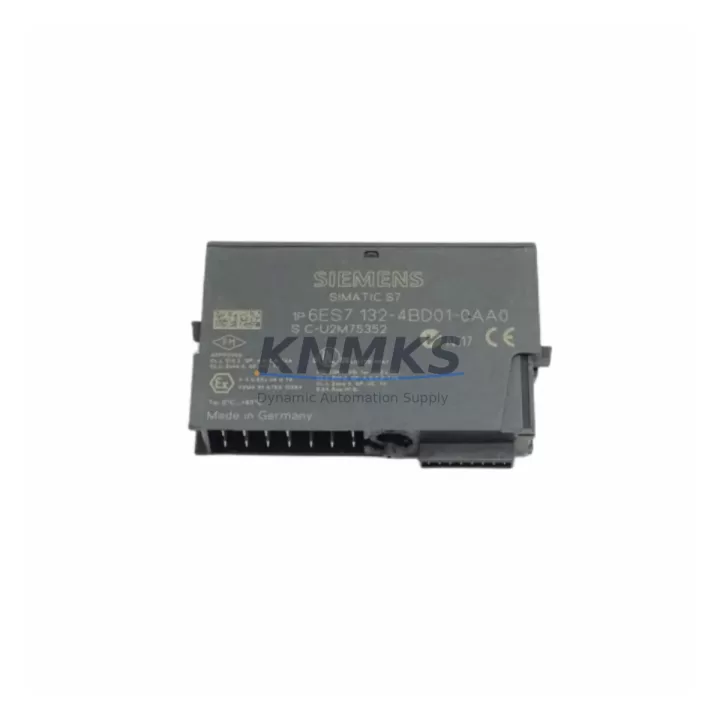
Siemens 6ES7132-4BD01-0AA0 DO Module ET 200S: Legacy System Migration & Compatible Upgrade
The Siemens 6ES7132-4BD01-0AA0 is a 4-channel 24 VDC digital output module designed for the ET 200S distributed I/O system, widely deployed across PROFIBUS DP and PROFINET-based automation architectures. As legacy S7-300 and early ET 200S installations approach end-of-life, this module remains a critical spare for brownfield retrofit projects, production line upgrades, and control cabinet modernization programs where maintaining original wiring topology and program logic is a priority.
Engineers managing aging automation infrastructure frequently encounter the challenge of sourcing discontinued or long-lead-time output modules without triggering a full system redesign. The 6ES7132-4BD01-0AA0 addresses this directly: it slots into existing ET 200S terminal module bases — specifically the TM-E15S24-01 or compatible TM-E variants — without requiring rewiring of field devices or modification of the existing 24 VDC load circuit. This physical and electrical compatibility is essential when downtime windows are measured in hours, not days.
Before installation, retrofit planners should verify the following parameters against the existing system documentation: power budget on the ET 200S power module (such as the 6ES7138-4CA01-0AA0 PM-E 24VDC), backplane slot addressing, module parameter assignment in STEP 7 or TIA Portal, and the output load current per channel (max 0.5 A per channel, 2 A aggregate). If the control program references specific hardware identifiers or diagnostic addresses, these must be confirmed in the hardware configuration before the replacement module is commissioned online.
Migration Compatibility Table
| Parameter | 6ES7132-4BD01-0AA0 | Retrofit Notes |
|---|---|---|
| Output Channels | 4 × 24 VDC DO | Direct replacement for same-channel-count DO modules in ET 200S |
| Output Current | 0.5 A per channel | Verify field device load; no derating required for standard solenoid/relay loads |
| Terminal Module | TM-E15S24-01 (or equivalent) | Terminal module stays in place; only electronic module is replaced |
| Communication | PROFIBUS DP / PROFINET (via IM) | Compatible with IM 151-1 (PROFIBUS) and IM 151-3 (PROFINET) interface modules |
| Power Supply | 24 VDC via PM-E module | Confirm PM-E current budget before adding modules to existing rack |
| Installation | Snap-on to terminal module base | No tools required; confirm slot position matches HW Config |
| Firmware | No firmware update required | Module is parameterized via GSD/GSDML file in STEP 7 / TIA Portal |
| Diagnostics | Short-circuit and overload detection | Verify diagnostic address mapping in existing PLC program |
| Support terms | support terms confirmed by quotation | Pre-shipment functional test included | |
Retrofit Planning for Existing Automation Systems
Successful integration of the 6ES7132-4BD01-0AA0 into a running ET 200S station requires a structured pre-commissioning checklist. Begin by auditing the existing ET 200S rack layout: confirm the interface module type — either the IM 151-1 Standard for PROFIBUS DP networks or the IM 151-3 PN for PROFINET topologies — as this determines the GSD or GSDML file version required in your hardware configuration tool.
Next, review the power module allocation. The 6ES7138-4CA01-0AA0 PM-E 24VDC power module supplies load voltage to output modules in its segment. Adding or replacing a DO module requires confirming that the aggregate output current does not exceed the PM-E’s rated capacity. If the existing power budget is marginal, a second PM-E segment may be required — a common finding in older ET 200S installations that were originally sized conservatively.
For sites running STEP 7 Classic (v5.x), the hardware configuration must reflect the correct module order in the ET 200S station. Any mismatch between the physical slot position and the configured slot will result in a station fault at startup. TIA Portal users should verify the device configuration in the network view and confirm that the module’s I/O addresses align with the existing symbol table or tag assignments in the PLC program. Where HMI screens — such as those running on a Siemens TP700 Comfort or similar SIMATIC HMI panel — display output status from this module, the tag bindings should be validated before going live.
Wiring continuity is another critical checkpoint. Because the terminal module base remains in place during an electronic module swap, field wiring is undisturbed. However, technicians should use a multimeter to verify terminal continuity and check for any corrosion or loose connections that may have developed over the module’s service life. Signal isolators or relay output cards connected downstream of the DO channels should also be inspected for compatibility with the module’s 0.5 A per-channel output rating.
For sites migrating from older PROFIBUS-only architectures toward PROFINET, the 6ES7132-4BD01-0AA0 can be retained as part of a phased migration strategy: replace the interface module (e.g., upgrading from IM 151-1 to IM 151-3 PN) while keeping existing I/O modules in place, minimizing the scope of change and reducing commissioning risk. A PC Adapter USB A2 or equivalent programming cable is recommended for on-site diagnostics and online monitoring during the cutover window.
Downtime Control During System Migration
Minimizing unplanned downtime is the primary constraint in any brownfield retrofit. For the 6ES7132-4BD01-0AA0, the electronic module swap procedure is designed to be non-destructive to field wiring: the terminal module base remains mechanically fixed to the DIN rail, and the electronic module is released by pressing the orange locking tab and sliding it free. Replacement takes under two minutes per module under normal conditions.
To protect existing program logic, always perform a full PLC program backup — including the hardware configuration, symbol table, and any SFC/SFB library references — before beginning the swap. If the system is running in RUN mode with outputs active, coordinate with the process team to place the affected outputs in a safe state (e.g., de-energize solenoids, confirm valve positions) before removing the module. For critical loops, consider using the ET 200S’s diagnostic interrupt capability to monitor module status in real time during the transition.
Where a hot-swap is not feasible and a planned shutdown is required, use the downtime window to perform a broader audit: inspect the ET 200S backplane connectors, verify the IM module firmware version, and test communication continuity on the PROFIBUS or PROFINET segment using a bus diagnostic tool. This approach converts a reactive spare replacement into a proactive maintenance event, extending the operational life of the surrounding infrastructure and reducing the likelihood of a repeat failure in adjacent modules.
All units supplied are pre-tested prior to shipment. Each 6ES7132-4BD01-0AA0 module undergoes functional verification to confirm output switching, diagnostic response, and communication handshake before dispatch. This pre-shipment testing protocol, combined with a support terms confirmed by quotation, ensures that replacement modules arrive ready for immediate installation without requiring bench testing on site.
Retrofit Support FAQ
Q1: Is the 6ES7132-4BD01-0AA0 a direct drop-in replacement for other ET 200S 4-channel DO modules?
Yes, provided the terminal module base (TM-E15S24-01 or equivalent) is already installed. The electronic module snaps directly onto the existing base without rewiring. Confirm that the replacement module’s parameter set matches the original in your STEP 7 or TIA Portal hardware configuration to avoid diagnostic faults at startup.
Q2: What commissioning steps are required after installing the replacement module?
After physical installation, perform a hardware download to the PLC (or use “Load to device” in TIA Portal) to ensure the module is recognized at the correct slot address. Monitor the ET 200S station diagnostics for any SF (system fault) LEDs. Verify output switching by forcing individual channels in the PLC test environment before returning the system to automatic mode.
Q3: Can this module be used in a PROFINET ET 200S station replacing a PROFIBUS-era installation?
Yes. The 6ES7132-4BD01-0AA0 I/O module is interface-agnostic — it communicates via the ET 200S backplane to whichever interface module (IM) is installed. Replacing the IM 151-1 (PROFIBUS) with an IM 151-3 PN (PROFINET) while retaining existing I/O modules is a supported migration path and is commonly used to modernize communication infrastructure without replacing the entire I/O tier.
Q4: What does the support terms confirmed by quotation cover, and is stock available for immediate shipment?
The support terms confirmed by quotation cover manufacturing defects and functional failures under normal operating conditions. Units are held availability confirmed by RFQ and are available for same-day or next-business-day dispatch depending on order time and destination. Pre-shipment functional testing is standard on all units. Contact admin@knmks.com or +86 18359268345 for lead time confirmation and volume pricing.
© 2026 KNMKS. All rights reserved.
Original Source: https://knmks.com
Contact: admin@knmks.com | +86 18359268345
Product Identification
- Brand / Ecosystem
-
Siemens
Siemens - Model / Series
-
6ES7132-4BD01-0AA0
SIMATIC Series - Product Family
- PLCs & Controllers
- Availability Status
- Available on request after model and quantity confirmation
- Inquiry Type
- B2B RFQ, replacement inquiry and project spare-part request
- Pre-Quote Check
- Exact SKU, brand, series, quantity, nameplate photos and destination country are checked before quotation
System Path
Where this product fits in the KNMKS automation structure.
Specification & Inquiry Focus
- Control platform
- PLC, PAC and modular controllers
- Common needs
- CPU, rack, power and I/O expansion
- Project support
- Replacement, cabinet build and maintenance
Buyer Confirmation
Information KNMKS checks before replying.
- Exact model
- 6ES7132-4BD01-0AA0
- Brand / ecosystem
- Siemens
- Product family
- PLCs & Controllers
- Application note
- Replacement, maintenance, project build or spare-part list
- Useful photos
- Nameplate, installed unit, cabinet layout or connector side
- Delivery details
- Quantity, destination country and target schedule
Document Support
Files and notes can be confirmed during quotation.
- Product photos or nameplate confirmation when available
- Packing and delivery notes before quotation confirmation
- Support scope and delivery terms confirmed per inquiry
- Export document coordination for qualified B2B requests
Inquiry Support
- Model cross-checking before quotation
- CPU, power, rack and expansion module matching
- Support for replacement and project inquiry
What to Send Us
- Brand and exact model number: Siemens 6ES7132-4BD01-0AA0
- Quantity and required delivery time
- Application, replacement requirement or nameplate photo
- Destination country and shipping preference
RFQ Preparation
This is a product inquiry page built for RFQ communication.
Fast Model Check
Send this model to KNMKS for confirmation.
Include quantity, destination country and photos if this is a maintenance replacement. The inquiry will be saved with a reference number after submission.
Brand & Compatibility Note
KNMKS displays automation product information for well-known industrial brand ecosystems and compatible replacement references. Brand names are used for product identification and compatibility reference only; final availability and commercial terms are confirmed per quotation.
 Manufacturing
 Machine Tools
 Packaging
 Energy & Power



 HMI & Displays
 Servo Systems
 Variable Frequency Drives
 Sensors