
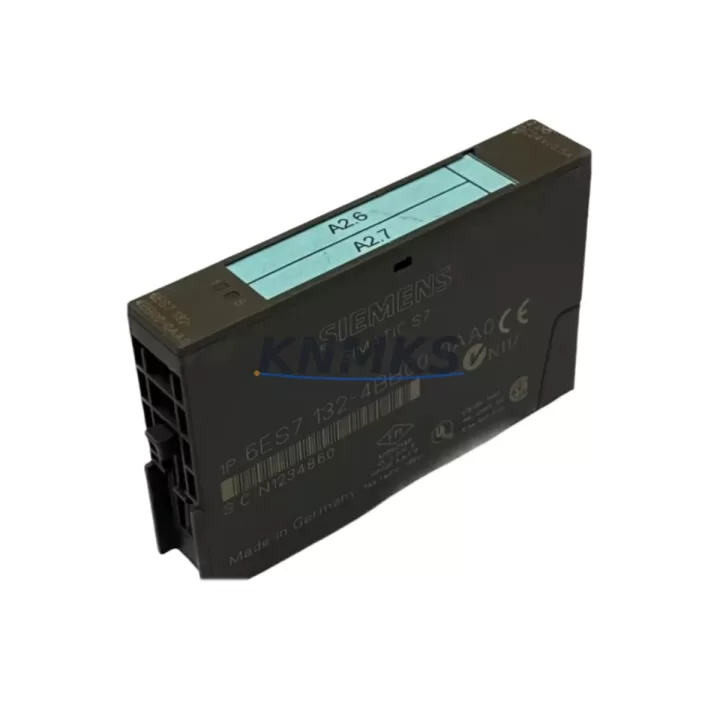
Overview
Siemens 6ES7132-4BB00-0AA0 Spare Part for Factory Uptime
The Siemens 6ES7132-4BB00-0AA0 is a 2-channel 24 VDC digital output module designed for the ET 200S distributed I/O system, fully integrated with Siemens SIMATIC S7-300 and S7-400 PLC architectures. As a maintenance-proven spare part, this module is a critical component for factories seeking to minimize unplanned downtime, sustain production continuity, and protect aging automation infrastructure. Whether you are managing a scheduled annual overhaul, responding to an emergency fault, or building a strategic spare parts inventory, the 6ES7132-4BB00-0AA0 delivers the original Siemens engineering quality and system compatibility that field engineers and procurement teams depend on.
Sourced directly from authorized supply channels and subject to pre-shipment functional testing, each unit is dispatched with a support terms confirmed by quotation covering manufacturing defects and operational failures under normal industrial use conditions. Our global logistics network supports urgent delivery to manufacturing sites across Asia, Europe, the Middle East, and the Americas, ensuring that critical replacement parts reach your facility when production cannot wait.
Spare Maintenance Table
| Parameter | Specification |
|---|---|
| Part Number / SKU | 6ES7132-4BB00-0AA0 |
| Brand | Siemens |
| Series | ET 200S Distributed I/O |
| Module Type | 2-Channel Digital Output Module |
| Output Voltage | 24 VDC |
| Output Current (per channel) | 0.5 A |
| Total Output Current | 1 A |
| Signal Type | Digital Output (DO) |
| Compatible Systems | SIMATIC ET 200S, S7-300, S7-400 |
| Interface | ET 200S backplane bus |
| Supply Voltage | 24 VDC (via power module) |
| Operating Temperature | 0 °C to +60 °C |
| Protection Class | IP20 |
| Country of Origin | Germany |
| Installation | DIN rail via ET 200S terminal module |
| Dimensions (W×H×D) | 15 mm × 81 mm × 52 mm (approx.) |
| Certifications | CE, UL, cULus (per Siemens standard) |
| Support terms | 12 Months — Covers manufacturing defects and operational failure under normal use |
| Pre-Shipment Testing | Functional output verification performed before dispatch |
| Delivery | Worldwide express shipping available |
Maintenance Planning for Continuous Operation
When replacing the 6ES7132-4BB00-0AA0 in an ET 200S station, a disciplined maintenance engineer will not stop at swapping the output module alone. The ET 200S architecture distributes I/O across a shared backplane bus, meaning that a fault in one module can mask or trigger cascading issues in adjacent components. During the replacement procedure, it is strongly recommended to inspect the 6ES7138-4AA10-0AA0 power module that supplies 24 VDC to the I/O tier — voltage ripple or connector wear on the power module is a common root cause of intermittent digital output faults that are incorrectly attributed to the output module itself.
Simultaneously, verify the condition of the ET 200S terminal modules (such as the 6ES7193-4CA30-0AA0) on which the 6ES7132-4BB00-0AA0 is mounted. Terminal module contacts degrade over years of thermal cycling, and a corroded or loose contact will cause unreliable output switching even after a new module is installed. If the station has been in service for more than five years, proactive replacement of terminal modules during the same maintenance window is a cost-effective strategy that avoids a repeat shutdown.
For stations where the 6ES7132-4BB00-0AA0 drives relay coils or solenoid valves, inspect the intermediate relay modules in the control cabinet — particularly any Siemens 3RH or 3RT series contactors connected downstream. Relay contact wear and coil insulation degradation are frequent failure points in high-cycle applications. Pairing a new digital output module with worn relay contacts will not restore full system reliability.
If the ET 200S station communicates over PROFIBUS DP, the 6ES7151-1AA05-0AB0 IM 151-1 interface module should be checked for firmware currency and connector integrity. A degraded PROFIBUS connector or outdated IM firmware can cause the CPU to report the output module as faulted even when the module hardware is functional. Similarly, review the PROFIBUS cable termination resistors at both ends of the segment — missing or failed termination is a leading cause of intermittent communication faults in aging ET 200S installations.
For facilities managing multiple ET 200S stations across a production line, consider maintaining a minimum buffer stock of the 6ES7132-4BB00-0AA0 alongside the 6ES7131-4BB01-0AA0 digital input module and the 6ES7134-4GB01-0AB0 analog input module. These three module types collectively cover the majority of I/O fault scenarios in a typical ET 200S-based machine control cabinet, and holding two units of each reduces mean time to repair (MTTR) from hours to minutes.
Site Replacement Workflow
Before beginning the physical replacement of the 6ES7132-4BB00-0AA0, place the associated CPU or IM interface module into STOP mode and de-energize the 24 VDC supply to the affected ET 200S station. Do not attempt hot-swap replacement unless the specific terminal module variant installed is rated for live insertion — confirm this against the terminal module order number before proceeding.
Remove the faulty output module by pressing the release tab on the terminal module and sliding the electronics module upward. Inspect the terminal module contacts for oxidation or mechanical damage before inserting the replacement 6ES7132-4BB00-0AA0. If contacts show visible wear, replace the terminal module concurrently. Insert the new module firmly until the locking tab engages, then restore power and return the CPU or IM to RUN mode.
After restoration, use the SIMATIC Manager or TIA Portal online diagnostics to confirm that the module is recognized without fault codes. Perform a functional output test by forcing each channel ON and OFF from the diagnostic interface and verifying the corresponding field device response. Document the replacement date, module serial number, and test results in the site maintenance log to support support requests and future fault analysis.
For facilities migrating from older ET 200S configurations to newer ET 200SP or ET 200MP platforms, the 6ES7132-4BB00-0AA0 provides a direct in-kind replacement that preserves existing wiring, terminal layouts, and PLC program logic without requiring hardware redesign. This makes it the preferred choice for life-extension projects where a full platform migration is not yet justified by production economics.
Spare Parts Support FAQ
Q1: Is the 6ES7132-4BB00-0AA0 compatible with both S7-300 and S7-400 CPU systems?
Yes. The 6ES7132-4BB00-0AA0 is an ET 200S distributed I/O module that communicates with the CPU via the IM interface module over PROFIBUS DP or PROFINET, making it compatible with any Siemens CPU that supports the ET 200S station — including S7-300, S7-400, and S7-1500 systems configured with the appropriate IM module.
Q2: What pre-shipment testing is performed before dispatch?
Each 6ES7132-4BB00-0AA0 unit undergoes functional output verification prior to shipment. Both output channels are tested for correct switching behavior and current delivery within specification. Units that do not pass testing are not dispatched. A support terms confirmed by quotation covering manufacturing defects and operational failure under normal use conditions is included with every shipment.
Q3: How should I manage long-term spare parts inventory for ET 200S digital output modules?
For production facilities with more than three ET 200S stations, we recommend maintaining a minimum of two 6ES7132-4BB00-0AA0 units in on-site stock. Pair this with buffer stock of the corresponding terminal modules and power modules. Review and replenish spare stock annually or after any unplanned replacement event. For facilities with critical uptime requirements, blanket purchase orders covering 12–24 months of projected consumption provide supply security and price stability.
Q4: Can this module replace older or discontinued Siemens ET 200S output module variants?
The 6ES7132-4BB00-0AA0 is the standard 2-channel 24 VDC digital output module for the ET 200S platform and is the direct replacement for earlier production revisions of the same order number. For cross-compatibility with adjacent module types or alternative channel configurations, consult the Siemens ET 200S system manual or contact our technical support team with your existing module order number and hardware revision for confirmation before ordering.
© 2026 KNMKS. All rights reserved.
Original Source: https://knmks.com
Contact: admin@knmks.com | +86 18359268345
Product Identification
- Brand / Ecosystem
-
Siemens
Siemens - Model / Series
-
6ES7132-4BB00-0AA0
SIMATIC Series - Product Family
- PLCs & Controllers
- Availability Status
- Available on request after model and quantity confirmation
- Inquiry Type
- B2B RFQ, replacement inquiry and project spare-part request
- Pre-Quote Check
- Exact SKU, brand, series, quantity, nameplate photos and destination country are checked before quotation
System Path
Where this product fits in the KNMKS automation structure.
Specification & Inquiry Focus
- Control platform
- PLC, PAC and modular controllers
- Common needs
- CPU, rack, power and I/O expansion
- Project support
- Replacement, cabinet build and maintenance
Buyer Confirmation
Information KNMKS checks before replying.
- Exact model
- 6ES7132-4BB00-0AA0
- Brand / ecosystem
- Siemens
- Product family
- PLCs & Controllers
- Application note
- Replacement, maintenance, project build or spare-part list
- Useful photos
- Nameplate, installed unit, cabinet layout or connector side
- Delivery details
- Quantity, destination country and target schedule
Document Support
Files and notes can be confirmed during quotation.
- Product photos or nameplate confirmation when available
- Packing and delivery notes before quotation confirmation
- Support scope and delivery terms confirmed per inquiry
- Export document coordination for qualified B2B requests
Inquiry Support
- Model cross-checking before quotation
- CPU, power, rack and expansion module matching
- Support for replacement and project inquiry
What to Send Us
- Brand and exact model number: Siemens 6ES7132-4BB00-0AA0
- Quantity and required delivery time
- Application, replacement requirement or nameplate photo
- Destination country and shipping preference
RFQ Preparation
This is a product inquiry page built for RFQ communication.
Fast Model Check
Send this model to KNMKS for confirmation.
Include quantity, destination country and photos if this is a maintenance replacement. The inquiry will be saved with a reference number after submission.
Brand & Compatibility Note
KNMKS displays automation product information for well-known industrial brand ecosystems and compatible replacement references. Brand names are used for product identification and compatibility reference only; final availability and commercial terms are confirmed per quotation.
 Manufacturing
 Machine Tools
 Packaging
 Energy & Power



 HMI & Displays
 Servo Systems
 Variable Frequency Drives
 Sensors