
Overview
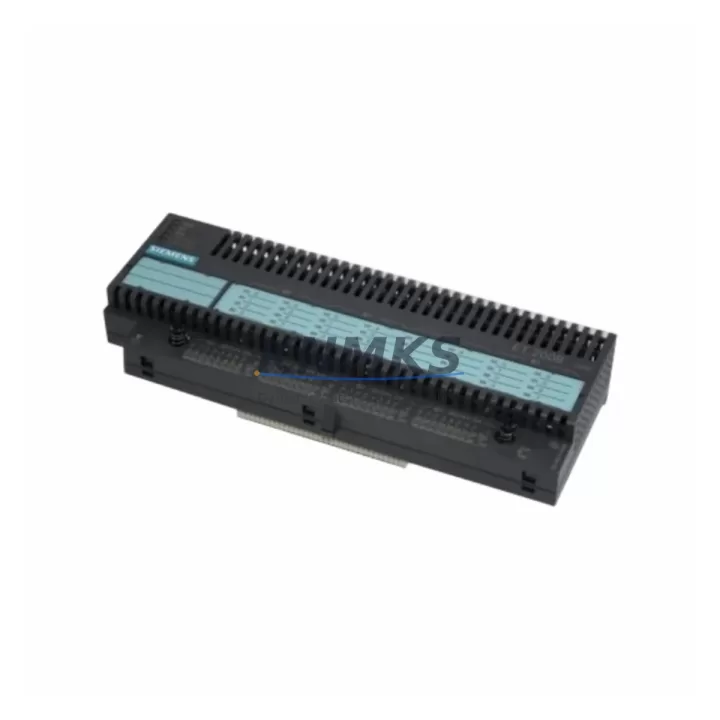
Siemens 6ES7132-0BL01-0XB0 Spare Part for Factory Uptime
The Siemens 6ES7132-0BL01-0XB0 is a 16-channel digital output module designed for the SIMATIC ET 200B distributed I/O system. As a maintenance-proven spare part, it plays a critical role in sustaining factory uptime across discrete manufacturing, process automation, and machine control environments. Whether you are managing a scheduled annual overhaul, responding to an unplanned line stoppage, or building a strategic spare parts inventory, the 6ES7132-0BL01-0XB0 is a high-priority component that maintenance and procurement engineers should keep on hand.
This module interfaces directly with the ET 200B bus terminal and delivers 24 VDC switching outputs capable of driving actuators, solenoid valves, indicator lamps, and relay coils. Its compact DIN-rail form factor and tool-free replacement design make it well-suited for rapid field substitution during production recovery scenarios. Every unit shipped from our inventory undergoes functional verification and is backed by a support terms confirmed by quotation, ensuring confidence in both quality and long-term supply continuity.
Spare Maintenance Table
| Parameter | Specification |
|---|---|
| SKU / Part Number | 6ES7132-0BL01-0XB0 |
| Brand | Siemens |
| Series | SIMATIC ET 200B |
| Module Type | Digital Output Module |
| Number of Outputs | 16 channels |
| Output Voltage | 24 VDC |
| Output Current (per channel) | 0.5 A |
| Total Current Load | 4 A (max) |
| Protection Class | IP20 |
| Mounting | DIN rail, ET 200B bus terminal |
| Operating Temperature | 0 °C to +60 °C |
| Country of Origin | Germany |
| Compatibility | SIMATIC ET 200B distributed I/O systems |
| Support terms | 12 months from shipment date |
| Condition | Original, factory-tested |
| Shipping | Worldwide express; tested before dispatch |
Maintenance Planning for Continuous Operation
Effective maintenance planning for an ET 200B station goes well beyond replacing the 6ES7132-0BL01-0XB0 output module in isolation. When this module is flagged during a fault diagnostic or routine panel inspection, experienced maintenance engineers treat it as a trigger to audit the surrounding electrical circuit and associated components.
Begin by inspecting the ET 200B bus terminal (e.g., 6ES7193-0CB00-0XA0) for signs of corrosion, loose contacts, or mechanical damage, as a degraded bus terminal can cause intermittent output faults that are misdiagnosed as module failure. Next, verify the 24 VDC power supply module feeding the ET 200B rack — voltage sags or ripple exceeding specification will cause erratic output behavior even with a new module installed. A SITOP or equivalent industrial power supply with adequate current headroom should be confirmed before sign-off.
Check all field wiring terminals and terminal blocks connected to the 16 output channels. Loose or oxidized terminations are a leading cause of intermittent output faults in high-vibration or high-humidity environments. If the outputs drive inductive loads such as solenoid valves or motor contactors, confirm that freewheeling diodes or surge suppressors are installed at each load — missing suppression components accelerate output transistor degradation and reduce module service life.
For systems where the ET 200B communicates over PROFIBUS DP, inspect the DP bus connector and cable termination resistors. A faulty bus connector on the ET 200B head station can cause the entire I/O rack to drop off the network, making it appear as though individual modules have failed. Similarly, review the PROFIBUS DP master interface module in the main PLC rack — typically a CP 342-5 or integrated CPU DP port — to confirm communication parameters and baud rate settings remain consistent after module replacement.
If the control cabinet houses additional ET 200B digital input modules such as the 6ES7131-0BL01-0XB0, inspect them concurrently. Input and output modules in the same rack share the same bus and power infrastructure, and a systematic check prevents repeat callouts. Finally, review any signal isolators or intrinsic safety barriers in the output circuit if the installation is in a hazardous area — these components have their own service intervals and can mask output module performance issues.
Site Replacement Workflow
Replacing the 6ES7132-0BL01-0XB0 on a live ET 200B station follows a structured sequence to minimize downtime and avoid secondary faults:
1. Isolate and document: Before removal, record the current output channel states via the SIMATIC STEP 7 or TIA Portal diagnostic buffer. Note any active fault codes and capture a photograph of the wiring layout for reference during reinstallation.
2. De-energize safely: Switch off the 24 VDC supply to the ET 200B rack. Do not rely solely on the PLC CPU stop mode — physically isolate the field power supply to prevent accidental actuator activation during module swap.
3. Remove and inspect: Slide the module off the bus terminal. Inspect the bus connector pins on both the module and the terminal for bent contacts or contamination. Clean with isopropyl alcohol if required.
4. Install replacement: Seat the new 6ES7132-0BL01-0XB0 firmly onto the bus terminal until the locking tab engages. Reconnect field wiring according to the documented layout, verifying terminal torque to manufacturer specification.
5. Power-up and verify: Restore 24 VDC supply and bring the PLC CPU online. Force-test each of the 16 output channels individually using the STEP 7 or TIA Portal variable table to confirm correct field device response before returning the line to automatic mode.
6. Update maintenance records: Log the replacement date, module serial number, and test results in the plant CMMS. Schedule the next inspection interval based on the operating environment and load cycle.
This workflow is compatible with both hot-swap-capable ET 200B configurations and standard power-down replacement procedures, ensuring system compatibility is maintained and production recovery is achieved in the shortest possible time.
Spare Parts Support FAQ
Q1: Is the 6ES7132-0BL01-0XB0 compatible with all ET 200B configurations?
The 6ES7132-0BL01-0XB0 is designed specifically for the SIMATIC ET 200B distributed I/O platform and is compatible with standard ET 200B bus terminals and head stations operating on PROFIBUS DP. Before installation, confirm that your ET 200B head station firmware and GSD file version support 16-channel digital output modules. If you are replacing an older revision of this module, functional compatibility is maintained across hardware revisions within the ET 200B product family.
Q2: How is each unit tested before shipment?
Every 6ES7132-0BL01-0XB0 unit in our inventory is functionally tested prior to dispatch. Testing includes power-on verification, output channel activation across all 16 channels, and bus communication confirmation. Units that do not pass functional verification are quarantined and not shipped. A support terms confirmed by quotation is provided from the date of shipment, covering manufacturing defects and functional failures under normal operating conditions.
Q3: What is the recommended spare parts inventory strategy for ET 200B systems?
For production lines with high uptime requirements, we recommend maintaining a minimum of one spare 6ES7132-0BL01-0XB0 per ET 200B station on-site. For facilities operating multiple ET 200B racks, a pooled inventory of two to three units per site is a practical baseline. Pair this with a spare ET 200B bus terminal and a spare 24 VDC power supply module to cover the most common failure scenarios. Annual inventory audits should verify that spare parts are within their storage life and have not been subjected to adverse environmental conditions.
Q4: Can you support long-term or repeat procurement for this part?
Yes. We maintain ongoing stock of the 6ES7132-0BL01-0XB0 and can support both one-time emergency orders and scheduled blanket purchase agreements. For procurement engineers managing legacy ET 200B systems where this module is no longer available through standard distribution channels, we offer a reliable alternative source with consistent lead times, documented test records, and support terms confirmed by quotation coverage. Contact our team to discuss volume pricing, consignment stock arrangements, or long-term supply contracts tailored to your maintenance schedule.
—
© 2026 KNMKS. All rights reserved.
Original Source: https://knmks.com
Contact: admin@knmks.com | +86 18359268345
Product Identification
- Brand / Ecosystem
-
Siemens
Siemens - Model / Series
-
6ES7132-0BL01-0XB0
SIMATIC Series - Product Family
- PLCs & Controllers
- Availability Status
- Available on request after model and quantity confirmation
- Inquiry Type
- B2B RFQ, replacement inquiry and project spare-part request
- Pre-Quote Check
- Exact SKU, brand, series, quantity, nameplate photos and destination country are checked before quotation
System Path
Where this product fits in the KNMKS automation structure.
Specification & Inquiry Focus
- Control platform
- PLC, PAC and modular controllers
- Common needs
- CPU, rack, power and I/O expansion
- Project support
- Replacement, cabinet build and maintenance
Buyer Confirmation
Information KNMKS checks before replying.
- Exact model
- 6ES7132-0BL01-0XB0
- Brand / ecosystem
- Siemens
- Product family
- PLCs & Controllers
- Application note
- Replacement, maintenance, project build or spare-part list
- Useful photos
- Nameplate, installed unit, cabinet layout or connector side
- Delivery details
- Quantity, destination country and target schedule
Document Support
Files and notes can be confirmed during quotation.
- Product photos or nameplate confirmation when available
- Packing and delivery notes before quotation confirmation
- Support scope and delivery terms confirmed per inquiry
- Export document coordination for qualified B2B requests
Inquiry Support
- Model cross-checking before quotation
- CPU, power, rack and expansion module matching
- Support for replacement and project inquiry
What to Send Us
- Brand and exact model number: Siemens 6ES7132-0BL01-0XB0
- Quantity and required delivery time
- Application, replacement requirement or nameplate photo
- Destination country and shipping preference
RFQ Preparation
This is a product inquiry page built for RFQ communication.
Fast Model Check
Send this model to KNMKS for confirmation.
Include quantity, destination country and photos if this is a maintenance replacement. The inquiry will be saved with a reference number after submission.
Brand & Compatibility Note
KNMKS displays automation product information for well-known industrial brand ecosystems and compatible replacement references. Brand names are used for product identification and compatibility reference only; final availability and commercial terms are confirmed per quotation.
 Manufacturing
 Machine Tools
 Packaging
 Energy & Power



 HMI & Displays
 Servo Systems
 Variable Frequency Drives
 Sensors