
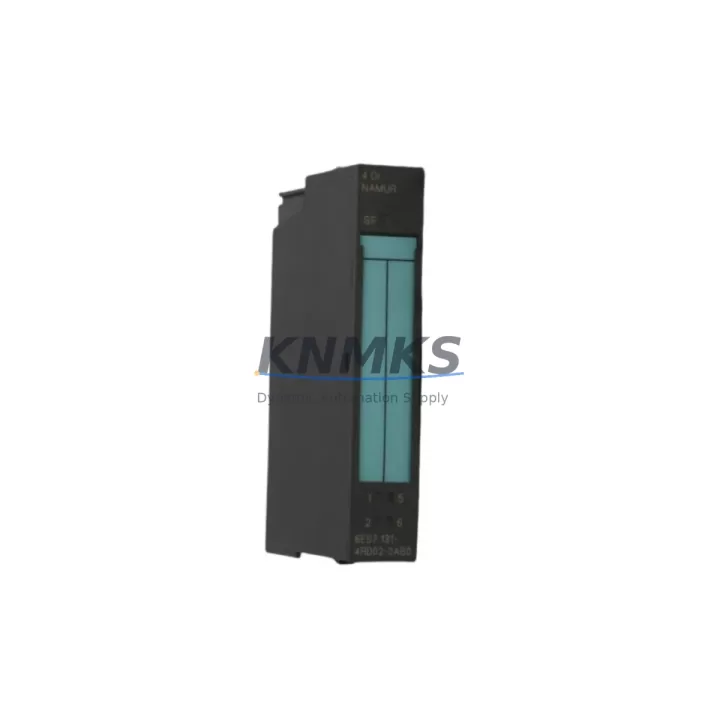
Overview
Siemens 6ES7131-4RD02-0AB0 Maintenance-Proven Spare Part for Factory Uptime
The Siemens 6ES7131-4RD02-0AB0 is a 4-channel 24 VDC digital input module designed for the ET 200S distributed I/O system, fully integrated into the SIMATIC S7 automation architecture. As a maintenance-proven spare part, this module is a critical component for factories that depend on continuous production lines, automated assembly systems, and process control environments. Whether you are managing a scheduled annual overhaul, responding to an unplanned line stoppage, or building a strategic spare parts inventory, the 6ES7131-4RD02-0AB0 delivers the compatibility, reliability, and fast-swap capability that maintenance and procurement engineers require.
At KNMKS, every unit is sourced from verified supply channels, individually tested prior to shipment, and backed by a support terms confirmed by quotation. We support long-term supply agreements for facilities that operate aging SIMATIC S7-300 and ET 200S installations, ensuring your maintenance team always has access to the exact module needed to restore operations without delay.
Spare Maintenance Table
| Parameter | Specification |
|---|---|
| Part Number / SKU | 6ES7131-4RD02-0AB0 |
| Brand | Siemens |
| Series | SIMATIC ET 200S |
| Module Type | Digital Input (DI) Module |
| Number of Channels | 4 Channels |
| Input Voltage | 24 VDC |
| Signal Type | Digital Input, IEC 61131-2 Type 1/3 |
| Compatible Systems | SIMATIC S7-300, ET 200S Distributed I/O, PROFIBUS DP |
| Interface Module Compatibility | IM 151-1, IM 151-3 PN, IM 151-7 CPU |
| Installation | DIN Rail, ET 200S Terminal Module (TM-E) |
| Operating Temperature | 0 °C to +60 °C |
| Protection Rating | IP20 |
| Country of Origin | Germany |
| Weight | Approx. 80 g |
| Support terms | 12 Months |
| Condition | Original, Tested Before Shipment |
| Maintenance Recommendation | Inspect terminal module contacts and wiring on each replacement cycle; verify PROFIBUS address settings after installation |
Maintenance Planning for Continuous Operation
Replacing the 6ES7131-4RD02-0AB0 in an ET 200S station is rarely an isolated task. A thorough maintenance plan requires the engineer to inspect the surrounding electrical environment to prevent repeat failures and ensure the restored system operates reliably until the next scheduled maintenance window.
Begin by verifying the 24 VDC power supply rail feeding the ET 200S station — voltage fluctuations or ripple beyond specification are a common root cause of premature digital input module failure. The PM-E 24VDC power module (6ES7138-4CA01-0AA0) should be checked for output stability and thermal condition before the new DI module is inserted.
Next, inspect the terminal module (TM-E15S24-A1, 6ES7193-4CA40-0AA0) on which the 6ES7131-4RD02-0AB0 is mounted. Worn or corroded spring contacts on the terminal module can cause intermittent signal loss even with a new input module installed. If the terminal module shows signs of mechanical wear, replace it as part of the same maintenance event.
The interface module (IM 151-1, 6ES7151-1AA06-0AB0) governing the ET 200S station should also be inspected. Confirm that the PROFIBUS DP address is correctly set and that the IM firmware is compatible with the station configuration stored in the S7-300 CPU. A mismatch here can cause the new DI module to appear as a hardware fault in STEP 7 or TIA Portal diagnostics.
For stations with mixed I/O, also check adjacent digital output modules (e.g., 6ES7132-4BD32-0AA0) and any installed analog input modules (e.g., 6ES7134-4FB01-0AB0) for parameter consistency and wiring integrity. Loose field wiring at the terminal module is a frequent source of nuisance faults that are misdiagnosed as module failures.
If the ET 200S station is part of a safety-rated circuit, verify that any installed F-DI modules (6ES7138-4FA04-0AB0) and associated F-CPU or F-IM configurations remain intact and that the safety program has not been inadvertently modified during the maintenance event. Finally, inspect the PROFIBUS cable connectors and bus termination resistors at both ends of the segment — degraded bus termination is a leading cause of intermittent communication errors that surface after module replacement.
Procurement engineers should consider stocking a minimum of two units of the 6ES7131-4RD02-0AB0 per production line, alongside one spare terminal module and one spare PM-E power module, to support rapid swap-out without waiting for emergency procurement lead times.
Site Replacement Workflow
Step 1 — Isolate and Document: Before removing the failed module, record the current PROFIBUS station address, the slot position within the ET 200S rack, and the field wiring assignment from the terminal module. Take a photograph of the wiring if labels are worn or absent.
Step 2 — Power Down the Station: De-energize the 24 VDC supply to the ET 200S station via the PM-E power module or the upstream circuit breaker. Confirm zero voltage at the terminal module contacts before proceeding.
Step 3 — Remove the Failed Module: Slide the 6ES7131-4RD02-0AB0 out of the terminal module. Inspect the terminal module contacts for corrosion or deformation. Clean or replace the terminal module if necessary before installing the new unit.
Step 4 — Install the Replacement Module: Insert the new 6ES7131-4RD02-0AB0 into the terminal module until it clicks into place. No re-parameterization is required if the hardware configuration in STEP 7 or TIA Portal already includes this module type — the S7-300 CPU will recognize the replacement automatically on the next PROFIBUS scan cycle.
Step 5 — Restore Power and Verify: Re-energize the station and monitor the diagnostic LEDs on the IM 151-1 interface module. A steady green SF/BF LED indicates normal operation. Confirm all four input channels are reading correctly in the PLC online monitor before returning the line to production.
Step 6 — Update Maintenance Records: Log the replacement date, the serial number of the removed module, and the source of the replacement unit. This record supports support requests and future lifecycle planning for the ET 200S station.
This workflow is compatible with both hot-swap-capable ET 200S configurations and standard power-down replacement procedures, minimizing downtime to under 30 minutes for a prepared maintenance team.
Spare Parts Support FAQ
Q1: Is the 6ES7131-4RD02-0AB0 compatible with all ET 200S interface modules?
The 6ES7131-4RD02-0AB0 is compatible with the full range of ET 200S interface modules, including the IM 151-1 Standard, IM 151-3 PN (PROFINET), and IM 151-7 CPU variants. Compatibility is determined by the ET 200S hardware configuration in STEP 7 or TIA Portal — as long as the module type is correctly defined in the hardware catalog, the replacement will be recognized without additional parameterization.
Q2: How does KNMKS verify the condition of spare modules before shipment?
Every 6ES7131-4RD02-0AB0 unit shipped by KNMKS undergoes functional testing on a live ET 200S test bench prior to dispatch. We verify channel-level input response, PROFIBUS communication integrity, and LED diagnostic behavior. A test report is available upon request. All units are covered by a support terms confirmed by quotation from the date of shipment.
Q3: Can KNMKS support long-term supply for obsolete or discontinued ET 200S modules?
Yes. KNMKS maintains stock of both current-production and legacy ET 200S components to support facilities running older SIMATIC S7-300 systems that cannot be immediately migrated. We offer long-term supply agreements with guaranteed lead times, allowing procurement engineers to plan annual maintenance budgets without exposure to spot-market price volatility or availability risk.
Q4: What is the recommended spare parts inventory strategy for ET 200S digital input modules?
For production lines with high uptime requirements, we recommend maintaining a minimum of two 6ES7131-4RD02-0AB0 units on-site per ET 200S station, with a replenishment trigger set at one unit remaining. This buffer supports immediate swap-out during unplanned failures while allowing time for standard procurement to replenish stock. Pairing this with a spare terminal module and a PM-E power module provides comprehensive coverage for the most common ET 200S field failures.
© 2026 KNMKS. All rights reserved.
Original Source: https://knmks.com
Contact: admin@knmks.com | +86 18359268345
Product Identification
- Brand / Ecosystem
-
Siemens
Siemens - Model / Series
-
6ES7131-4RD02-0AB0
SIMATIC Series - Product Family
- PLCs & Controllers
- Availability Status
- Available on request after model and quantity confirmation
- Inquiry Type
- B2B RFQ, replacement inquiry and project spare-part request
- Pre-Quote Check
- Exact SKU, brand, series, quantity, nameplate photos and destination country are checked before quotation
System Path
Where this product fits in the KNMKS automation structure.
Specification & Inquiry Focus
- Control platform
- PLC, PAC and modular controllers
- Common needs
- CPU, rack, power and I/O expansion
- Project support
- Replacement, cabinet build and maintenance
Buyer Confirmation
Information KNMKS checks before replying.
- Exact model
- 6ES7131-4RD02-0AB0
- Brand / ecosystem
- Siemens
- Product family
- PLCs & Controllers
- Application note
- Replacement, maintenance, project build or spare-part list
- Useful photos
- Nameplate, installed unit, cabinet layout or connector side
- Delivery details
- Quantity, destination country and target schedule
Document Support
Files and notes can be confirmed during quotation.
- Product photos or nameplate confirmation when available
- Packing and delivery notes before quotation confirmation
- Support scope and delivery terms confirmed per inquiry
- Export document coordination for qualified B2B requests
Inquiry Support
- Model cross-checking before quotation
- CPU, power, rack and expansion module matching
- Support for replacement and project inquiry
What to Send Us
- Brand and exact model number: Siemens 6ES7131-4RD02-0AB0
- Quantity and required delivery time
- Application, replacement requirement or nameplate photo
- Destination country and shipping preference
RFQ Preparation
This is a product inquiry page built for RFQ communication.
Fast Model Check
Send this model to KNMKS for confirmation.
Include quantity, destination country and photos if this is a maintenance replacement. The inquiry will be saved with a reference number after submission.
Brand & Compatibility Note
KNMKS displays automation product information for well-known industrial brand ecosystems and compatible replacement references. Brand names are used for product identification and compatibility reference only; final availability and commercial terms are confirmed per quotation.
 Manufacturing
 Machine Tools
 Packaging
 Energy & Power



 HMI & Displays
 Servo Systems
 Variable Frequency Drives
 Sensors