
Overview
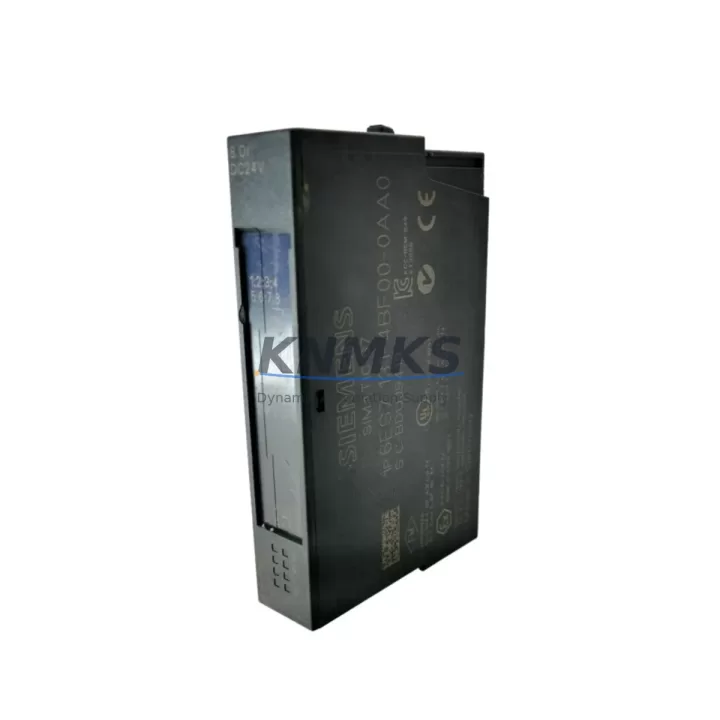
Siemens 6ES7131-4BF00-0AA0 Migration-Ready Digital Input Module for Legacy Control Systems
The Siemens 6ES7131-4BF00-0AA0 is a 4-channel 24 VDC digital input module designed for the ET 200S distributed I/O system. As legacy S7-300 and S7-400 control architectures reach end-of-life, this module has become a critical component in retrofit and modernization projects across manufacturing, process, and infrastructure industries. Whether you are replacing a failed unit in an aging control cabinet, migrating from an obsolete distributed I/O platform, or expanding an existing ET 200S rack to accommodate new field signals, the 6ES7131-4BF00-0AA0 provides a verified, drop-in compatible solution that minimizes engineering risk and reduces planned downtime.
In retrofit scenarios, engineers frequently encounter the challenge of sourcing discontinued modules that must match the original terminal wiring, backplane slot addressing, and STEP 7 or TIA Portal hardware configuration without requiring a full program rewrite. The 6ES7131-4BF00-0AA0 retains the standard 4-pin terminal block layout used across the ET 200S digital input family, meaning existing field wiring — typically 24 VDC two-wire or three-wire proximity sensors, limit switches, and pushbutton inputs — can be reconnected without modification. The module occupies a single ET 200S slot on the IM 151-1 or IM 151-3 interface module backplane, and its hardware identifier is recognized natively by both STEP 7 V5.x and TIA Portal V13 and later, eliminating the need for GSD file updates or manual hardware catalog entries.
Before installation, retrofit planners should verify several key parameters. Power budget on the ET 200S backplane must accommodate the module’s 24 VDC supply current draw alongside other installed modules such as the 6ES7132-4BF00-0AA0 digital output module or 6ES7134-4FB01-0AB0 analog input modules sharing the same rack. Terminal block torque specifications should be confirmed against the original installation records to ensure consistent contact resistance on signal lines. If the existing IM 151 interface module firmware predates the module’s hardware revision, a firmware update may be required to ensure correct diagnostic reporting. Module slot address assignment in the hardware configuration must match the physical slot position; mismatches will generate configuration errors during online download and prevent the CPU — whether an S7-315-2 DP, S7-317-2 DP, or a newer S7-1500 with ET 200S compatibility mode — from entering RUN state.
Communication link integrity is equally important during migration. ET 200S stations connected via PROFIBUS DP must maintain correct baud rate settings and termination resistor placement, particularly when the retrofit involves replacing a station master or upgrading from a CP 342-5 communications processor to a newer PROFINET-capable interface. If the migration path includes transitioning from PROFIBUS to PROFINET, the IM 151-3 PN interface module can be substituted for the IM 151-1 without changing the I/O module population, preserving the 6ES7131-4BF00-0AA0 and other installed modules while enabling the network protocol upgrade. HMI screens built on WinCC flexible or WinCC V7 that reference the ET 200S station’s I/O addresses will continue to function correctly provided the hardware configuration download preserves the original symbolic address assignments.
Installation space in the control cabinet should be confirmed before ordering. The ET 200S system uses a modular rail-mount design, and the 6ES7131-4BF00-0AA0 requires a standard 35 mm DIN rail with adequate clearance for the terminal block wiring harness. In densely populated cabinets where the original layout included signal isolators or marshalling terminals between field devices and the ET 200S rack, the retrofit plan should account for any changes to cable routing that may affect EMC compliance or heat dissipation. A 6ES7193-4CA30-0AA0 terminal module is required as the mechanical carrier for the 6ES7131-4BF00-0AA0; this must be confirmed as present on the rail before the electronic module is inserted.
Each unit supplied by KNMKS undergoes pre-shipment functional testing covering channel-level input detection, diagnostic LED response, and backplane communication handshake verification. Units are shipped with original or equivalent packaging and include a support terms confirmed by quotation covering manufacturing defects and functional failures under normal operating conditions. Stock availability is maintained to support both emergency breakdown replacements and planned retrofit procurement schedules.
Migration Compatibility Table
| Parameter | Detail |
|---|---|
| SKU / Part Number | 6ES7131-4BF00-0AA0 |
| Series | Siemens ET 200S |
| Module Type | 4-Channel Digital Input, 24 VDC |
| Compatible Interface Modules | IM 151-1 Standard, IM 151-1 FO, IM 151-3 PN |
| Compatible CPUs | S7-300 (315/317/319), S7-400, S7-1500 (ET 200S compat. mode) |
| Communication Protocol | PROFIBUS DP / PROFINET (via IM 151-3 PN) |
| Terminal Module Required | 6ES7193-4CA30-0AA0 |
| Backplane Interface | ET 200S single-slot, standard backplane bus |
| Programming Software | STEP 7 V5.x, TIA Portal V13+ |
| Installation | 35 mm DIN rail, requires terminal module carrier |
| Replacement Recommendation | Direct drop-in; verify slot address and power budget |
| Commissioning Notes | Confirm firmware version on IM 151; download HW config after replacement |
| Support terms | 12 Months — manufacturing defects and functional failures |
Retrofit Planning for Existing Automation Systems
A successful retrofit of the 6ES7131-4BF00-0AA0 into an existing ET 200S station requires a structured approach that accounts for the interdependencies between the digital input module and the surrounding system components. The terminal module 6ES7193-4CA30-0AA0 must be pre-installed on the DIN rail before the electronic module is clipped in; attempting to insert the electronic module without its carrier will damage the backplane connector. Once the module is seated, the ET 200S rack’s power distribution must be reviewed: the 6ES7138-4CA01-0AA0 power module, if present in the station, provides the 24 VDC supply rail for the I/O modules, and its load capacity must be sufficient to cover the combined current draw of all installed modules including any newly added 6ES7131-4BF00-0AA0 units.
In systems where the retrofit also involves adding new I/O capacity — for example, expanding from 4 to 8 digital input channels by adding a second 6ES7131-4BF00-0AA0 alongside the existing module — the hardware configuration in TIA Portal must be updated to reflect the new slot population before the program download. Analog input modules such as the 6ES7134-4FB01-0AB0, if present in the same station, should be verified for address conflicts after the hardware configuration is modified. Signal isolators installed between field transmitters and the ET 200S terminal blocks should be checked for compatibility with the 24 VDC input threshold of the 6ES7131-4BF00-0AA0 to ensure correct logic level detection.
For sites migrating from PROFIBUS DP to PROFINET as part of a broader control system modernization, the IM 151-3 PN interface module can replace the IM 151-1 without disturbing the installed I/O module population. This migration path allows the 6ES7131-4BF00-0AA0 and co-installed modules to remain in service while the network layer is upgraded, significantly reducing the scope of the retrofit and limiting the required downtime window. A SIMATIC programming cable or Ethernet connection to the PG/PC is required for the hardware configuration download following any module change.
Downtime Control During System Migration
Minimizing unplanned downtime during a module replacement or system retrofit requires preparation that begins before the maintenance window opens. The existing STEP 7 or TIA Portal project file should be backed up and the current hardware configuration exported prior to any physical work. If the 6ES7131-4BF00-0AA0 is being replaced due to a channel fault rather than a complete module failure, the diagnostic buffer of the CPU should be read and saved to document the fault history and confirm that the fault is isolated to the module rather than to the field wiring or the terminal module carrier.
During the replacement, the ET 200S station can be taken offline while the CPU continues to run in STOP mode, preserving the program logic and retentive data areas. After the new module is inserted and the terminal block wiring is reconnected and torqued to specification, the hardware configuration download should be performed with the CPU in STOP state to avoid triggering safety interlocks or process alarms. Following the download, a controlled restart sequence — CPU to RUN, verification of the ET 200S station’s BF LED extinguishing, and confirmation of correct input signal states on all four channels — should be completed before returning the process to automatic control. HMI faceplates referencing the replaced module’s I/O addresses should be verified for correct signal display as part of the post-commissioning checklist. The entire replacement procedure, when pre-staged with a tested spare module and a prepared hardware configuration file, can typically be completed within a 30-to-60-minute planned maintenance window.
Retrofit Support FAQ
Q: Is the 6ES7131-4BF00-0AA0 a direct replacement for other ET 200S 4-channel digital input modules?
A: Yes. The 6ES7131-4BF00-0AA0 is the standard 4-channel 24 VDC digital input module for the ET 200S system and is recognized by STEP 7 and TIA Portal hardware catalogs. It is compatible with all IM 151 interface module variants. If replacing an earlier hardware revision of the same part number, no hardware configuration change is required in most cases; confirm the firmware version of the IM 151 if diagnostic issues arise after replacement.
Q: What wiring changes are required when installing this module as a replacement?
A: No wiring changes are required if the terminal module 6ES7193-4CA30-0AA0 is already installed on the rail. The field wiring connects to the terminal module, not to the electronic module, so the electronic module can be swapped without disturbing the field cables. If the terminal module is also being replaced, the field wiring must be reconnected to the new terminal module according to the original wiring diagram.
Q: Does KNMKS perform pre-shipment testing on this module?
A: Yes. Each 6ES7131-4BF00-0AA0 unit undergoes functional testing prior to shipment, covering channel-level input detection and backplane communication verification. Units are supplied with a support terms confirmed by quotation covering manufacturing defects and functional failures under normal operating conditions. Test records are available upon request for quality-critical procurement.
Q: What is the typical lead time and stock availability?
A: KNMKS maintains stock of the 6ES7131-4BF00-0AA0 to support both emergency breakdown replacements and planned retrofit procurement. Contact admin@knmks.com or call +86 18359268345 to confirm current availability and lead time for your required quantity.
© 2026 KNMKS. All rights reserved.
Original Source: https://knmks.com
Contact: admin@knmks.com | +86 18359268345
Product Identification
- Brand / Ecosystem
-
Siemens
Siemens - Model / Series
-
6ES7131-4BF00-0AA0
SIMATIC Series - Product Family
- PLCs & Controllers
- Availability Status
- Available on request after model and quantity confirmation
- Inquiry Type
- B2B RFQ, replacement inquiry and project spare-part request
- Pre-Quote Check
- Exact SKU, brand, series, quantity, nameplate photos and destination country are checked before quotation
System Path
Where this product fits in the KNMKS automation structure.
Specification & Inquiry Focus
- Control platform
- PLC, PAC and modular controllers
- Common needs
- CPU, rack, power and I/O expansion
- Project support
- Replacement, cabinet build and maintenance
Buyer Confirmation
Information KNMKS checks before replying.
- Exact model
- 6ES7131-4BF00-0AA0
- Brand / ecosystem
- Siemens
- Product family
- PLCs & Controllers
- Application note
- Replacement, maintenance, project build or spare-part list
- Useful photos
- Nameplate, installed unit, cabinet layout or connector side
- Delivery details
- Quantity, destination country and target schedule
Document Support
Files and notes can be confirmed during quotation.
- Product photos or nameplate confirmation when available
- Packing and delivery notes before quotation confirmation
- Support scope and delivery terms confirmed per inquiry
- Export document coordination for qualified B2B requests
Inquiry Support
- Model cross-checking before quotation
- CPU, power, rack and expansion module matching
- Support for replacement and project inquiry
What to Send Us
- Brand and exact model number: Siemens 6ES7131-4BF00-0AA0
- Quantity and required delivery time
- Application, replacement requirement or nameplate photo
- Destination country and shipping preference
RFQ Preparation
This is a product inquiry page built for RFQ communication.
Fast Model Check
Send this model to KNMKS for confirmation.
Include quantity, destination country and photos if this is a maintenance replacement. The inquiry will be saved with a reference number after submission.
Brand & Compatibility Note
KNMKS displays automation product information for well-known industrial brand ecosystems and compatible replacement references. Brand names are used for product identification and compatibility reference only; final availability and commercial terms are confirmed per quotation.
 Manufacturing
 Machine Tools
 Packaging
 Energy & Power



 HMI & Displays
 Servo Systems
 Variable Frequency Drives
 Sensors