
Overview
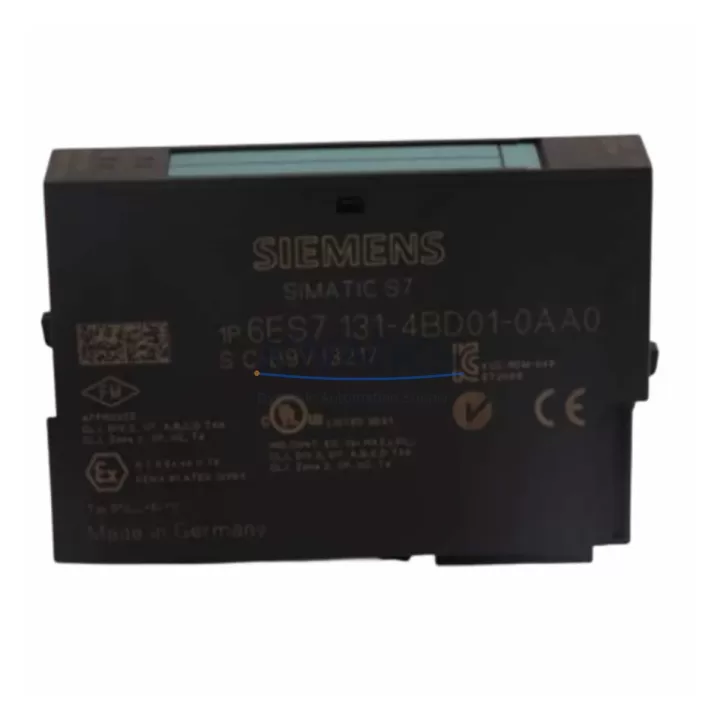
Siemens 6ES7131-4BD01-0AB0 ET 200S Spare Part: Maintenance-Proven Digital Input Module for Factory Uptime
The Siemens 6ES7131-4BD01-0AB0 is a 4-channel 24 VDC digital input module designed for the ET 200S distributed I/O system. As a critical interface between field sensors and the SIMATIC S7-300/S7-400 or PROFIBUS-DP controller, this module plays a central role in production line monitoring, machine interlocking, and process signal acquisition. Maintaining a verified spare of the 6ES7131-4BD01-0AB0 in your cabinet inventory is a proven strategy for reducing unplanned downtime and accelerating fault recovery in high-availability industrial environments.
Whether you are managing a petrochemical plant, an automotive assembly line, a water treatment facility, or a packaging operation, the 6ES7131-4BD01-0AB0 is frequently found in control cabinets alongside power supply modules, terminal blocks, and PROFIBUS communication adapters. When this module fails or degrades, the impact is immediate: sensor signals are lost, interlocks may trip, and the PLC loses visibility into field conditions. Having a tested replacement on-site eliminates the lead time risk associated with emergency procurement and keeps your maintenance team in control of the recovery timeline.
Each unit supplied by KNMKS is sourced from verified channels, inspected for physical integrity, and functionally tested prior to shipment. All 6ES7131-4BD01-0AB0 modules are covered by a support terms confirmed by quotation and shipped with full traceability documentation to support your incoming inspection and asset management processes.
Spare Maintenance Table
| Parameter | Specification |
|---|---|
| Part Number / SKU | 6ES7131-4BD01-0AB0 |
| Brand | Siemens |
| Series | ET 200S Distributed I/O |
| Module Type | 4-Channel Digital Input (DI) |
| Input Voltage | 24 VDC |
| Number of Channels | 4 |
| Signal Standard | IEC 61131-2 Type 1 / Type 3 |
| Input Current (per channel) | Approx. 7 mA at 24 VDC |
| Isolation | Electrically isolated from backplane bus |
| Compatible Systems | SIMATIC S7-300, S7-400, PROFIBUS-DP, ET 200S IM 151 interface modules |
| Interface Module Compatibility | IM 151-1 Standard, IM 151-1 High Feature, IM 151-7 CPU |
| Mounting | ET 200S terminal module (e.g., TM-E15S24-01) |
| Operating Temperature | 0 °C to +60 °C |
| Protection Class | IP20 |
| Dimensions (W × H × D) | 15 mm × 81 mm × 52 mm (approx.) |
| Weight | Approx. 40 g |
| Country of Origin | Germany |
| Support terms | 12 Months |
| Condition | Original, tested before shipment |
Maintenance Planning for Continuous Operation
When scheduling a replacement or inspection of the 6ES7131-4BD01-0AB0, maintenance engineers should treat the module as part of a broader cabinet health review rather than an isolated swap. The ET 200S architecture distributes I/O across multiple modules sharing a common backplane rail and power bus, which means a single degraded module can affect adjacent signal channels and trigger cascading diagnostic alarms in the SIMATIC controller.
Before or during replacement of the 6ES7131-4BD01-0AB0, the following components should be inspected and verified:
Power Supply and Bus Voltage: Confirm that the ET 200S power module (PM-E 24VDC, such as the 6ES7138-4CA01-0AA0) is delivering stable 24 VDC to the module rail. Voltage fluctuations or ripple above specification can cause intermittent input faults that mimic module failure. Check the power module’s LED status and measure output voltage under load before condemning the input module.
Terminal Module and Wiring: The 6ES7131-4BD01-0AB0 plugs into a dedicated terminal module (TM-E series). Inspect the terminal module for cracked housing, corroded contacts, or loose field wiring. Terminal modules are often overlooked during spare parts planning but are a common source of signal loss in aging ET 200S stations. Keeping a quantity of TM-E15S24-01 terminal modules in your spare parts cabinet is strongly recommended.
Interface Module (IM 151): The IM 151 interface module manages PROFIBUS-DP communication for the entire ET 200S station. If multiple input channels across different modules are reporting faults simultaneously, the IM 151 itself may be the root cause. Verify the PROFIBUS address, check the diagnostic LEDs, and confirm bus termination resistors are correctly installed at both ends of the segment.
PROFIBUS Cable and Connectors: Inspect the PROFIBUS DP cable for physical damage, especially at connector entry points where repeated flexing can cause internal wire breaks. A degraded PROFIBUS segment can produce sporadic I/O errors that are difficult to distinguish from module faults without a bus analyzer. Siemens PROFIBUS connectors (6ES7972-0BA52-0XA0 or equivalent) should be checked for secure seating and correct termination switch position.
Fuses and Circuit Protection: Verify that the 24 VDC supply fuses protecting the sensor circuits feeding the 6ES7131-4BD01-0AB0 inputs are intact and correctly rated. A blown fuse on the field side will present as a missing input signal and can be misdiagnosed as module failure. Include fuse inspection in your standard replacement checklist.
Signal Isolators and Relay Outputs: In applications where the 6ES7131-4BD01-0AB0 receives signals from relay contacts or signal isolators, verify that the relay coil voltage and contact ratings are within specification. Worn relay contacts with high contact resistance can produce marginal input voltages that fall below the module’s guaranteed switching threshold, causing unreliable signal acquisition.
Site Replacement Workflow
Step 1 — Pre-Replacement Verification: Before removing the 6ES7131-4BD01-0AB0, document the current diagnostic state in the SIMATIC manager or TIA Portal. Note which channels are reporting faults and confirm that the fault is consistent with module failure rather than field wiring or power supply issues. This step prevents unnecessary module replacement and protects your spare parts inventory.
Step 2 — Safe Isolation: Switch the ET 200S station to STOP mode via the controller or set the IM 151 to local mode if supported. De-energize the 24 VDC sensor supply to the affected module group. Do not remove the module under live bus conditions unless the system design explicitly supports hot-swap operation for this module type.
Step 3 — Module Removal: The 6ES7131-4BD01-0AB0 is designed for tool-free removal from its terminal module. Press the release lever and slide the module upward to disengage from the terminal module contacts. The terminal module and field wiring remain in place, which eliminates rewiring time and reduces the risk of wiring errors during replacement.
Step 4 — Replacement Installation: Align the new 6ES7131-4BD01-0AB0 with the terminal module guide rails and press firmly until the locking lever engages. Verify that the module is fully seated — a partially inserted module will not make reliable contact with the backplane bus and may generate intermittent faults.
Step 5 — System Restart and Verification: Restore power to the sensor supply and return the ET 200S station to RUN mode. Monitor the diagnostic LEDs on the new module and the IM 151 interface module. Confirm that all four input channels are reading correctly in the SIMATIC controller’s I/O status display. Perform a functional test by activating each connected sensor or switch and verifying the corresponding PLC input bit changes state as expected.
Step 6 — Documentation: Record the replacement in your maintenance log, including the date, technician name, old module serial number, and new module serial number. Update your spare parts inventory to reflect the consumed unit and initiate a replenishment order to maintain your minimum stock level.
Spare Parts Support FAQ
Q: Is the 6ES7131-4BD01-0AB0 still available as a new original spare, or has it been discontinued?
A: The 6ES7131-4BD01-0AB0 is part of the Siemens ET 200S product family, which has been in service for many years across global industrial installations. KNMKS maintains stock of this module to support ongoing maintenance and system life extension programs. All units are sourced from verified supply channels and tested before shipment. Contact admin@knmks.com to confirm current availability and lead time.
Q: Can the 6ES7131-4BD01-0AB0 be used as a direct replacement for other ET 200S 4-channel 24 VDC digital input modules?
A: The 6ES7131-4BD01-0AB0 is compatible with the standard ET 200S terminal module footprint and is electrically equivalent to other 4-channel 24 VDC DI modules in the ET 200S range. However, compatibility depends on the specific terminal module type installed in your cabinet. Verify the terminal module part number before ordering to ensure mechanical and electrical compatibility. Our technical team can assist with compatibility confirmation based on your existing cabinet documentation.
Q: What testing is performed before shipment, and what does the support terms confirmed by quotation cover?
A: Each 6ES7131-4BD01-0AB0 unit undergoes functional verification prior to shipment, including input channel response testing and visual inspection for physical damage. The support terms confirmed by quotation cover manufacturing defects and functional failures under normal operating conditions. It does not cover damage resulting from incorrect installation, overvoltage, or environmental conditions outside the module’s rated specification. Support requests are processed through admin@knmks.com with full support documentation.
Q: How should we manage long-term spare parts inventory for ET 200S systems that are no longer in active production?
A: For legacy ET 200S installations, we recommend maintaining a minimum of two units of the 6ES7131-4BD01-0AB0 per active station, with additional buffer stock proportional to the criticality of the controlled process. KNMKS offers long-term supply agreements for customers managing aging automation infrastructure, providing price stability and guaranteed availability over multi-year maintenance cycles. Contact our procurement team to discuss a tailored supply arrangement for your facility.
© 2026 KNMKS. All rights reserved.
Original Source: https://knmks.com
Contact: admin@knmks.com | +86 18359268345
Product Identification
- Brand / Ecosystem
-
SIEMENS
Siemens - Model / Series
-
6ES7131-4BD01-0AB0
SIMATIC Series - Product Family
- PLCs & Controllers
- Availability Status
- Available on request after model and quantity confirmation
- Inquiry Type
- B2B RFQ, replacement inquiry and project spare-part request
- Pre-Quote Check
- Exact SKU, brand, series, quantity, nameplate photos and destination country are checked before quotation
System Path
Where this product fits in the KNMKS automation structure.
Specification & Inquiry Focus
- Control platform
- PLC, PAC and modular controllers
- Common needs
- CPU, rack, power and I/O expansion
- Project support
- Replacement, cabinet build and maintenance
Buyer Confirmation
Information KNMKS checks before replying.
- Exact model
- 6ES7131-4BD01-0AB0
- Brand / ecosystem
- SIEMENS
- Product family
- PLCs & Controllers
- Application note
- Replacement, maintenance, project build or spare-part list
- Useful photos
- Nameplate, installed unit, cabinet layout or connector side
- Delivery details
- Quantity, destination country and target schedule
Document Support
Files and notes can be confirmed during quotation.
- Product photos or nameplate confirmation when available
- Packing and delivery notes before quotation confirmation
- Support scope and delivery terms confirmed per inquiry
- Export document coordination for qualified B2B requests
Inquiry Support
- Model cross-checking before quotation
- CPU, power, rack and expansion module matching
- Support for replacement and project inquiry
What to Send Us
- Brand and exact model number: SIEMENS 6ES7131-4BD01-0AB0
- Quantity and required delivery time
- Application, replacement requirement or nameplate photo
- Destination country and shipping preference
RFQ Preparation
This is a product inquiry page built for RFQ communication.
Fast Model Check
Send this model to KNMKS for confirmation.
Include quantity, destination country and photos if this is a maintenance replacement. The inquiry will be saved with a reference number after submission.
Brand & Compatibility Note
KNMKS displays automation product information for well-known industrial brand ecosystems and compatible replacement references. Brand names are used for product identification and compatibility reference only; final availability and commercial terms are confirmed per quotation.
 Manufacturing
 Machine Tools
 Packaging
 Energy & Power



 HMI & Displays
 Servo Systems
 Variable Frequency Drives
 Sensors