
Overview
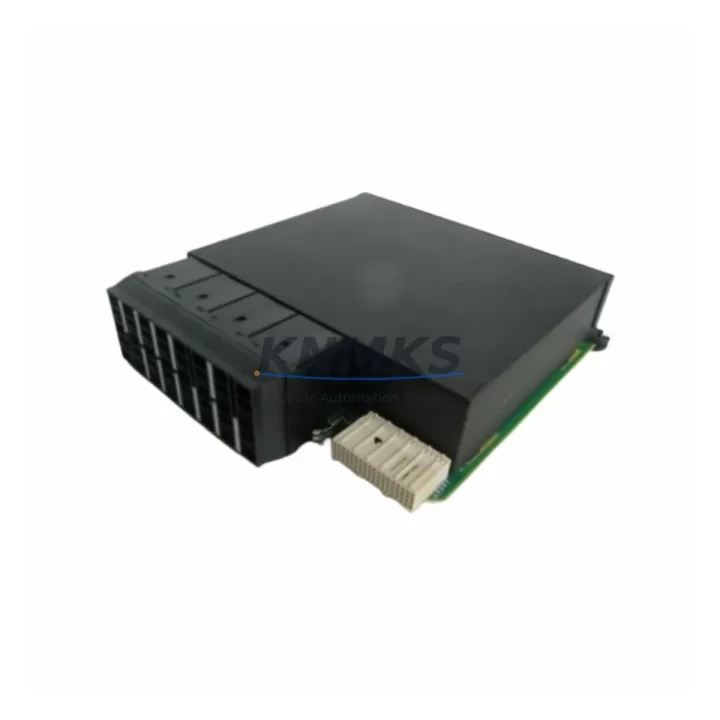
Siemens 6ES7131-4BD01-0AA0 ET 200S DI Spare Part: Maintenance-Proven for Factory Uptime
The Siemens 6ES7131-4BD01-0AA0 is a 4-channel 24 VDC digital input module designed for the ET 200S distributed I/O system, operating within the SIMATIC S7 automation platform. As a maintenance-critical spare part, it plays a central role in keeping production lines operational during unplanned failures, scheduled annual overhauls, and control cabinet inspections. For maintenance engineers managing aging distributed I/O racks, having a verified, ready-to-deploy replacement of this module on the shelf is one of the most effective strategies for minimizing unplanned downtime.
This module interfaces directly with the ET 200S interface module — typically the IM 151-1 or IM 151-3 PN — via the terminal module base. Before replacing the 6ES7131-4BD01-0AA0, engineers should confirm that the terminal module (such as the 6ES7193-4CA30-0AA0) is undamaged and that the blade contacts are clean and properly seated. A faulty terminal module is a common root cause of intermittent input faults that are incorrectly attributed to the DI module itself.
Spare Maintenance Table
| Parameter | Specification |
|---|---|
| SKU / Part Number | 6ES7131-4BD01-0AA0 |
| Series | ET 200S / SIMATIC S7 |
| Module Type | 4-Channel Digital Input (DI) |
| Input Voltage | 24 VDC |
| Input Current (per channel) | Approx. 4 mA |
| Signal Delay | 0.1 ms / 3 ms (configurable) |
| Mounting | ET 200S Terminal Module (blade contact) |
| Communication | PROFIBUS DP / PROFINET (via IM) |
| Degree of Protection | IP20 |
| Operating Temperature | 0 °C to +60 °C |
| Country of Origin | Germany |
| Compatibility | ET 200S stations with IM 151-x interface modules |
| Replacement Scope | Direct plug-in replacement; no programming required |
| Pre-shipment Testing | Function-tested before dispatch |
| Support terms | 12 Months |
Maintenance Planning for Continuous Operation
Effective spare parts planning for an ET 200S station goes beyond stocking the 6ES7131-4BD01-0AA0 alone. A complete maintenance strategy for the control cabinet should account for the full signal chain. The 24 VDC field power supply feeding the input circuits — often a SITOP PSU100S or equivalent — should be checked for output voltage stability and ripple before concluding that a DI module has failed. Voltage sags below 20 VDC at the terminal block are a frequent cause of false input readings.
The ET 200S interface module (IM 151-1 or IM 151-3 PN) should be included in the annual inspection checklist. A degraded interface module can cause entire station dropouts that appear as multiple simultaneous DI failures. Similarly, the PROFIBUS DP cable or PROFINET patch cable connecting the ET 200S station to the S7-300 or S7-400 CPU rack should be inspected for connector corrosion, bend radius violations, and shield continuity — particularly in high-vibration or high-humidity environments.
For stations with mixed I/O, maintenance engineers should also verify the condition of adjacent digital output modules (such as the 6ES7132-4BD02-0AA0) and any installed analog input modules. Thermal stress from a failed output module can affect neighboring DI modules on the same terminal module row. Where signal isolation is required between field devices and the PLC, signal isolators or relay modules in the same cabinet should be tested for contact resistance and isolation integrity during the same maintenance window.
Finally, the ET 200S power module (PM-E 24VDC) that segments the station’s load groups should be verified for correct voltage output and fuse integrity. A blown fuse in the PM-E will de-energize all modules in that load group, producing symptoms identical to multiple simultaneous module failures. Stocking a spare PM-E alongside the 6ES7131-4BD01-0AA0 is a low-cost insurance policy against extended downtime.
Site Replacement Workflow
Replacing the 6ES7131-4BD01-0AA0 in a live ET 200S station is a straightforward procedure when the correct steps are followed. Begin by documenting the current diagnostic state in STEP 7 or TIA Portal — capture the hardware configuration, module address, and any active fault messages. If the station is on PROFIBUS, note the DP address; if on PROFINET, note the device name and IP assignment.
Power down the affected load group using the PM-E segment switch if available, or isolate the full ET 200S station at the field power supply. Remove the faulty 6ES7131-4BD01-0AA0 by pressing the release lever and sliding the module off the terminal module base. Inspect the terminal module blade contacts for deformation or contamination before inserting the replacement module. The new module snaps into place without tools and requires no address setting — the ET 200S system assigns the slot address automatically based on physical position.
After reinserting the module, restore power and observe the module’s LED status. A steady green SF/DIAG LED indicates normal operation. If the LED shows red or flashing, re-check the terminal module seating and verify that the hardware configuration in the CPU matches the installed module type. In TIA Portal, an online comparison will immediately flag any mismatch between the configured and actual hardware. Total replacement time for a trained technician is typically under 10 minutes, making this one of the lowest-risk field replacements in the ET 200S family.
Spare Parts Support FAQ
Q1: Is the 6ES7131-4BD01-0AA0 a direct replacement for older ET 200S DI modules?
Yes. The 6ES7131-4BD01-0AA0 is compatible with all ET 200S terminal module bases designed for 4-channel DI modules. No hardware configuration change is required in STEP 7 or TIA Portal when replacing a module of the same order number. If replacing a different-channel-count variant, a hardware reconfiguration and download will be necessary.
Q2: How is the module tested before shipment?
Each unit undergoes functional verification on an ET 200S test bench prior to dispatch. Input channel response, LED status, and terminal module blade contact engagement are all checked. A test report is available upon request. Units are packed in anti-static packaging with foam protection to prevent transit damage.
Q3: What is the support terms coverage and what does it include?
All units are covered by a support terms confirmed by quotation from the date of shipment. The support terms covers manufacturing defects and functional failures under normal operating conditions. It does not cover damage caused by incorrect installation, overvoltage, or environmental conditions outside the specified range. Support requests are processed within 5 business days of receiving the returned unit.
Q4: Can you supply multiple units for long-term spare parts inventory?
Yes. We maintain stock of the 6ES7131-4BD01-0AA0 and can fulfill both single-unit emergency orders and bulk procurement requests for annual maintenance budgets. Lead times for in-stock units are typically 1–3 business days. For large-quantity orders, please contact our sales team for pricing and delivery scheduling.
© 2026 KNMKS. All rights reserved.
Original Source: https://knmks.com
Contact: admin@knmks.com | +86 18359268345
Product Identification
- Brand / Ecosystem
-
Siemens
Siemens - Model / Series
-
6ES7131-4BD01-0AA0
SIMATIC Series - Product Family
- PLCs & Controllers
- Availability Status
- Available on request after model and quantity confirmation
- Inquiry Type
- B2B RFQ, replacement inquiry and project spare-part request
- Pre-Quote Check
- Exact SKU, brand, series, quantity, nameplate photos and destination country are checked before quotation
System Path
Where this product fits in the KNMKS automation structure.
Specification & Inquiry Focus
- Control platform
- PLC, PAC and modular controllers
- Common needs
- CPU, rack, power and I/O expansion
- Project support
- Replacement, cabinet build and maintenance
Buyer Confirmation
Information KNMKS checks before replying.
- Exact model
- 6ES7131-4BD01-0AA0
- Brand / ecosystem
- Siemens
- Product family
- PLCs & Controllers
- Application note
- Replacement, maintenance, project build or spare-part list
- Useful photos
- Nameplate, installed unit, cabinet layout or connector side
- Delivery details
- Quantity, destination country and target schedule
Document Support
Files and notes can be confirmed during quotation.
- Product photos or nameplate confirmation when available
- Packing and delivery notes before quotation confirmation
- Support scope and delivery terms confirmed per inquiry
- Export document coordination for qualified B2B requests
Inquiry Support
- Model cross-checking before quotation
- CPU, power, rack and expansion module matching
- Support for replacement and project inquiry
What to Send Us
- Brand and exact model number: Siemens 6ES7131-4BD01-0AA0
- Quantity and required delivery time
- Application, replacement requirement or nameplate photo
- Destination country and shipping preference
RFQ Preparation
This is a product inquiry page built for RFQ communication.
Fast Model Check
Send this model to KNMKS for confirmation.
Include quantity, destination country and photos if this is a maintenance replacement. The inquiry will be saved with a reference number after submission.
Brand & Compatibility Note
KNMKS displays automation product information for well-known industrial brand ecosystems and compatible replacement references. Brand names are used for product identification and compatibility reference only; final availability and commercial terms are confirmed per quotation.
 Manufacturing
 Machine Tools
 Packaging
 Energy & Power



 HMI & Displays
 Servo Systems
 Variable Frequency Drives
 Sensors