
Overview
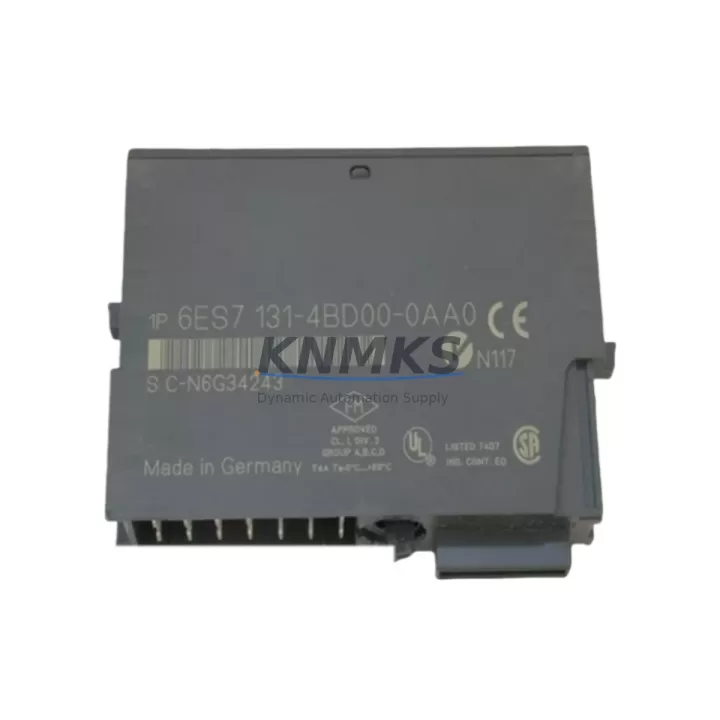
Siemens 6ES7131-4BD00-0AA0 Migration-Ready Digital Input Module for ET 200S Legacy System Retrofit
The Siemens 6ES7131-4BD00-0AA0 is a 4-channel 24 VDC digital input module designed for the ET 200S distributed I/O platform. As legacy SIMATIC S7-300 and early S7-400 installations approach end-of-life, this module has become a critical spare part and migration component for engineers managing aging control cabinets, PROFIBUS-DP networks, and distributed field stations. Whether you are replacing a failed module in a running line, consolidating spare inventory ahead of a planned shutdown, or executing a phased migration toward PROFINET-based architecture, the 6ES7131-4BD00-0AA0 provides a verified drop-in fit within the ET 200S backplane without requiring changes to terminal wiring or module addressing.
In retrofit and upgrade projects, the 6ES7131-4BD00-0AA0 is typically installed alongside the IM 151-1 interface module, which manages PROFIBUS-DP communication between the ET 200S station and the upstream S7-300 CPU or CP 342-5 communications processor. Engineers replacing this digital input module should confirm that the IM 151-1 firmware version is compatible with the installed GSD file revision, as mismatched firmware can cause diagnostic faults during initial power-up. The module occupies a single slot on the ET 200S terminal module TM-E15S24-A1 or equivalent, and the 24 VDC supply rail must be verified to deliver sufficient current capacity when the full station is populated with additional I/O modules.
For sites transitioning from PROFIBUS-DP to PROFINET IO, the 6ES7131-4BD00-0AA0 remains fully usable when the IM 151-1 is replaced with the IM 151-3 PN interface module, allowing the existing ET 200S I/O population — including this digital input module — to be retained while the communication backbone is upgraded. This approach significantly reduces downtime and capital expenditure compared to a full station replacement. The HMI screens referencing the associated I/O tags do not require modification provided the STEP 7 or TIA Portal hardware configuration is updated to reflect the new interface module and the PROFINET device name is assigned correctly.
Migration Compatibility Table
| Parameter | Specification / Recommendation |
|---|---|
| Module SKU | 6ES7131-4BD00-0AA0 |
| Platform | Siemens ET 200S Distributed I/O |
| Input Channels | 4 × 24 VDC Digital Input |
| Terminal Module | TM-E15S24-A1 or TM-E15S24-01 (confirm before ordering) |
| Communication Interface | PROFIBUS-DP via IM 151-1; PROFINET IO via IM 151-3 PN |
| Compatible Controllers | S7-300 (CPU 314, 315, 317), S7-400, S7-1500 (via IM 155-6 PN) |
| Installation Space | Single ET 200S slot; confirm rail length and power budget |
| Firmware Compatibility | Verify IM 151-1 firmware vs. GSD file revision before commissioning |
| Replacement Path | Direct drop-in; no terminal rewiring required |
| Commissioning Note | Confirm module address in STEP 7 / TIA Portal HW Config after swap |
| Support terms | 12 Months — covers hardware defects from date of shipment |
Retrofit Planning for Existing Automation Systems
A successful retrofit of the 6ES7131-4BD00-0AA0 begins with a thorough audit of the existing ET 200S station. Engineers should document the current slot population, the power module type (PM-E 24VDC or PM-E 24VDC/AC 120/230V), and the total current draw across all installed I/O modules before introducing a replacement unit. The 6ES7 138-4CA01-0AA0 power module, commonly found in the same cabinet, must be verified to have sufficient headroom to support the digital input module’s 24 VDC supply current without triggering an overload diagnostic.
In multi-station PROFIBUS-DP segments, the DP address of the ET 200S station must be confirmed against the STEP 7 hardware configuration before the replacement module is inserted. Address conflicts caused by incorrect DIP switch settings on the IM 151-1 are a common source of commissioning delays. Similarly, if the control system includes a CP 342-5 communications processor on the S7-300 rack, the DP master configuration must reflect the correct GSD parameters for the ET 200S station to avoid bus faults after the module swap.
For projects that also involve upgrading the HMI layer — for example, migrating from a TP 177B or OP 177B operator panel to a newer KTP700 Basic or KTP900 Basic panel — the I/O tag mapping associated with the 6ES7131-4BD00-0AA0 input channels should be exported and validated before the panel replacement. This prevents screen-level faults from masking underlying field wiring issues during the commissioning phase. Signal isolators or barriers installed upstream of the digital input terminals should also be inspected for compatibility with the 24 VDC input threshold of the replacement module.
Where the retrofit scope extends to the programming cable and laptop interface, engineers using a PC Adapter USB A2 or MPI/PROFIBUS adapter should confirm that the STEP 7 version installed on the engineering station supports the firmware level of the IM 151-1 in the target station. Mismatched software versions can prevent online access to the ET 200S station during live commissioning, extending unplanned downtime.
Downtime Control During System Migration
Minimizing production downtime during a module replacement requires preparation that begins well before the maintenance window opens. The original STEP 7 or TIA Portal project should be archived and backed up to a secure location, and the current hardware configuration should be printed or exported as a reference document. If the plant operates on a 24/7 schedule, the replacement should be staged during a planned maintenance window with a pre-tested spare module confirmed functional through a bench test against a known-good ET 200S station or simulator.
During the swap, the ET 200S station should be powered down at the PM-E power module rather than at the main cabinet breaker, where possible, to avoid disturbing adjacent stations on the same PROFIBUS-DP segment. After the 6ES7131-4BD00-0AA0 is seated and the terminal module latch is confirmed closed, power should be restored and the IM 151-1 diagnostic LEDs observed for the standard initialization sequence. A BF (Bus Fault) LED that remains lit after initialization indicates a GSD mismatch or address conflict that must be resolved before the station returns to normal operation.
The PLC program logic referencing the input channels of the replaced module should not require modification provided the module type and slot position are unchanged. However, a forced I/O test — cycling each input channel through its on/off states and confirming the corresponding bit in the process image — is strongly recommended before releasing the line back to production. This test also validates the field wiring continuity and confirms that no terminal connections were disturbed during the module exchange.
For sites with strict change management requirements, the commissioning record should document the module serial number, the date and time of replacement, the engineer responsible, and the results of the forced I/O test. This record supports the support terms confirmed by quotation claim process and provides traceability for future audits.
Retrofit Support FAQ
Q1: Is the 6ES7131-4BD00-0AA0 a direct replacement for earlier ET 200S digital input modules?
Yes. The 6ES7131-4BD00-0AA0 is a direct slot-compatible replacement for earlier 4-channel 24 VDC digital input modules in the ET 200S range. No terminal rewiring is required provided the same terminal module type is already installed. Confirm the terminal module part number before ordering to ensure mechanical compatibility.
Q2: Can this module be used in a PROFINET IO system without replacing the entire ET 200S station?
Yes. By replacing only the IM 151-1 PROFIBUS interface module with the IM 151-3 PN PROFINET interface module, the existing ET 200S I/O population — including the 6ES7131-4BD00-0AA0 — can be retained. The TIA Portal hardware configuration must be updated to reflect the new interface module, and the PROFINET device name must be assigned via the engineering station before the station will communicate on the new network.
Q3: What pre-shipment testing is performed on this module?
Each 6ES7131-4BD00-0AA0 unit is functionally tested prior to shipment. Testing covers input channel response, backplane communication integrity, and LED diagnostic behavior. A test report is available upon request. All units are shipped with ESD-protective packaging and are covered by a support terms confirmed by quotation from the date of shipment.
Q4: What is the typical lead time and are units available from stock?
Units are maintained availability confirmed by RFQ to support urgent replacement and planned retrofit projects. Standard orders ship within 1–3 business days. For bulk orders or blanket purchase agreements supporting long-term maintenance programs, please contact the sales team to confirm availability and lead time. Stock levels are updated regularly to support ongoing spare part lifecycle management.
© 2026 KNMKS. All rights reserved.
Original Source: https://knmks.com
Contact: admin@knmks.com | +86 18359268345
Product Identification
- Brand / Ecosystem
-
Siemens
Siemens - Model / Series
-
6ES7131-4BD00-0AA0
SIMATIC Series - Product Family
- PLCs & Controllers
- Availability Status
- Available on request after model and quantity confirmation
- Inquiry Type
- B2B RFQ, replacement inquiry and project spare-part request
- Pre-Quote Check
- Exact SKU, brand, series, quantity, nameplate photos and destination country are checked before quotation
System Path
Where this product fits in the KNMKS automation structure.
Specification & Inquiry Focus
- Control platform
- PLC, PAC and modular controllers
- Common needs
- CPU, rack, power and I/O expansion
- Project support
- Replacement, cabinet build and maintenance
Buyer Confirmation
Information KNMKS checks before replying.
- Exact model
- 6ES7131-4BD00-0AA0
- Brand / ecosystem
- Siemens
- Product family
- PLCs & Controllers
- Application note
- Replacement, maintenance, project build or spare-part list
- Useful photos
- Nameplate, installed unit, cabinet layout or connector side
- Delivery details
- Quantity, destination country and target schedule
Document Support
Files and notes can be confirmed during quotation.
- Product photos or nameplate confirmation when available
- Packing and delivery notes before quotation confirmation
- Support scope and delivery terms confirmed per inquiry
- Export document coordination for qualified B2B requests
Inquiry Support
- Model cross-checking before quotation
- CPU, power, rack and expansion module matching
- Support for replacement and project inquiry
What to Send Us
- Brand and exact model number: Siemens 6ES7131-4BD00-0AA0
- Quantity and required delivery time
- Application, replacement requirement or nameplate photo
- Destination country and shipping preference
RFQ Preparation
This is a product inquiry page built for RFQ communication.
Fast Model Check
Send this model to KNMKS for confirmation.
Include quantity, destination country and photos if this is a maintenance replacement. The inquiry will be saved with a reference number after submission.
Brand & Compatibility Note
KNMKS displays automation product information for well-known industrial brand ecosystems and compatible replacement references. Brand names are used for product identification and compatibility reference only; final availability and commercial terms are confirmed per quotation.
 Manufacturing
 Machine Tools
 Packaging
 Energy & Power



 HMI & Displays
 Servo Systems
 Variable Frequency Drives
 Sensors